
We're excited to introduce Multiple Facebook Account Support, making it easier for businesses and agencies to manage multiple Facebook accounts and Pages within a single subaccount! With this enhancement, users can now connect multiple Facebook accounts, each with multiple Facebook Pages, without ha
Michael's take
My first impression is that this is a solid quality of life upgrade. It isn’t a brand new product, but it removes a lot of the friction we’ve been dealing with when handling several Facebook accounts.
If you’re already using the Facebook integration, you can now add extra accounts and pages without pulling the plug on any of your existing connections. Everything lives under the same subaccount in Settings > Integrations.
I’d spend some time adding a second account and a few pages, then check that leads flow into the same pipeline and that messages stay grouped correctly. Also verify that the token stays valid after a day or two.
In practice I’d use it to run one automation that pulls leads from three different brand pages into a single list, then fire the same follow up sequence for all of them. That cuts down on duplicate setup work and keeps reporting tidy.
I’m all for technology that simplifies the day to day grind. Adding multiple accounts in one place is the kind of small win that adds up over time.
If you already have more than one Facebook Page, give this a look.
What changed
Overview
We're excited to introduce Multiple Facebook Account Support, making it easier for businesses and agencies to manage multiple Facebook accounts and Pages within a single subaccount! With this enhancement, users can now connect multiple Facebook accounts, each with multiple Facebook Pages, without having to disconnect existing integrations or repeatedly switch between accounts. The Facebook integration has also been migrated to the Marketplace architecture, providing a more unified integration management experience, improved stability, and enhanced security through secure token storage using the Marketplace keychain.
Multiple Facebook Account Connections
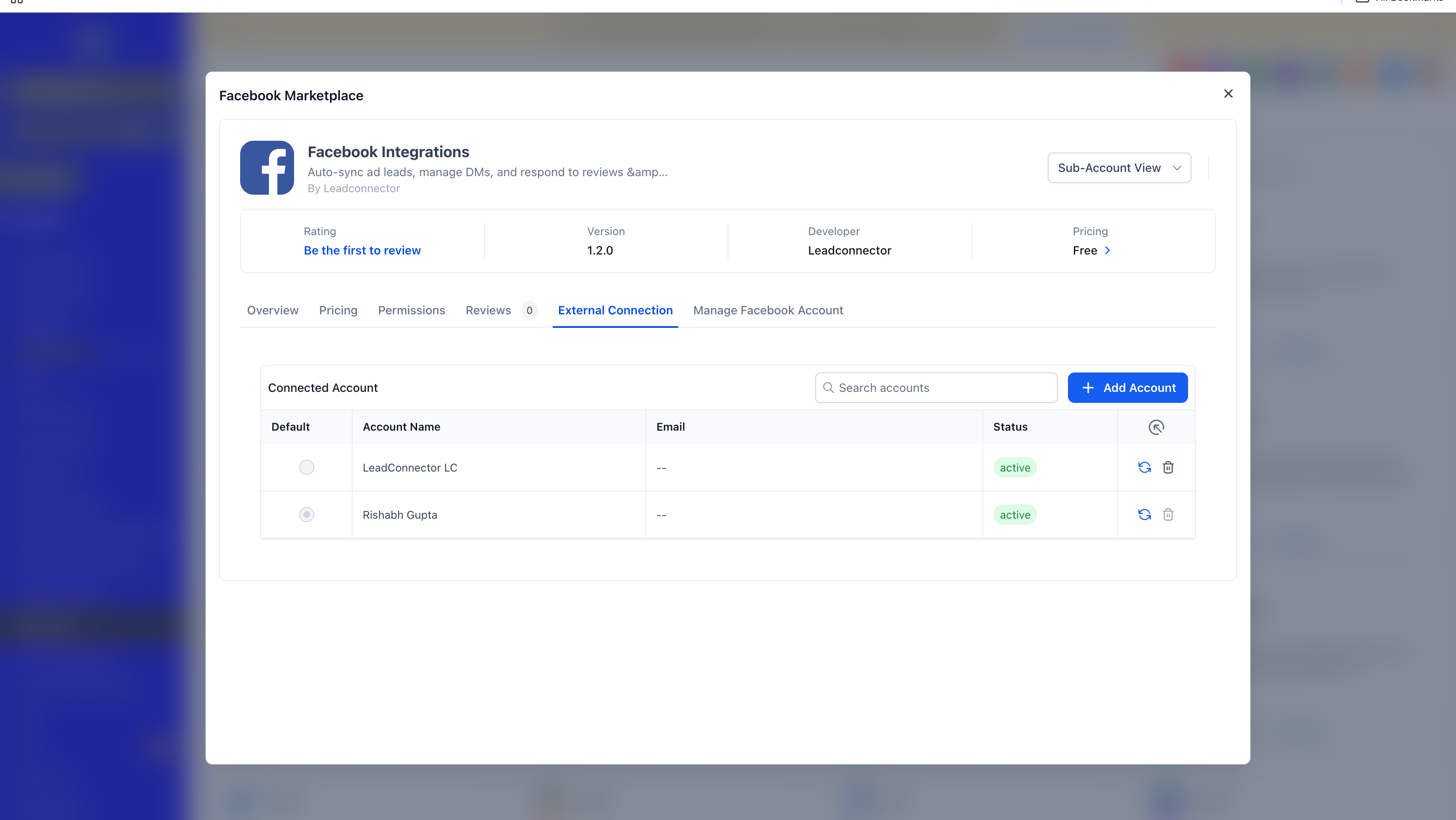
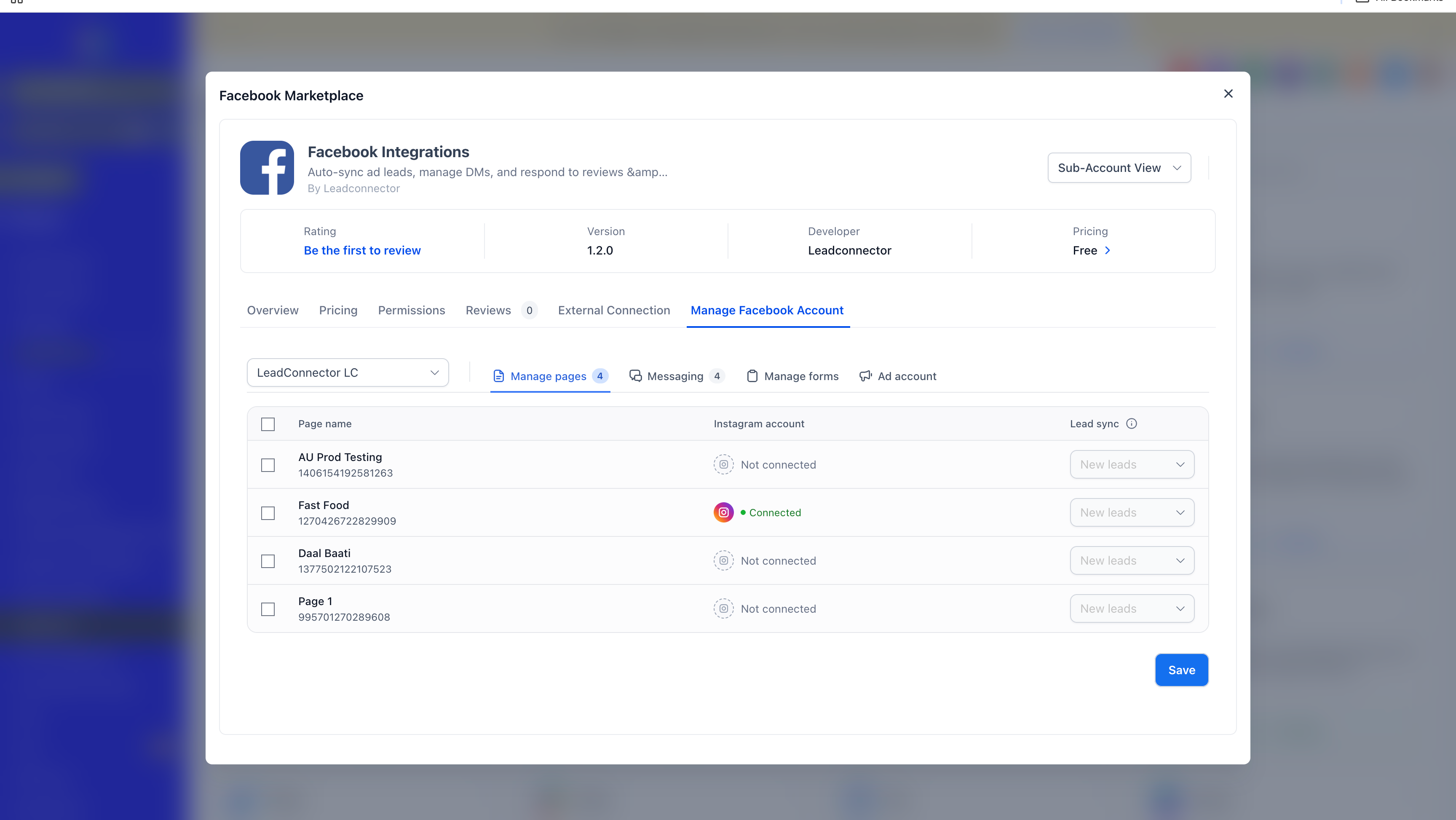
- Connect multiple Facebook accounts to the same subaccount, with the flexibility to connect multiple Facebook Pages under each account.
- Manage all your connected Facebook accounts and Pages without disconnecting existing integrations or switching between accounts.
Messaging Across Multiple Pages
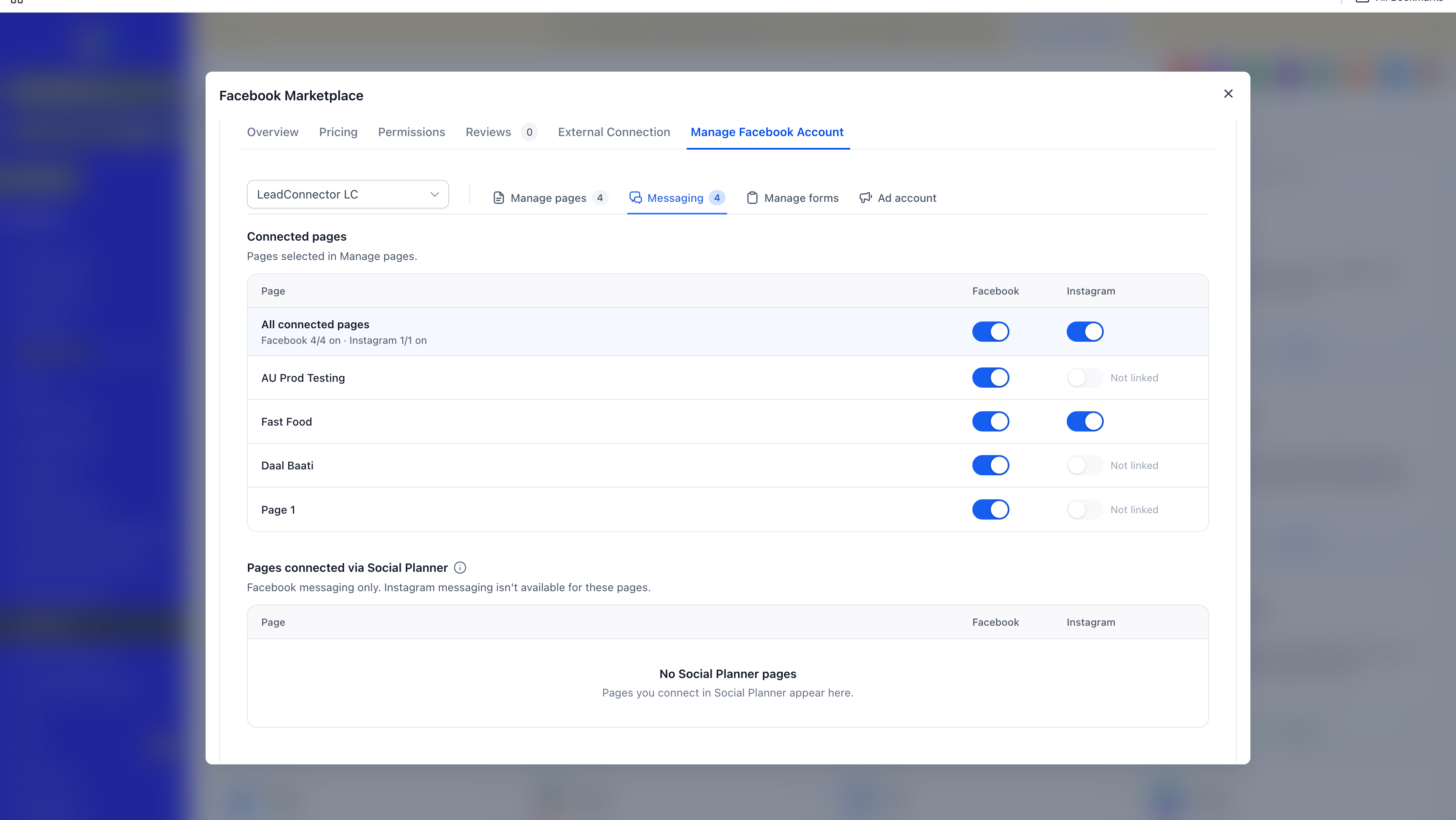
- Sync and manage messages across connected Facebook Pages, including Pages belonging to different Facebook accounts.
- Keep your conversations organized while managing multiple social media identities.
Lead Sync Across Connected Pages
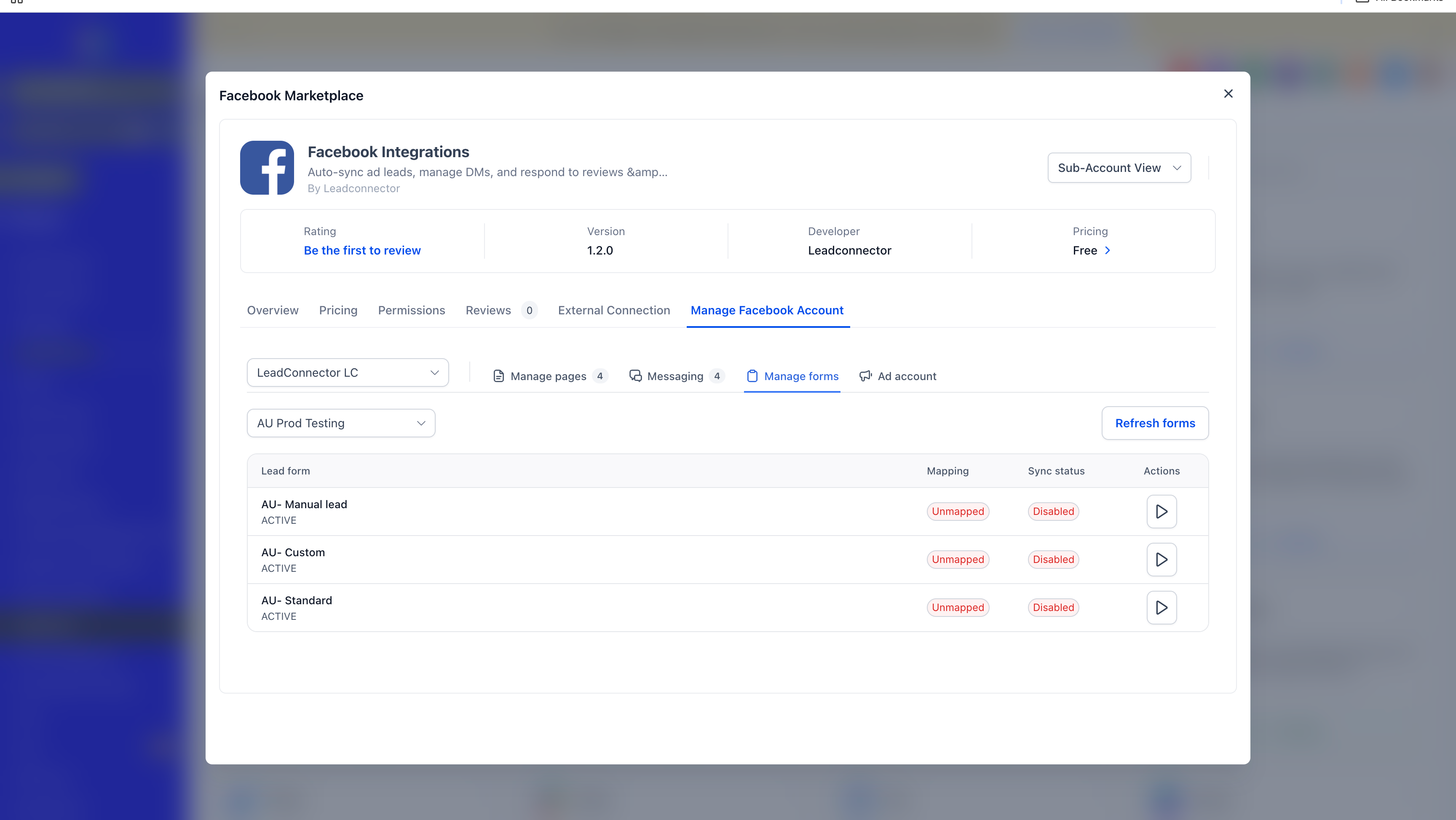
- Sync leads from multiple connected Facebook Pages, allowing businesses and agencies to manage incoming leads from different Facebook accounts within the same subaccount.
Automations Across Multiple Facebook Pages
- Run supported automations across multiple connected Facebook Pages without needing separate integration setups for each Facebook account.
Marketplace Migration
The Facebook integration is now available through the Marketplace architecture which improves:
- integration stability.
- security through Marketplace keychain for secure token storage and maintenance.
- connection and authorization experience.
How to turn it on
Follow these steps to enable and use the new functionality:
- Go to Labs and enable the feature: Facebook marketplace migration & multiple account support.
- Navigate to Settings > Integrations.
- Search for and select Facebook.
- Click to connect an additional Facebook account.
- Complete the Facebook authorization flow.
- Select the required Facebook Pages and grant the necessary permissions.
- Once connected, start using your Facebook accounts and Pages across supported workflows, including Lead Sync, Messaging and Automations.
Why it matters for Founders
Users can now:
- Centralize Management: Manage multiple Facebook accounts and their associated Pages from a single subaccount.
- Improve Flexibility: Handle social media operations across multiple brands, businesses and identities.
- Increase Efficiency: Eliminate the need to repeatedly disconnect and reconnect Facebook accounts.
- Scale Your Operations: Give agencies and businesses greater flexibility to manage multiple Facebook accounts and Pages.
- Streamline Workflows: Sync leads, manage messages and run automations across multiple connected Pages.
- Improve Security: Benefit from secure token storage and management through the Marketplace keychain.
Notes and availability
ℹ Good to Know
A few important things to keep in mind:
- Existing Integrations: Existing Facebook connections are being migrated to the Marketplace as part of this enhancement. Users don't need to disconnect their existing integrations manually.
- Facebook Authorization: Facebook authorization and permissions are subject to Meta's requirements.
- Page Availability: The Facebook Pages and other assets available depend on the permissions granted during account authorization.
- Shops and Ad Accounts: These currently support only a single Facebook account.
- Multiple Account Support: Multiple Facebook accounts are currently supported for:
- Lead Sync
- Messaging across Pages belonging to different Facebook accounts
- Automations
What is coming next
Unification with Social Planner: The next step is to unify Facebook connections with Social Planner, simplifying connection management and reducing UX complexities. Our goal is to have a single Facebook connection powering all supported functionalities, providing users with a consistent, seamless experience across products.
Preview
Questions Founders ask
What did HighLevel release in "Facebook integration: Marketplace migration and multiple facebook account support"?
We're excited to introduce Multiple Facebook Account Support, making it easier for businesses and agencies to manage multiple Facebook accounts and Pages within a single subaccount! With this enhancement, users can now connect multiple Facebook accounts, each with multiple Facebook Pages, without ha
What should a Founder do with Facebook integration: Marketplace migration and multiple facebook account support?
Enable the Facebook marketplace migration & multiple account support in Labs and connect your extra accounts this week. any agency or Founder who runs more than one Facebook Page or brand.
How do I turn on Facebook integration: Marketplace migration and multiple facebook account support in HighLevel?
In HighLevel: Go to Labs and enable the feature: Facebook marketplace migration & multiple account support. Then Navigate to Settings > Integrations. Then Search for and select Facebook. Then Click to connect an additional Facebook account. Then Complete the Facebook authorization flow. Then Select the required Facebook Pages and grant the necessary permissions.
Why does Facebook integration: Marketplace migration and multiple facebook account support matter?
Users can now: Centralize Management: Manage multiple Facebook accounts and their associated Pages from a single subaccount. Improve Flexibility: Handle social media operations across multiple brands, businesses and identities. Increase Efficiency: Eliminate the need to repeatedly disconnect and reconnect Facebook accounts. Scale Your Operations: Give agencies and businesses greater flexibility to manage multiple Fac
How do I get this feature with setup help?
Start a free HighLevel trial through Michael Reimer's link and the CRM Pros team helps with setup in your first 7 days, with an onboarding call, three live calls every week and the affiliate community included.
Get More InformationOpens in a new tab Published November 4, 2026. Screenshots belong to HighLevel.