
01Custom payment providers, explained
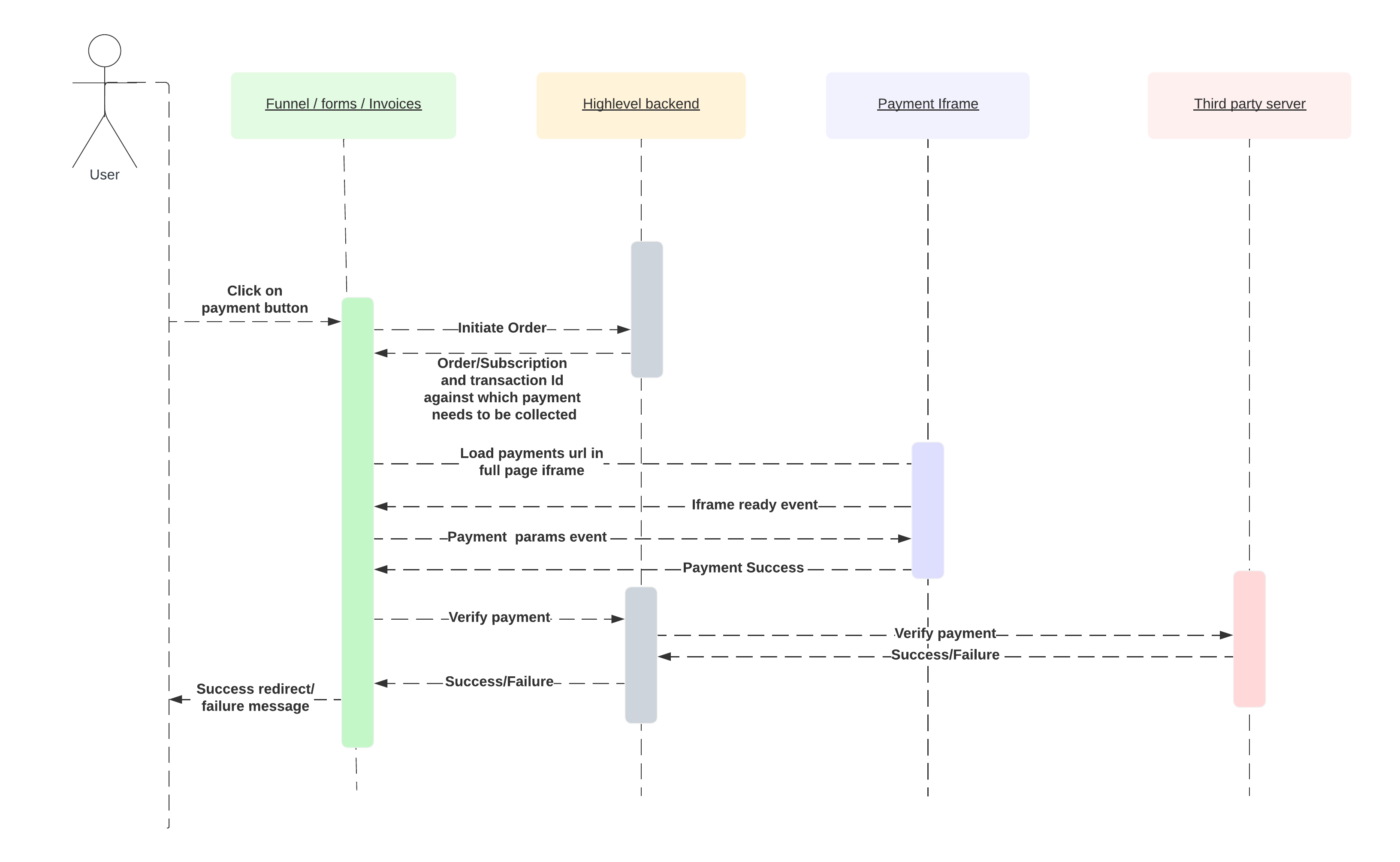
The custom payment provider framework is a way to turn any payment gateway into a HighLevel payment option. You create a Marketplace app, provide OAuth scopes, and supply URLs for backend calls and an iframe that collects customer payment details. Once the app is installed, HighLevel calls your backend for verification, refunds, saved method queries and subscription actions.
All payment flows. One time purchases, recurring subscriptions, off session charges, manual subscription schedules and refunds. Run through the URLs you define. The platform communicates with your service via JSON payloads such as type: "verify", "charge_payment" or "refund" and expects specific response structures that update orders, transactions and subscription status inside HighLevel.
02How businesses use custom payment providers
- Connect your own gateway. Create a Marketplace app, set up OAuth and the required scopes, then point queryUrl and paymentsUrl to your backend and checkout page. HighLevel will list your provider in Payments > Integrations and route all payment requests to it.
- Support off session charges. Enable the Off Session payment provider type, store card details via the addCardOnFileSupported flag, and implement the "charge_payment" request so HighLevel can bill a saved method without a customer present.
- Run manual subscription schedules. Declare the subscription schedule capability with the Update Capabilities API, then handle "create_subscription" and "cancel_subscription" requests from HighLevel to manage recurring billing on your side.
03Before you start
- HighLevel account with access to the Marketplace Dashboard.
- Backend service (Node.js, Python, Ruby, etc.) hosted on any cloud provider.
- Public domain for OAuth redirect URL, custom configuration page, queryUrl, paymentsUrl and webhooks.
- Familiarity with OAuth 2.0, JSON and HTTP APIs, and handling webhooks.
04How to set up and use custom payment providers in HighLevel
Create marketplace app
- Go to https://marketplace.gohighlevel.com.
- Create a new app.
- Configure Settings, Payment Provider, Profile and Custom Pages.
Implement authentication and installation flow
- Handle OAuth redirect URL and exchange the code for an access token.
- Load your Custom Page for configuration after install.
- Call Create Public Provider Config API with name, description, imageUrl, locationId, queryUrl and paymentsUrl.
Connect test and live configuration
- Collect test and live API keys on the Custom Page.
- Call Connect Config API for test mode then repeat for live mode.
- Set the provider as default in Payments > Integrations.
Implement checkout iFrame integration
- Emit custom_provider_ready when the iframe loads.
- Handle payment_initiate_props event and start the payment flow.
- Send one of the outcome events (custom_element_success_response, custom_element_error_response, custom_element_close_response) back to HighLevel.
Add saved payment methods and manual subscriptions
- Include addCardOnFileSupported: True in the ready event.
- Respond to setup_initiate_props for card on file setup.
- Implement list_payment_methods and charge_payment endpoints.
- Declare subscription schedule capability and handle create_subscription and cancel_subscription requests.
05What it looks like in HighLevel
06Settings that matter
- Required scopes. Allow the app to read and write orders, subscriptions, transactions and custom provider configuration.
- Redirect URL. Receives the OAuth code after app installation; the code is exchanged for an access token.
- Client keys. Provided by HighLevel for OAuth; must be stored on the backend and used when exchanging the code.
- Webhook URL (app install/uninstall). Called whenever the app is installed or removed from a location to set up or clean up configuration.
- SSO key. Used to decrypt the auth token passed to Custom Pages inside the iframe.
- Payment provider type. Select OneTime, Recurring or Off Session to tell HighLevel which payment flows your gateway supports.
- AddCardOnFileSupported flag. Set to true only if the provider can store payment methods and you have implemented the save, list and charge flows.
Michael's take

Don’t forget to return a complete verify response; missing chargeSnapshot or subscriptionSnapshot data will leave orders stuck in an incomplete state.