
01Who this is for
- Founders who take many inbound calls can quickly spot potentially unwanted numbers and stay focused.
- Customer support teams handling high call volumes gain visibility of spam calls without extra steps.
- Sales managers can reduce time lost to nuisance calls, keeping reps on productive conversations.
02Spam tagging on mobile, explained
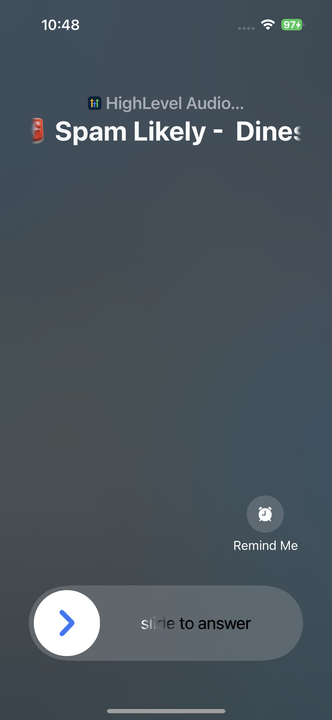
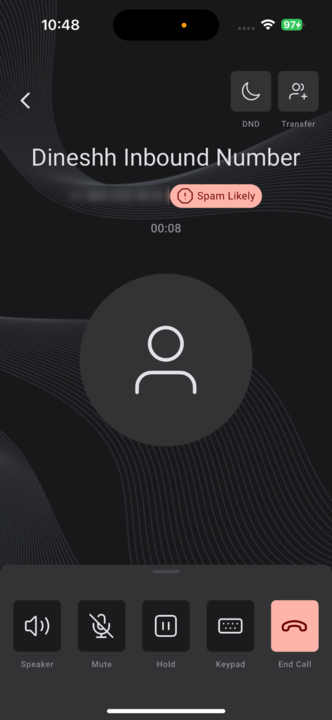
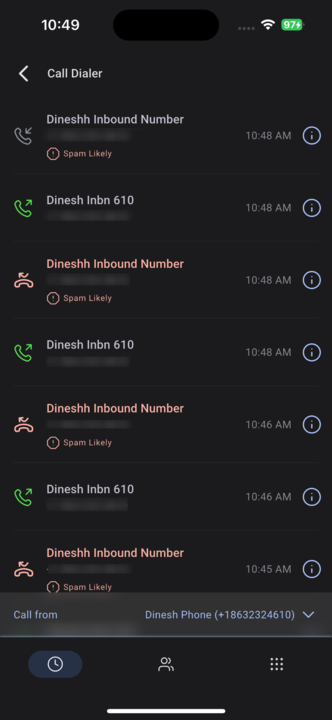
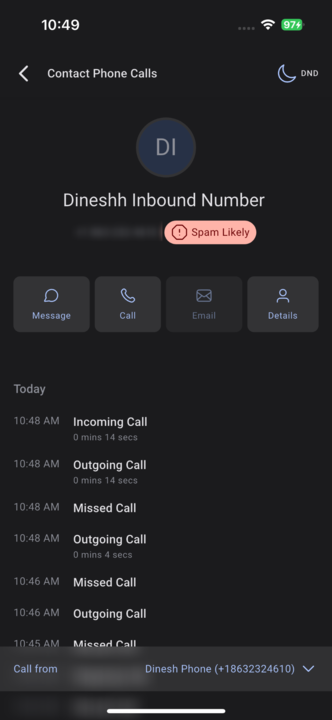
The feature adds a visible “Spam Likely” tag to any call that matches third party reputation data. The label appears at the top of the caller ID on the incoming call screen, remains on the in call interface, and is shown in call logs and detailed view records.
Spam Tagging works on both iOS and Android devices, but it only activates after the app is updated to version 3.97.3 or newer. White label app users must request a manual update through support. No configuration or toggle is required; the system turns it on automatically.
03How businesses use spam tagging on mobile
- Real estate agency. Agents receive incoming calls on the HighLevel mobile app. When a number is flagged as spam, the “Spam Likely” tag appears, letting them decline or note the call without interrupting their schedule.
- Dental practice. Front desk staff see the spam label on the in call screen and in the call log, allowing them to ignore unwanted calls and focus on patient appointments.
- IT support firm. Technicians can glance at the call logs later and see which calls were marked as spam, avoiding unnecessary follow up on calls that were likely scams.
04The numbers and rules that matter
- Available on HighLevel and LeadConnector apps version 3.97.3 or higher.
05Before you start
- The HighLevel or LeadConnector mobile app must be updated to version 3.97.3 or higher.
- White label app users need to request a manual update through support.
06How to set up and use spam tagging on mobile in HighLevel
Activate Spam Tagging automatically
- Update the HighLevel or LeadConnector mobile app to version 3.97.3 or later; the spam tagging feature turns on without any manual setup.
07What it looks like in HighLevel
08Things to know before you rely on it
- Only available in HighLevel and LeadConnector apps version 3.97.3 or higher; earlier versions do not show the tag.
- White label app users must ask support for a manual update to get the feature.
- Spam Tagging cannot be turned off; it is always active once the required version is installed.
- The label appears only on numbers identified as potentially suspicious; regular calls remain unchanged.
- Identification relies on third party reputation data providers.
09How it connects to the rest of HighLevel
- Browse all mobile and desktop app capabilities Mobile & Desktop features
- Check HighLevel pricing and plan options Pricing
- Start a trial to explore the app 30 day trial
Michael's take

In high volume call environments, the Spam Likely label can be helpful for prioritising calls.
If your business rarely receives inbound calls or already uses a dedicated call screening service, the feature adds little value. In that case, the built in tag may feel unnecessary.