
01Who this is for
- Sales teams that dial prospects across many regions benefit because the local number improves answer rates.
- Real estate offices with agents calling buyers in different cities see more pickups with city level matching.
- SaaS Founders who use the built in dialer can keep a professional image without purchasing a new number for each market.
02Local Presence Dialing, explained
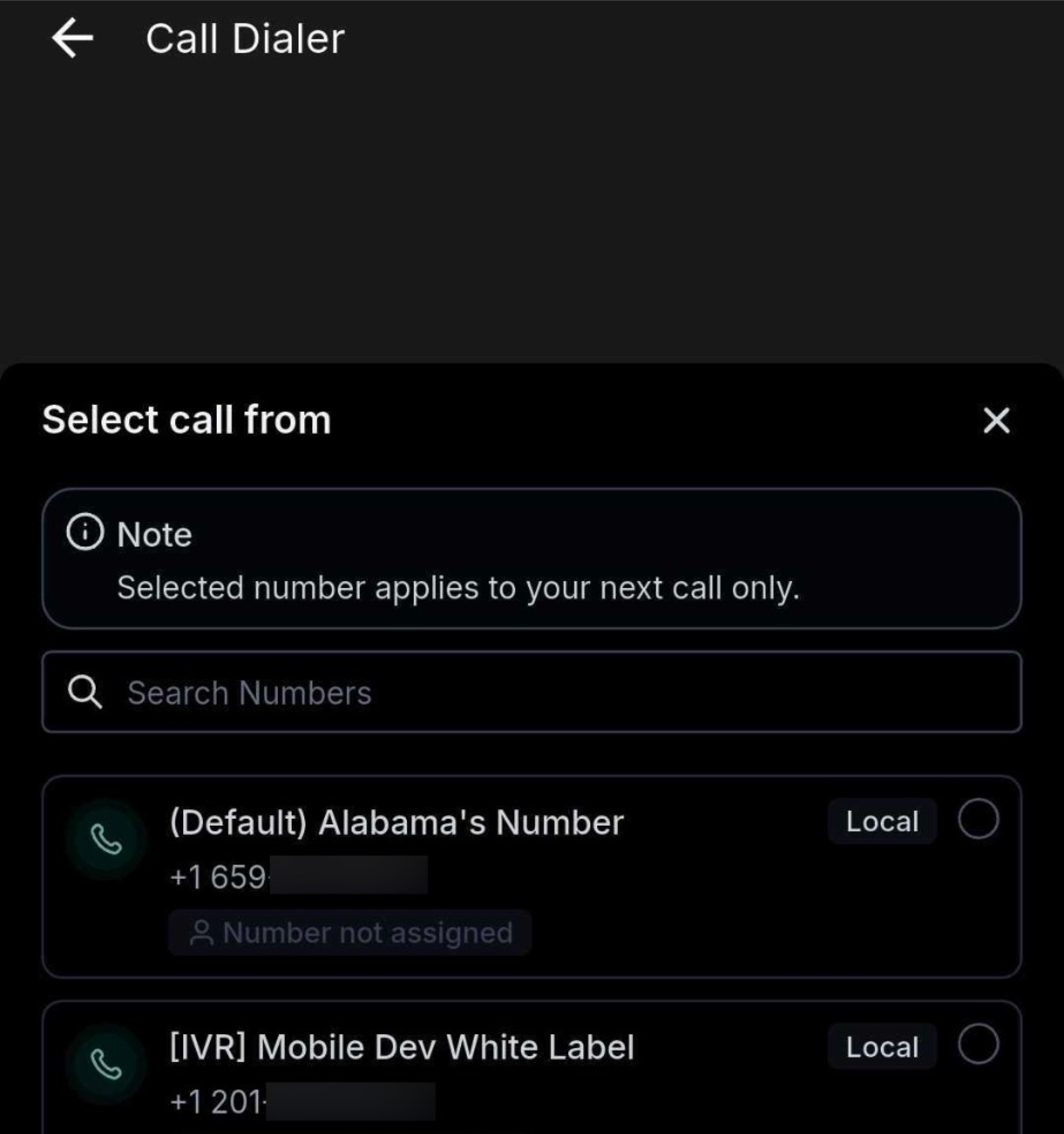
The feature automatically selects the best outbound caller ID for each call made from the HighLevel mobile app. It scans all numbers purchased or verified in your workspace, prioritizing a match to the contact’s area code, then the nearest city, and finally the state. If no exact match exists, the system uses the user assigned number, then the subaccount’s primary number.
Local Presence Dialing works for calls inside and outside the United States and Canada. When an overseas contact is dialed, the app first looks for a number you own in that country and uses it if available. The selection logic runs in real time, so no extra configuration is required after the initial web app setup. The option is synchronized to every mobile user automatically.
03How businesses use Local Presence Dialing
- Real estate agency. Agents set the default outbound number to Local Presence Dialing in the web portal. When they call potential buyers from the mobile app, the caller ID shows a local number for the buyer’s city, increasing the chance the call is answered.
- Insurance brokerage. The brokerage enables Local Presence Dialing and lets each representative override the caller ID for a single call using the Number Picker. This allows a personalized number for a special prospect while keeping the default logic for all other calls.
- SaaS startup. The startup links its Twilio subaccount to HighLevel. Local Presence Dialing then selects from the Twilio numbers owned by the account, ensuring each outbound call displays a number that matches the prospect’s region, even for international leads.
04The numbers and rules that matter
- Contacts are 3 to 4× more likely to answer a familiar local number.
05Before you start
- A HighLevel workspace must have at least one purchased and verified phone number.
- The default outbound caller ID setting must be configured in the web app.
- The mobile app must be version 4.0.0 or newer.
06How to set up and use Local Presence Dialing in HighLevel
Set up Local Presence Dialing
- In the web interface, open the appropriate Location.
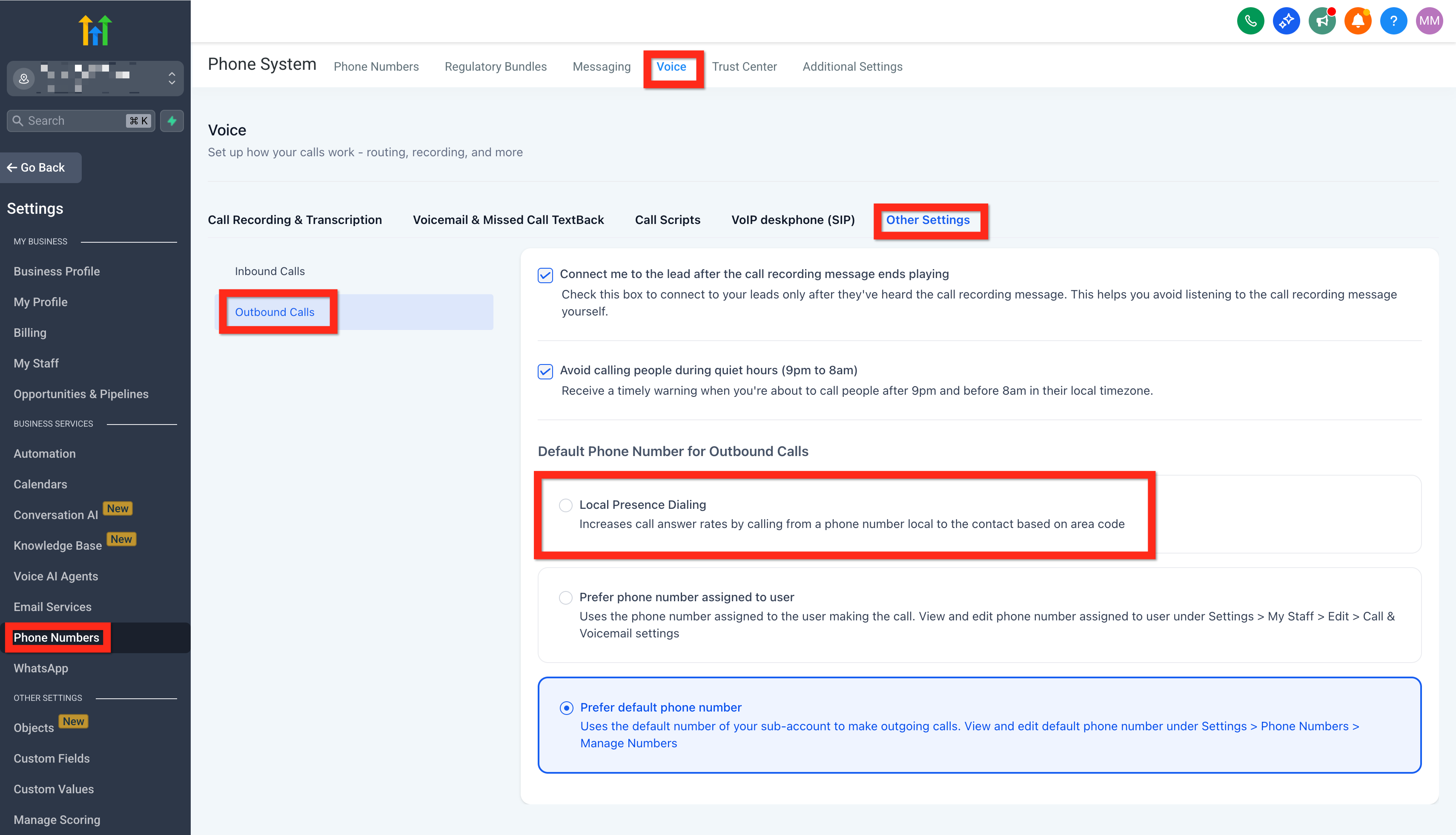
- Navigate to Settings > Phone Numbers > Voice > Other Settings > Outbound Call > Default Phone Number for Outbound Calls.
- Choose Local Presence Dialing as the default option.
- Update the HighLevel mobile app to version 4.0.0 or later.
- Launch the app and begin dialing; the feature activates automatically.
07What it looks like in HighLevel
08Settings that matter
- Default Phone Number for Outbound Calls. Determines which outbound caller ID logic the system applies, including the Local Presence Dialing selection process.
09Things to know before you rely on it
- Toll free numbers appear in the Number Picker but are not used automatically unless they share the contact’s country code.
- Calls placed via the phone’s carrier (SIM based) do not use Local Presence Dialing.
- International matching works only if you own a number in the destination country; otherwise fallback logic applies.
- The feature is part of the existing phone system plan; no additional charge is applied.
10How it connects to the rest of HighLevel
- All Mobile & Desktop App features Mobile & Desktop features
- HighLevel pricing and plans Pricing
- Start a 30 day HighLevel trial 30 day trial
Michael's take

Local Presence Dialing is worth the investment for any small business that relies on outbound calls; it puts a familiar local number on the line and can dramatically lift answer rates without extra fees.
Don’t forget that SIM based calls won’t use the feature.