
01Who this is for
- Online apparel retailer, needs instant shipment notices to keep shoppers informed.
- Handmade jewelry shop, wants to segment high value orders for premium follow ups.
- Subscription box service, requires separate handling for each warehouse shipment.
02Order fulfilled triggers, explained
The Order Fulfilled trigger watches the fulfillment status of every order that reaches the Fulfilled state. It works for orders created inside a HighLevel ecommerce store and for orders synced from supported external platforms, currently Shopify, as well as shipping integrations like Shippo or ShipStation.
When the status changes, the trigger launches a workflow that can contain any combination of emails, SMS, internal notifications, or data updates. Filters let you narrow enrollment to specific cart values, products, carriers, sources, tags, and more, so only the relevant orders run the automation.
You configure the trigger inside the Automation > Workflows area. After selecting the Order Fulfilled event, you give the trigger a name, add the desired filters, and save it. The workflow then runs each time a matching fulfillment event occurs.
03How businesses use order fulfilled trigger
- Online apparel retailer. Create a workflow that sends an email with the tracking link to customers whose orders are marked fulfilled. Add a filter for Cart Value greater than a set amount to send a VIP thank you to high spending shoppers.
- Handmade jewelry shop. Add a filter for specific Fulfilled Products SKUs to trigger a custom SMS that includes care instructions for those items. The workflow runs only when those jewelry pieces are part of the shipment.
- Subscription box service. Set Order Source to External and Order Sub Source to Shopify, then filter by Shipping Carrier. The workflow posts a notification to a Slack channel used by the warehouse each time a box ships via a particular carrier.
04The numbers and rules that matter
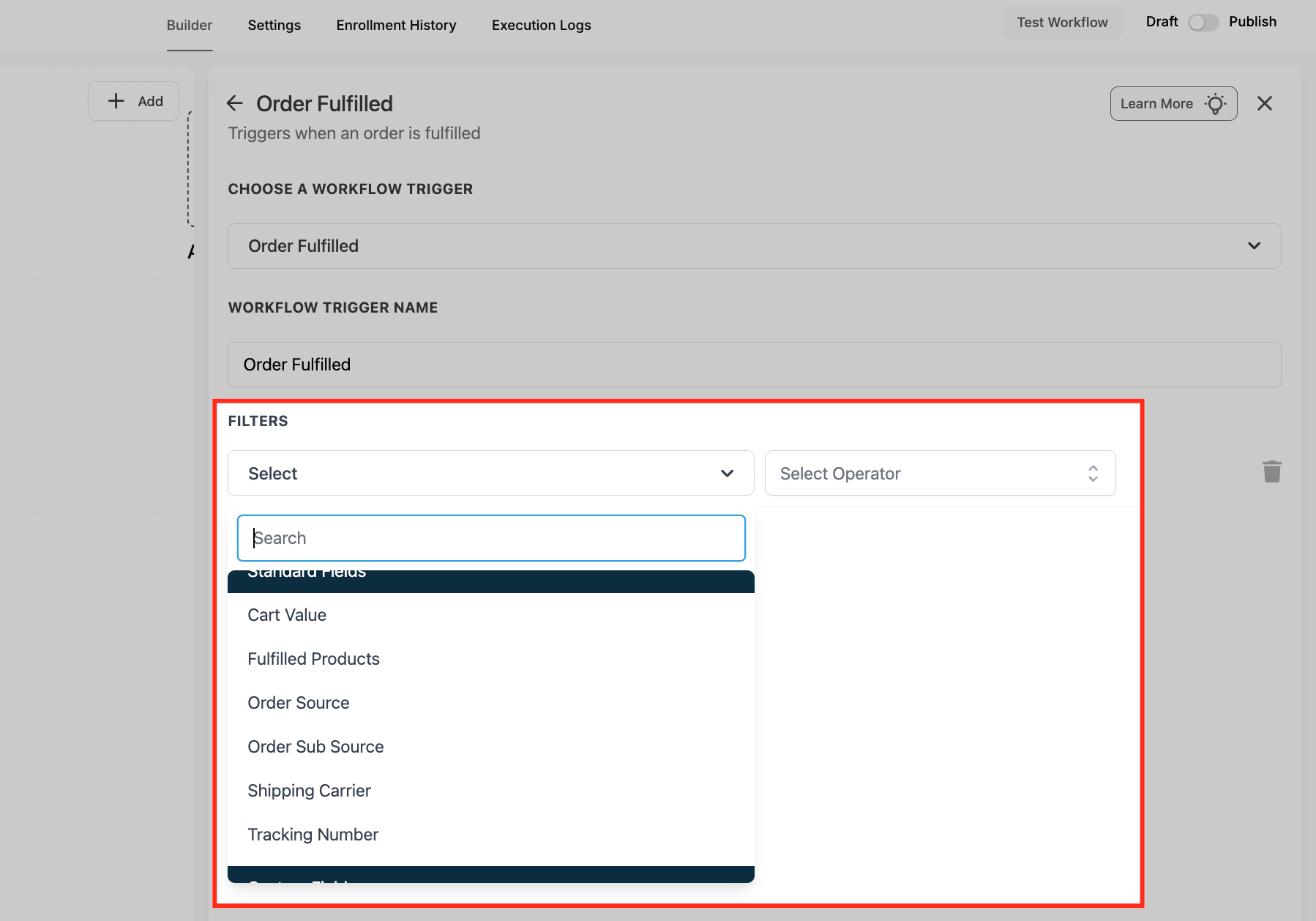
- Filters include Cart Value, Fulfilled Products, Order Source, Order SubSource, Shipping Carrier, Tracking Number, Available Quantity, Fulfillment Status, Product Collection, Order Tags, Product and Price.
- Supported shipping integrations: Shippo, ShipStation, and other connected shipping tools.
05How to set up and use order fulfilled trigger in HighLevel
Set up Order Fulfilled trigger
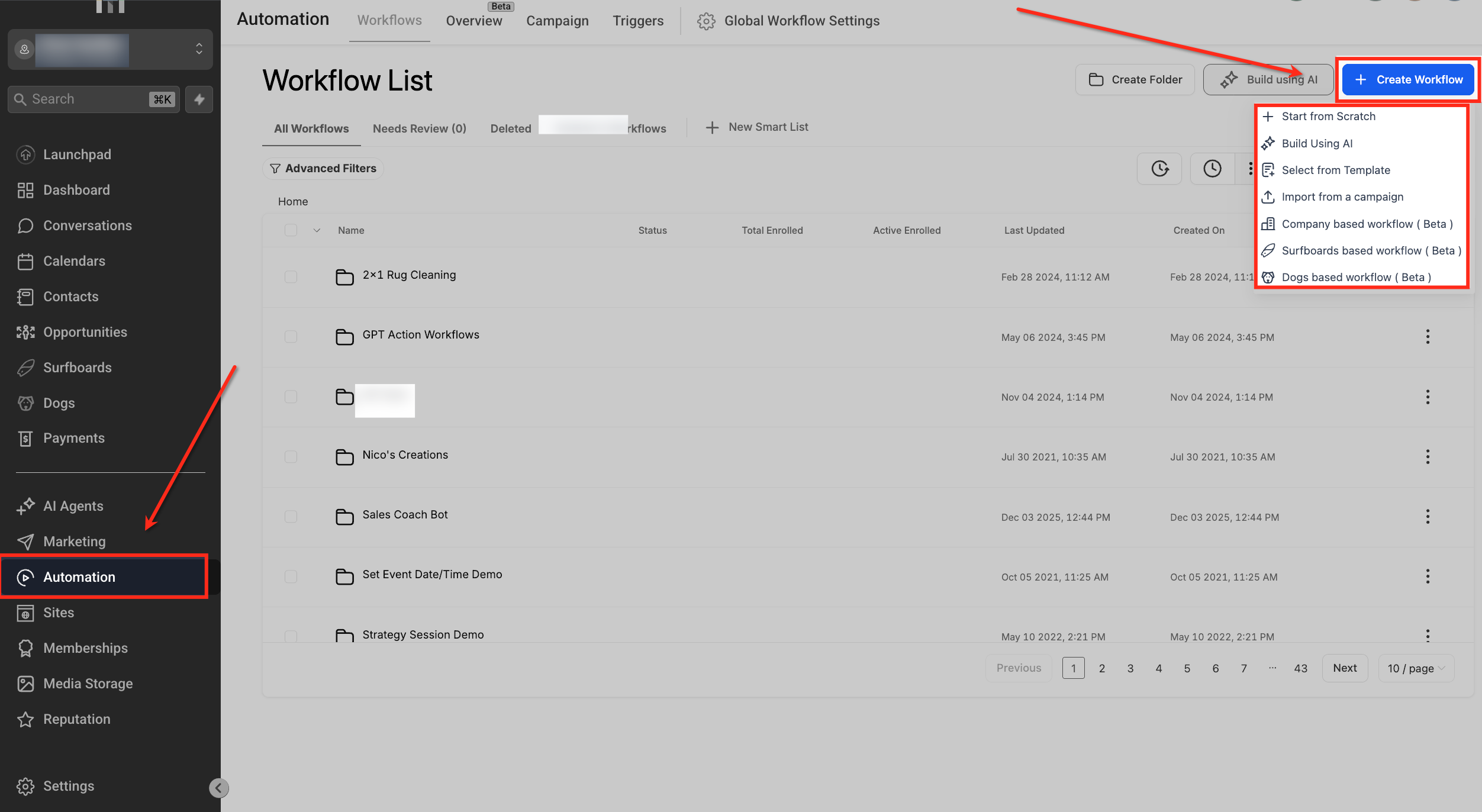
- Open Automation from the left navigation to reach the workflow list.
- Click + Create Workflow or open an existing workflow to edit.
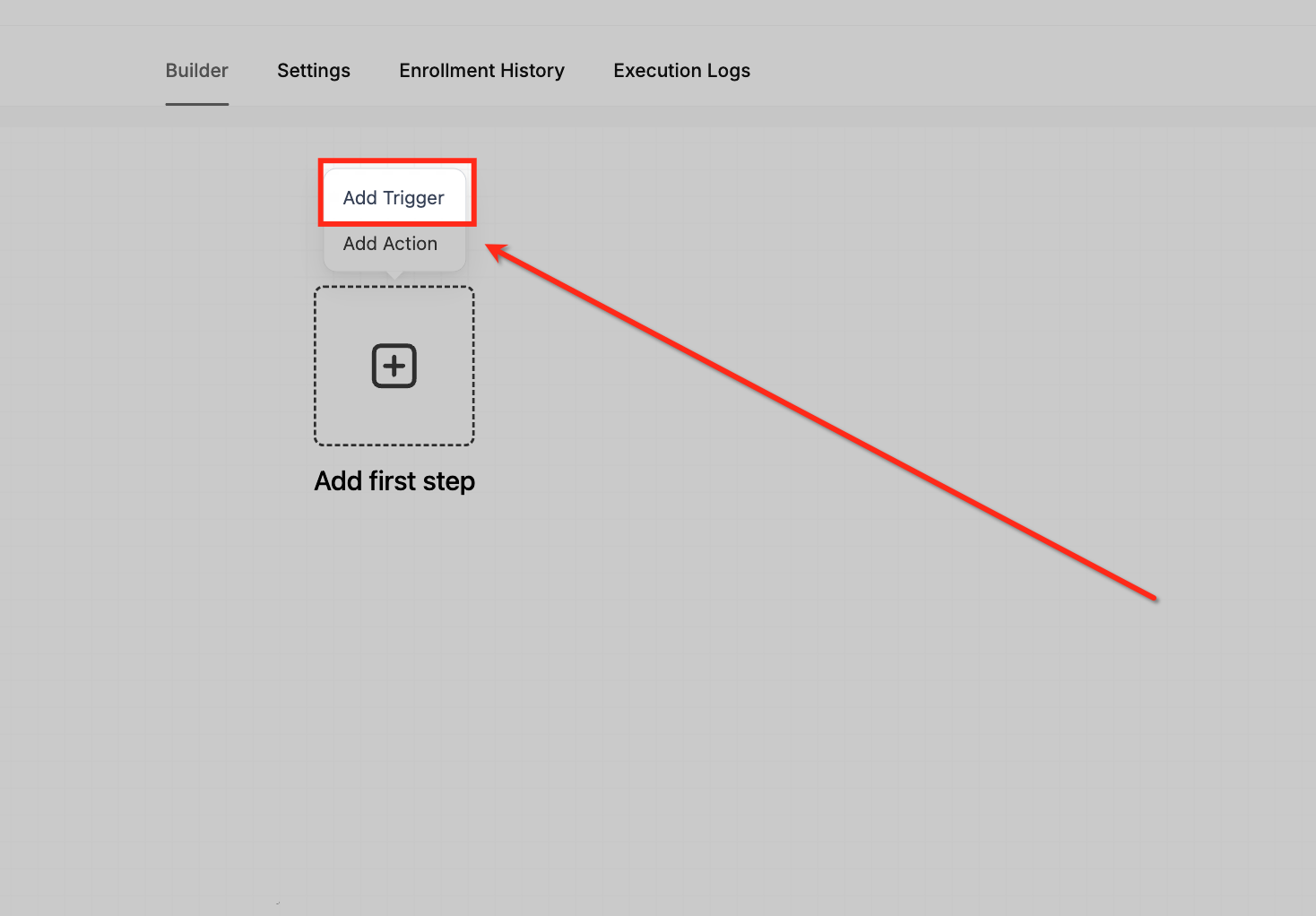
- In the workflow canvas, press Add Trigger.
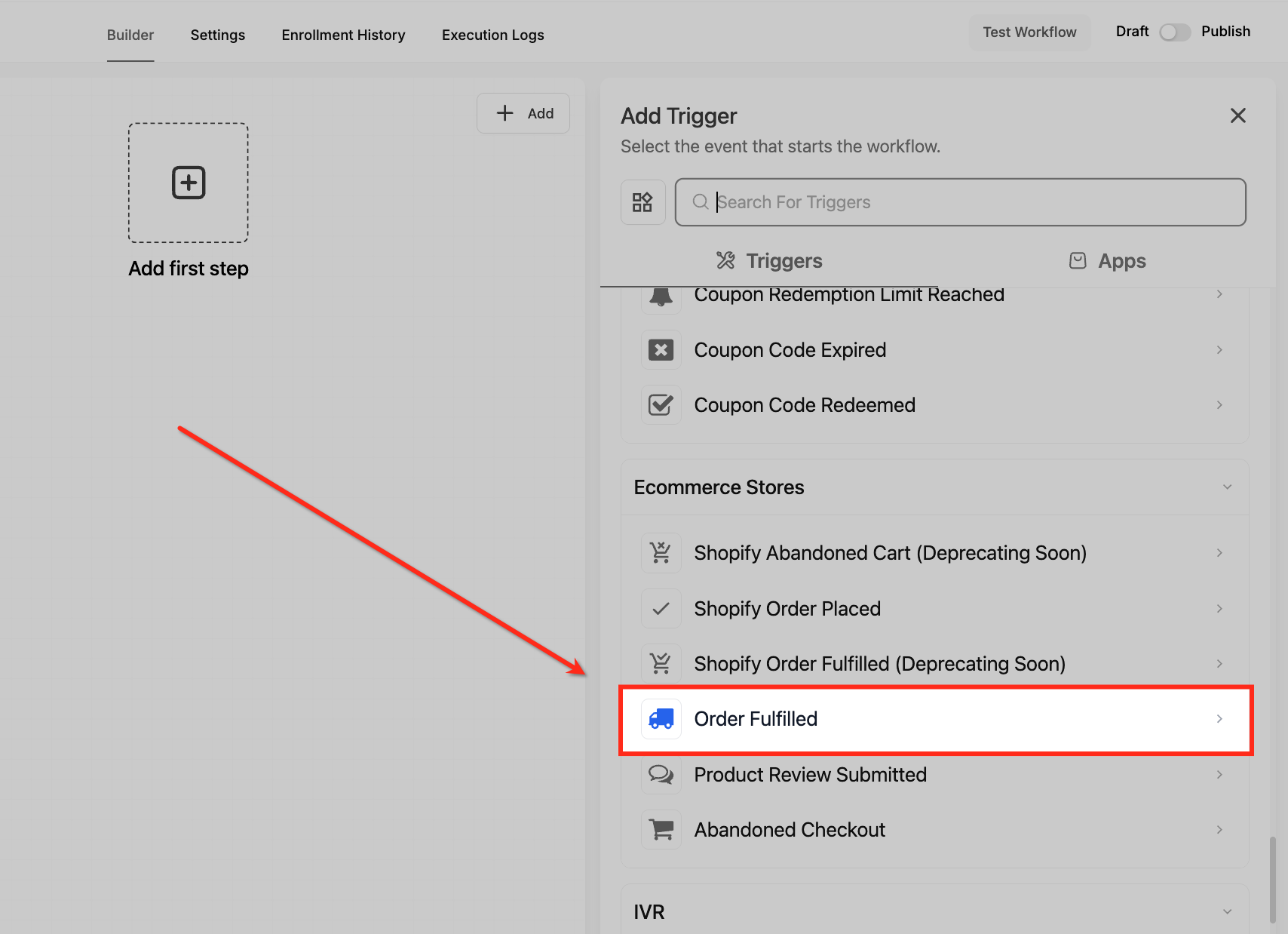
- In the Add Trigger panel, scroll to Ecommerce Stores and select Order Fulfilled.
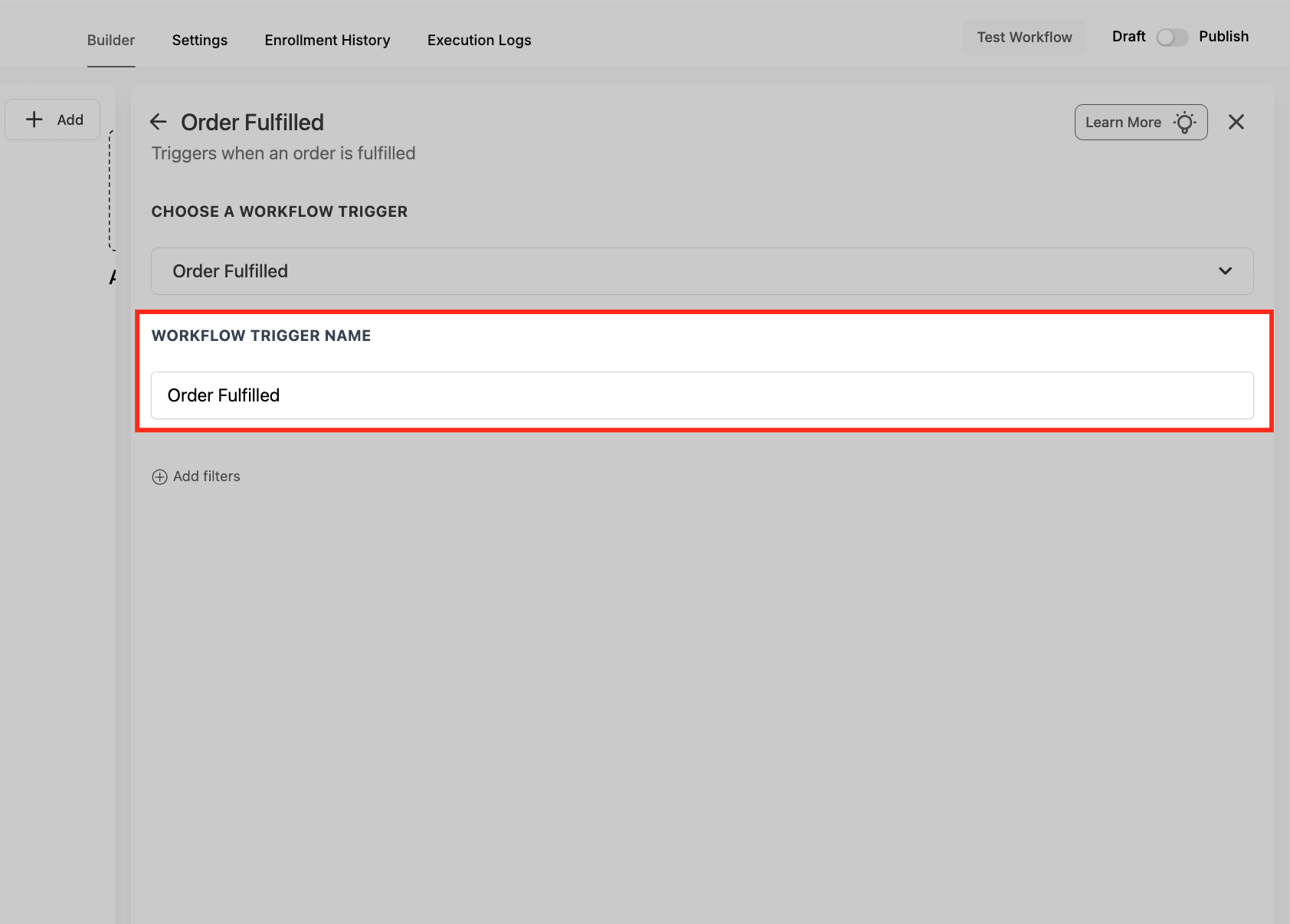
- Enter a clear descriptive name for the trigger.
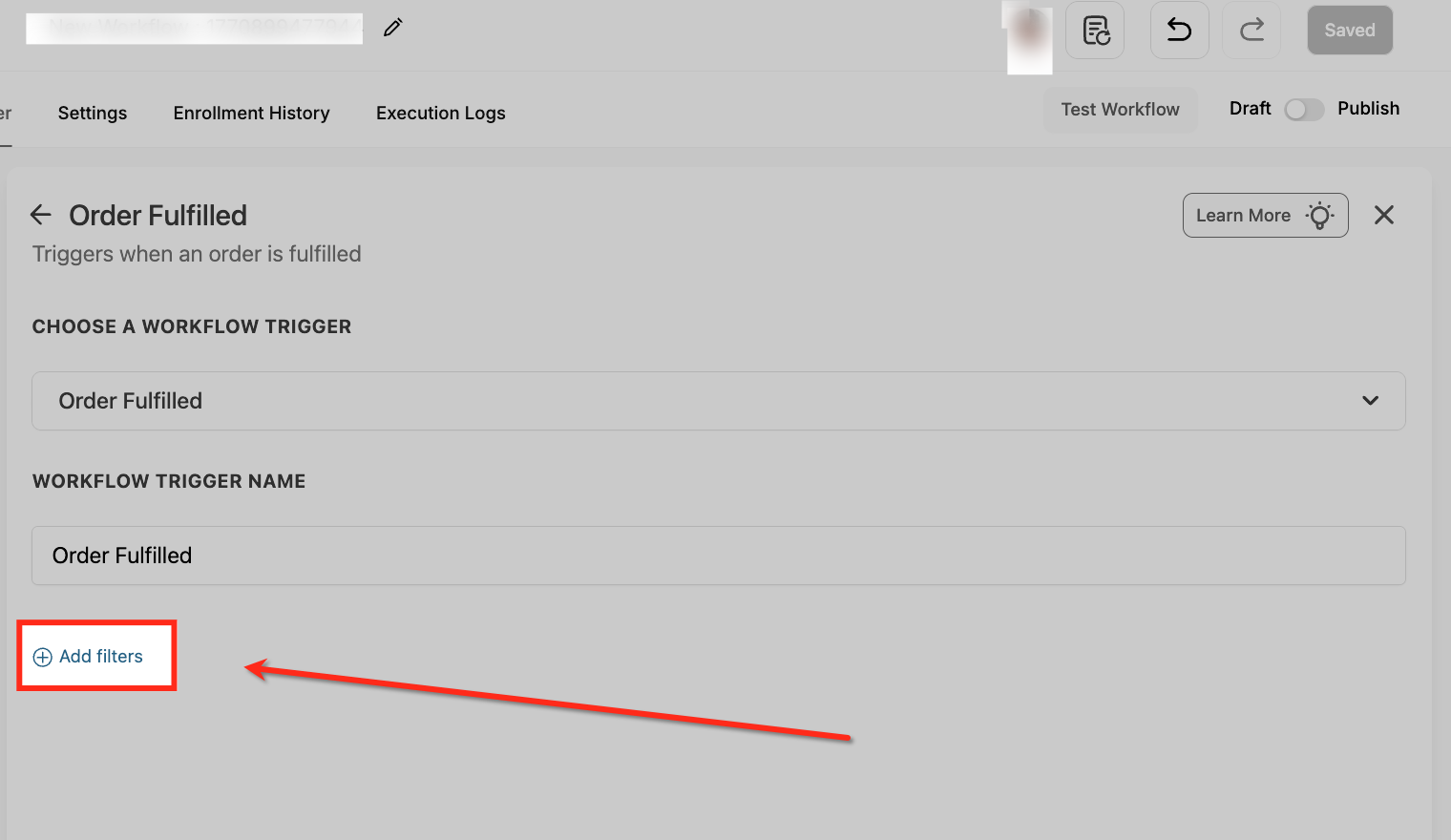
- Under Filters, click Add filters and choose the conditions you need, such as Cart Value or Order Source.
- For inventory filtering, use the nested path Global Products > Price > Available Quantity, select a price, set the condition, and type the numeric value.
- If handling Shopify orders, set Order Source to External and Order Sub Source to Shopify, then add any additional filters.
- Save Trigger, saving is required before you can reliably add actions or publish the workflow.
- Optionally toggle Allow Multiple if the order may have several shipments.
- Test the trigger by fulfilling a test order in your store or via Shopify.
06What it looks like in HighLevel
07Settings that matter
- Cart Value. Filters orders based on the total amount the customer spent.
- Fulfilled Products. Filters on specific product SKUs that were included in the fulfillment.
- Order Source. Specifies whether the order originated in a HighLevel store or from an external platform.
- Order Sub Source. When Order Source is External, narrows the source down to a particular platform such as Shopify.
- Shipping Carrier. Filters shipments by the carrier name, allowing carrier specific actions.
- Tracking Number. Filters based on the presence or pattern of the tracking number.
- Available Quantity. Filters fulfilled orders by the current inventory level for a selected product price.
- Fulfillment Status. Filters events according to the fulfillment status value.
- Product Collection. Filters shipments based on the collection associated with the fulfilled products.
- Order Tags. Filters Shopify fulfillment events using order tag values.
- Product and Price. Filters shipments using the product or price details of the items actually fulfilled.
- Allow Multiple. Optional toggle that permits the trigger to fire multiple times for orders with several shipments.
08Things to know before you rely on it
- The legacy “Shopify Order Fulfilled” trigger is being deprecated; new automations should use the Order Fulfilled trigger to access the full filter set.
- The trigger fires only when an order status changes to Fulfilled; it does not react to Delivered status changes.
- Partial fulfillments generate separate Order Fulfilled events for each shipment; filters evaluate only the items in the specific shipment.
- WooCommerce is not yet supported as an external source; the External > Sub Source filters will work for new platform integrations as they become available.
09If something goes wrong
- Duplicate notifications on split shipments. Enable the Tracking Number filter and choose the Is Not Empty operator so only shipments with a new tracking number trigger the workflow.
- Existing “Shopify Order Fulfilled” workflows might become outdated. Migrate those workflows to the new Order Fulfilled trigger to ensure continued compatibility before the legacy trigger is retired.
10How it connects to the rest of HighLevel
- How to set up a HighLevel ecommerce store ecommerce store setup
- Configure WooCommerce integration in HighLevel WooCommerce integration
- HighLevel pricing and plans pricing
Michael's take

Customers want to know when their package is on the way, and a missed or late shipment email can hurt trust. The first thing I would get right is the Tracking Number filter set to “Is Not Empty” so every message contains a real link the buyer can click.
After that, I’d map the fulfillment Custom Values into a short SMS that tells the buyer the carrier and tracking URL. Test it with a real order, watch the data flow, and then roll it out to the full list of customers.