
01Who this is for
- Founders who use personal Calendly links have the appointment owner set to the user who linked the account.
- Teams that operate round robin scheduling receive random owner assignment from the pool of connected users.
02Calendly syncs, explained
The integration links a Calendly account through Calendar Settings > Connections. After authorization, HighLevel pulls future bookings and past events created within the last 180 days from the calendars you select. Each incoming event becomes an appointment record, and the guest’s name and email generate a new contact.
Sync is one way: data moves only from Calendly into HighLevel. Events created inside HighLevel never appear in Calendly, and existing Calendly bookings cannot be edited from HighLevel. Ownership rules differ by calendar type, personal links assign the connecting user, while shared links randomly allocate a connected user.
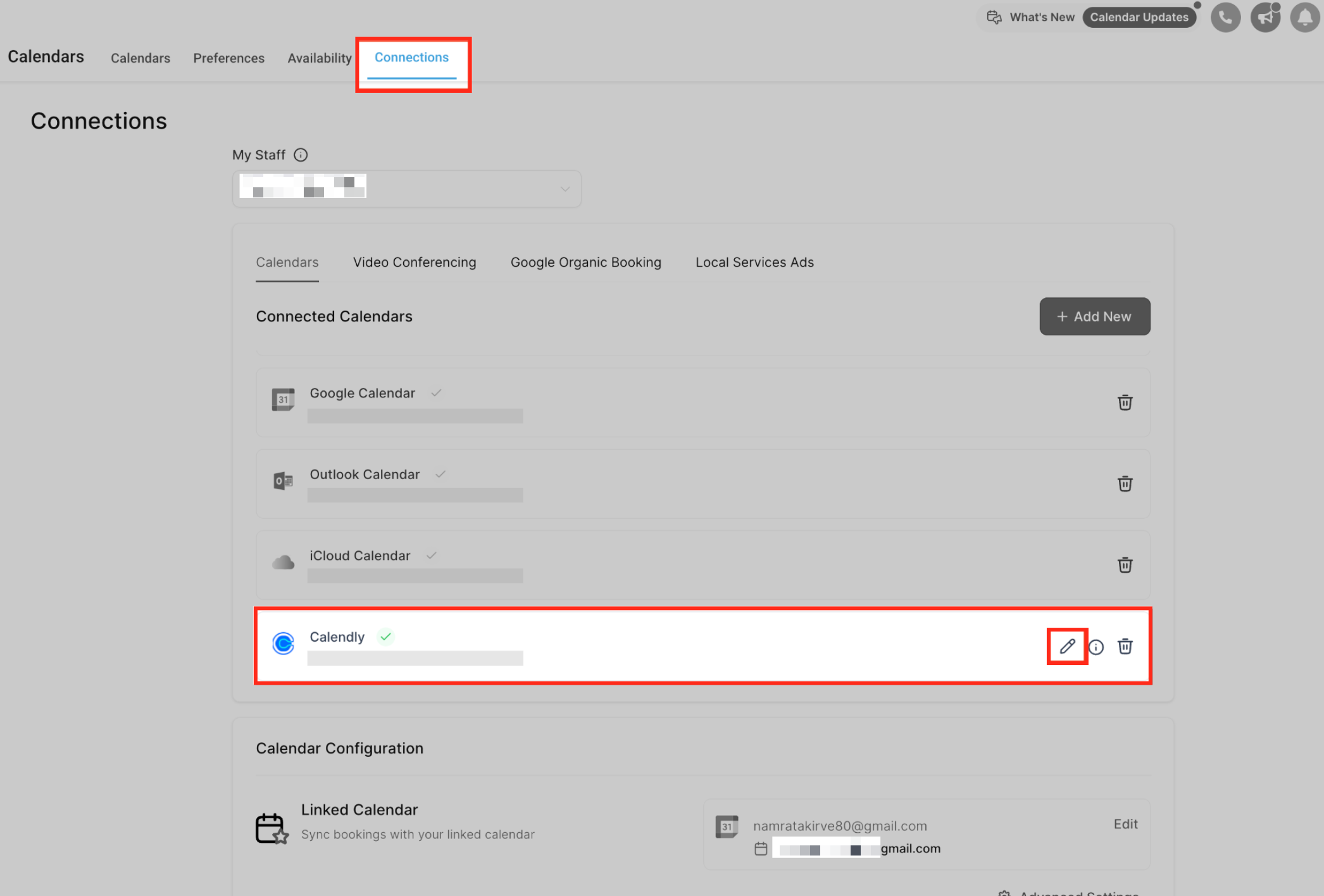
All of this is managed in the Calendars & Appointments area, under the Connections tab where you add, edit, or remove the Calendly link.
03How businesses use Calendly syncs
- Consulting firm. The consultant connects their personal Calendly link, selects the calendar to import, and lets HighLevel create contacts automatically from each client booking, enabling follow up automations without manual data entry.
- Multi coach practice. The practice uses a shared round robin Calendly link. After linking the account, HighLevel assigns each new appointment to a random coach from the connected users, ensuring fair distribution of leads.
- Dental office. The office adds a Calendly form that includes a phone field. During sync setup, they choose the phone field source on the mapping screen so every new patient contact receives a phone number automatically.
04The numbers and rules that matter
- One Calendly account per user per subaccount.
- Supported only for Standard, Teams, and Enterprise plans on Calendly.
- Past events created more than 180 days before connection are not imported.
05Before you start
- A Calendly subscription on the Standard, Teams, or Enterprise tier.
- Event types must capture at least the guest’s name and email address.
06How to set up and use Calendly syncs in HighLevel
Set up Calendly sync
- Open Calendar Settings and select the Connections tab.
- Choose the option to add a Calendly connection and follow the sign in prompts.
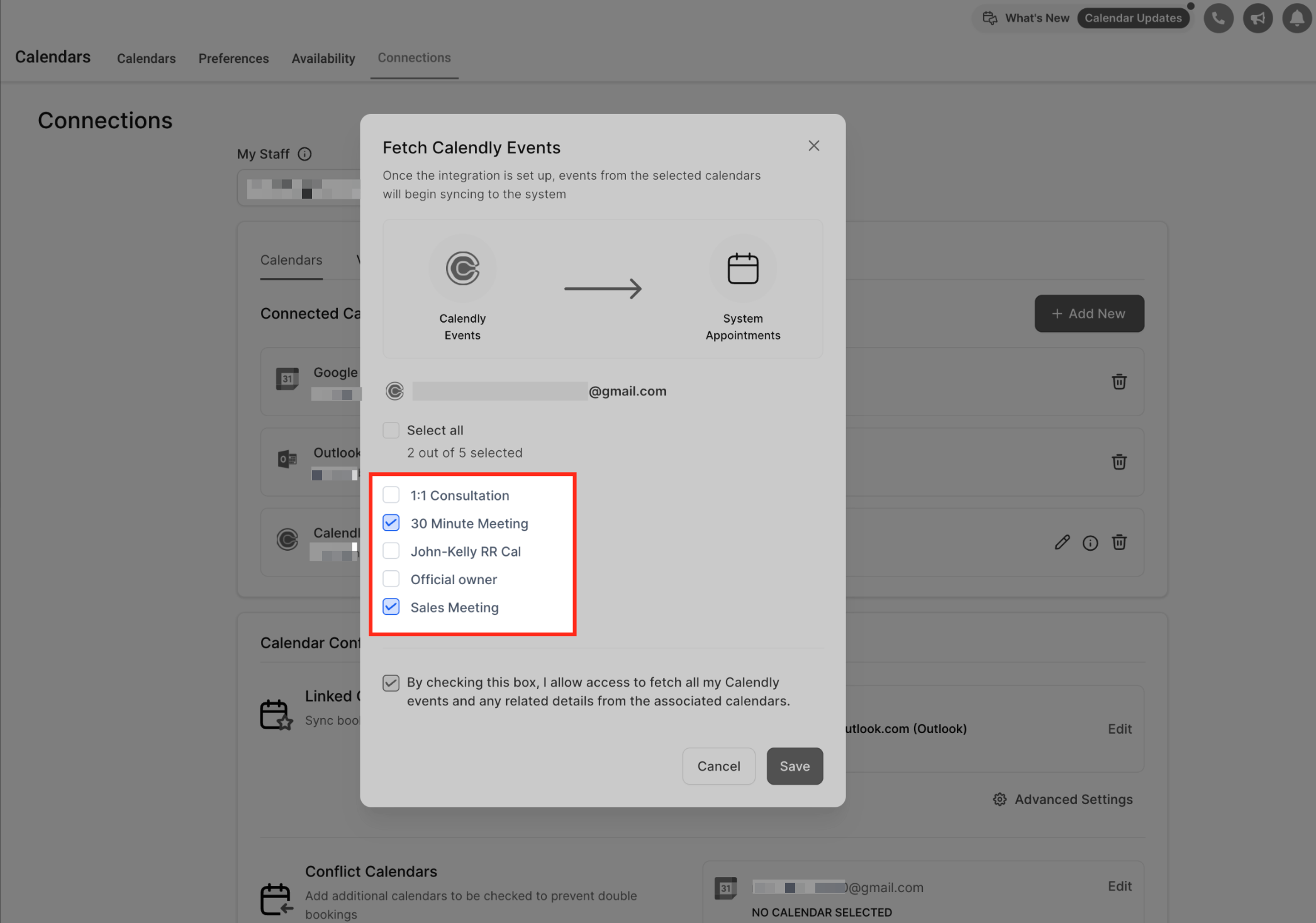
- Grant HighLevel permission to access the desired Calendly calendars.
- Mark the calendars you want to import into HighLevel.
- Click Save; new bookings will now appear as appointments.
Edit calendar selections
- Navigate to Calendar Settings > Connections.
- Find the Calendly entry among the listed connections.
- Press the Edit icon to open the calendar list.
- Add or remove calendars, then save the changes.
- Note: only events from newly added calendars will sync from the time of selection; no historical data will be imported.
Disconnect Calendly
- Go to Calendar Settings > Connections.
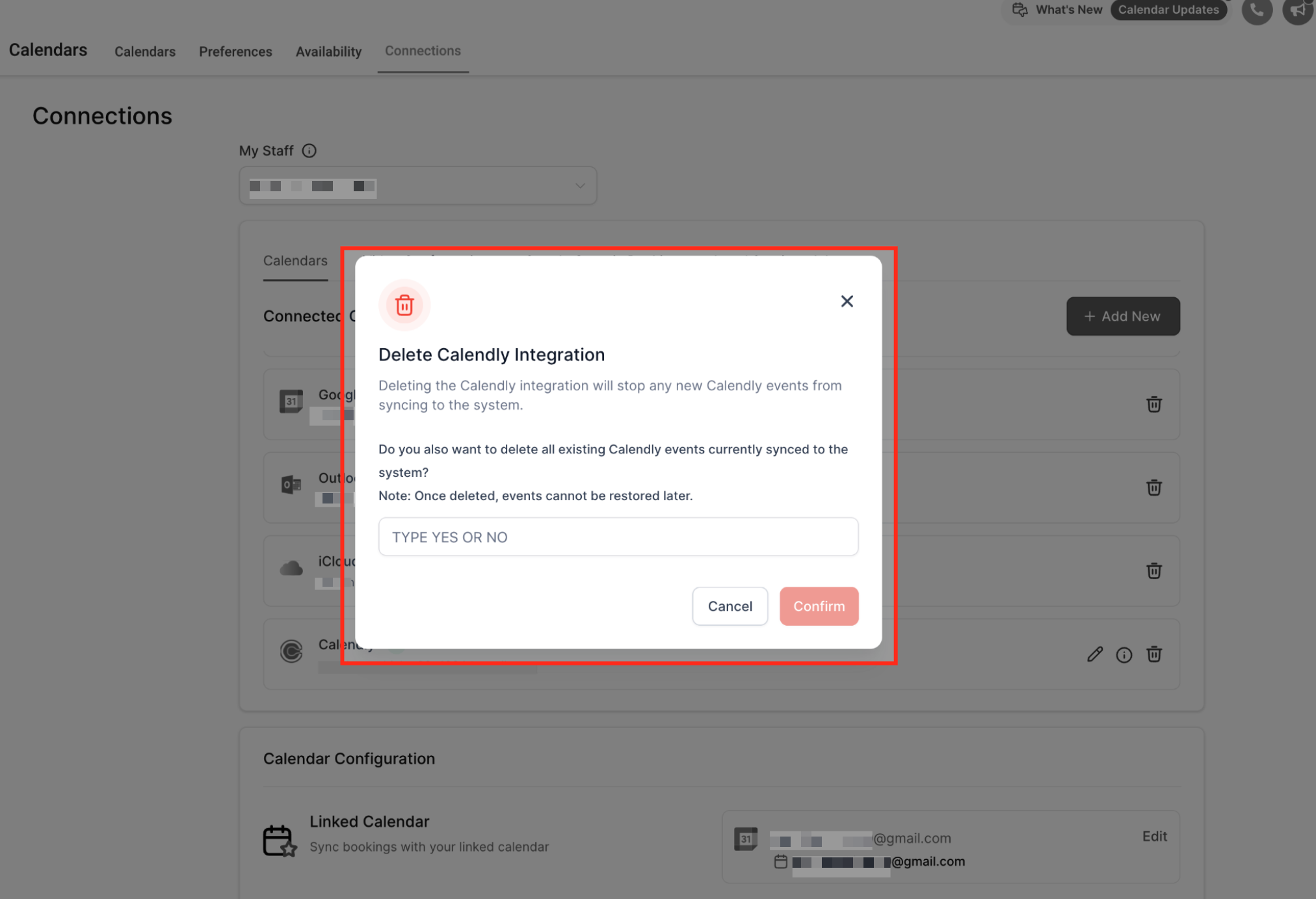
- Select the Calendly integration and choose the disconnect option.
- When prompted, decide whether to delete all events that were synced.
- Confirm the disconnection to stop further syncing. Deleting synced events is permanent and cannot be restored.
07What it looks like in HighLevel
08Settings that matter
- Calendar Settings > Connections. Controls which external calendars are linked and which Calendly calendars are included in the import process.
- Phone number source mapping screen. Lets you specify whether a contact receives a phone number from the Calendly form field, the meeting location, or no number at all.
09Things to know before you rely on it
- One Calendly account per user per subaccount.
- The same Calendly account may be linked across multiple subaccounts belonging to the user.
- Integration works only with Calendly Standard, Teams, or Enterprise plans; Free and Essentials plans are not supported.
- Sync moves data only from Calendly into HighLevel; changes made in HighLevel do not update Calendly.
- Only the guest’s name and email are transferred; no custom fields, notes, or attachments are synced.
- Events older than 180 days at the time of connection are excluded from the initial import.
- Cancelled or rescheduled bookings are not reflected in HighLevel.
- Deleted synced events cannot be restored.
10How it connects to the rest of HighLevel
- Add Google Calendar as another sync source. Google Calendar integration
- Set up Outlook calendar sync for additional bookings. Outlook calendar sync
- Review pricing to confirm your plan supports the required Calendly tier. Pricing and plans
Michael's take

Businesses lose time and data when staff manually copy Calendly bookings into their CRM. The sync eliminates that double entry and keeps contacts and appointments aligned automatically.
The first setting I would get right is the calendar selection during the initial connection. Picking only the calendars you need ensures you capture the right data from day one and avoids importing unwanted events.