
01Who this is for
- Businesses can offer flexible financing at booking to reduce upfront cost pressure.
- Service providers can let clients spread payments for higher ticket appointments.
02Buy now, pay later in Calendars, explained
The feature adds Klarna and Affirm as payment alternatives on the calendar booking widget. During checkout, eligible visitors see the installment option alongside regular card entry and can complete the payment flow within the widget.
These methods are managed through Stripe. HighLevel checks the customer's location, the provider's eligibility requirements, and the product area settings before showing the options. If any condition is not met, only standard card payments appear.
The settings live inside the Payments section of the platform. After enabling the methods, they become part of every calendar flow that has payments turned on.
03How businesses use buy now, pay later in Calendars
- Business that offers appointments. Enable Klarna and/or Affirm in Stripe settings, then test the calendar widget to verify eligible clients see the installment option at checkout.
- Health practitioner. Activate the payment methods, open the appointment page, and run a test booking to ensure the installment button appears for qualified patients.
- Event organizer. Turn on both Klarna and Affirm, then use the calendar widget to confirm that guests from supported regions see the buy now, pay later choices during ticket checkout.
04Before you start
- Stripe must be connected to HighLevel.
- Payment methods need to be enabled for the calendar product area.
05How to set up and use buy now, pay later in Calendars in HighLevel
Set up buy now, pay later in calendars
- Navigate to Payments in the platform menu.
- Select Settings from the Payments screen.
- Open the Integrations tab.
- Choose Manage Stripe.
- Examine the payment methods listed for the calendar product area.
- Turn on Klarna and Affirm where they are supported.
- Save the changes you made.
- Open the calendar booking widget and run a test checkout.
06What it looks like in HighLevel
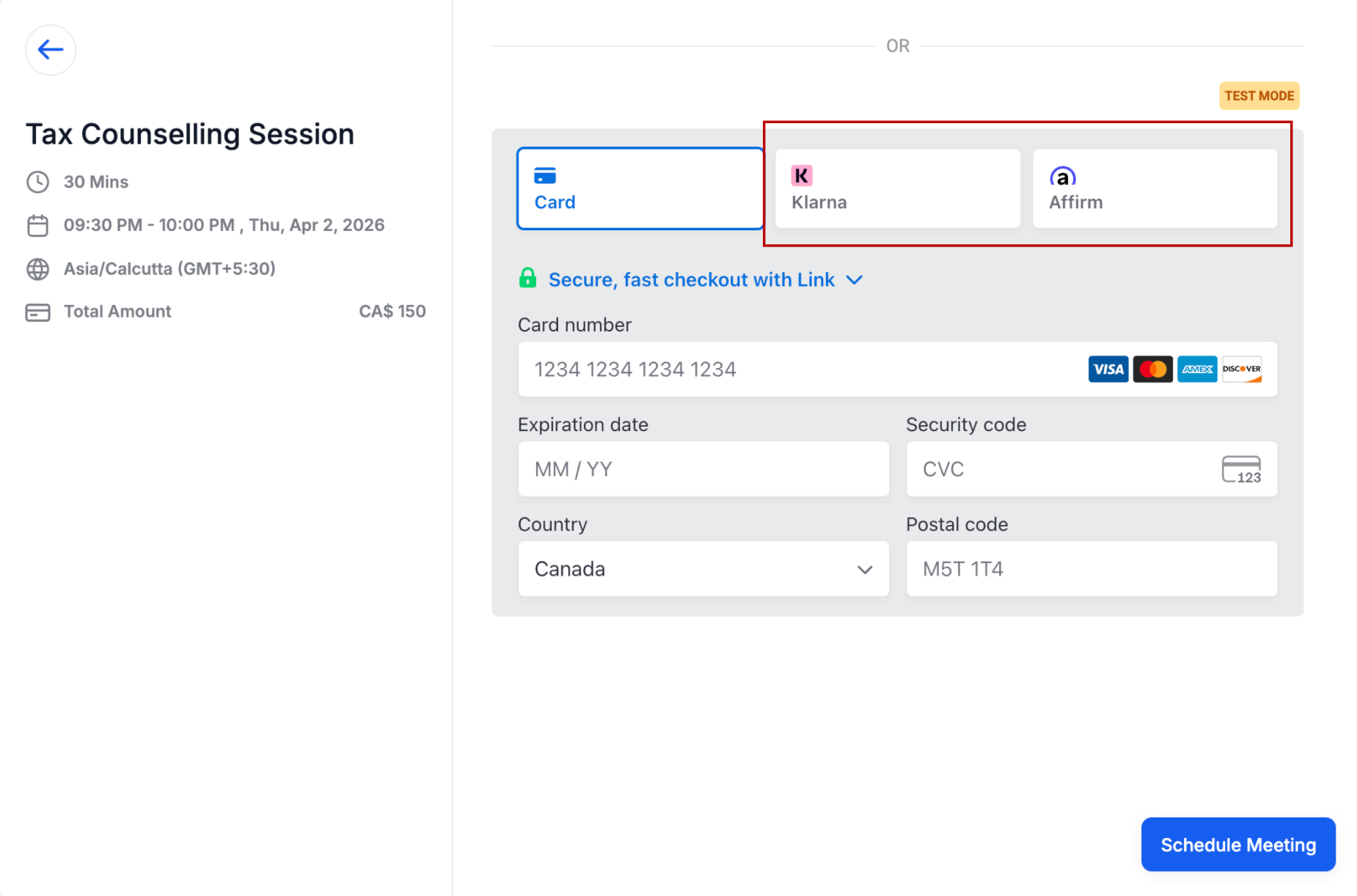
07Settings that matter
- Klarna. Activates Klarna as an installment payment option for eligible calendar bookings.
- Affirm. Activates Affirm as an installment payment option for eligible calendar bookings.
08Things to know before you rely on it
- Only customers in regions supported by Klarna or Affirm and who meet provider eligibility will see the options.
- The feature currently applies to calendar booking flows where payments are enabled and correctly configured.
- Availability is determined by Stripe managed settings and may differ per customer.
09How it connects to the rest of HighLevel
- Learn how to add a payment gateway and enable payments for calendars. Calendar payments
- Review how Stripe payment methods are managed inside HighLevel. Stripe payment methods
- Explore all calendar and appointment features offered by HighLevel. All calendar features
Michael's take

The small convenience of letting a client pay over time can become a real shift for businesses that sell higher ticket appointments. When the checkout offers Klarna or Affirm, it aligns with a more modern payment experience.
I think a boutique fitness studio that charges premium class packages could benefit from offering installment options.