
01Who this is for
- App developers who publish Marketplace apps and need insight into why users uninstall.
- Agency owners managing white label solutions and wanting to catch white label breach uninstall reasons.
- Product managers tracking version specific churn to prioritize improvements.
02Marketplace uninstall feedback, explained
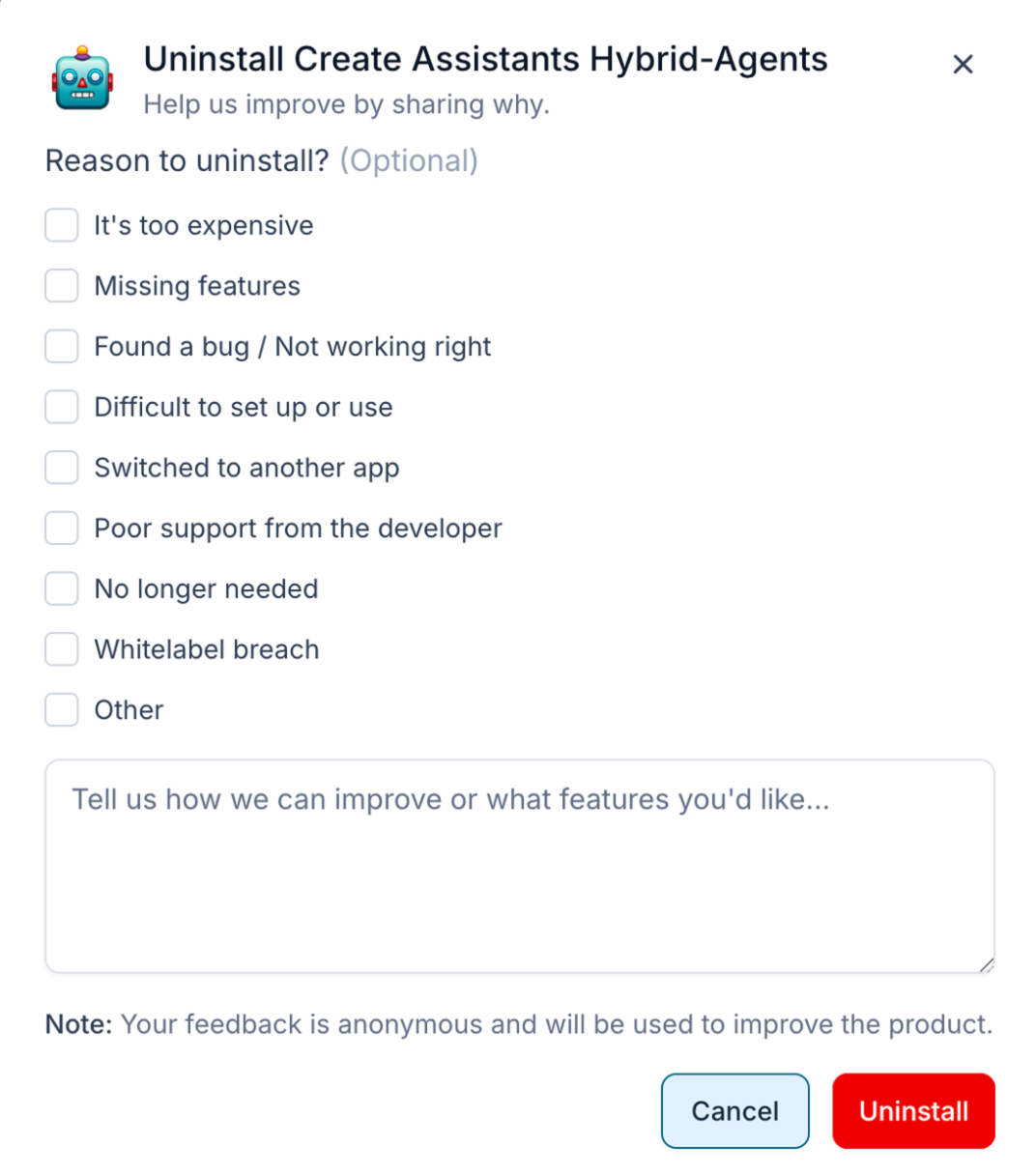
The feature captures optional, anonymous feedback at the moment a user uninstalls a Marketplace app. Users may pick one or more predefined reasons and add a short comment. The platform records the reason, comment, user type, app version, and submission date.
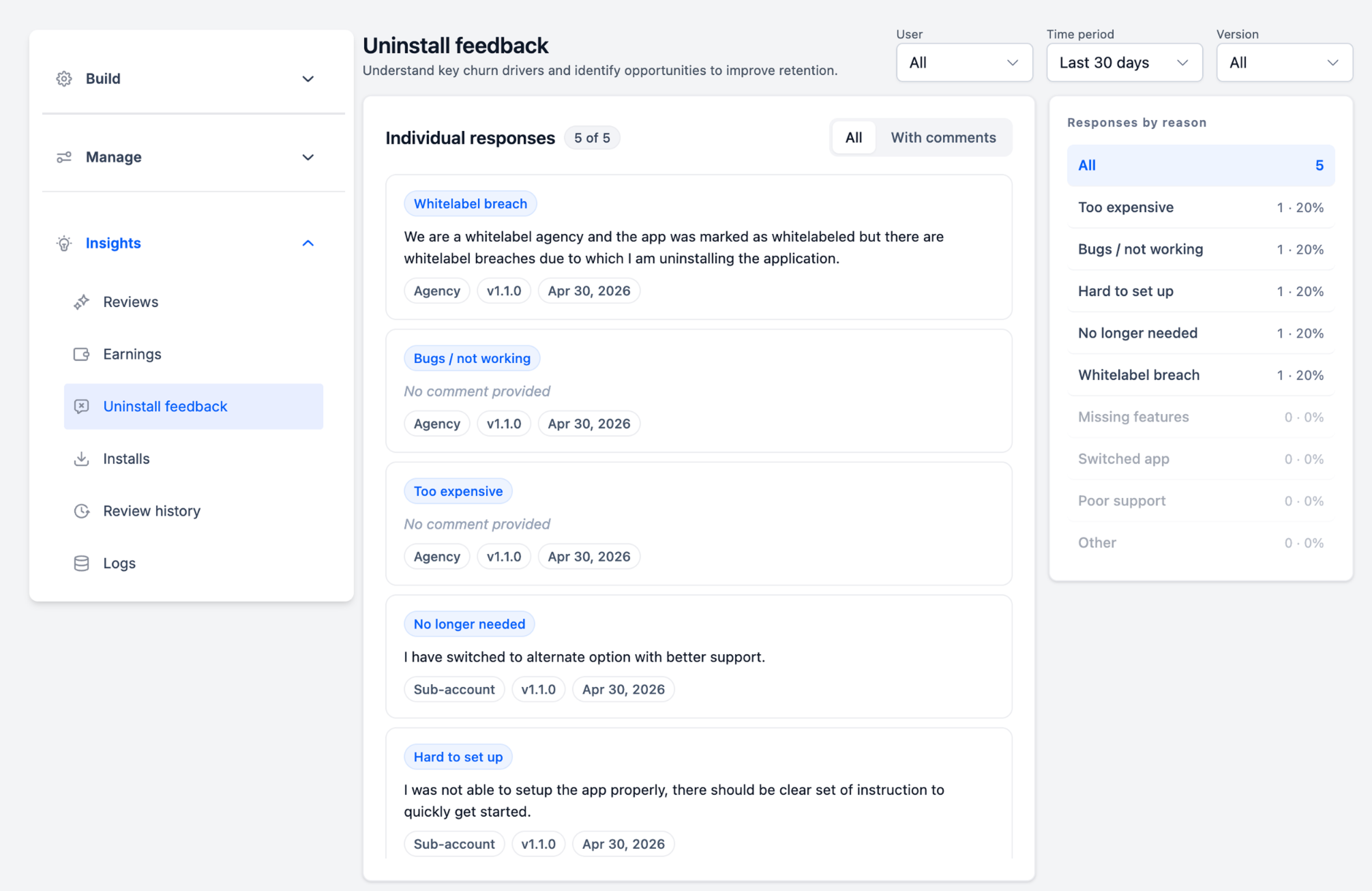
Feedback is displayed only in the Developer Marketplace. To access it, open the Developer Marketplace, select the target app, choose Insights, and then click Uninstall feedback. The dashboard shows individual responses and aggregated counts.
Developers can filter responses by user type, time period, or app version. A summary panel breaks down each uninstall reason with total counts and percentages, allowing quick identification of the most common issues.
03How businesses use marketplace uninstall feedback
- SaaS startup. The team opens the Developer Marketplace, selects its app, and reviews uninstall feedback to spot bugs reported in comments. By filtering for the latest version, they pinpoint issues introduced in recent releases.
- Digital marketing agency. Agency owners examine the reason list for white label breach entries. Seeing this trend helps them adjust documentation and support for agencies using the white label version of the app.
- E learning platform. Product managers view price related uninstall reasons and compare counts across subscription tiers. The insight guides pricing adjustments and communication of value.
04The numbers and rules that matter
- Predefined uninstall reasons include: It’s too expensive, Missing features, Found a bug / Not working right, Difficult to set up or use, Switched to another app, Poor support from the developer, No longer needed, Other.
- Filters available: User type, Time period, Version, All / With comments.
05How to set up and use marketplace uninstall feedback in HighLevel
View uninstall feedback
- Open the Developer Marketplace.
- Select the app you want to review.
- Go to Insights.
- Select Uninstall feedback.
06What it looks like in HighLevel
07Things to know before you rely on it
- The feature is available only on the developer portal at marketplace.gohighlevel.com.
- Feedback collection is optional and anonymous for users.
08How it connects to the rest of HighLevel
- Explore all App marketplace features All App marketplace features
- Learn how to use the agency app marketplace Agency app marketplace
- Manage external connections for Marketplace apps External connections
Michael's take

This feels like a small convenience that can become a real shift for developers who are flying blind on churn. Being able to see why a user clicks uninstall turns a mystery into a data point you can act on.
A SaaS tool builder that offers a free tier will find it useful. Knowing if users leave because the app feels too expensive or because a bug slipped through lets you prioritize the right fixes without guessing.