
01Who this is for
- Marketers who need to segment leads right away based on quiz performance and send targeted follow ups.
- Educators who want to deliver personalized feedback or certificates as soon as a learner submits a quiz.
- Sales managers who wish to assign high scoring prospects to reps for immediate outreach.
02Quiz submitted triggers, explained
The Quiz Submitted trigger is a workflow entry condition that activates when a contact submits a published quiz. It lives in the Automation section of HighLevel where workflows are created or edited. Once the trigger fires, any actions you have added to the workflow run in real time.
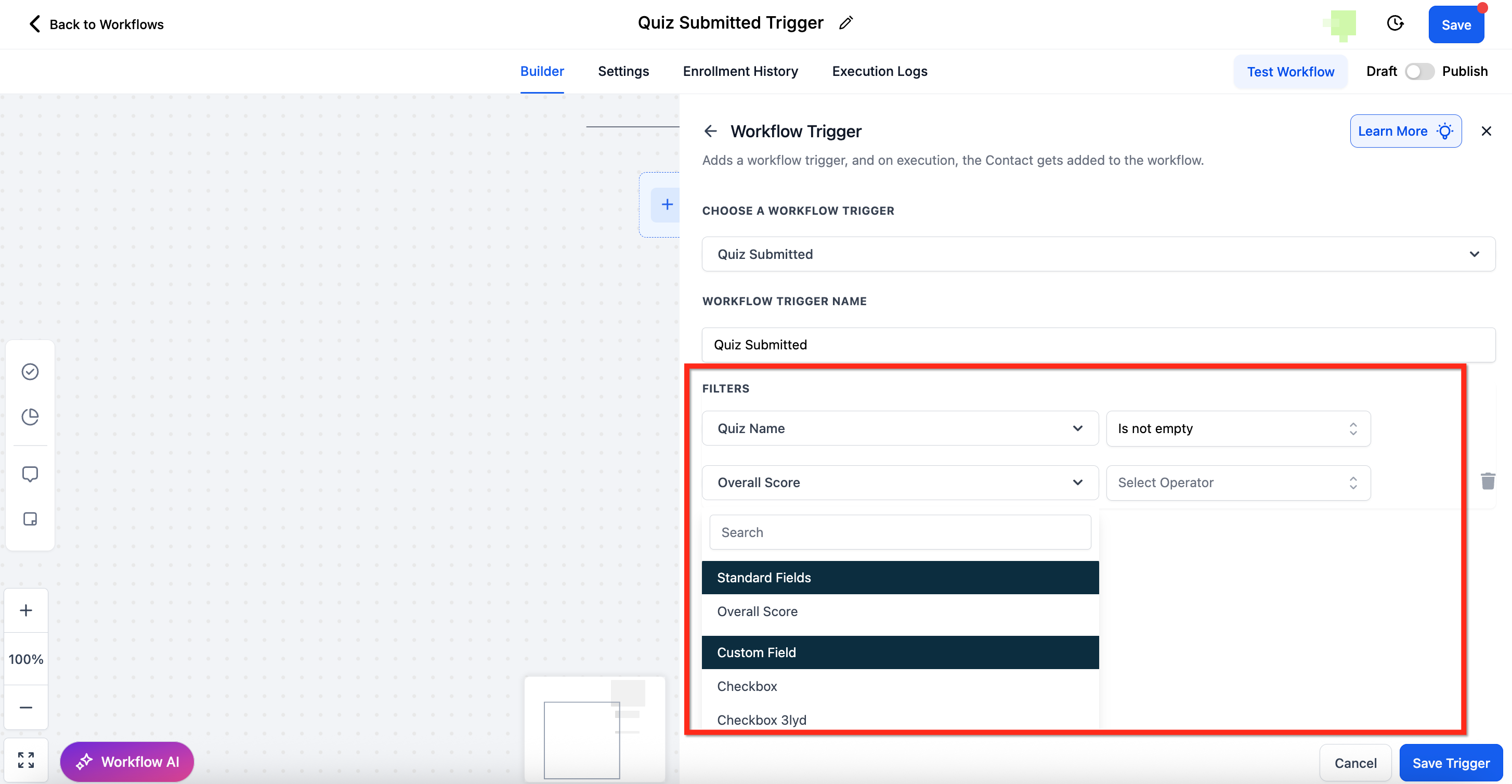
Filters let you narrow when the trigger fires. You can select a specific quiz, use Any to include all quizzes, or exclude quizzes. You can also set overall score ranges, category level scores, or reference custom fields defined in the quiz. The Between operator includes both end points of a range and prevents a minimum that is higher than the maximum.
After the trigger fires, you can add any combination of workflow actions: send an email, send an SMS, create a task for a team member, or update contact records with the quiz results. These actions run automatically without manual handling of export files.
03How businesses use quiz submitted trigger
- Educational institution. Create a quiz to assess student understanding, then set the Quiz Submitted trigger to send each student a feedback email that references their score range. The workflow also updates a custom field in the student’s record for future reporting.
- Marketing agency. Build a personality quiz for a client, configure the trigger to segment respondents by overall score, and automatically add them to nurture sequences with email and SMS content tailored to their category results.
- Sales team. Use the trigger to identify prospects who score above a defined threshold, then assign a follow up task to a sales rep and push the score into HighLevel so the rep can prioritize outreach.
04The numbers and rules that matter
- Quiz Name filter: Select a specific quiz, use Any to include all quizzes, or use Is Not to exclude certain quizzes.
- Overall Score filter: Create rules such as is greater than 80 or between 50 and 70.
- The system prevents invalid ranges where the minimum score is greater than the maximum score.
05How to set up and use quiz submitted trigger in HighLevel
Set up Quiz Submitted trigger
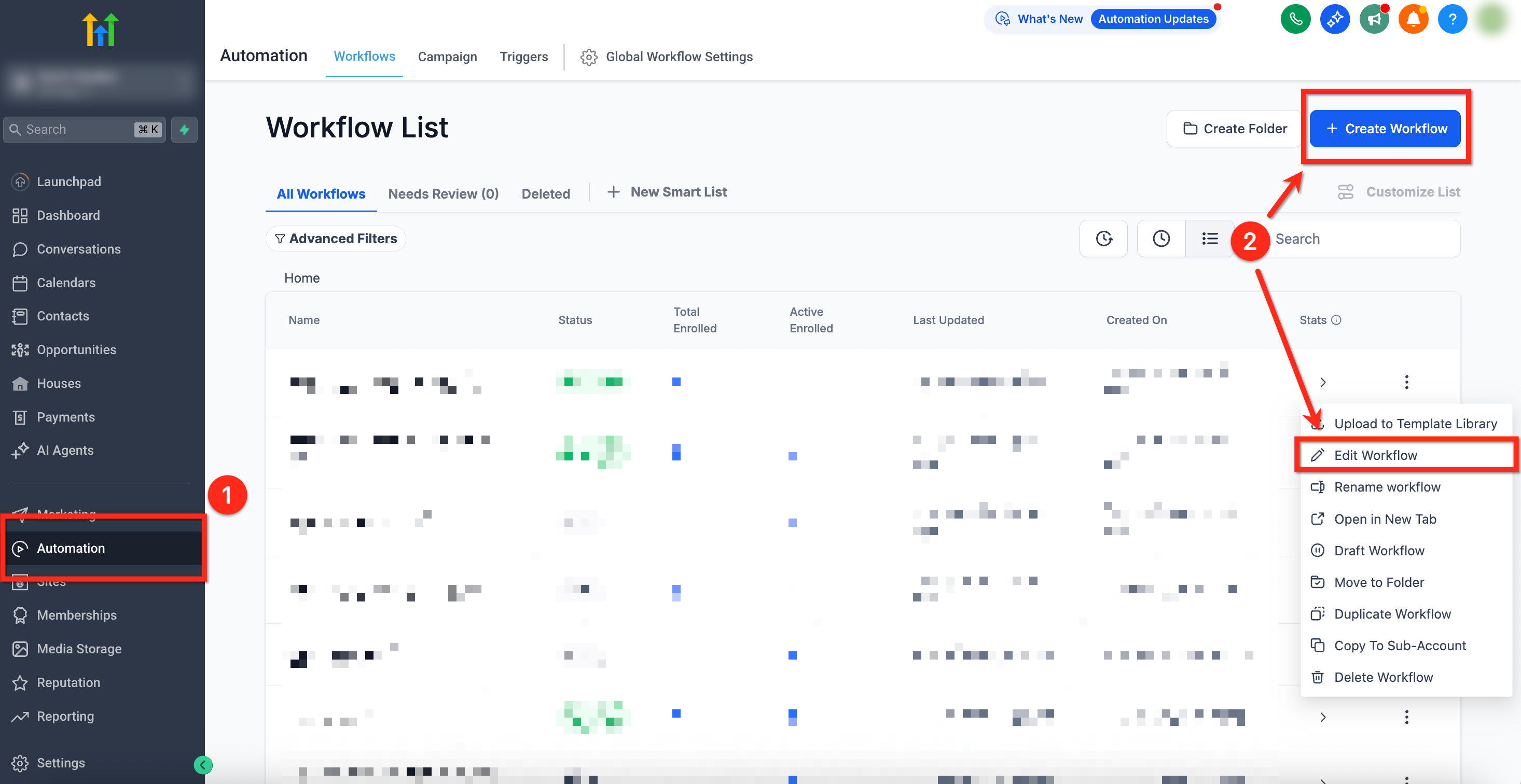
- Open the Automation area using the left hand navigation menu.
- Create a new workflow or edit an existing one by clicking the three dot icon next to its name and selecting Edit Workflow.
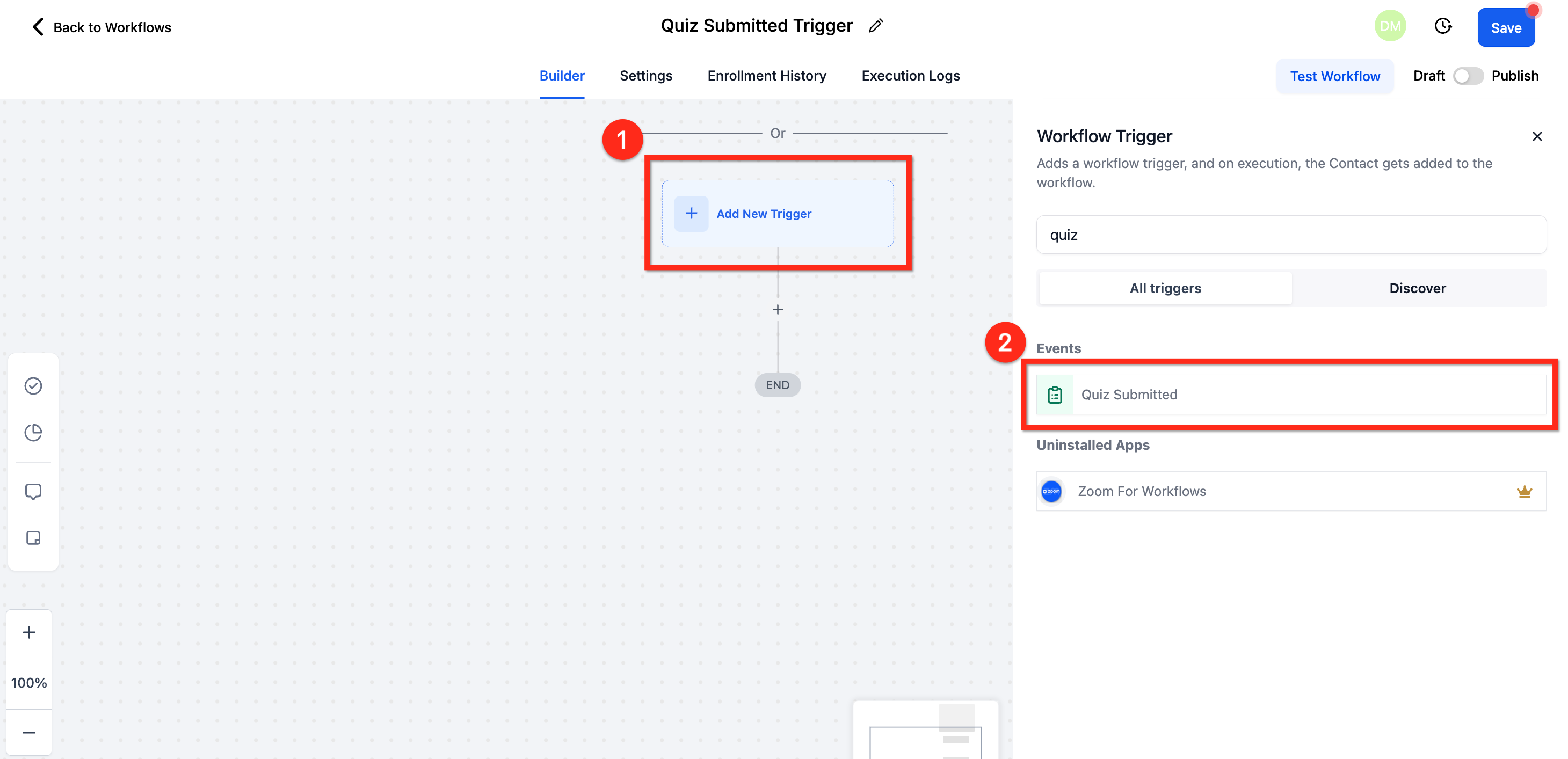
- In the workflow canvas, click Add Trigger.
- Choose Quiz Submitted from the list of available triggers.
- Add filter conditions such as the quiz name, overall score range, or category scores to define when the trigger should fire.
- Add an Email action and configure the message you want participants to receive.
- Add additional actions like SMS, task assignment, or record updates as needed.
- Click Save and then Publish the workflow to activate the automation.
06What it looks like in HighLevel
07Settings that matter
- Quiz Name. Selects a specific quiz, includes all quizzes with Any, or excludes quizzes with Is Not to limit when the trigger fires.
- Overall Score. Sets numeric conditions such as greater than, less than, or a Between range to filter contacts by total quiz score.
- Category Score. Filters contacts based on the score they achieved in a particular quiz section or category.
- Custom Field. References custom score fields that were created when the quiz was designed, allowing more granular filtering.
08Things to know before you rely on it
- Both the lower and upper values entered in a Between score range are included in the match.
- The system blocks a range where the minimum score exceeds the maximum score.
09How it connects to the rest of HighLevel
- Use the Quiz Builder to design quizzes that feed into this trigger. Quiz Builder guide
- Configure score thresholds and result pages to work with the trigger’s filter options. Quiz scoring setup
- Start from a pre built quiz template to speed creation before linking the trigger. Quiz template library
Michael's take

Wondering if a quiz can actually drive your marketing or training without extra manual work? The quiz submitted trigger turns each quiz completion into a real time signal that can launch emails, SMS alerts or team tasks the moment a score lands in your system.
If I were setting this up, I’d start by mapping the score ranges I care about, then attach the appropriate follow up. A feedback email for low scores, a sales task for high scores. Test the flow with a few dummy entries to confirm the right messages fire before you go live.