
Quizzes just got a whole lot smarter!
Michael's take
My first glance at this update is that it’s a solid quality of life change rather than a brand new product. It adds conditional logic to quizzes, something a lot of people have asked for.
If you already have quizzes set up, you can now add redirect rules right in the builder. Instead of always landing on the default results page, you can send respondents to any URL you choose.
I would start by testing each of the four new score fields. Highest category, lowest category, overall score and category score. To make sure they fire the way I expect. Also check that the redirect works on both desktop and mobile browsers.
In practice I can see a quiz that scores a prospect’s needs and then routes a high scoring lead straight to a premium offer page, while a lower scorer gets sent to a nurture video. That cuts the manual follow up step out of the funnel.
I’m a firm believer that tools should do the heavy lifting for us, not add more steps. This tweak lets the quiz do the routing work automatically.
If you’re already using quizzes to qualify leads or recommend products, this is definitely worth a look.
We're excited to introduce one of the most requested features in Quizzes,Conditional Logic!
With the introduction ofRedirect to URL Conditional Logic, users can now create personalized Quiz experiences by redirecting respondents to different URLs based on their answers, overall scores, category scores, and more!
And that's not all! We've also introducedQuiz Score Based Conditions, unlocking an entirely new level of personalization beyond what's currently available in Forms & Surveys.
What changed
1. Conditional Logic Is Finally Here in Quizzes!
Until now, users didn't have access to Conditional Logic within Quizzes, limiting their ability to create personalized experiences based on how respondents interacted with their Quizzes.
That's changing!
We're bringing the Redirect to URL conditional logic type to Quizzes, allowing users to dynamically redirect respondents to different destinations based on the conditions they configure.
Here's what's new:
- Conditional URL Redirects: Redirect respondents to specific URLs based on their Quiz responses.
- Personalized Quiz Journeys: Create different experiences for respondents depending on the conditions they meet.
- Existing Conditional Logic Capabilities: Leverage the same Redirect to URL conditional logic functionality already supported in Forms & Surveys.
- Go Beyond the Results Page: Redirect respondents to custom destinations instead of always sending them to the default Quiz Results page.
Whether it's directing respondents to a personalized landing page, a product recommendation, or a specific next step, users now have greater control over what happens after someone completes their Quiz!
2. Quiz Score Based Conditional Logic, Take Personalization to the Next Level!
Here's where things get even more exciting!
Alongside the existing conditions supported by Redirect to URL in Forms & Surveys, we've introduced four new Quiz specific score fields that can be used when configuring conditional logic.
These include:
- Highest Category: Redirect respondents based on the category in which they scored the highest.
- Lowest Category: Create redirects based on the category in which they scored the lowest.
- Overall Score: Redirect respondents based on their total Quiz score.
- Category Score: Configure conditions based on a respondent's score within a particular category.
What does this unlock? Imagine you're building a Quiz to assess a respondent's knowledge, preferences, or performance.
- Knowledge Assessments: Redirect high scoring respondents to an advanced learning page while directing lower scoring respondents to additional learning resources.
- Product Recommendations: Send respondents to different product pages based on their highest scoring category.
- Performance Assessments: Redirect respondents to personalized next steps based on their Overall Score.
- Category Specific Journeys: Create targeted experiences based on how respondents performed in a particular category.
Instead of every respondent landing on the same Quiz Results page, users can now create dynamic, score driven experiences tailored to individual Quiz outcomes!
3. Custom Redirects Instead of the Default Quiz Results Page!
Previously, respondents would land on the Quiz Results page after completing their Quiz. With Conditional Logic, users now have the flexibility to redirect respondents to custom URLs based on their Quiz results. This opens up new possibilities for using Quizzes as part of larger customer journeys. For example:
- Redirect respondents to personalized recommendation pages.
- Direct respondents to relevant product or service pages.
- Send respondents to learning resources based on their scores.
- Guide respondents into different Funnels or Website pages based on their Quiz outcomes.
The result? Quizzes can now do more than just display results, they can drive personalized actions!
- Conditional Logic in Quizzes: One of the most requested capabilities is now available!
- Redirect to URL Support: Dynamically redirect respondents based on configured conditions.
- Highest & Lowest Category Conditions: Personalize redirects based on a respondent's strongest or weakest category.
- Overall & Category Score Conditions: Build score based redirect experiences using total or category specific Quiz scores.
- Personalized Quiz Outcomes: Send respondents to custom URLs instead of the default Quiz Results page.
- Existing Logic Support: Includes the existing Redirect to URL conditional logic capabilities from Forms & Surveys.
- More Powerful Quiz Experiences: Use Quiz results to guide respondents toward relevant content, products, and next steps.
How to turn it on
- Open Your Quiz Builder:Navigate to the Quiz you want to configure.
- Access Conditional Logic: Open the Conditional Logic section within the builder.
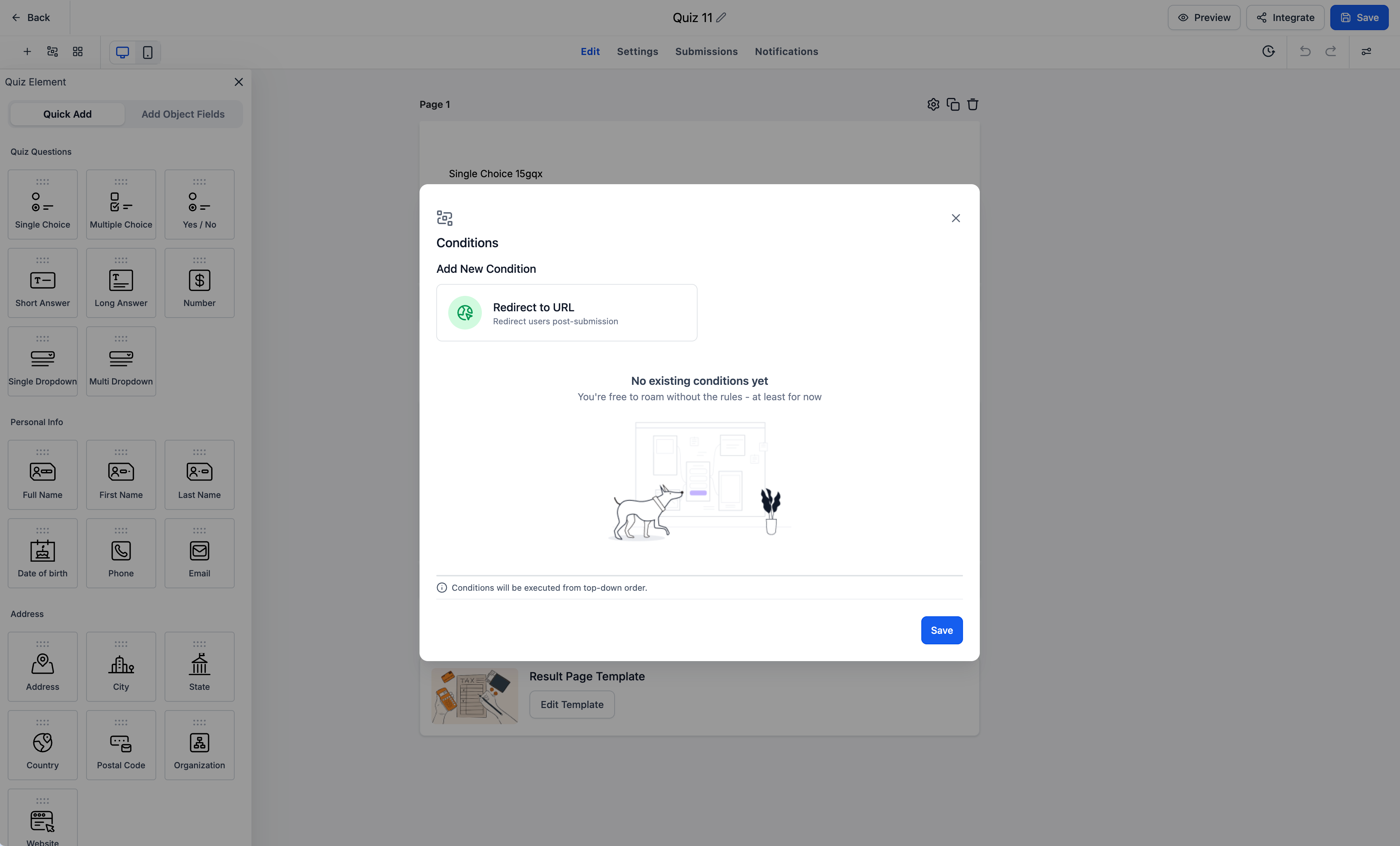
- Select Redirect to URL: Choose the newly supported Redirect to URL conditional logic type.
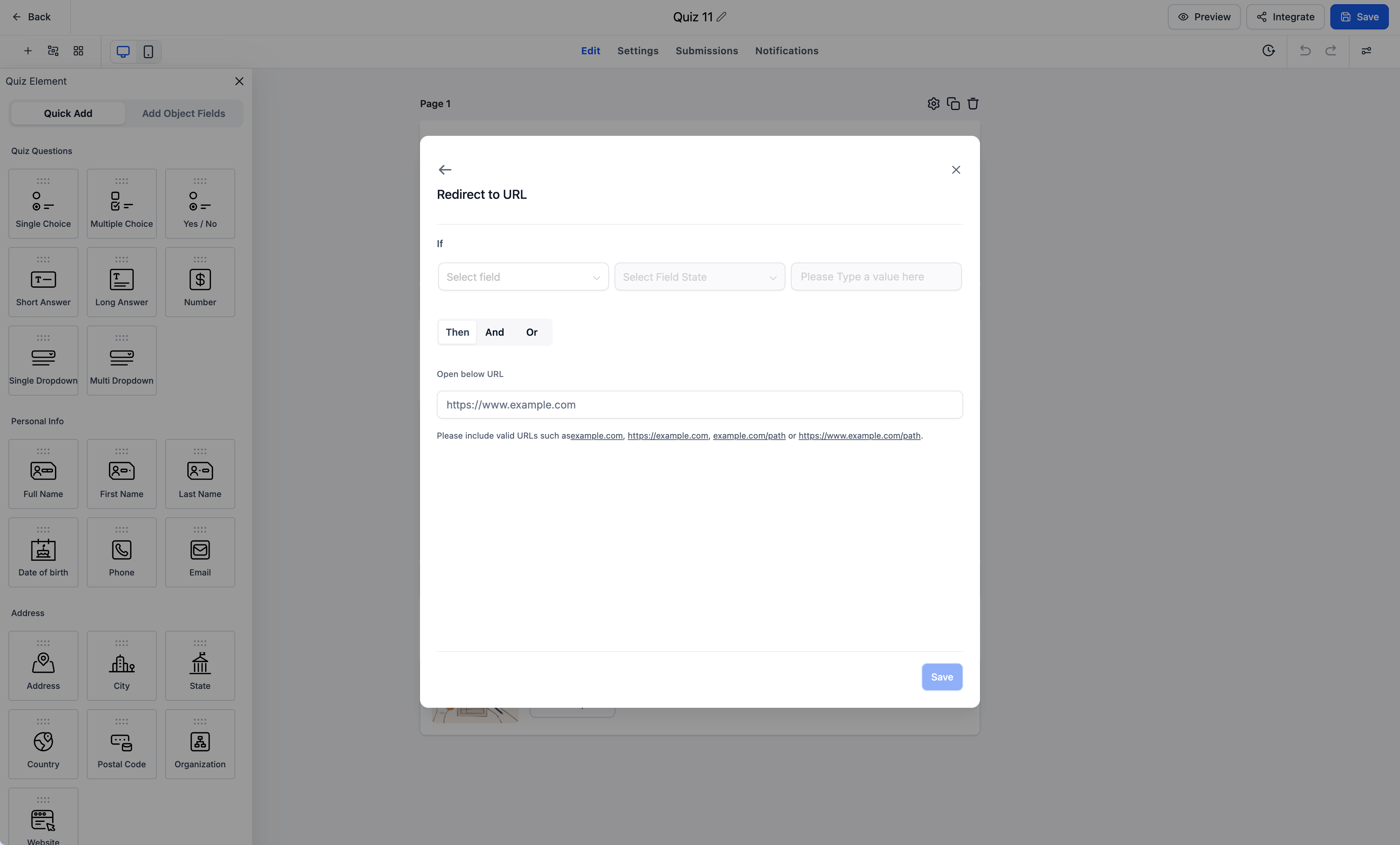
- Configure Your Conditions:Set conditions based on Quiz responses or any of the four Quiz Score fields, Highest Category, Lowest Category, Overall Score, or Category Score.
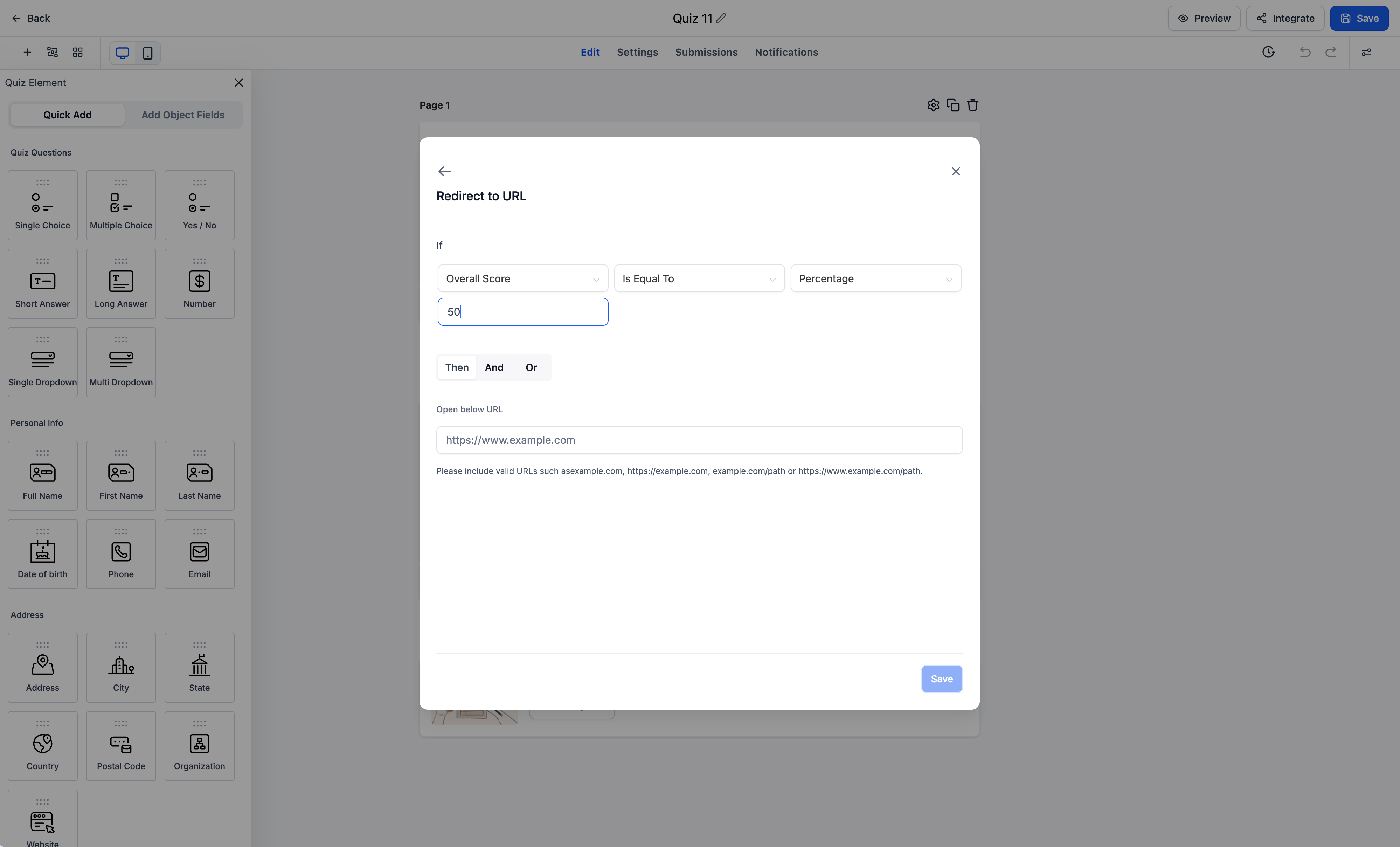
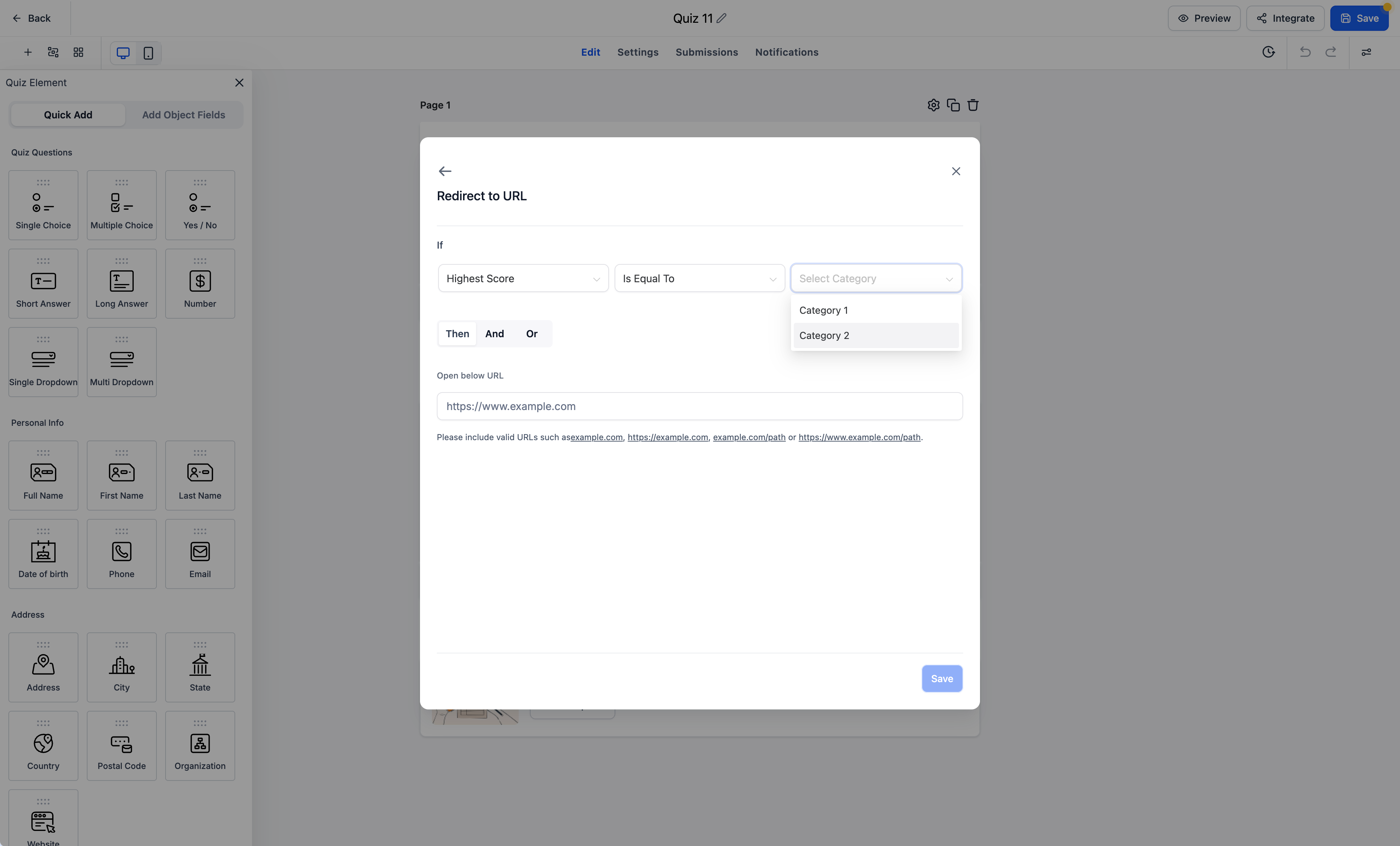
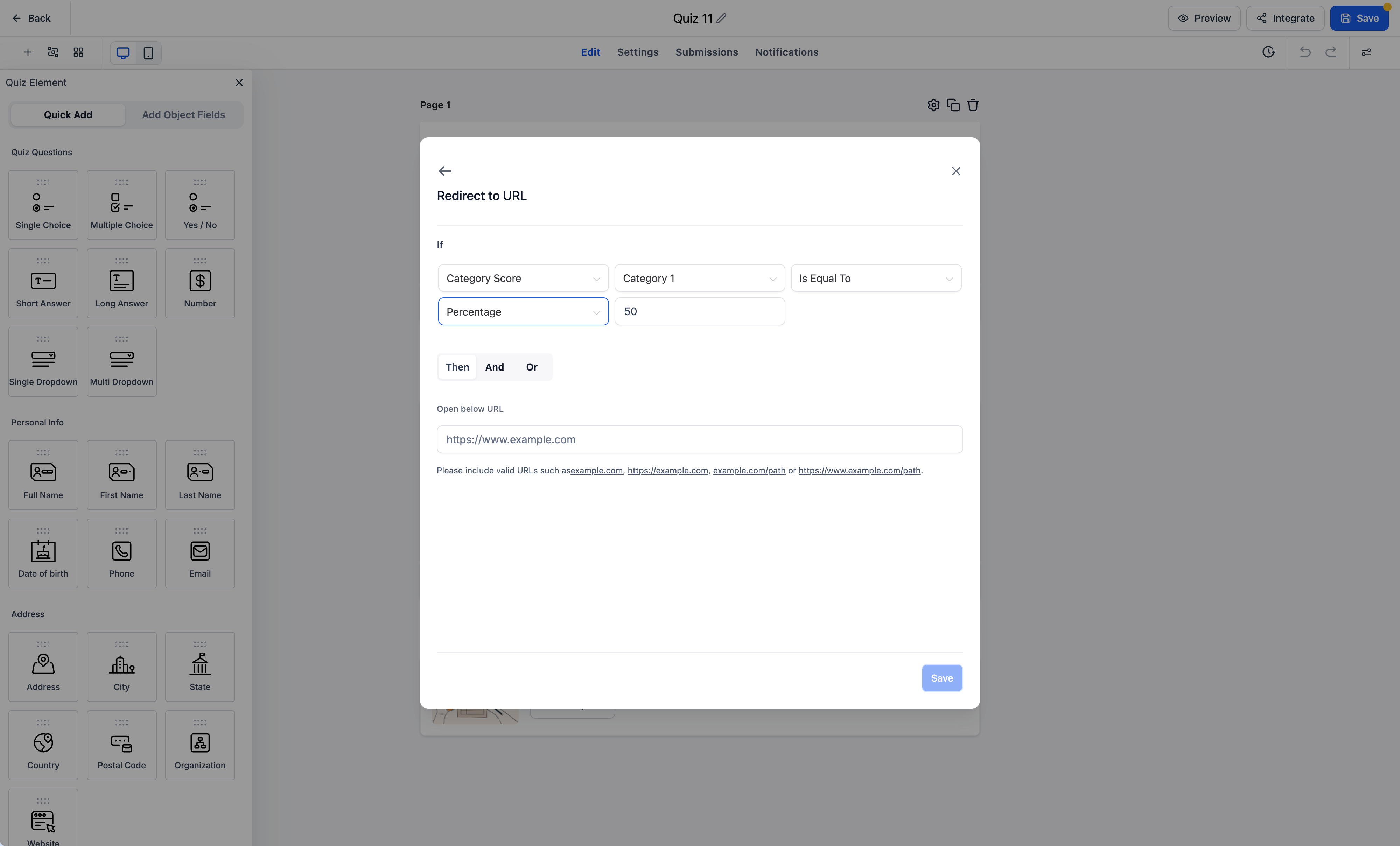
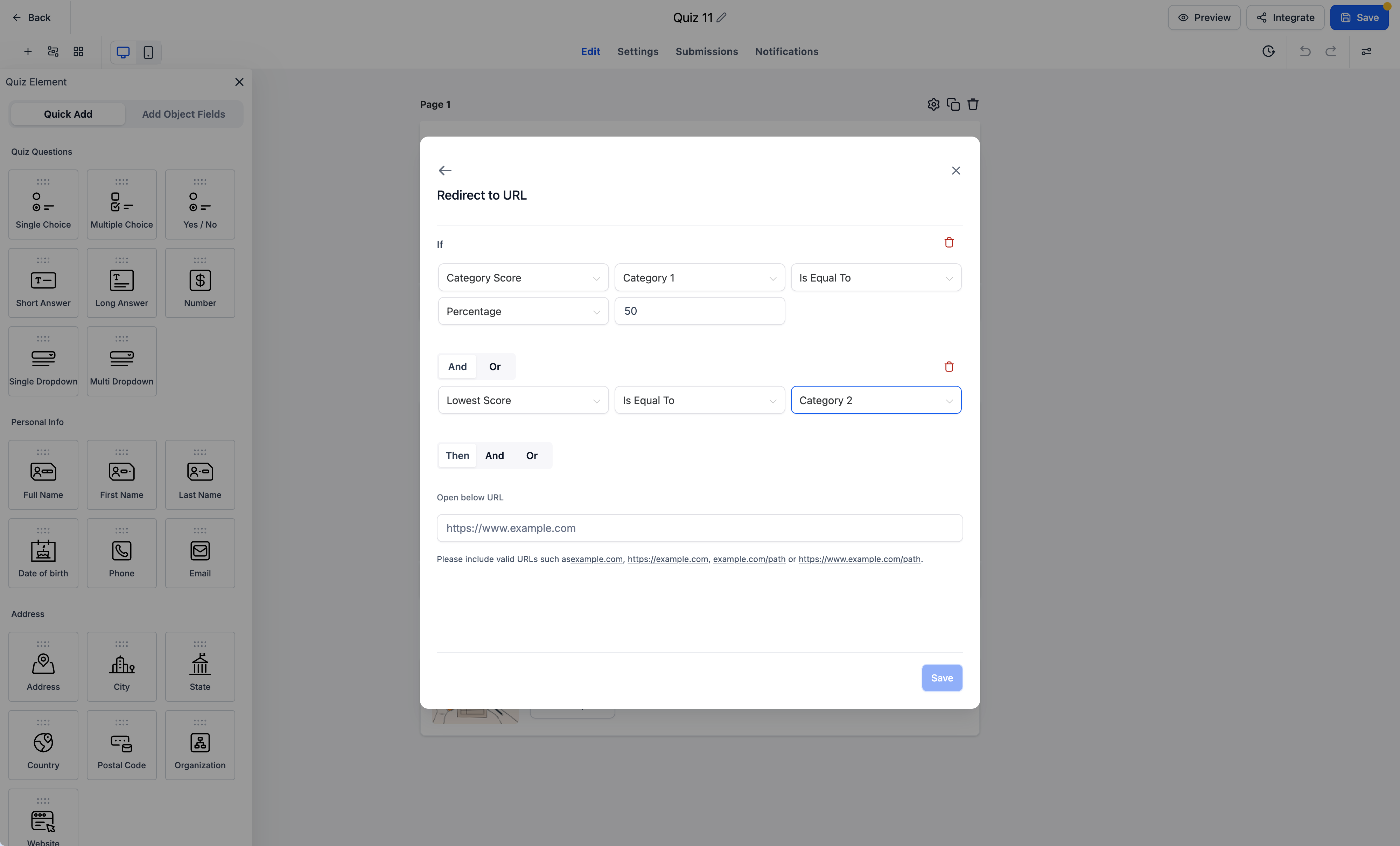
- Set Your Destination URL: Specify the URL respondents should be redirected to when the configured conditions are met.
- Create Personalized Journeys: Configure different redirect rules to guide respondents to relevant destinations based on their Quiz outcomes.
Notes and availability
Availability: Conditional Logic is now supported in Quizzes. Supported Logic Type: Redirect to URL is the first conditional logic type available in Quizzes. Quiz Specific Conditions: Highest Category, Lowest Category, Overall Score, and Category Score are supported as conditional logic fields. Existing Conditions: The Redirect to URL logic type also supports the existing conditional logic capabilities available in Forms & Surveys. Custom Redirects: Respondents can be redirected to custom URLs based on configured conditions instead of landing on the default Quiz Results page.
What is coming next
We're not stopping here! We're planning to bring the remaining three conditional logic types to Quizzes:
- Display a Custom Message: Show personalized messages based on configured conditions.
- Disqualify a Lead: Disqualify respondents based on their Quiz answers or configured conditions.
- Show/Hide Fields: Dynamically control field visibility based on respondent choices.
These additions will further expand the possibilities for building intelligent, personalized Quiz experiences!
Why it matters for Founders
Quizzes are a powerful way to engage audiences, understand their preferences, assess knowledge, and recommend relevant next steps. But until now, users were limited in how they could act on the information collected through their Quizzes. With Conditional Logic and Quiz Score Based Redirects, we're changing that.
Users can now turn Quiz responses and scores into personalized customer journeys, guiding respondents toward the most relevant destination based on their individual results. And with additional conditional logic types on the roadmap, this is just the beginning of making Quizzes more dynamic, flexible, and powerful!
Smarter Quizzes. Personalized Redirects. Better Customer Journeys!
Questions Founders ask
What did HighLevel release in "Introducing Conditional Logic in Quizzes: Personalized Redirects Based on Quiz Scores!"?
Quizzes just got a whole lot smarter!
What should a Founder do with Introducing Conditional Logic in Quizzes: Personalized Redirects Based on Quiz Scores!?
Open one of your existing quizzes, add a Redirect to URL condition using the overall score field, and test the flow to a custom landing page. Founders and agency owners who already run quizzes in HighLevel and want more control over what happens after a quiz.
How do I turn on Introducing Conditional Logic in Quizzes: Personalized Redirects Based on Quiz Scores! in HighLevel?
In HighLevel: Open Your Quiz Builder: Navigate to the Quiz you want to configure. Then Access Conditional Logic: Open the Conditional Logic section within the builder. Then Select Redirect to URL: Choose the newly supported Redirect to URL conditional logic type. Then Configure Your Conditions: Set conditions based on Quiz responses or any of the four Quiz Score fields, Highest Category, Lowest Category, Overall Score, or Category Score. Then Set Your Destination URL: Specify the URL respondents should be redirected to when the configured conditions are met. Then Create Personalized Journeys: Configure different redirect rules to guide respondents to relevant destinations based on their Quiz outcomes.
Why does Introducing Conditional Logic in Quizzes: Personalized Redirects Based on Quiz Scores! matter?
Quizzes are a powerful way to engage audiences, understand their preferences, assess knowledge, and recommend relevant next steps. But until now, users were limited in how they could act on the information collected through their Quizzes. With Conditional Logic and Quiz Score Based Redirects, we're changing that. Users can now turn Quiz responses and scores into personalized customer journeys, guiding respondents tow
How do I get this feature with setup help?
Start a free HighLevel trial through Michael Reimer's link and the CRM Pros team helps with setup in your first 7 days, with an onboarding call, three live calls every week and the affiliate community included.
Get More InformationOpens in a new tab Published November 2, 2026. Screenshots belong to HighLevel.