
01Who this is for
- Marketers who need fast lead generation quizzes can start with a template and focus on branding instead of building from scratch.
- Coaches and educators can use assessment templates to evaluate learners and then customize results for their courses.
- Membership site owners can deploy quiz funnels that segment members and guide them to tailored content.
02Quiz template library, explained
The Quiz Template Library is a collection of pre designed quiz layouts stored inside the HighLevel platform. Each template includes a set of questions, answer choices, result logic and styling that matches a specific intent, such as lead capture or scoring.
When you select a template, the system loads it into the standard quiz editor. From there you can modify any element, questions, answers, outcomes, design details, and conditional logic, to suit your brand and goals. The templates are responsive, so they display correctly on mobile devices without extra effort.
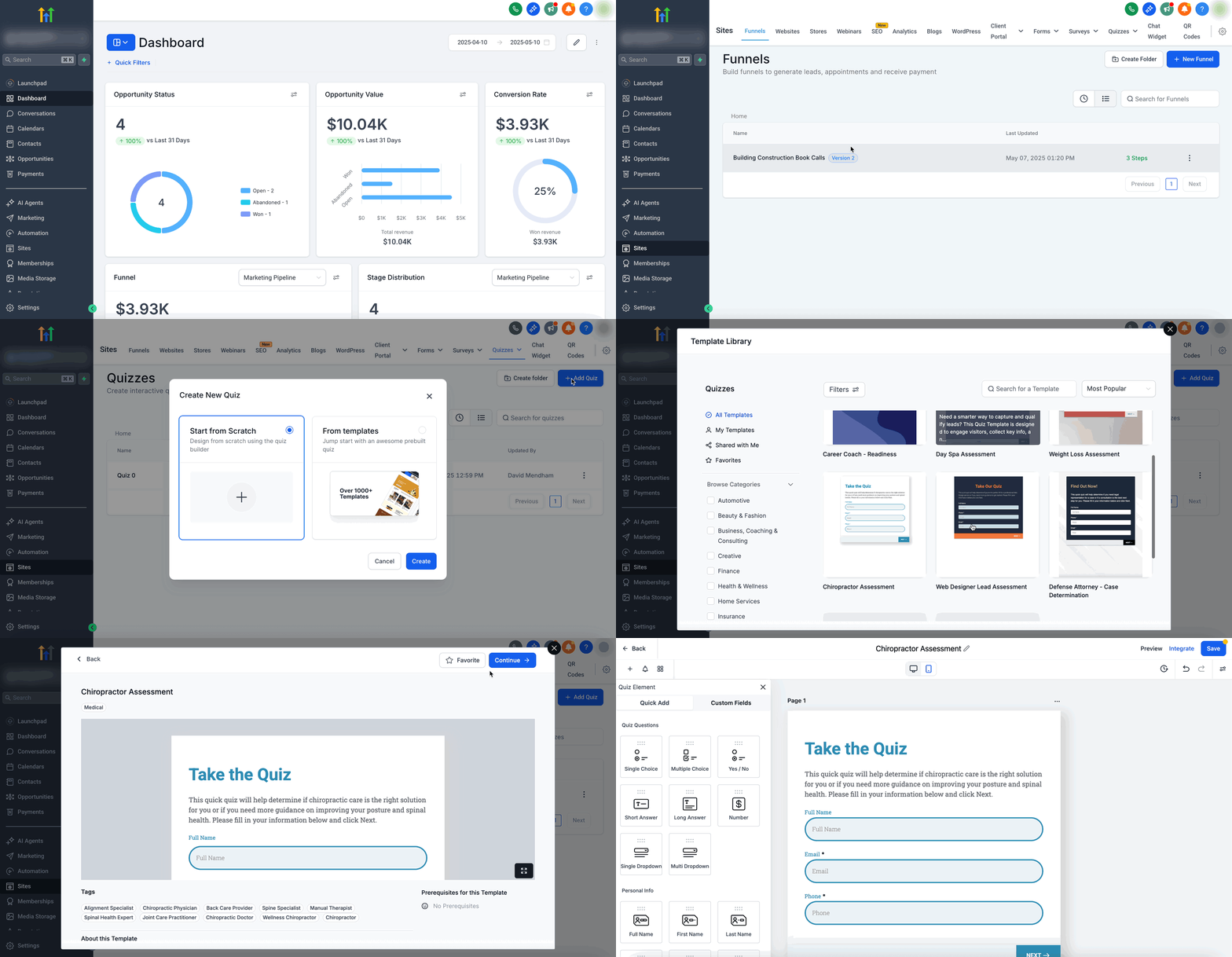
You find the library under Sites > Quizzes, then click New and choose the option to start with the Template Library. After previewing a template, clicking Continue opens the editor with the chosen structure already populated.
03How businesses use the quiz template library
- Digital marketing agency. An agency selects a lead generation template, replaces the placeholder questions with client specific offers, and links the quiz to a funnel. The editor lets them adjust branding and set up email capture fields.
- Online tutoring service. A tutoring business picks an assessment template, customizes the questions to match their curriculum, and configures result pages that direct students to appropriate study modules.
- Fitness studio. A studio chooses a personality style quiz template, edits the outcomes to recommend class types, and personalizes the design to fit its brand before publishing the quiz on its website.
04How to set up and use the quiz template library in HighLevel
Create a quiz using the template library
- From the HighLevel dashboard go to Sites > Quizzes.
- Click the New button at the top right and select Start with Template Library from the dropdown.
- Scroll through the displayed templates, read the titles and short descriptions, and click a template to see a preview.
- Press Continue to open the quiz editor with the selected template loaded and begin customizing.
05What it looks like in HighLevel
06Things to know before you rely on it
- User created templates cannot be saved in the library; only HighLevel provided templates are available.
- Using a template always creates a new quiz; it does not modify any existing quizzes.
07How it connects to the rest of HighLevel
- Guide to building quizzes that capture leads Quiz Builder guide
- Set up scoring, categories and result pages for quizzes Quiz scoring guide
- Create a workflow that triggers when a quiz is submitted Quiz submitted trigger
Michael's take

The quiz template library is a quick way to launch effective quizzes without building them from scratch.
Skip it if you already have a fully custom quiz workflow and don’t need premade structures.