
01Who this is for
- Marketing agencies that build client funnels and need reliable script execution.
- SaaS Founders who embed tracking or UI tweaks in funnel pages.
- Ecommerce owners customizing checkout pages with JavaScript.
02Hydration events, explained
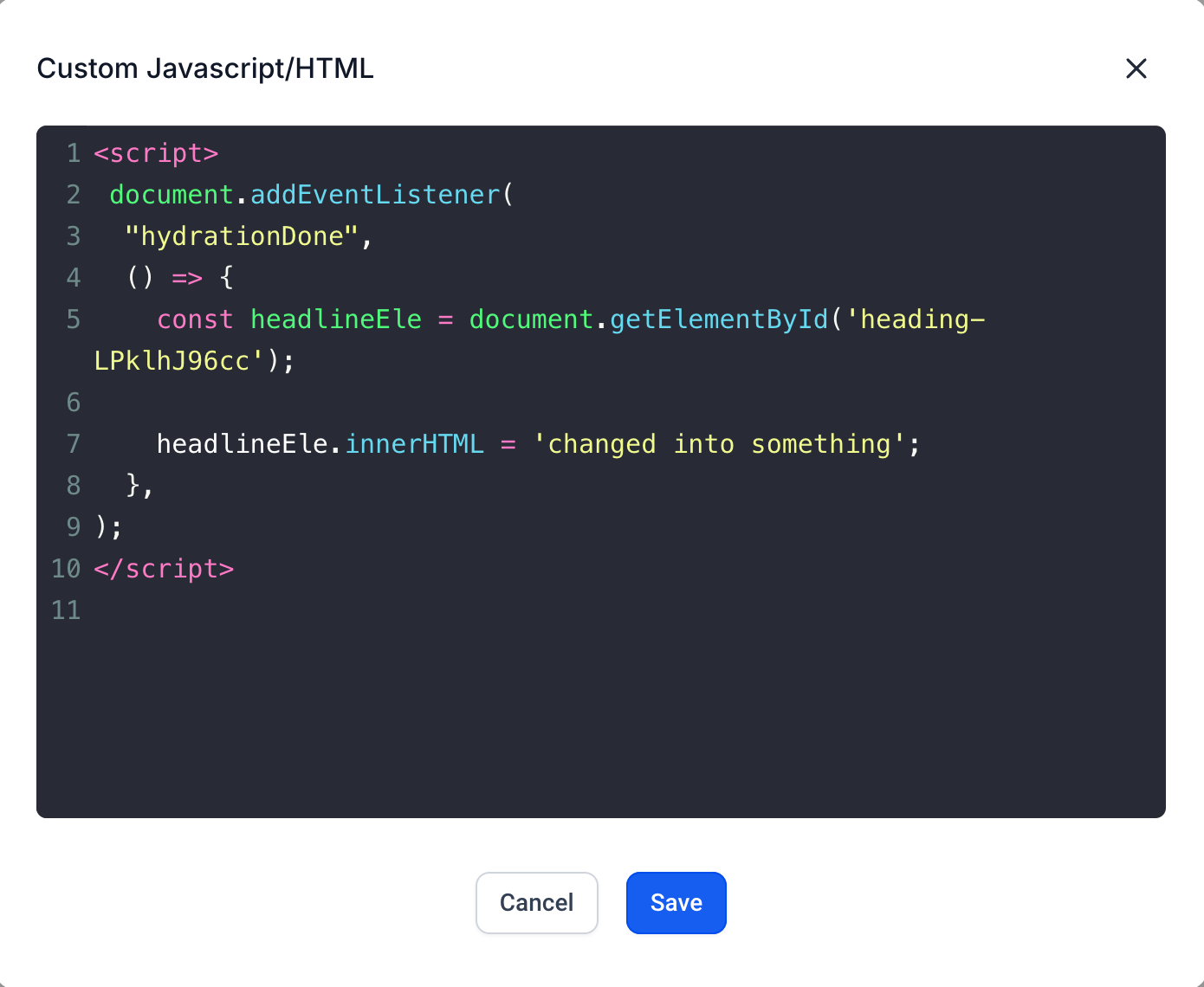
The platform now dispatches a custom event named hydrationDone after the preview has fully hydrated. This event signals that the DOM produced by the preview is ready for manipulation. By listening for hydrationDone, you can place any JavaScript that depends on the final preview layout without risking premature execution.
The event is available only within the funnel or website preview environment. It is emitted once per preview load, immediately after the platform completes its internal hydration process. Scripts added through a Code element can register a listener and run safely once the event arrives.
03How businesses use hydration event in custom code in funnels
- Marketing agency. The agency adds a Code element to a client’s funnel page, writes a listener for hydrationDone, and places custom DOM manipulation code inside the callback. This ensures the client’s branding script runs after the page is fully rendered.
- SaaS Founder. The Founder inserts a tracking snippet inside a Code element, wraps it in a hydrationDone listener, and publishes the funnel. The snippet fires only after hydration, guaranteeing accurate data collection.
- Ecommerce store owner. The store owner needs to adjust checkout button styles based on loaded content. By listening for hydrationDone in a Code element, the style changes execute after the preview has completed, avoiding visual glitches.
04How to set up and use hydration event in custom code in funnels in HighLevel
Add event listener for hydrationDone
- Open the funnel builder where the page will receive custom code.
- Drag a Code element from the left toolbar onto the desired section of the page.
- Click the Code element to open its editor window.
- Enter the JavaScript that registers a listener for the "hydrationDone" event and place custom code inside the callback.
- Save the changes and preview the funnel to confirm the custom script runs after hydration.
05What it looks like in HighLevel
06Settings that matter
- Optimise javascript. When enabled, this setting delays the hydrationDone event. Disabling it ensures the event fires promptly if critical JavaScript must run on page load.
07Things to know before you rely on it
- The hydrationDone event is only emitted in the preview mode of funnels and websites.
- If Optimise javascript remains enabled, the event may be delayed until a user interacts with the page.
- The feature is currently in preview and may change before general release.
08How it connects to the rest of HighLevel
- Add tracking code to funnels and websites in HighLevel tracking code guide
- Set a page load popup in HighLevel popup guide
- Install the HighLevel chat widget and configure its workflow chat widget guide
Michael's take

Wondering if you really need to wait for the preview to finish loading before running your custom script? The hydrationDone event acts as a pause point, indicating the preview has completed its hydration, which can help avoid race conditions or missing elements.
If I were setting up a new widget on a funnel, I’d drop a code block, listen for hydrationDone, and then inject the widget. That way I can work with the DOM after it’s ready and avoid the frustration of code that sometimes works and sometimes doesn’t.