
01Who this is for
- Founders who are migrating from ClickFunnels to HighLevel and need to keep existing funnel pages intact.
- Marketing teams that manage multiple client funnels and want to avoid rebuilding each page manually.
- Agency owners who handle both ClickFunnels and HighLevel accounts and need a quick way to transfer pages.
02ClickFunnels funnel importer, explained
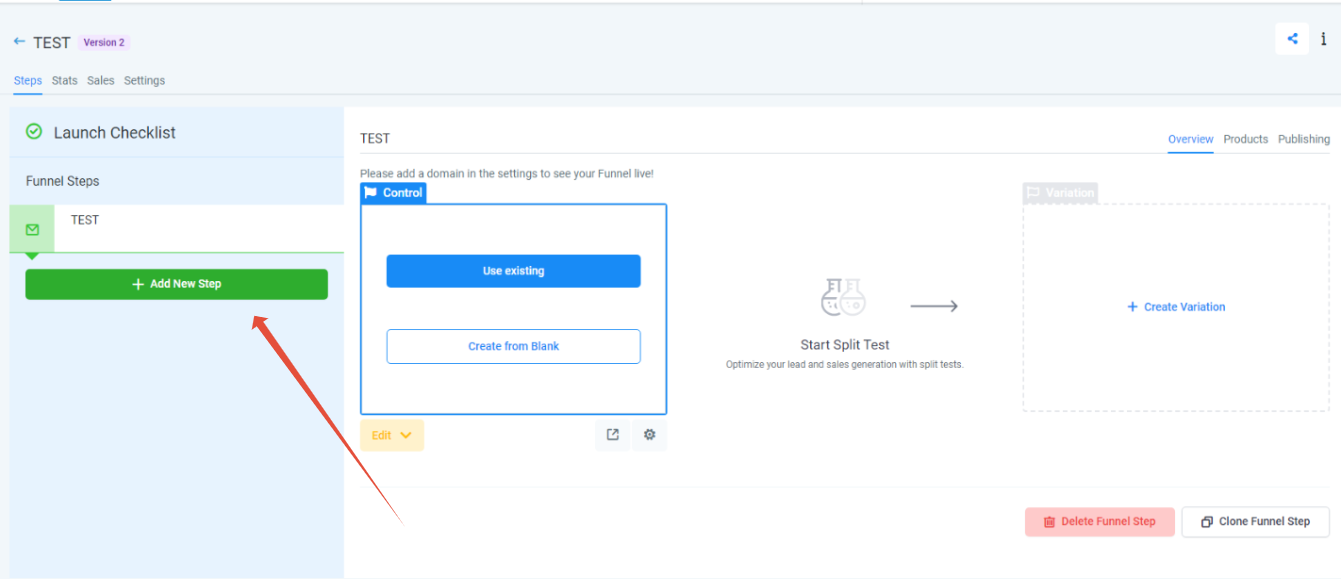
The importer is a tool inside HighLevel that pulls a live ClickFunnels page and recreates it as a step in a HighLevel funnel. You open the funnel builder, start a new funnel, add a new step, paste the publishable ClickFunnels link, confirm the import, and HighLevel builds the page with its own styling and elements. The process only works inside the funnel area; other site sections are not affected.
Standard funnel pages, opt ins, sales, thank you, etc., are transferred automatically. ClickFunnels Membership Areas are excluded and must be rebuilt manually with HighLevel’s Memberships feature found in the left navigation. The importer accepts URLs from both ClickFunnels 1.0 and 2.0 versions.
03How businesses use clickFunnels funnel importer
- Digital marketing agency. The agency opens a new funnel in HighLevel, clicks “Add new step,” and pastes the live ClickFunnels URL. After confirming, the page appears as a step, allowing the agency to continue campaign setup without recreating the layout.
- Ecommerce store owner. The store owner creates a HighLevel funnel for a product launch, imports the existing ClickFunnels checkout page by providing its live link, and then adds upsell steps directly in HighLevel.
- Coaching business. The coach builds a lead capture funnel in HighLevel, imports the ClickFunnels opt in page using the live URL, and then attaches their email automation workflow to the imported step.
04The numbers and rules that matter
- Works for ClickFunnels 1.0 and ClickFunnels 2.0 funnels.
05Before you start
- Have a publishable (live) ClickFunnels page URL, not a shareable link.
- Plan to import one funnel step at a time for a smooth experience.
06How to set up and use clickFunnels funnel importer in HighLevel
Import a ClickFunnels page into HighLevel funnel builder
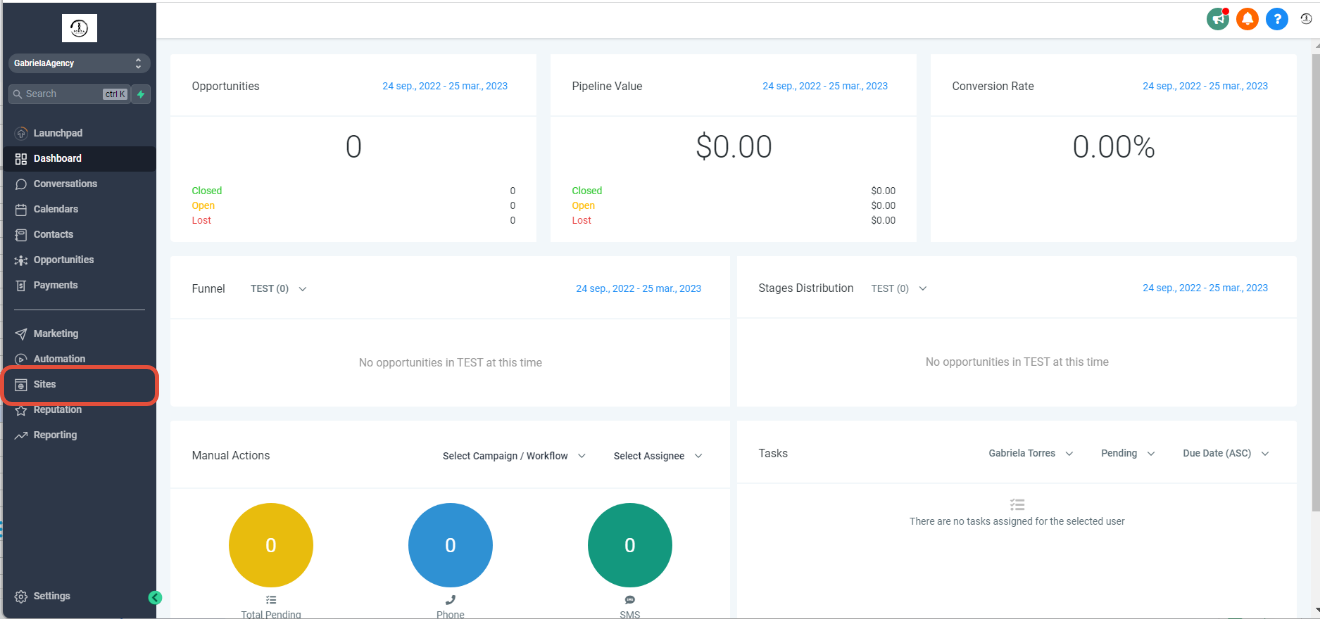
- Open HighLevel and go to the template list view.
- Select Sites from the main menu.
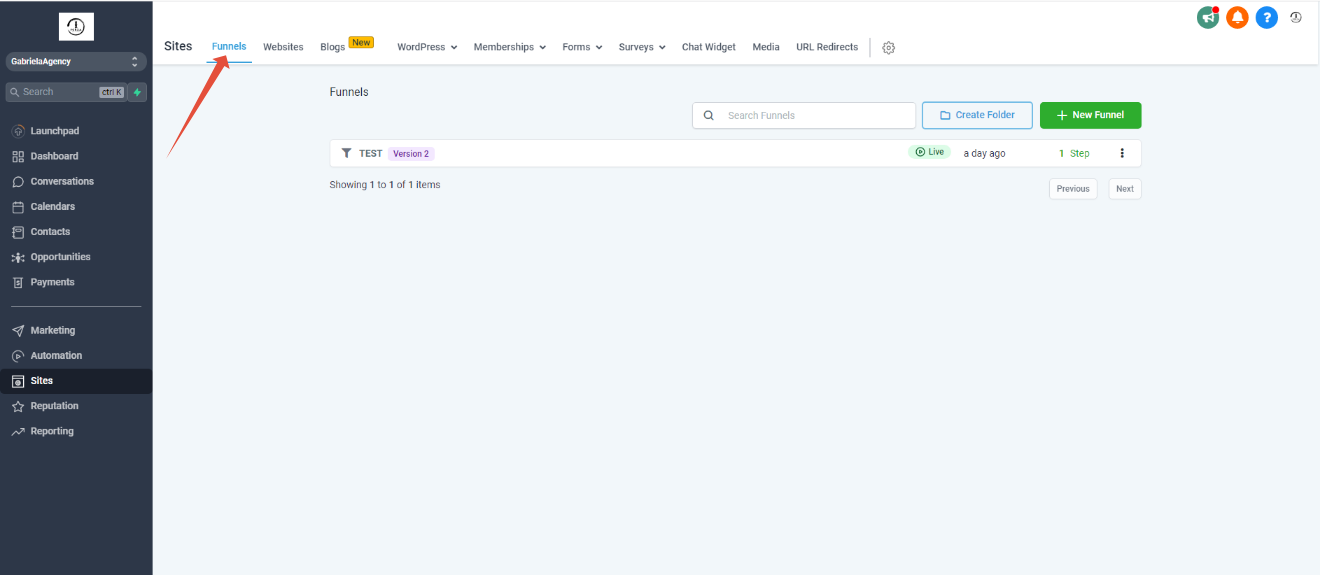
- Choose Funnels within the Sites section.
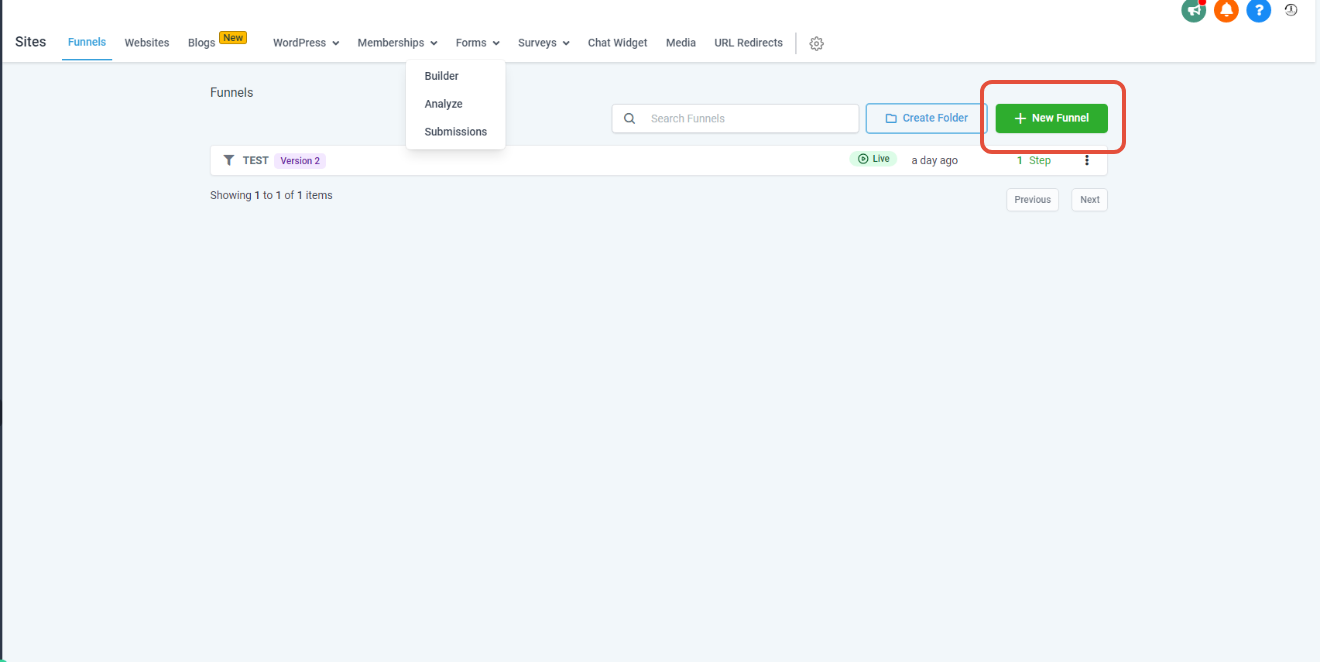
- Click the New Funnel button.
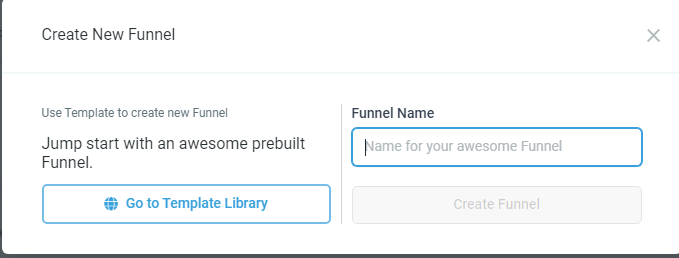
- Enter a name for the funnel and press Create funnel.
- Click Add new step to start the import.
- Provide the page name, set the path, paste the ClickFunnels live URL (not the shareable link), and tick the confirm checkbox.
- Press Create funnel step to finish the import.
07What it looks like in HighLevel

08Settings that matter
- Confirm checkbox. Ensures the pasted ClickFunnels URL is validated before HighLevel creates the funnel step.
09Things to know before you rely on it
- Only standard funnel pages (opt ins, sales, thank you, etc.) import; Membership Areas do not.
- The importer works with both ClickFunnels 1.0 and 2.0 funnels.
- A live (publishable) ClickFunnels link is required; shareable links are ignored.
- Import one funnel step at a time for best results.
10How it connects to the rest of HighLevel
- Add tracking code to funnels and websites in HighLevel Add tracking code
- How to add a root or subdomain with HighLevel Domain Connect Domain Connect
- HighLevel pricing and plans Pricing
Michael's take

Moving a ClickFunnels funnel into HighLevel is a small convenience that can become a real shift for anyone with a library of pages. The importer lets you lift standard opt in, sales and thank you pages directly into HighLevel, so you don’t have to rebuild each one from scratch.
A coaching business that runs webinars with a multistep signup flow fits perfectly. Bring each step over, then use HighLevel’s Memberships area to reconstruct the members only sections that the importer skips.