
01Who this is for
- Agency owners who oversee many client locations, because they must keep each product’s domain separate across the agency.
- Marketing teams that run Funnels, Websites and Client Portals, to ensure each live piece stays on its intended address.
- Web developers using WordPress within the platform, to avoid accidental domain overlap that could break a site.
02Domain connection conflicts, explained
When you start to link a domain to a product, HighLevel first runs a conflict scan. The scan looks for any other supported product that already uses that domain across every location in the agency. If a match is found, the system refuses the new link.
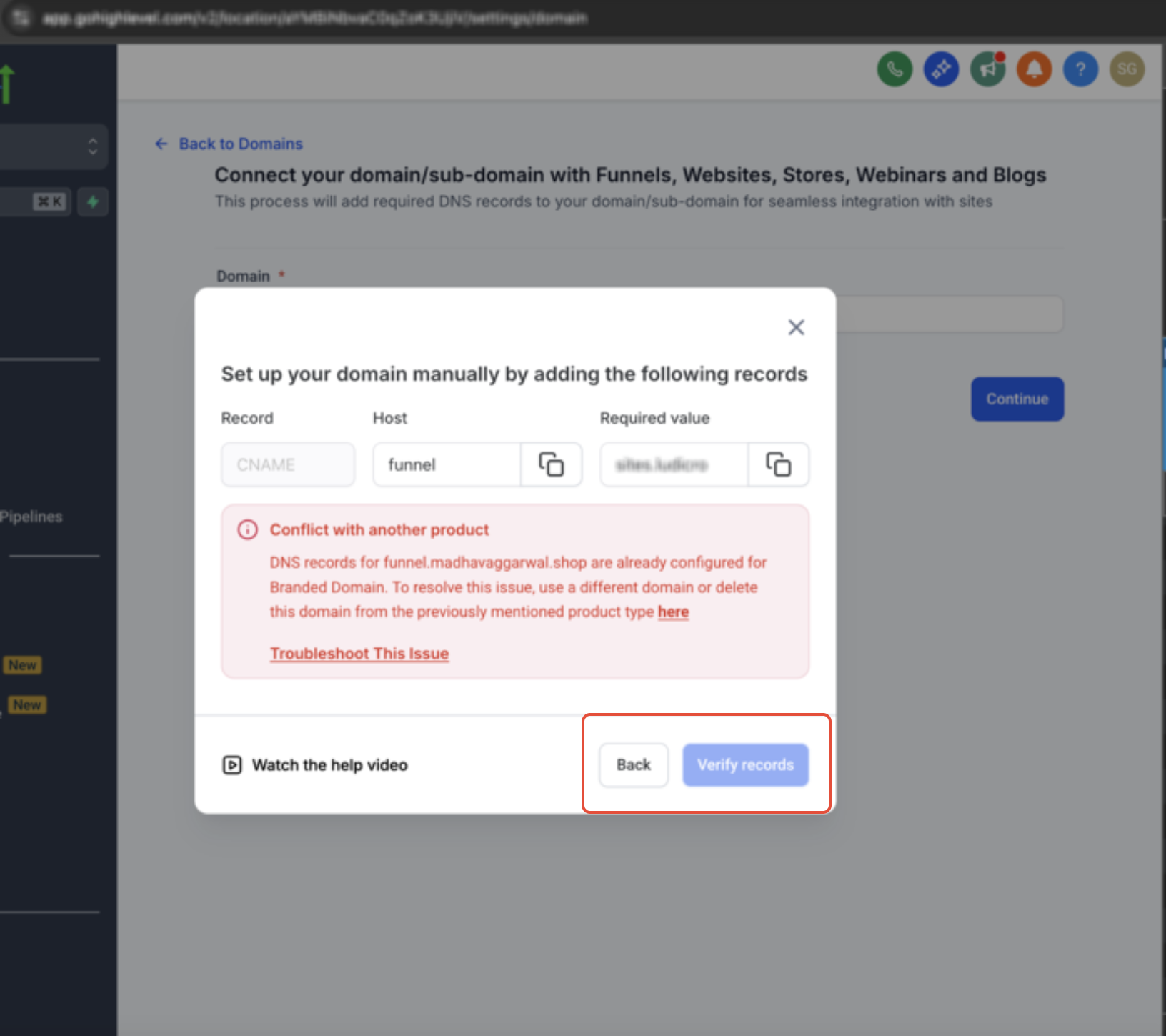
The refusal action includes three parts: it tells you which product is currently using the domain, gives troubleshooting tips, and, when the conflicting product lives in the same location, provides a clickable link straight to its domain settings. If the conflict lives in a different location, the link is omitted, but the error still names the problem.
HighLevel also reviews DNS records during this step. It blocks the connection if A, AAAA or CAA records clash with what the platform needs, and the error explains which record type must be changed at the DNS host.
03How businesses use domain connection conflicts
- Marketing agency. When adding a new Funnel, the agency attempts to assign its domain. HighLevel checks for existing Funnels or Websites using that address and stops the save if a conflict exists, then points the user to the current product’s settings for review.
- Ecommerce store. Before connecting a Store domain, the platform scans for other Store, Blog or Client Portal links that share the same URL. If a clash is found, the store owner receives an error describing the DNS record that must be corrected.
- Online course provider. When linking a Webinar domain, the system verifies that no other Webinar, Website or WordPress site already occupies the address. If a same location conflict is detected, a direct link appears, letting the provider open the existing domain settings and decide whether to disconnect it.
04The numbers and rules that matter
- Supported product types: Funnel, Website, Store, Blog, Webinar, WordPress, Client Portal, Branded Domain.
05How to set up and use domain connection conflicts in HighLevel
Detect and prevent domain connection conflicts
- Initiate a domain connection for a new product.
- HighLevel runs a conflict scan before any DNS validation.
- If another supported product already uses the domain, the platform blocks the new link.
- The system identifies the product that currently holds the domain.
- An error message is shown with troubleshooting advice.
- When the conflicting product is in the same location, a direct navigation link to its settings is added.
- If the conflict exists in a different location, no link is provided but the error still mentions the issue.
- HighLevel also checks DNS records for A, AAAA or CAA conflicts.
- When a DNS record conflict is found, the connection is blocked and the error specifies the record type needing change.
- The user must adjust the DNS record at the provider before retrying.
- All conflict checks run across every location within the agency.
- Existing domain connections remain unchanged unless the user edits them manually.
- Email related products are not part of the conflict detection process.
06What it looks like in HighLevel
07Things to know before you rely on it
- Conflict detection applies only to Funnel, Website, Store, Blog, Webinar, WordPress, Client Portal and Branded Domain product types.
- Email products are excluded from product type conflict checks.
08How it connects to the rest of HighLevel
- Explore all Settings options in HighLevel. All Settings features
- Read about API domain links that may affect branding. Branding system generated links
- See pricing and plan details for access to domain management features. HighLevel pricing and plans
Michael's take

Most people assume they can point the same domain at a new funnel without checking what else is using it. The system will stop you, but the error can be confusing if you don’t know where the conflict lives.
I would open the error, follow the provided link to the existing product, and either disconnect it or pick a different domain. Making sure DNS records are clean before you start can help avoid the block.