
01Who this is for
- Agency Founders who need to adjust their subscription as the business grows or contracts.
- Finance managers who must track recurring plan costs, prorated upgrades and Wallet usage.
- Support leads who handle billing disputes, payment failures or cancellation requests.
02Agency billing, explained
The billing area is located in Agency Settings under the Billing tab. From there you can upgrade or downgrade the recurring plan, switch between monthly and yearly billing when upgrading, cancel the subscription, request a one time financial assistance discount, and view payment history. All actions appear in the Payments section, where invoices and any failed payment retries are listed. Wallet credits are billed separately and cannot be applied to the recurring subscription fee. Add ons, Marketplace apps and phone numbers remain active after a downgrade unless you cancel them manually.
03How businesses use agency billing
- Digital marketing agency. The agency logs into Agency Settings, selects Billing and upgrades to a higher tier when adding new client locations. The platform charges a prorated amount and immediately reflects the new feature limits for all subaccounts.
- Consulting firm. When business slows, the firm downgrades to a lower plan from the Billing tab, reviews the adjusted price, effective date and any credit, and confirms the change. Existing add ons stay active, allowing the firm to keep its current tools while reducing the base fee.
- Startup accelerator. If cash flow tightens, the accelerator requests financial assistance from the Billing page, provides a detailed explanation, acknowledges the terms and confirms the discounted month. The discount applies only once.
04The numbers and rules that matter
- Data is deleted after 90 days of cancellation.
- A $27 per month Pause Plan is available as an alternative to cancellation (per HighLevel's help center, checked November 2026).
- Financial assistance provides a one time discount of 10% for one month.
- ACH bank transfers are accepted for Wallet recharge payments of $1000 or more and take 3 to 10 business days (per HighLevel's help center, checked November 2026).
- After a failed subscription payment, access continues for 21 days.
- Payment retries continue for up to 30 days from the failed payment date.
05Before you start
- You must have an agency account that was purchased directly from HighLevel, not through another agency.
- You need access to Agency Settings > Billing as an agency admin.
06How to set up and use agency billing in HighLevel
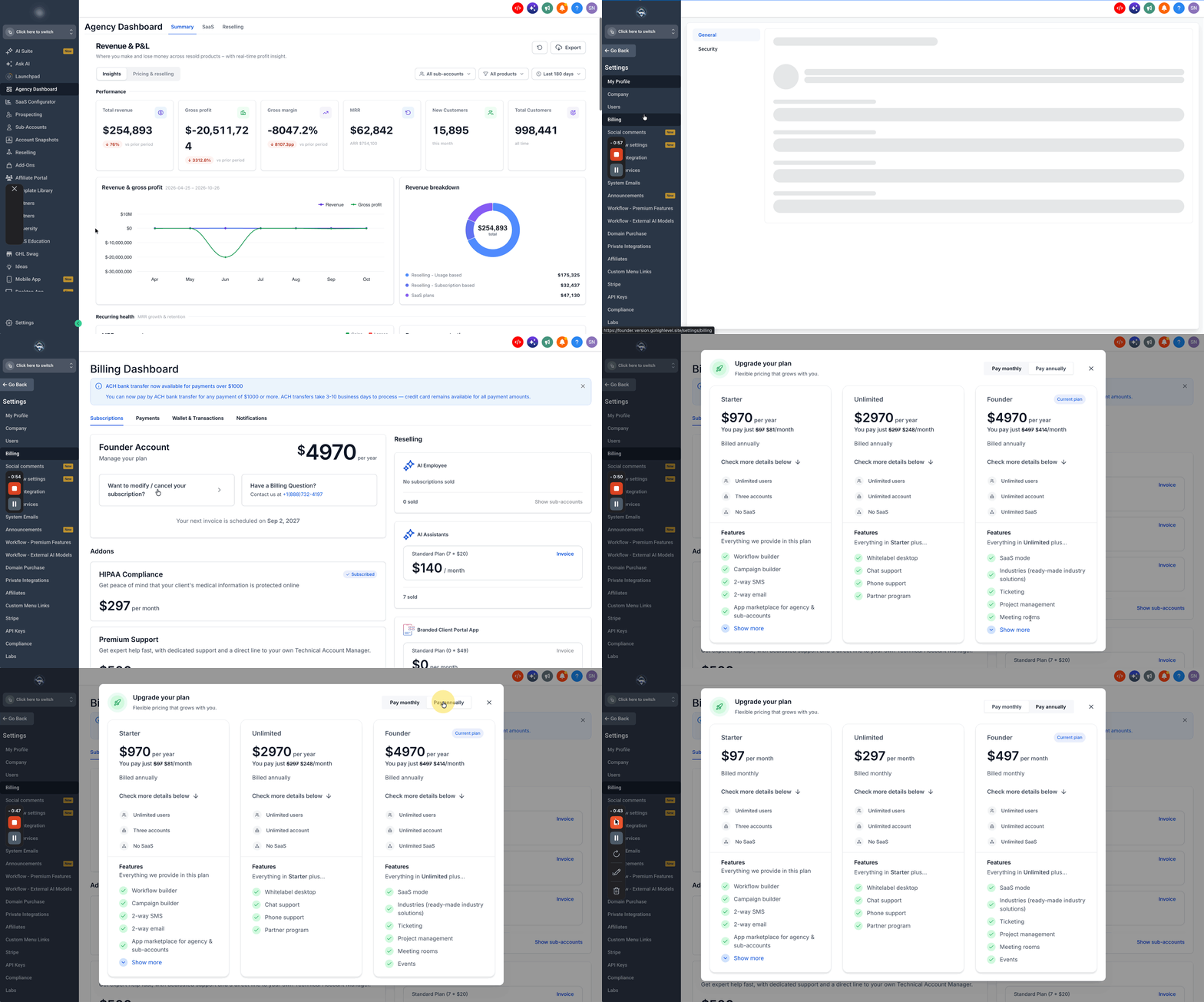
Upgrade your HighLevel agency plan
- Open Agency Settings.
- Select the Billing tab.
- Click the Want to Modify/Cancel Your Subscription? option.
- Press the Upgrade button.
- Toggle between Monthly and Yearly billing options and pick the desired plan.
- Click the Upgrade Now button for the selected plan.
- Click Pay (amount) & Subscribe to complete the payment (a prorated charge is applied immediately).
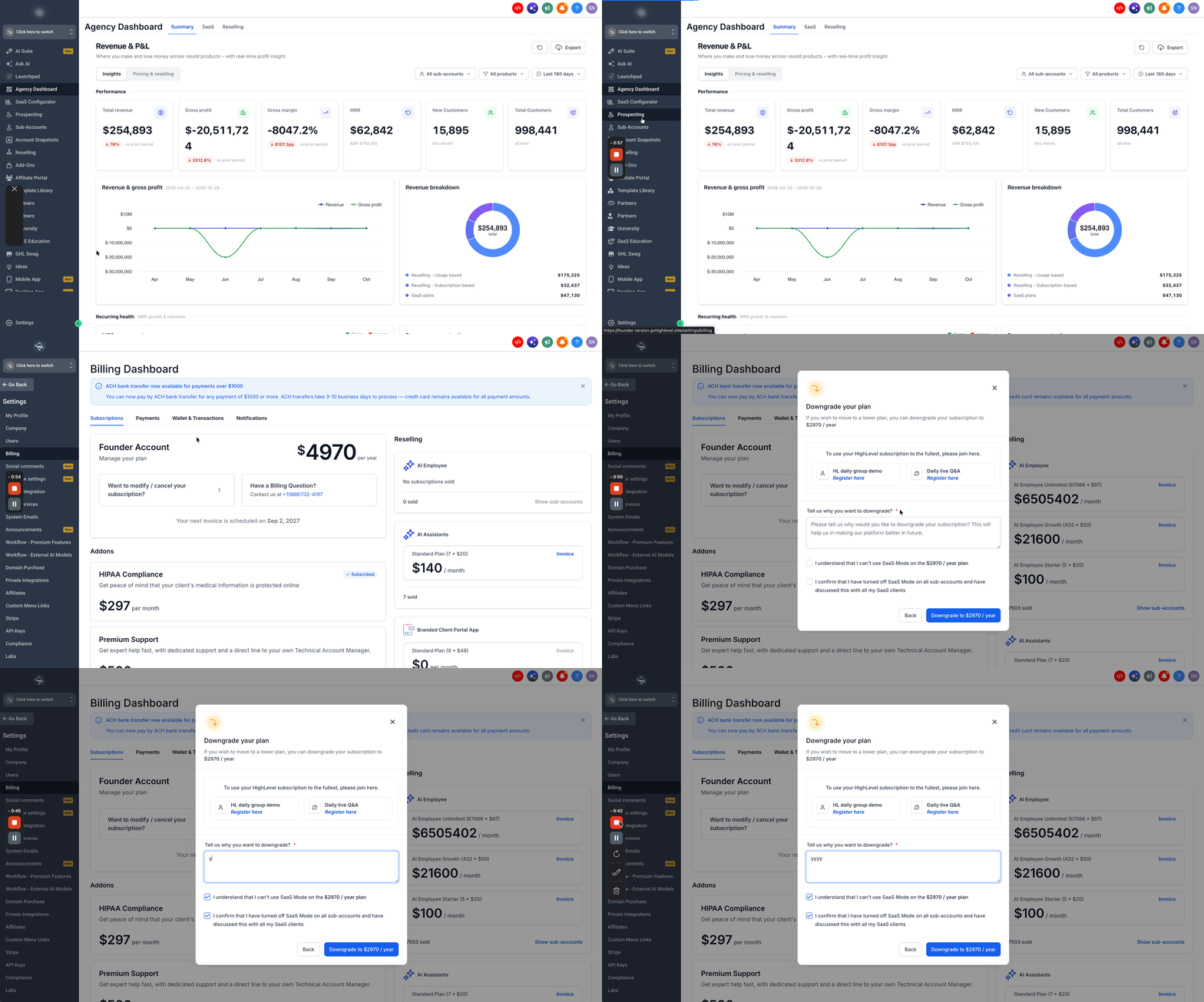
Downgrade your HighLevel agency plan
- Navigate to Agency Settings > Billing.
- Click Want to Modify/Cancel Your Subscription?.
- Select an available lower tier plan.
- Review the new price, effective date and any prorated adjustment.
- Confirm the downgrade.
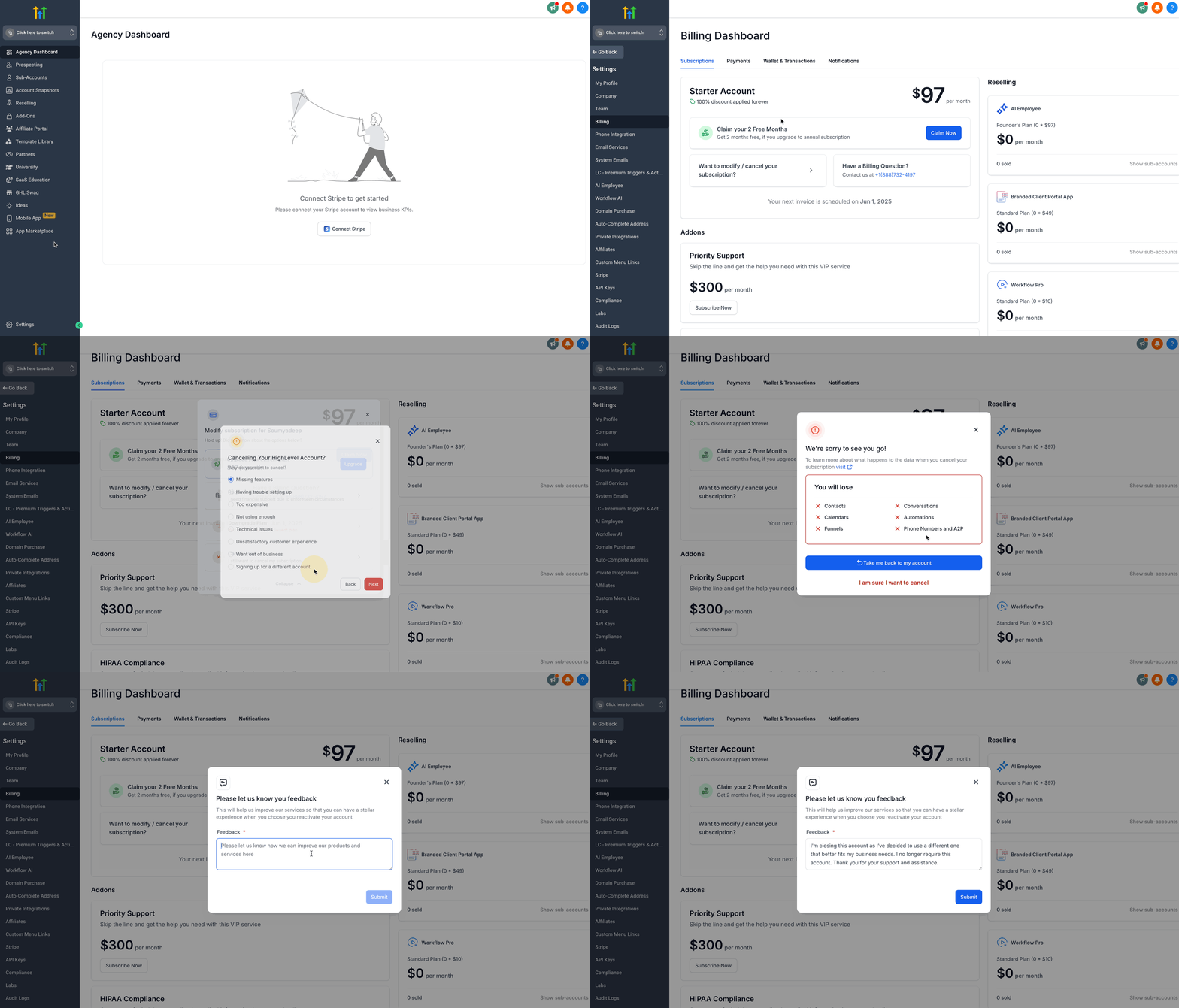
Cancel your HighLevel subscription
- Go to Agency Settings and open Billing.
- Select the Want to modify/cancel your subscription? link.
- Click Show More in the pop up.
- Choose Cancel Plan.
- Select a Reason for Cancellation and click Next.
- Read the data loss warning.
- Click I am sure I want to cancel.
- Enter feedback of at least 30 words.
- Click Submit.
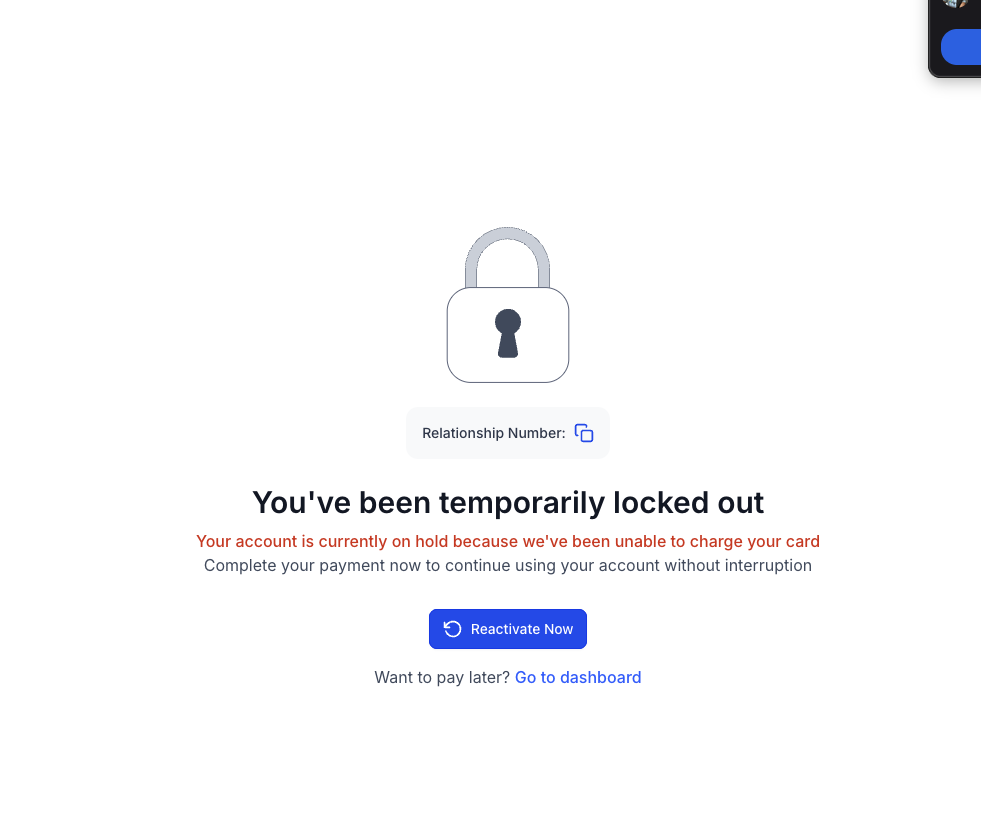
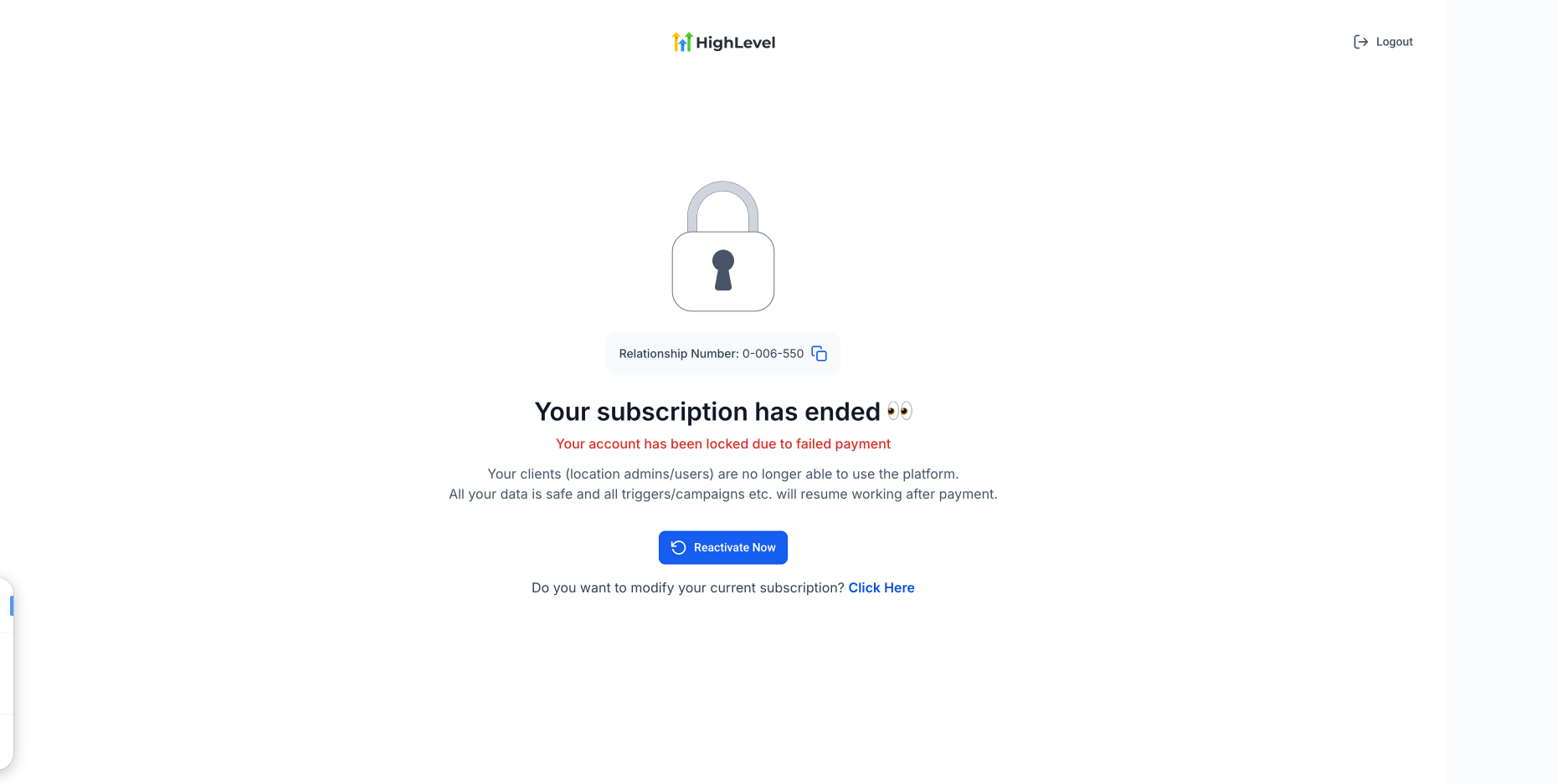
Reactivate a HighLevel agency account
- Click Reactivate Account to restore access right away.
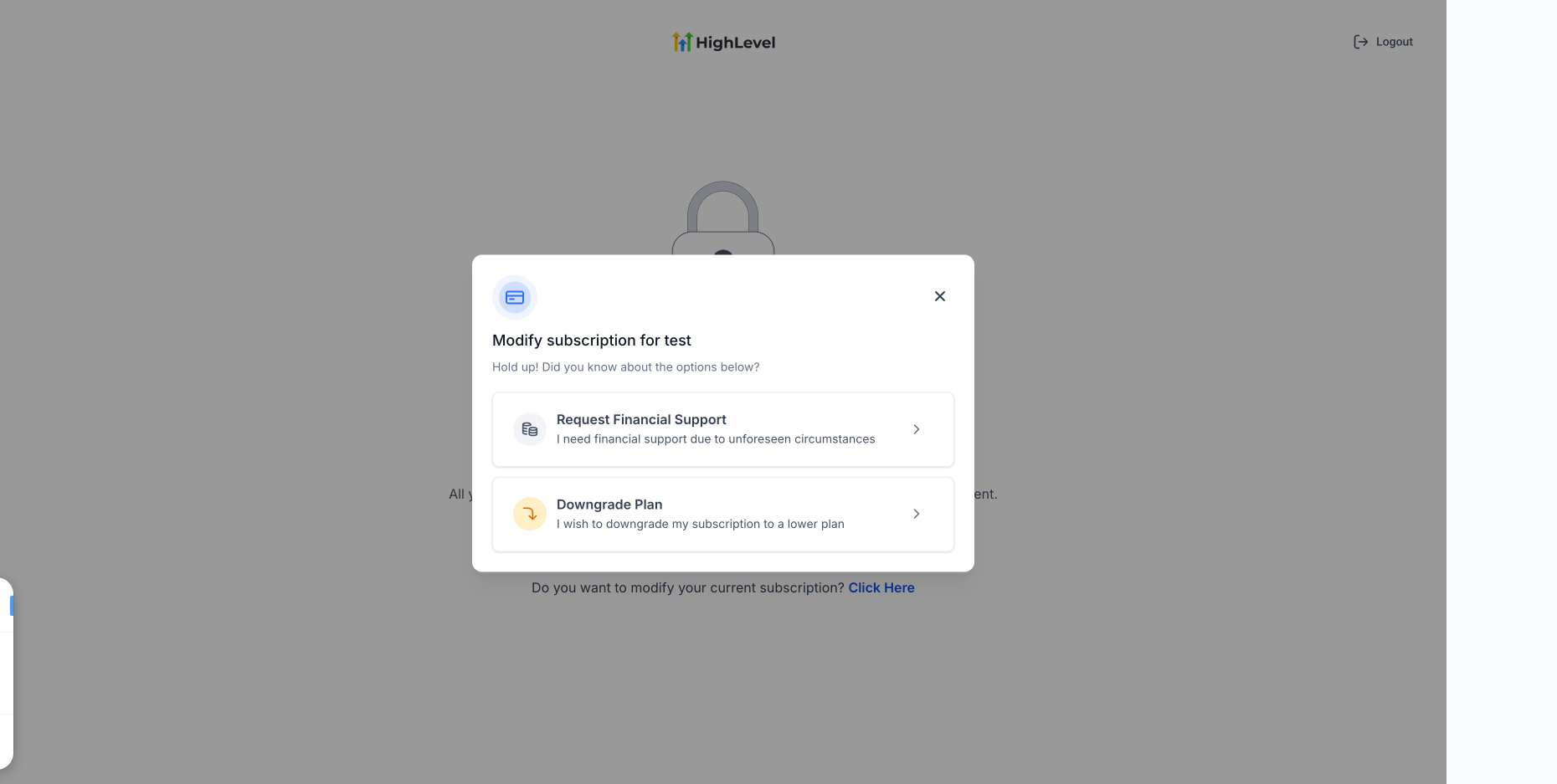
- If needed, select the link to modify your current subscription.
- Add a new payment method when prompted.
- If eligible, you may choose to downgrade while reactivating.
- On the reactivation screen, click the link to modify the subscription.
- Select Downgrade Plan in the modification window.
- Review the lower tier option offered.
- Complete required downgrade details and acknowledgements.
- Confirm the downgrade to finish reactivation on the lower tier plan.
Request financial assistance for your agency
- Open Settings and go to Billing.
- Click the Want to Modify/Cancel Your Subscription? button.
- Choose the Request Financial Support option.
- Provide a detailed explanation of the financial need.
- Check all acknowledgement boxes and click Proceed.
- Verify the next invoice details and click Confirm and Apply.
View past invoices
- Enter Settings and select Billing.
- Open the Payments tab.
- Click Invoices under Payment History.
07What it looks like in HighLevel
08Settings that matter
- Billing tab. Shows subscription details, payment methods and options to modify or cancel the plan.
- Want to Modify/Cancel Your Subscription?. Opens the menu where you can upgrade, downgrade, cancel, reactivate or request financial assistance.
- Upgrade button. Starts the process to select a higher tier plan.
- Downgrade Plan. Allows selection of a lower tier plan during reactivation or modification.
- Cancel Plan. Finalizes the termination of the agency subscription.
- Request Financial Support. Triggers the one time discount request workflow.
09Things to know before you rely on it
- Agency accounts cannot be paused; cancellation is required to stop billing.
- Financial assistance provides a single month at 10 % of the plan cost and cannot be repeated.
- Downgrading does not automatically cancel Marketplace apps, phone numbers or other paid services.
- Switching a yearly plan back to monthly billing must be handled by HighLevel Support, not via the platform.
- Failed subscription payments keep the account accessible for 21 days; after that period, access is locked.
10If something goes wrong
- Payment shows “Processing payment”. Do not submit another payment attempt. Wait and verify the status before trying again.
- Payment failed. Check card number, expiration date, CVV and billing address. Ensure the bank is not blocking the charge. Go to Agency Settings > Billing > Payments, locate the failed invoice and click Retry. Complete any 3D Secure, OTP or bank authentication prompts.
- Payment succeeded but account did not reactivate. Email billing@gohighlevel.com or call 1 to 888 to 732 to 4197 (Option 2). Include agency name, login email, relationship number if available, and relevant invoice details.
- Account access after a failed payment. The account remains accessible for 21 days after a failed subscription payment. If the issue is not resolved within that window, access is locked and payment retries continue for up to 30 days.
11How it connects to the rest of HighLevel
- View agency tax ID options tax ID guide
- Check pricing for agency plans pricing
- Learn about the Founder Plan and subaccount controls Founder Plan
Michael's take

Agency billing gives a clear view of recurring plans, add on fees and wallet activity.
Downgrading a plan does not automatically cancel add ons; they must be handled separately.