
01Who this is for
- Agency owners, need to keep subaccount WhatsApp setups running without billing interruptions.
- Agency administrators, must ensure the agency’s payment method is valid to avoid integration blocks.
02Payment failed messages, explained
The feature shows a “Payment Failed” message when a subaccount attempts to connect WhatsApp but the agency’s payment method cannot charge the subscription fee. The error stops the integration workflow until the agency resolves the billing issue.
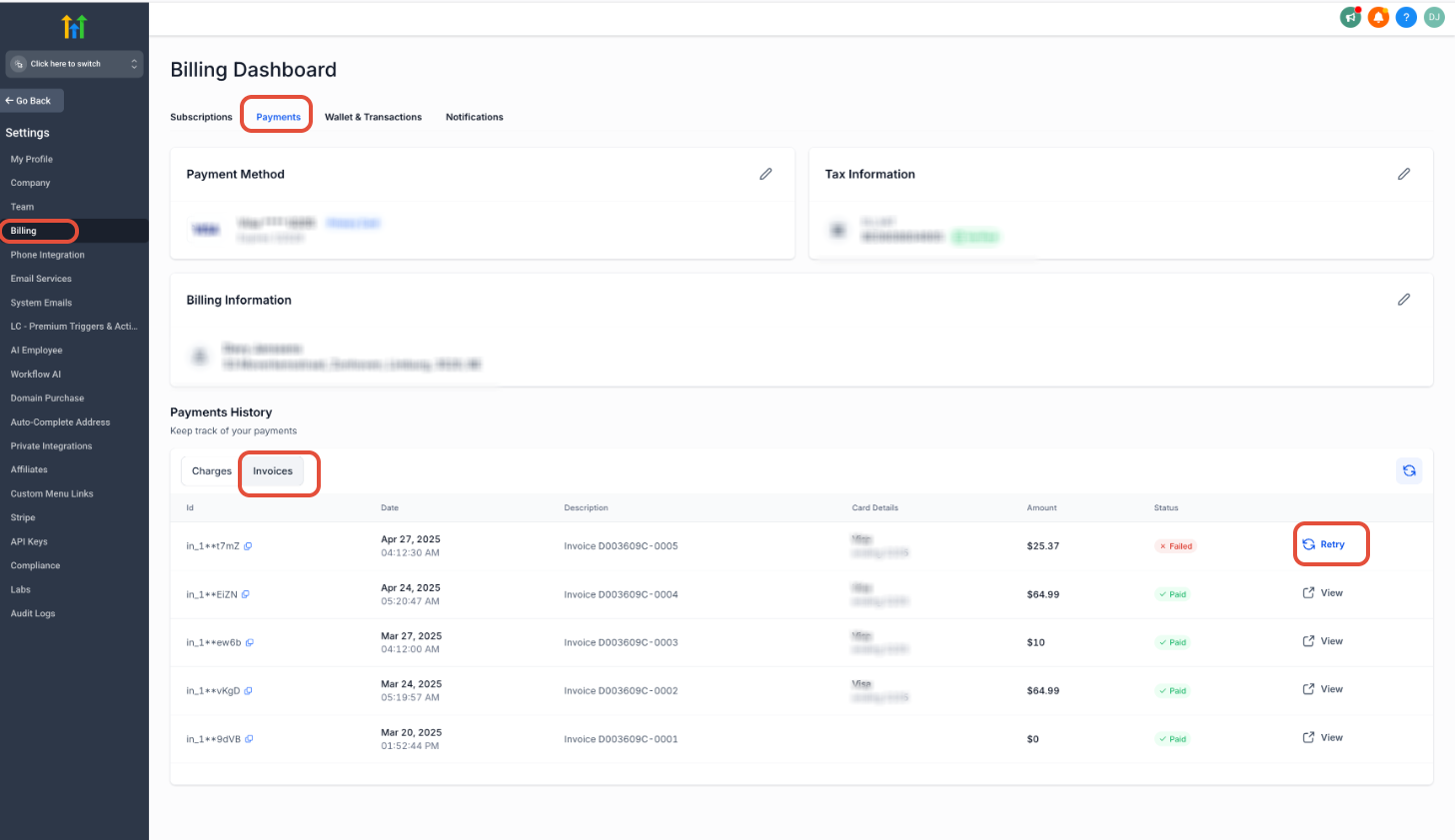
The resolution is performed from the agency side. An agency admin opens the Settings area, goes to Billing, selects the Payments tab, views Invoices, and clicks the Retry Payment button on the failed invoice. Once the payment succeeds, the subaccount can proceed with WhatsApp setup.
This process lives entirely inside the HighLevel platform under the agency dashboard. No changes are required in the subaccount itself, and the integration resumes automatically after the payment clears.
03How businesses use payment failed messages
- Digital marketing agency. The agency admin opens Settings > Billing > Payments > Invoices, locates the failed invoice for the WhatsApp subscription, and clicks Retry Payment. After the charge succeeds, client subaccounts can finish linking their WhatsApp numbers.
- SaaS reseller. A reseller accesses the agency dashboard, navigates to the invoice list, and retries the failed payment that blocked a client from adding WhatsApp messaging. The successful payment immediately lifts the block.
- Billing manager. The billing manager selects the failed invoice in the Payments tab and clicks Retry Payment. Once the agency payment processes, subaccounts can enable WhatsApp without further delay.
04Before you start
- Be logged in to the agency dashboard as an administrator.
- Ensure the agency has a valid payment method attached to its account.
05How to set up and use payment failed messages in HighLevel
Retry failed agency payment
- Open Settings from the agency dashboard.
- Select the Billing option.
- Click on the Payments tab.
- Enter the Invoices section.
- Find the invoice marked as failed and click Retry Payment.
06What it looks like in HighLevel
07How it connects to the rest of HighLevel
- WhatsApp pricing and client controls for agencies WhatsApp pricing guide
- Set up WhatsApp for a subaccount and migrate existing numbers Subaccount setup guide
- Activate WhatsApp rebilling for agencies Rebilling guide
Michael's take

When the "Payment Failed" banner appears, I know it’s tied to the agency’s billing. Once the agency clears the invoice, the subaccount can continue with the WhatsApp setup.