
Home/HighLevel/Features/Reselling Products/How to Resolve the Issue of Duplicate Contacts for WhatsApp Messages

Payments and Sales

How to Resolve the Issue of Duplicate Contacts for WhatsApp Messages

In short

Duplicate contacts appear for WhatsApp messages even when the Allow Duplicate Contact setting is disabled in the Business Profile. Selecting Phone as the secondary search preference prevents the duplication.

AreaReselling Products · WhatsApp
Used forReselling Products
Setup steps3 steps in 1 task
Last updatedNovember 3, 2026

01Duplicate contacts, explained

Duplicate contact entries are displayed for WhatsApp messages even though the Allow Duplicate Contact option is disabled in the Business Profile.

This issue may occur if the contact search preferences are not configured to include phone numbers as a secondary search criterion.

02How to set up and use duplicate contacts in HighLevel

Change contact duplicate preference

  1. Navigate to Business Profile.
  2. Go to Contact Duplicate Preference.
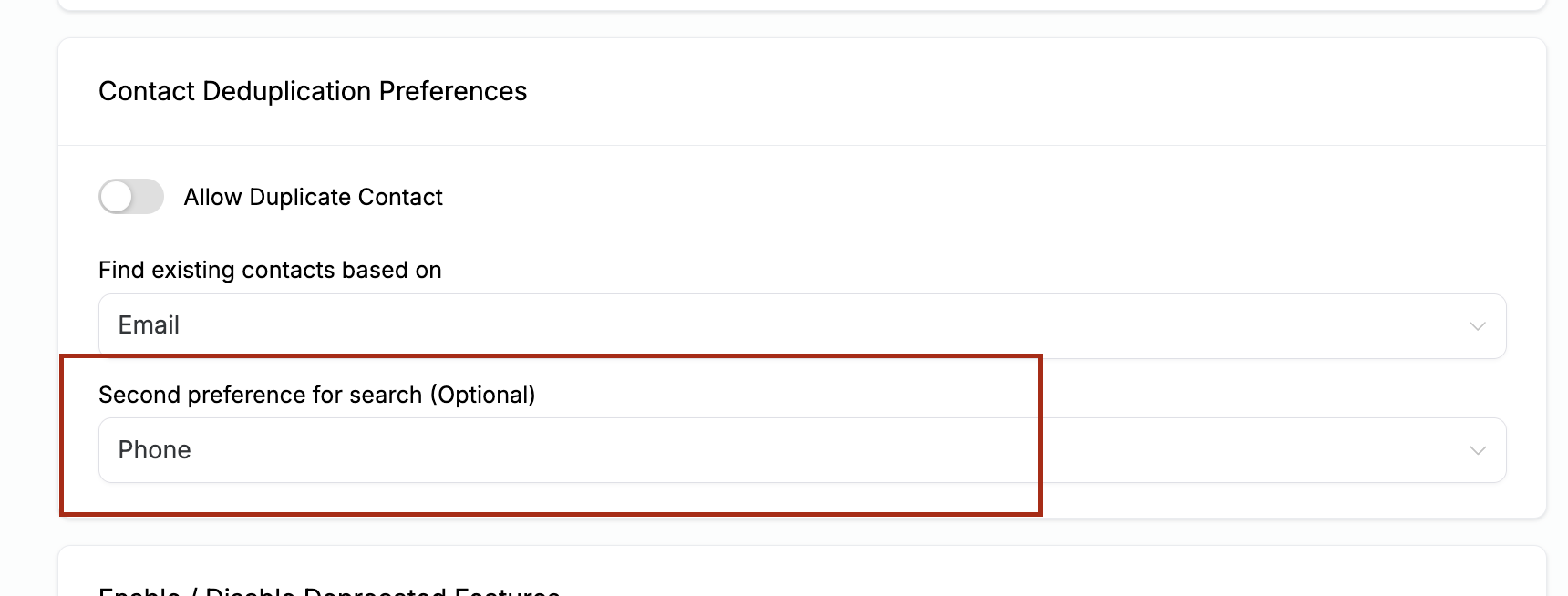
  3. Under Second Preference for Search (Optional), ensure that Phone is selected.

03What it looks like in HighLevel
04Settings that matter

  • Allow Duplicate Contact. A toggle in the Business Profile that, when enabled, permits the creation of duplicate contact records.
  • Second Preference for Search (Optional). A setting that lets you choose an additional field, such as Phone, to match contacts when the primary search does not find a match.

Michael's take

Michael Reimer
Michael ReimerFounder of CRM Pros, HighLevel Commander and Certified Admin

Duplicate contact records clutter a WhatsApp workflow and make reporting harder. The problem shows up when the system can’t match a number to an existing profile and creates a new entry, even though the duplicate toggle is off.

The first setting I would get right is the secondary search preference. Making sure Phone is selected there lets HighLevel use the number to find the right contact and keeps the list tidy.

Get More InformationOpens on HighLevelPublished November 2, 2026 · Updated November 3, 2026

Common questions

Common questions about duplicate contacts.

Why are duplicate contacts still created when Allow Duplicate Contact is off?

The issue may occur if a secondary search field that can match the incoming phone number is not configured. Adding Phone as a secondary preference lets HighLevel find the existing record and stop duplicates.

Where do I find the setting to change the secondary search preference?

Open Business Profile, then go to Contact Duplicate Preference. Under Second Preference for Search (Optional), select Phone.

Do I need to enable any other options to stop duplicates?

Only selecting Phone as the secondary search preference is required to prevent duplicate contacts.

Next step

Pick the features that matter. Then get the plan that unlocks them.

Explore the features you want, start with the five at the top, and upgrade through my link when you are ready. The bonuses and the team come with it.

The features directory explains every HighLevel feature in plain English. Browse it to see what the platform can do.

Back to the FeaturesSee the full details
⌃

Site preview

Explore the next page

This destination is reserved in the page inventory and is not built yet.