
01Who this is for
- Agencies that manage client WhatsApp messaging need to keep templates correctly classified to meet policy standards.
- Ecommerce businesses using transactional messages must ensure templates stay in the Utility category for order updates.
- Service providers that send appointment reminders rely on Utility classification to avoid promotional labeling.
02Template category reclassifications, explained
The feature lets a user submit a review request to Meta after a Utility template is automatically moved to the Marketing category. The request is made through Meta’s WhatsApp Manager, not directly inside HighLevel. After submission, the template status changes as Meta processes the appeal.
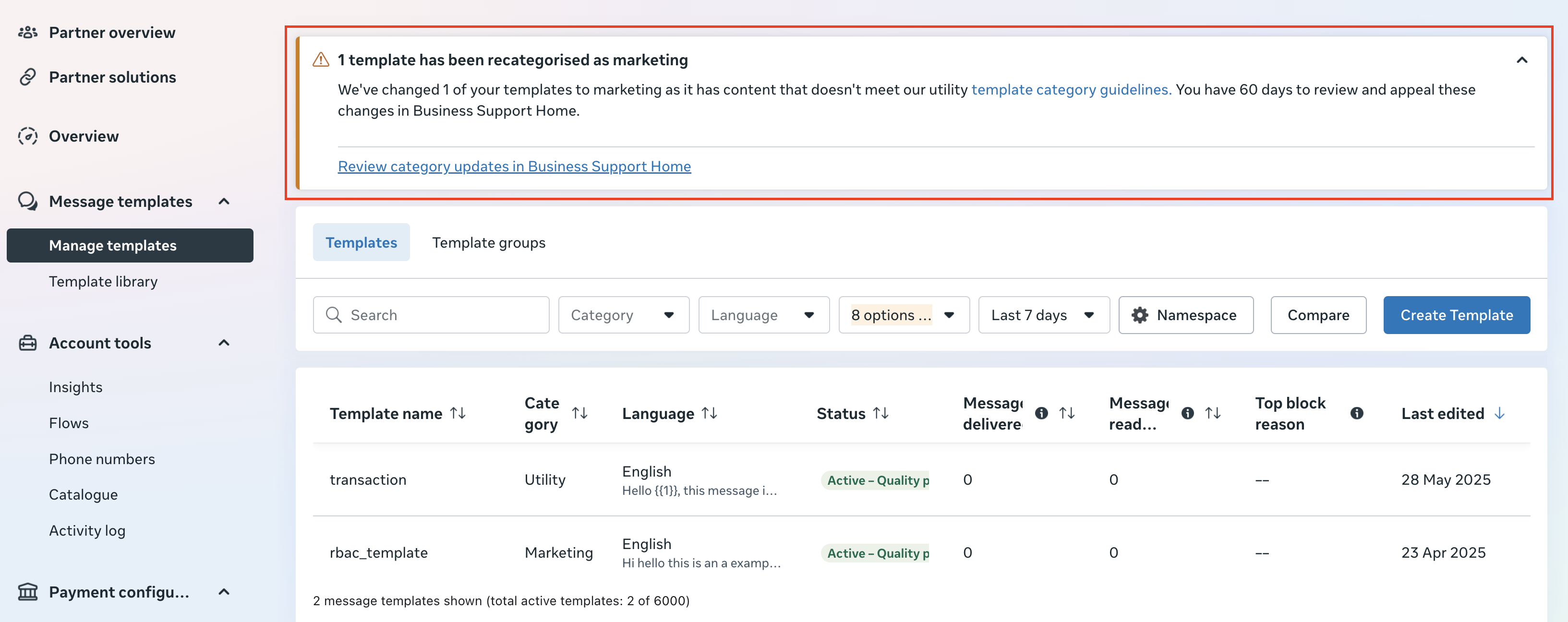
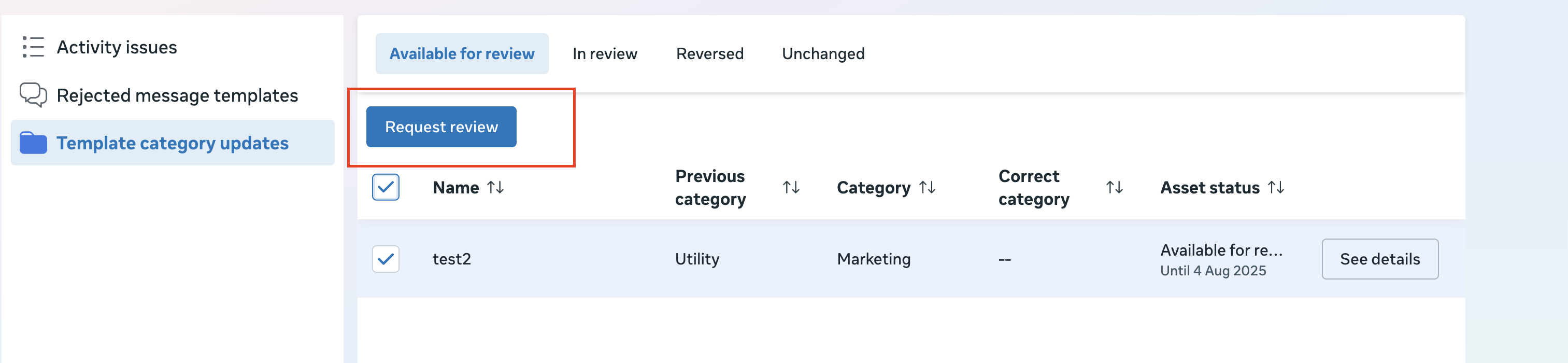
The process begins in the Manage Template view of the Business Manager account. A specific option titled Review category updates guides users to the appeal screen. Once the request is sent, the template appears under an In Review tab, and after approval it moves to a Reversed tab showing the restored Utility label.
03How businesses use review for automatic reclassification of a utility template to marketing
- Digital marketing agency. The agency creates a transactional template for client order confirmations in HighLevel. If Meta reclassifies it as Marketing, the agency opens WhatsApp Manager, selects the template in Review category updates, and clicks Request Review to restore the correct Utility label.
- Healthcare practice. The practice sends appointment reminders via WhatsApp. When a reminder template is flagged as Marketing, staff log into WhatsApp Manager, locate the template under Review category updates, and submit a review request to retain its service related status.
- Online education platform. The platform uses a template for course enrollment confirmations. After a reclassification to Marketing, the admin accesses WhatsApp Manager, picks the affected template, and files a review request so the message remains categorized as Utility.
04The numbers and rules that matter
- Meta provides a 45 day window to manually appeal this reclassification.
05Before you start
- Access to Meta Business Manager with appropriate credentials.
- A WhatsApp template that has been reclassified from Utility to Marketing.
- The appeal must be filed within 45 days of the reclassification.
06How to set up and use review for automatic reclassification of a utility template to marketing in HighLevel
Raise a review request
- Log in to Meta’s WhatsApp Manager using Business Manager credentials and open the Manage Template tab for the relevant account.
- Go to Review category updates in Business Support Home.
- Select the template you want to appeal and press the Request Review button.
- Confirm the template shows under the In Review tab after submitting the request.
- Wait for Meta to evaluate; when approved, the template moves to the Reversed tab.
07What it looks like in HighLevel


08Things to know before you rely on it
- Meta may reclassify a Utility template right away or after a period of time.
- The appeal window lasts for 45 days from the moment of reclassification.
- Meta typically reviews a request within a few business days.
09How it connects to the rest of HighLevel
- Creating WhatsApp templates in HighLevel WhatsApp template creation
- Automating WhatsApp workflows in HighLevel WhatsApp automation
- HighLevel pricing and plans Pricing
Michael's take

Michael ReimerFounder of CRM Pros, HighLevel Commander and Certified Admin
The review request process is useful but not essential for every WhatsApp user.
Get More InformationOpens on HighLevelPublished November 2, 2026 · Updated November 17, 2026