
01Who this is for
- Agency owners who manage multiple client WhatsApp accounts need to know why messages fail and how to keep communication flowing.
- Ecommerce Founders using WhatsApp for order confirmations benefit from a way to bypass template limits.
- Service providers (coaches, consultants) rely on prompt replies, so knowing how to request a customer initiated chat avoids delivery blocks.
02WhatsApp message undeliverable errors, explained
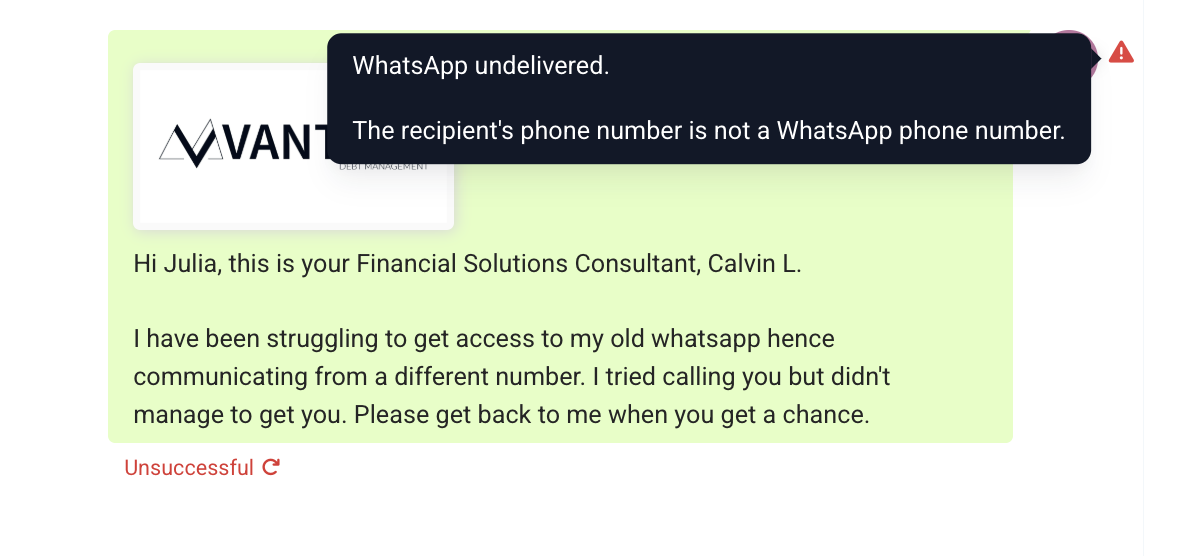
When HighLevel attempts to send a WhatsApp message, the platform may return a 'Message Undeliverable' error. The error indicates that the platform cannot deliver the message due to one of several conditions.
The causes include: the phone number is not registered on WhatsApp, the recipient has reached Meta’s marketing template limit, the user has not accepted the latest Terms of Service, the recipient is on an older version of WhatsApp, or the contact has blocked the business number. The error is displayed in the HighLevel messaging interface where WhatsApp messages are composed and sent.
03How businesses use WhatsApp message undeliverable error
- Ecommerce store. When a purchase confirmation hits the marketing template limit, the store creates a utility template, which has no limit, and sends it through HighLevel. This ensures the customer still receives a confirmation without hitting the limit.
- Real estate agency. If a potential buyer’s WhatsApp version is outdated and messages fail, the agent asks the buyer to update the app or to send the first message. The agent then replies using HighLevel, avoiding the undeliverable status.
- Health clinic. When a patient blocks the clinic’s number, the staff requests the patient to start a new conversation from their device. Once the patient initiates, HighLevel can send follow up messages without the error.
04The numbers and rules that matter
- Android minimum version: 2.21.15.15.
- SMBA minimum version: 2.21.15.15.
- IOS minimum version: 2.21.170.4.
- SMBI minimum version: 2.21.170.4.
- KaiOS minimum version: 2.2130.10.
- Web minimum version: 2.2132.6.
- Marketing templates are limited per recipient by Meta; utility templates have no limit.
05How to set up and use WhatsApp message undeliverable error in HighLevel
Send a utility template to avoid marketing limits
- Create a utility template in HighLevel and send it to the contact, because utility templates are not subject to the marketing template cap.
Prompt the contact to begin the chat
- Ask the recipient to send the first WhatsApp message, then reply through HighLevel once the conversation is initiated.
06What it looks like in HighLevel
07Things to know before you rely on it
- Meta may restrict the number of marketing template messages a person receives from any business within a given timeframe.
- Utility templates have no defined limit and can be sent without triggering the marketing cap.
- Recipients must be using WhatsApp version 2.21.15.15 or higher on Android or SMBA, 2.21.170.4 or higher on iOS or SMBI, 2.2130.10 on KaiOS, or 2.2132.6 on Web.
- If the recipient has blocked the business number, messages will be undeliverable.
08If something goes wrong
- Message undeliverable because the recipient reached the marketing template limit. Send a utility template instead, as it is not limited by Meta.
- Message undeliverable because the contact has not started the conversation. Ask the customer to send an initial message, then continue messaging through HighLevel.
09How it connects to the rest of HighLevel
- How to create and manage WhatsApp templates in HighLevel WhatsApp templates guide
- HighLevel WhatsApp subaccount setup and migration guide Subaccount setup
- HighLevel pricing and plans Pricing page
Michael's take

The undeliverable error feels like a small convenience hiccup that can quickly become a real workflow blocker if you keep hitting it. It’s a clear signal that something about the contact or the message type isn’t aligned with WhatsApp’s rules.