
01Who this is for
- Agencies that resell WhatsApp services, because they must confirm a number is not locked to another Cloud API account before offering Coexistence.
- Founders of small businesses that use both the WhatsApp Business app and HighLevel, so they can avoid onboarding failures caused by hidden associations.
02WhatsApp coexistence numbers, explained
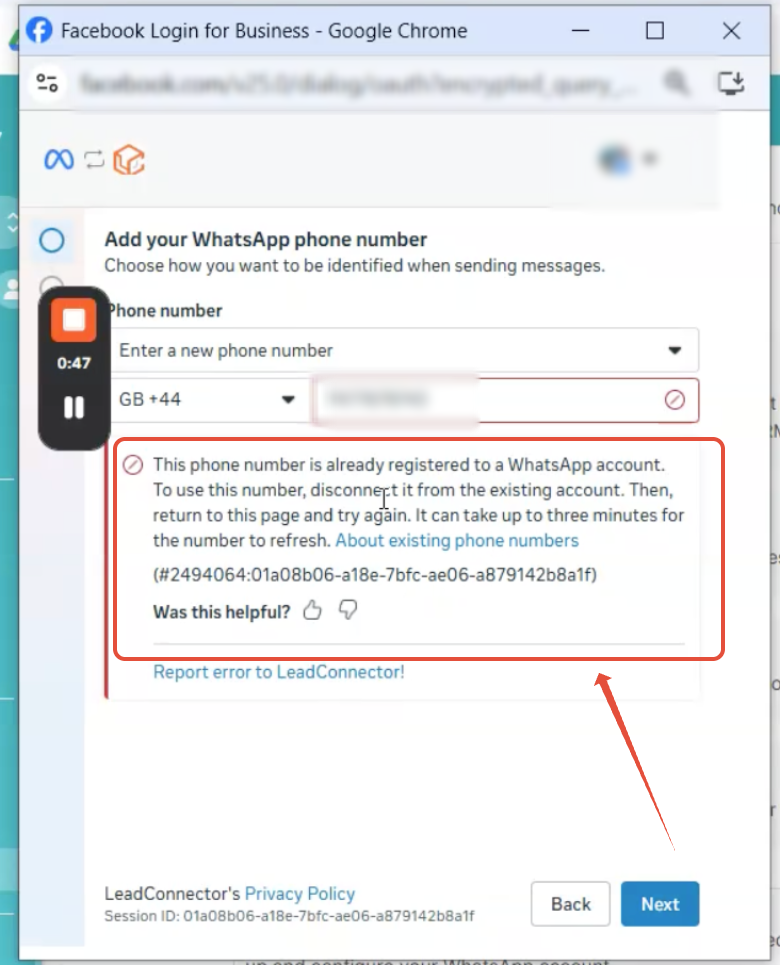
The feature checks a phone number during Coexistence onboarding for any existing Cloud API WhatsApp Business Account (WABA) link. If such a link exists, the onboarding process stops and shows an error that the number is already associated with another WABA. The check runs automatically in the background as soon as the number is entered, without a manual account picker step. Because the background verification cannot show which WABA is matched, the only way to proceed is to locate and delete the unwanted association in the Business Portfolio. Once the stale link is cleared, the onboarding flow can be restarted and the number will be accepted for Coexistence. The process lives inside the WhatsApp Coexistence onboarding flow, which is part of the Reselling Products section of HighLevel. It does not affect numbers used only in the WhatsApp Business mobile app; the error is tied to Cloud API records only.
03How businesses use WhatsApp coexistence numbers
- Marketing agency. The agency opens its Business Portfolio, reviews the list of WhatsApp Business Accounts, and removes any old Cloud API WABA that contains the client’s phone number. After deletion, the agency restarts the Coexistence onboarding to link the number for the client.
- Ecommerce retailer. The retailer checks the Business Manager for a hidden Cloud API WABA attached to the support line’s phone. By deleting that association, the retailer can enable Coexistence and use the same number in both the mobile app and HighLevel automation.
- Local service provider. The provider navigates to the Business Portfolio, finds the unwanted WABA linked to its appointment booking number, removes it, and then re runs the Coexistence onboarding to activate the number for messaging through HighLevel.
04How to set up and use WhatsApp coexistence numbers in HighLevel
Resolve number association issue
- Log in to the Business Portfolio and open the correct Business Manager for your organization.
- Open the list of WhatsApp Business Accounts and view all associated WABAs.
- Locate the phone number you want to use and see if it appears under a Cloud API WABA.
- Delete or remove the unwanted WABA or phone number link, making sure it is not actively used elsewhere.
- Start the WhatsApp Coexistence onboarding process again.
05What it looks like in HighLevel
06Things to know before you rely on it
- The new onboarding flow no longer shows a manual WABA selector; the system matches the number automatically.
- If a number is tied to an active Cloud API integration, you must not delete that association.
- Only numbers with existing Cloud API WABA links trigger the error; numbers used solely in the WhatsApp Business app are not affected.
07If something goes wrong
- Error: This phone number is already associated with another WhatsApp Business Account. In the Business Portfolio, find the Cloud API WABA that holds the number, remove the association, and retry the Coexistence onboarding.
08How it connects to the rest of HighLevel
- Full WhatsApp setup guide for agencies WhatsApp full setup
- WhatsApp subaccount configuration and migration Subaccount guide
- Activate WhatsApp rebilling for agencies Rebilling guide
Michael's take

The error is a clear sign you need to clean up old WABA links before using Coexistence.
Teams that rely heavily on multiple WhatsApp integrations should not skip this check; otherwise onboarding will keep failing.