
01Who this is for
- Agency owners who want to offer a white labelled mobile app as a recurring service to their clients.
- Marketing consultants managing multiple subaccounts and needing to control app availability per client.
- Tech service providers who require a way to see the monthly cost HighLevel charges for each app location.
02Branded Client Portal mobile apps, explained
The feature adds a branded version of the Client Portal as a native mobile app that agencies can sell to subaccounts. An agency sets a price that appears for every client, or customises the price for specific accounts. The app can be disabled for a client before it is sold. If an agency does not connect Stripe, the app can be deployed manually, but no subscription between the location and the agency is created.
Pricing and billing details are shown in the Agency Settings under Billing. The agency sees the amount it pays HighLevel, $79 per month per location, and a list of subaccounts that have the app active. Clients discover the app in their own subaccount menu under Sites > Client Portal > Settings > Branded Mobile App (per HighLevel's help center, checked November 2026).
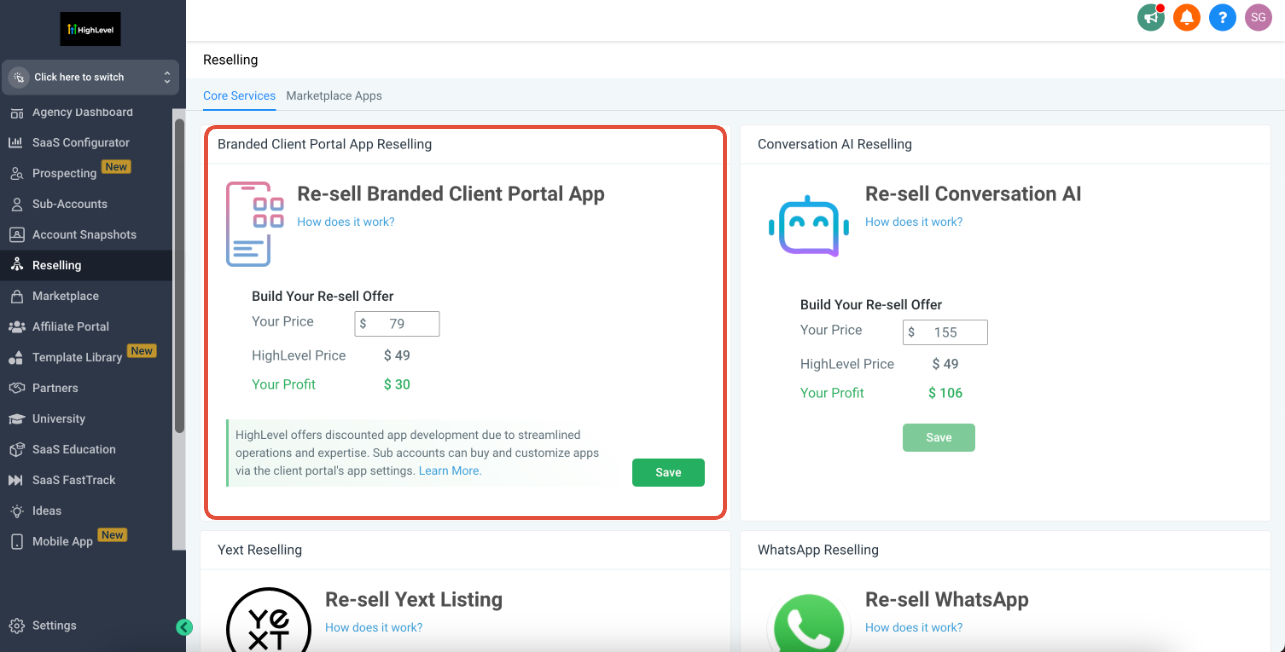
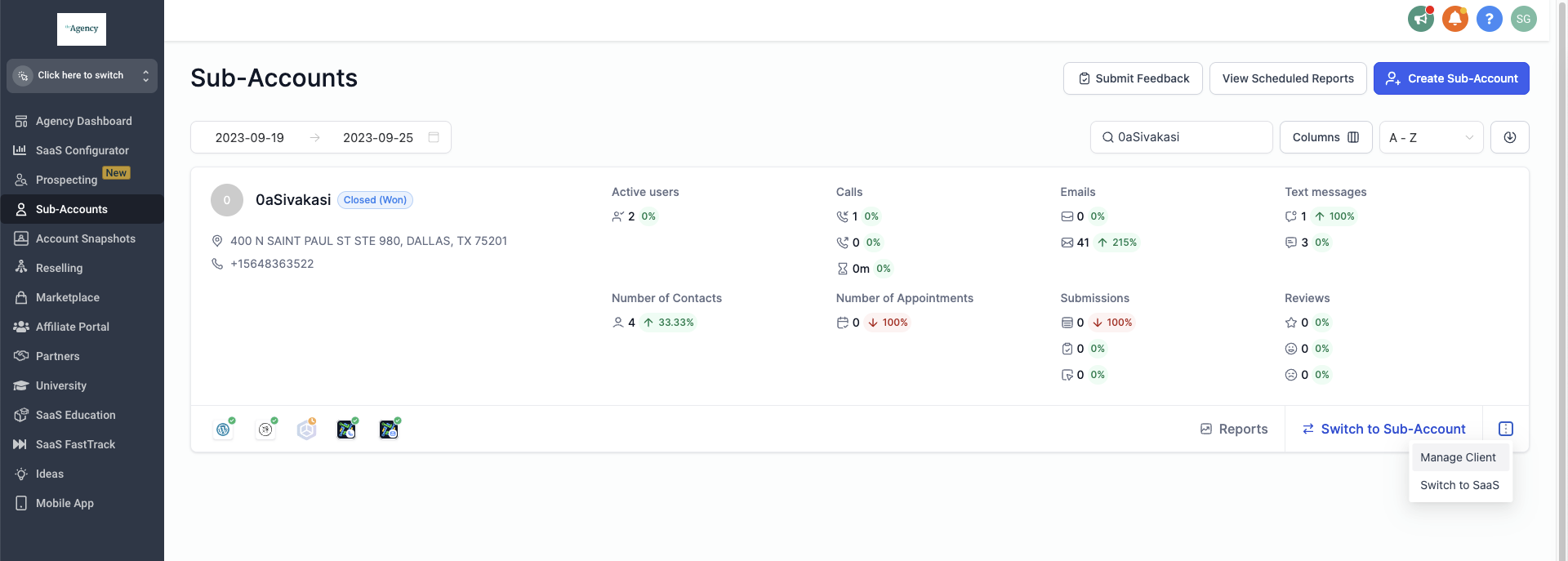
All actions are performed from the agency dashboard. The Reselling tab on the left menu holds the global price setting. Individual client changes are made from the Subaccount List by opening the three dot menu and selecting Manage Clients.
03How businesses use Branded Client Portal mobile apps
- Digital marketing agency. The agency sets a standard monthly fee in the Reselling tab, then offers a different rate to a high value client by editing the price in that client’s Manage Clients view. The client purchases the app and the agency receives the agreed payment while HighLevel charges $79 per location (per HighLevel's help center, checked November 2026).
- Consulting firm. When the firm does not have a Stripe account, it manually deploys the app for a client by accepting the terms in the Manage Clients screen and clicking Pay Now. The client gains access, but the firm does not create a recurring subscription on its side.
- SaaS reseller. The reseller checks the Billing > Subscription page to see how many subaccounts are using the app and the total monthly amount owed to HighLevel. This view helps the reseller keep track of costs across all client locations.
04The numbers and rules that matter
- $79/month/location paid to HighLevel (per HighLevel's help center, checked November 2026).
- Two subscriptions are created per purchase: Client to agency Stripe and agency to HighLevel.
05Before you start
- A connected agency Stripe account is required to enable auto resell pricing.
- Access to the agency dashboard with permission to view the Reselling tab.
06How to set up and use Branded Client Portal mobile apps in HighLevel
Set agency wide price for the Branded Client Portal Mobile App
- Open the agency dashboard.
- Select the Reselling tab from the left menu.
- Enter the desired monthly price for the Branded Client Portal Mobile App.
Personalise offer for a specific client
- Go to Subaccount List.
- Search for the client’s name.
- Click the three dot icon and choose Manage Clients.
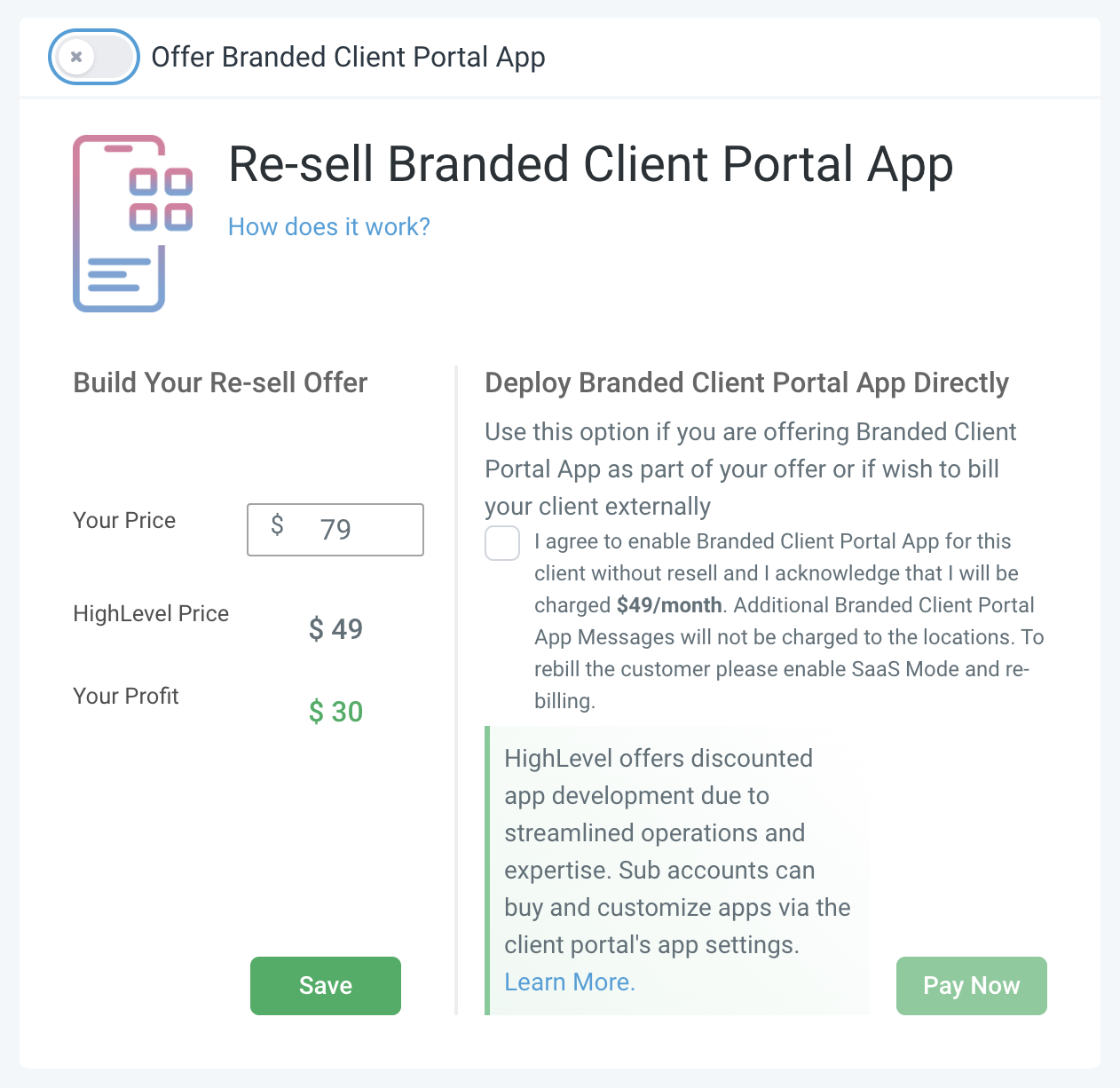
- Scroll to the reselling section and change the Branded Client Portal Mobile App Pricing.
- Save the changes.
Disable Branded Client Portal Mobile App for a client
- Open Subaccount List.
- Locate the client and open the three dot menu.
- Select Manage Clients.
- In the reselling section, toggle off Disable Branded Client Portal Mobile App.
- Save the setting.
Manually deploy Branded Client Portal Mobile App without Stripe
- Navigate to Subaccount List.
- Find the client and click the three dot menu.
- Choose Manage Clients.
- Read and accept the Deploy Branded Client Portal Mobile App directly T&C, then click Pay Now.
Check agency billing for the Branded Client Portal Mobile App
- Open Agency Settings.
- Select Billing then Subscription.
- Find Reselling Branded Client Portal Mobile App to view the monthly amount and subscription count.
- Click Show subaccounts to see which locations have the app.
07What it looks like in HighLevel
08Settings that matter
- Branded Client Portal Mobile App Pricing. Controls the monthly fee the agency charges each client for the app.
- Disable Branded Client Portal Mobile App. Turns the app off for a client before any purchase is made.
- Deploy Branded Client Portal Mobile App directly T&C. The agreement the agency must accept to manually deploy the app without using Stripe.
- Reselling Branded Client Portal Mobile App. Shows the amount the agency owes HighLevel for each location of the app.
09Things to know before you rely on it
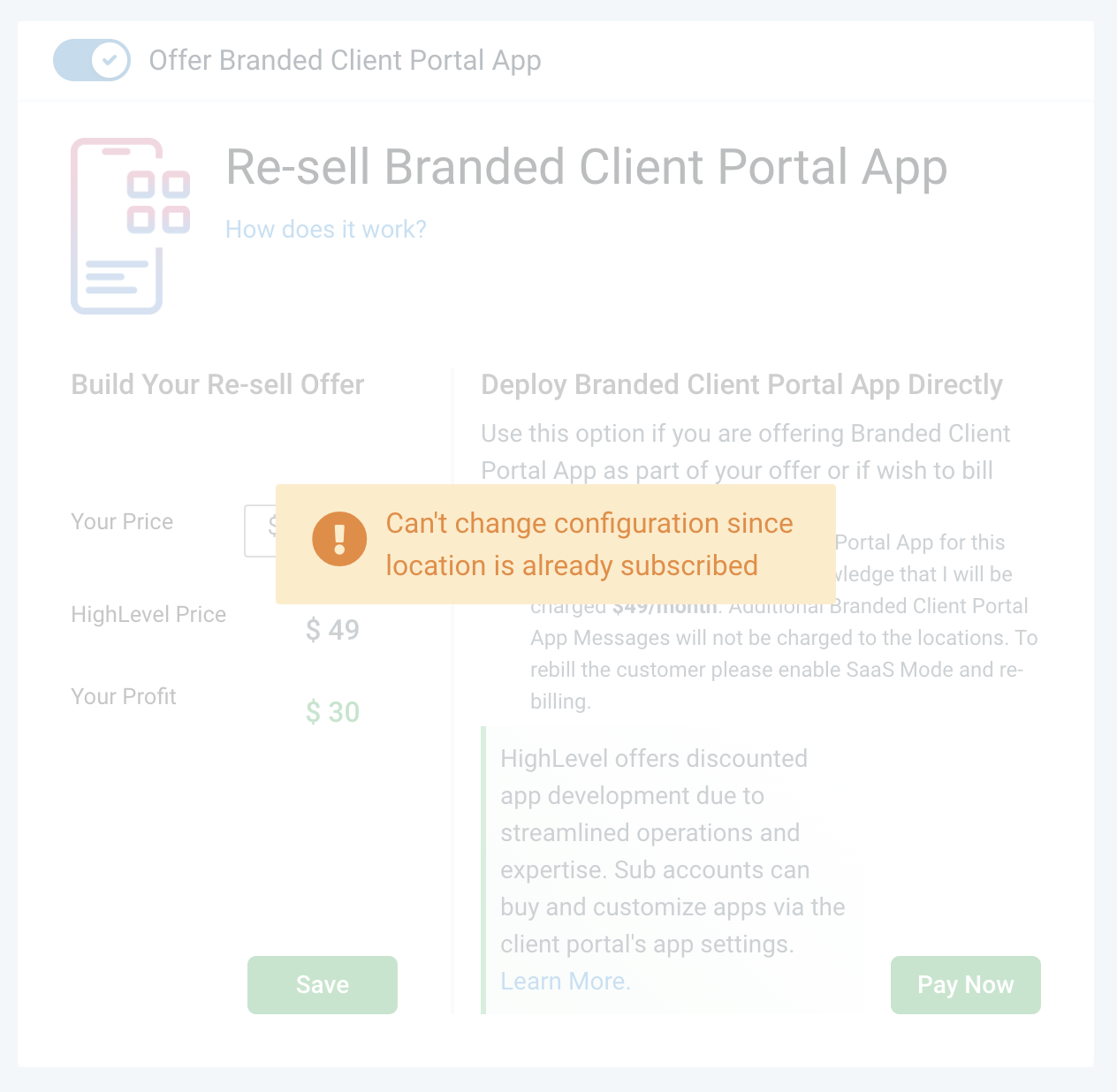
- The app can only be disabled for a client before the client has purchased it.
- Manual deployment does not create a subscription between the location and the agency.
- HighLevel charges $79 per month for each location that runs the app (per HighLevel's help center, checked November 2026).
- Auto resell pricing works only when the agency has a connected Stripe account.
10If something goes wrong
- App does not appear for a client after manual deployment. Confirm that the Deploy Branded Client Portal Mobile App directly T&C was accepted and that Pay Now was clicked.
- Unable to disable the app for a client that already bought it. Disabling is only possible before purchase; after a sale the option is unavailable.
- Billing page shows no subscription count. Verify that the agency Stripe account is connected; without Stripe the auto resell subscription is not created.
11How it connects to the rest of HighLevel
- Pricing details for HighLevel plans HighLevel pricing
- Start a 30 day trial of HighLevel 30 day trial
- Overview of all reselling product features Reselling products
Michael's take

In my experience, you can still give a client the white labeled app without a Stripe integration; however, manual deployment won’t set up a recurring subscription between the location and your agency.
I would first connect a Stripe account so the autoresell flow runs smoothly. Then I’d set a clear agency wide price, test a manual deployment on a test subaccount, and watch the two subscriptions appear. That way you know the billing and app visibility work before you start selling to real clients.