
01Who this is for
- Agencies, can white label the platform and add reputation services to their client portfolio.
- Local retailers, benefit from QR codes that let shoppers leave reviews right away at the point of sale.
- Service based businesses, use AI analytics to understand sentiment and improve customer interactions.
02Reputation Management, explained
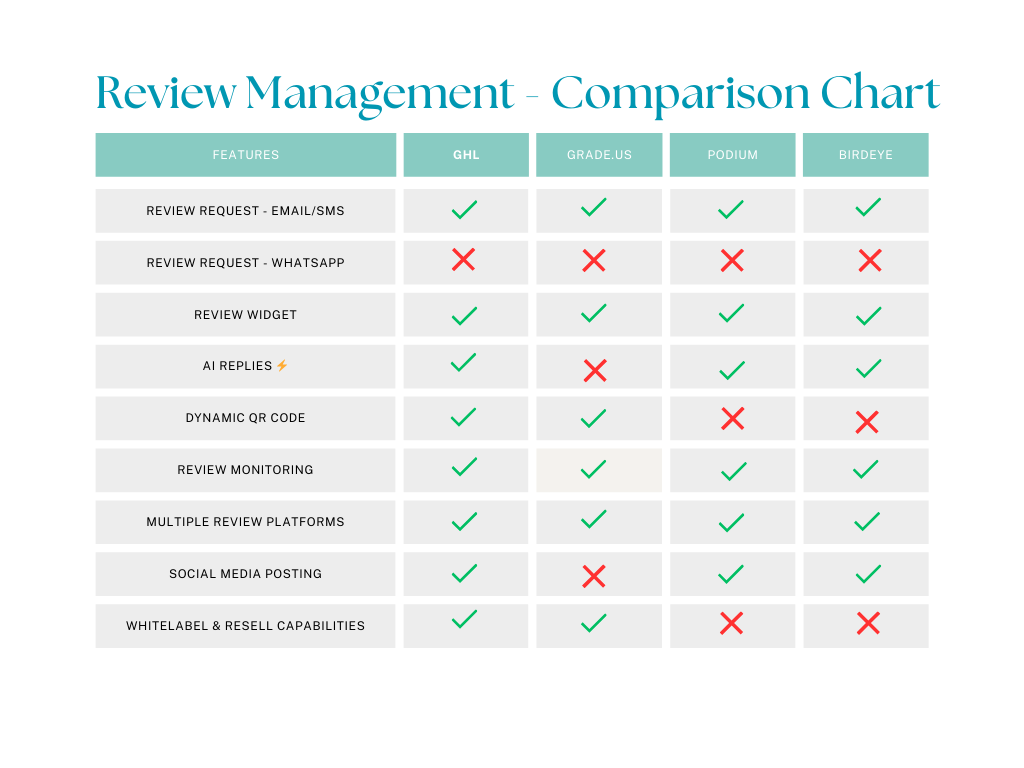
The reputation module gathers feedback from several online sources, lets you request new reviews via email or SMS, and will later support WhatsApp messages. It also creates dynamic QR codes that point customers to the chosen review site and provides widgets that can be placed on a website or social profile to display the latest positive comments.
All of these capabilities live inside HighLevel, so users can monitor trends, see sentiment analysis and respond to reviews without leaving the platform. Agencies can re brand the experience, while businesses get a single place to manage public perception.
03How businesses use Reputation Management
- Dental practice. Generate a QR code and print it on appointment cards so patients can quickly leave a Google review. Add a review widget to the clinic’s website to showcase patient feedback in real time.
- Restaurant. After a meal, send an SMS asking diners to share their experience on Facebook or Yelp. Review analytics then highlight common compliments or complaints for the manager to address.
- Marketing agency. Activate the white label option to sell reputation services under the agency’s brand, and use AI driven analysis to draft suggested responses for client reviews.
04The numbers and rules that matter
- Review request channels: Email, SMS, WhatsApp (Coming Soon).
- Supported review platforms: Google, Facebook, Yelp, and more.
05Before you start
- Connect your business accounts for Google, Facebook, Yelp or other review platforms in the Reputation settings.
- Ensure contact lists contain up to date email and phone numbers for customers you wish to request reviews from.
06What it looks like in HighLevel
07Things to know before you rely on it
- WhatsApp review requests are listed as coming soon and are not yet usable.
- AI analysis provides categorisation and sentiment insight but does not automatically post replies.
08How it connects to the rest of HighLevel
- Learn how to customise the email and SMS messages used for review requests. Custom review request messages
- See the options for sending review requests manually or through automated workflows. Send review requests
- Find out how to customise and embed a review widget on your site. Review widget setup
Michael's take

Most people think a review request is just a one off email and then forget to keep the flow going. What really moves the needle is using every channel you have. Email, SMS and soon WhatsApp. Plus a QR code right at the checkout. That creates multiple touchpoints and makes it easy for a customer to leave a review in the moment.
If I were setting this up, I’d start by building the dynamic QR code and placing it on receipts, then enable email and SMS requests for postpurchase follow ups. Watching the analytics dashboard to see where sentiment is shifting would be the next step, so you can tweak the messaging before scaling it to agency clients.