
01Who this is for
- Founders who run paid search campaigns need accurate lead attribution to make informed decisions.
- Marketing managers can avoid reporting confusion caused by duplicate ad names.
- Ad specialists benefit from a single, correctly formatted UTM template for consistent tracking.
02Google ads reporting, explained
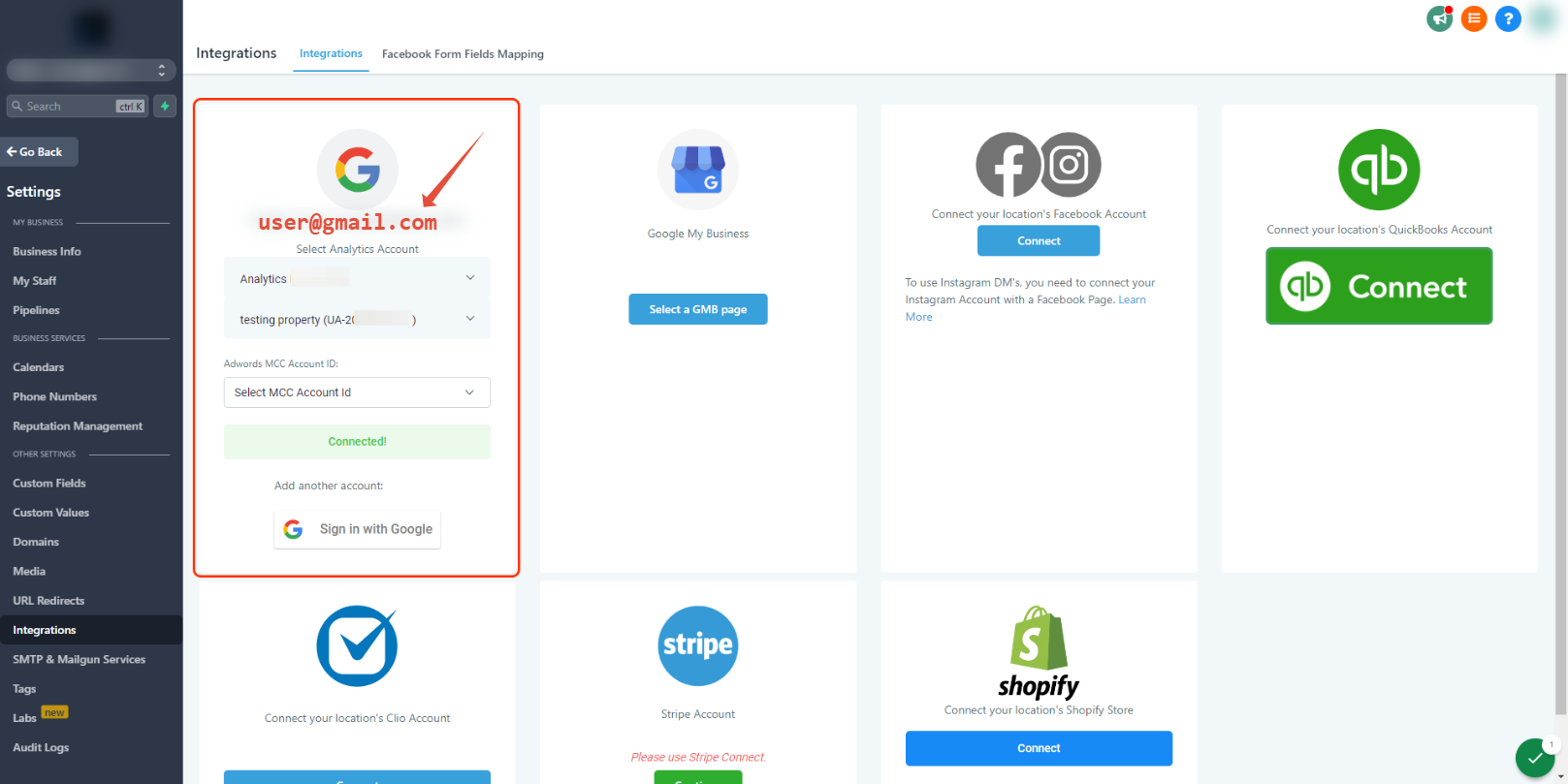
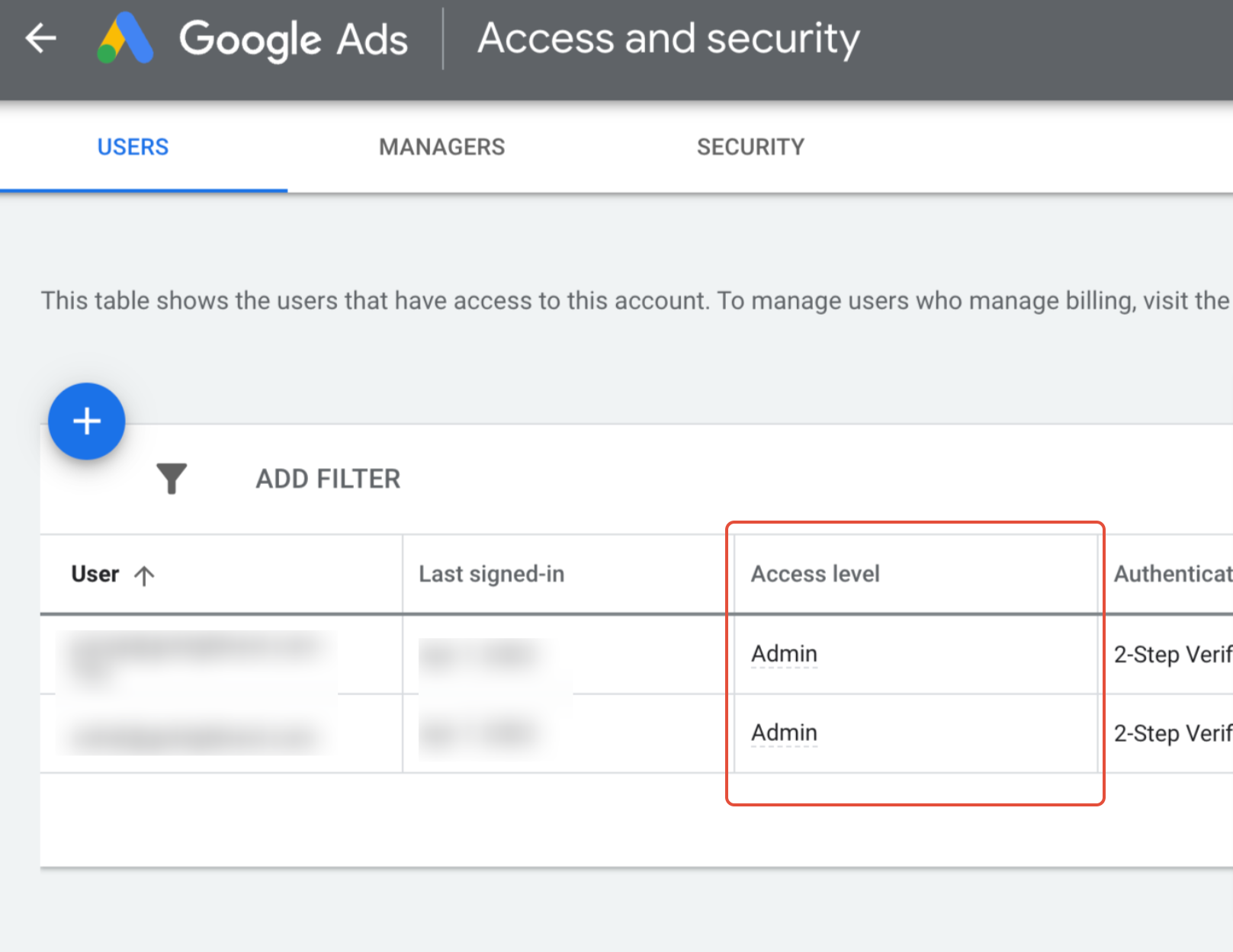
The feature checks the connection between a Google Ads account and HighLevel. It validates that the linked Gmail address belongs to the ad account and holds admin permissions. The integration lives under the Google Ads reporting section of the platform.
UTM tracking templates add URL parameters to clicks for attribution. HighLevel allows the template to be placed only once, either at the account, campaign, or ad level. The template must be written in lower case characters because it is case sensitive.
Campaign, ad set and ad names must be unique across the account. Duplicate names cause the same ad to appear in multiple rows of the reporting table, leading to misleading data. Changing a name does not rewrite existing UTM parameters, so new names should be created as fresh campaigns, ad sets or ads.
03How businesses use Google ads reporting
- Ecommerce retailer. The retailer confirms the Google Ads integration uses an admin Gmail address, adds a single lower case UTM template at the account level, and renames any duplicated product related ad campaigns. This keeps product level performance data clean.
- Local service provider. The provider checks that the linked Gmail account has admin rights, places the UTM template only in the campaign settings, and ensures each service specific ad set has a distinct name, preventing overlap in lead sources.
- Digital marketing agency. The agency verifies each client’s Google Ads integration uses the correct user, configures one UTM template per client account, and creates unique ad set names for each client campaign to avoid cross client reporting errors.
04Before you start
- Google Ads account integration must be linked to HighLevel.
- The Gmail user used in the integration must have admin permissions and cannot be a manager role.
05How to set up and use Google ads reporting in HighLevel
Check integration and permissions
- Confirm the Google Ads account integration is attached to HighLevel.
- Verify the Gmail address entered in the integration matches a user on the Google Ads account.
- Make sure that Gmail user holds admin permissions within the Google Ads account.
- Ensure the user is not assigned a manager role; it must be a standard or admin role.
Configure UTM tracking template
- Add the UTM tracking template in only one location such as the account, a campaign, or an ad.
- Avoid placing the same template in multiple places to prevent hierarchy conflicts.
- Write the template using only lower case letters because it is case sensitive.
Set unique campaign, ad set and ad names
- Review all campaign, ad set and ad names to confirm none are duplicated.
- Rename any repeated names so each identifier is distinct.
- Create new campaigns, ad sets or ads instead of editing existing ones to keep UTM parameters aligned.
06What it looks like in HighLevel
07Settings that matter
- Google Ad Account Integration. Controls the link between a Google Ads account and the HighLevel platform.
- UTM Tracking template. Defines the URL parameters that are appended to ad clicks for attribution.
08Things to know before you rely on it
- The UTM tracking template can be added in only one place; adding it at multiple levels follows the Account > Campaign > Ad hierarchy.
- The template is case sensitive; capital letters are not allowed.
- Campaign, ad set and ad names must be unique; duplicates cause duplicate rows in reporting.
- Renaming an existing campaign, ad set or ad does not update the UTM parameters already in use; a new entity should be created instead.
09If something goes wrong
- Integration not connected or Gmail address does not match the Google Ads account.. Link the correct Google Ads account in the integration settings and ensure the Gmail address belongs to that account.
- User linked to the integration lacks admin permissions or has a manager role.. Assign admin permissions to the Gmail user or use a standard user role; manager roles are not supported.
- UTM tracking template placed in multiple locations.. Remove extra instances so the template exists in only one place.
- UTM template contains capital letters.. Rewrite the template using only lower case characters.
- Duplicate campaign, ad set or ad names appear in the report.. Rename duplicated items so each name is distinct, or create new campaigns/ad sets with unique names.
10How it connects to the rest of HighLevel
- How to set up Google Ad reporting in HighLevel Google Ad reporting setup
- Understanding attribution sources in HighLevel Attribution sources
- Build, schedule and export custom reports in HighLevel Custom report export
Michael's take

Google ads reporting can be fragile, so double check each step before trusting the numbers. Skip it if you don’t need detailed paid search attribution.