
01Who this is for
- Service based businesses can see which days generate most bookings and adjust staffing accordingly.
- Coaches and trainers can identify top performing calendars to focus promotional effort.
- Clinics and spas can spot calendars with high cancellation rates and address retention issues.
02Appointment reports, explained
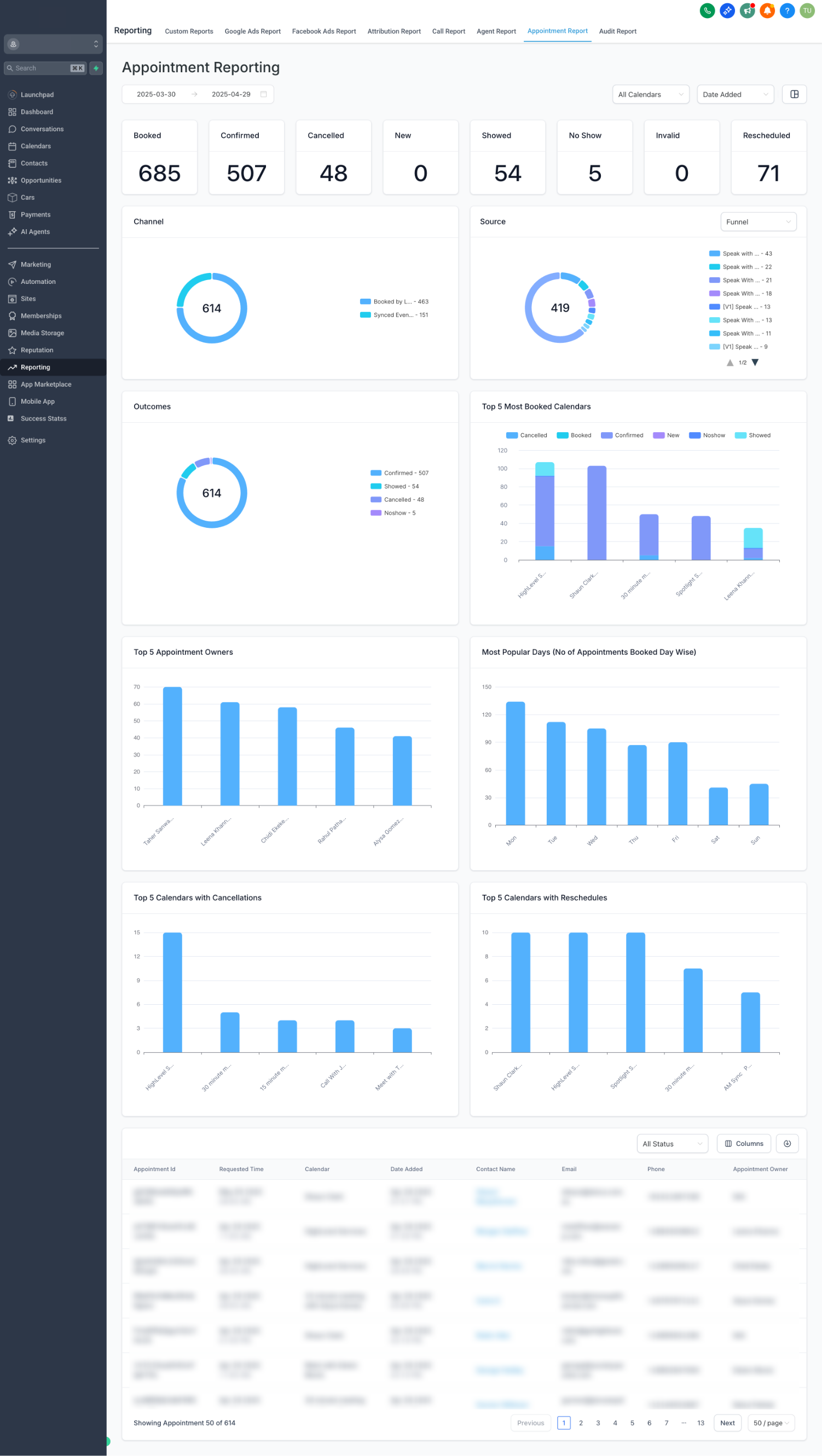
The Appointment Report lives under the Reporting menu on the left side of the HighLevel dashboard. Selecting Reporting then Appointment Report opens a screen with multiple visual widgets.
Numeric charts display the number of appointments grouped by status such as booked, confirmed, cancelled and new. A donut chart breaks down appointments by source channels, including events synced from external calendars.
Additional tables highlight the best performing calendars, the five users with the most appointments, the days of the week with the highest volume, and the calendars that see the most cancellations and reschedules.
03How businesses use appointment report
- Dental practice. Open the Appointment Report and review the top calendars with cancellations. Use the list to pinpoint which treatment rooms or providers have the highest drop off and take steps to improve patient retention.
- Online coaching business. View the Most Popular Days chart to see which weekdays attract the most group sessions. Schedule new class offerings on those days to match client demand.
- Real estate agency. Check the Top 5 Users by Number of Appointments table to see which agents close the most showings. Recognize those agents and use the data for performance reviews.
04The numbers and rules that matter
- Event Sync appointments are events with at least 1 attendee when synced from a third party calendar (Google, Outlook, iCloud, Calendly) into our system.
05How to set up and use appointment report in HighLevel
Open the Appointment Report
- From the left hand navigation, choose Reporting, then click Appointment Report.
06What it looks like in HighLevel
07How it connects to the rest of HighLevel
- See every reporting option the platform offers All Reporting features
- Learn how to schedule and export custom reports as PDFs Custom report scheduling
- Add UTM parameters to Facebook ads for clearer source data Facebook ad reporting
Michael's take

The first setting I would get right is the calendar source mapping, making sure every external sync (Google, Outlook, iCloud, Calendly) shows up as an Event Sync appointment so the report reflects true channel performance.
Next, I would review the status charts to see the counts of appointments by each status.