
01Who this is for
- Marketing agencies can assess client websites for AI discoverability and suggest improvements.
- Consultants can use the audit findings to advise prospects on gaps in their online presence.
02AI Search Visibility audits, explained
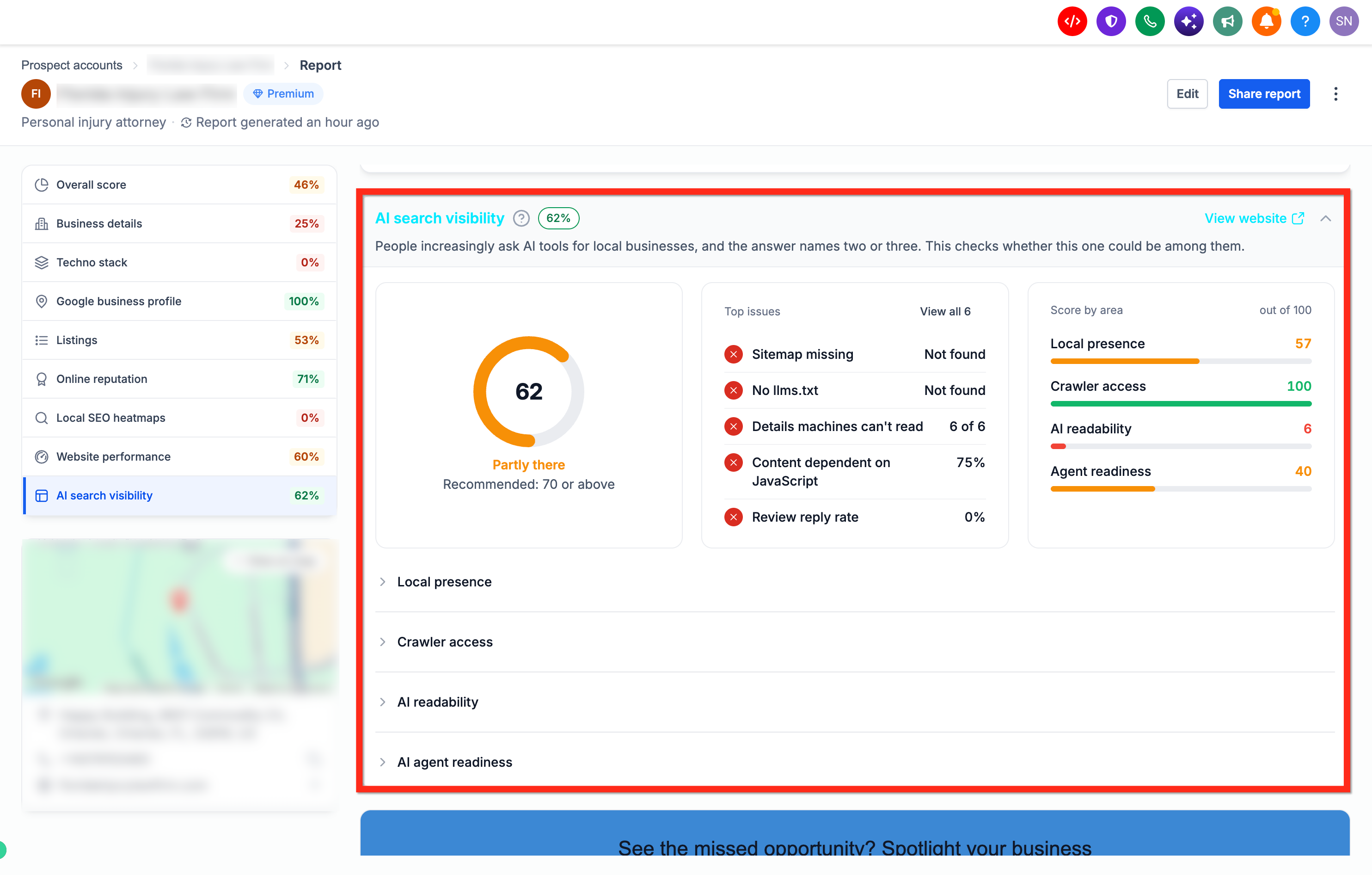
The AI Search Visibility audit lives inside a Marketing Audit Report and evaluates how readily AI tools such as ChatGPT, Claude, Perplexity and Gemini can find, read and act on a business’s online presence. It delivers an overall score out of 100, individual scores for four visibility categories, a list of top issues, and prioritized recommendations.
To access the audit, open the Marketing Audit Report for a prospect and select the AI Search Visibility option from the left hand navigation. The report displays the overall score, the four category scores and lets you expand each section to view detailed findings.
After reviewing the data, you can click the Share Report button to email, text or generate a shareable link that delivers the audit directly to the prospect.
03How businesses use AI Search Visibility audit
- Marketing agency. The agency opens a prospect’s Marketing Audit Report, selects AI Search Visibility, reviews the scores and recommendations, and uses the Share Report button to email the audit to the client.
- Local dental practice. The practice creates a prospect entry for its own business, runs the marketing audit, checks the AI Search Visibility scores, expands each area to understand issues such as missing phone numbers or blocked crawlers, then shares a link with staff for further action.
- Ecommerce store. The store’s team runs a Marketing Audit Report on its website, opens the AI Search Visibility section, examines the AI Agent Readiness findings to see if booking elements are detectable, and shares the audit via SMS to the marketing manager.
04The numbers and rules that matter
- Overall score out of 100 showing AI search readiness.
- Top issues highlighting problems that may limit AI access or understanding.
05Before you start
- A prospect must be added in the Prospecting tool.
- The Run marketing audit report option must remain selected when the prospect is created.
06How to set up and use AI Search Visibility audit in HighLevel
View and share the AI Search Visibility audit
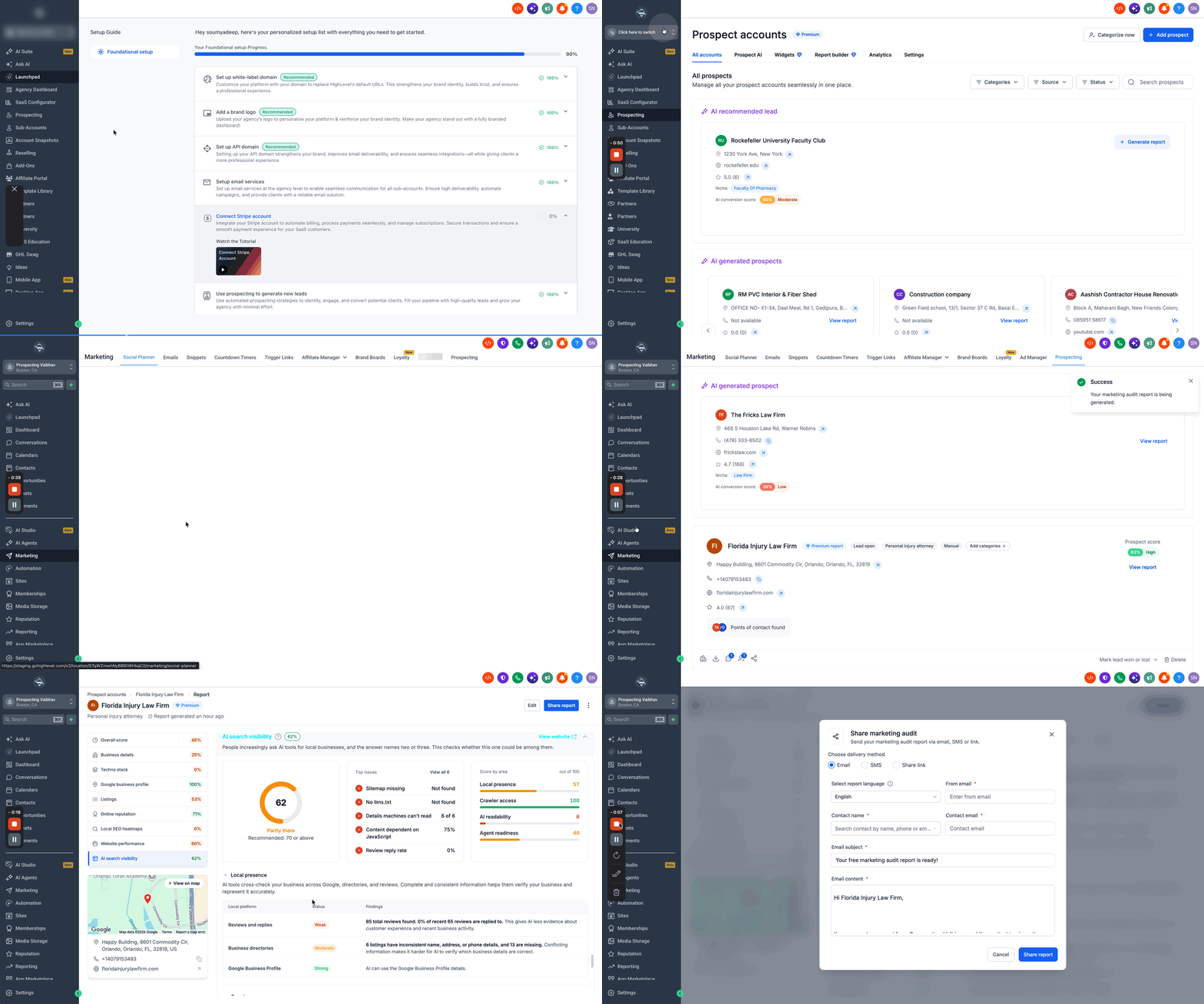
- Navigate to Agency View > Prospecting, or within a subaccount go to Marketing > Prospecting.
- Search for the business name and add it as a prospect.
- Confirm that Run marketing audit report stays selected so the audit will generate.
- Open the generated Marketing Audit Report.
- Select AI Search Visibility from the left sidebar.
- Review the overall score, Top issues and the four area scores.
- Expand each area to see individual checks and findings.
- Review the prioritized recommendations to identify the most important improvements.
- Click Share Report and choose email, SMS, or a shareable link to send the audit to the prospect.
07What it looks like in HighLevel
08Things to know before you rely on it
- The AI Search Visibility score indicates how ready a business is for AI discovery but does not guarantee that an AI assistant will recommend the business.
09How it connects to the rest of HighLevel
- Explore all other reporting capabilities available in HighLevel. All Reporting features
- Learn how attribution sources affect the interpretation of marketing data. Understanding attribution sources
- Review pricing options if you need a plan that includes the Prospecting tool. HighLevel pricing and plans
Michael's take

Prospecting often stalls when you can’t quickly see why an AI assistant might miss a prospect’s info. The AI Search Visibility audit provides a clear score and prioritized recommendations.
I would look at the overall AI visibility score and use the top issues list to focus the first conversation with the prospect.