
01Who this is for
- Call center managers, need to recognize that blocked caller IDs will be grouped under one placeholder number.
- Small business owners who run group texting campaigns, must know which phone numbers support true group threads.
- Agency owners using third party integrations, should verify the source of automated messages to avoid false alarms.
02Conversations issues, explained
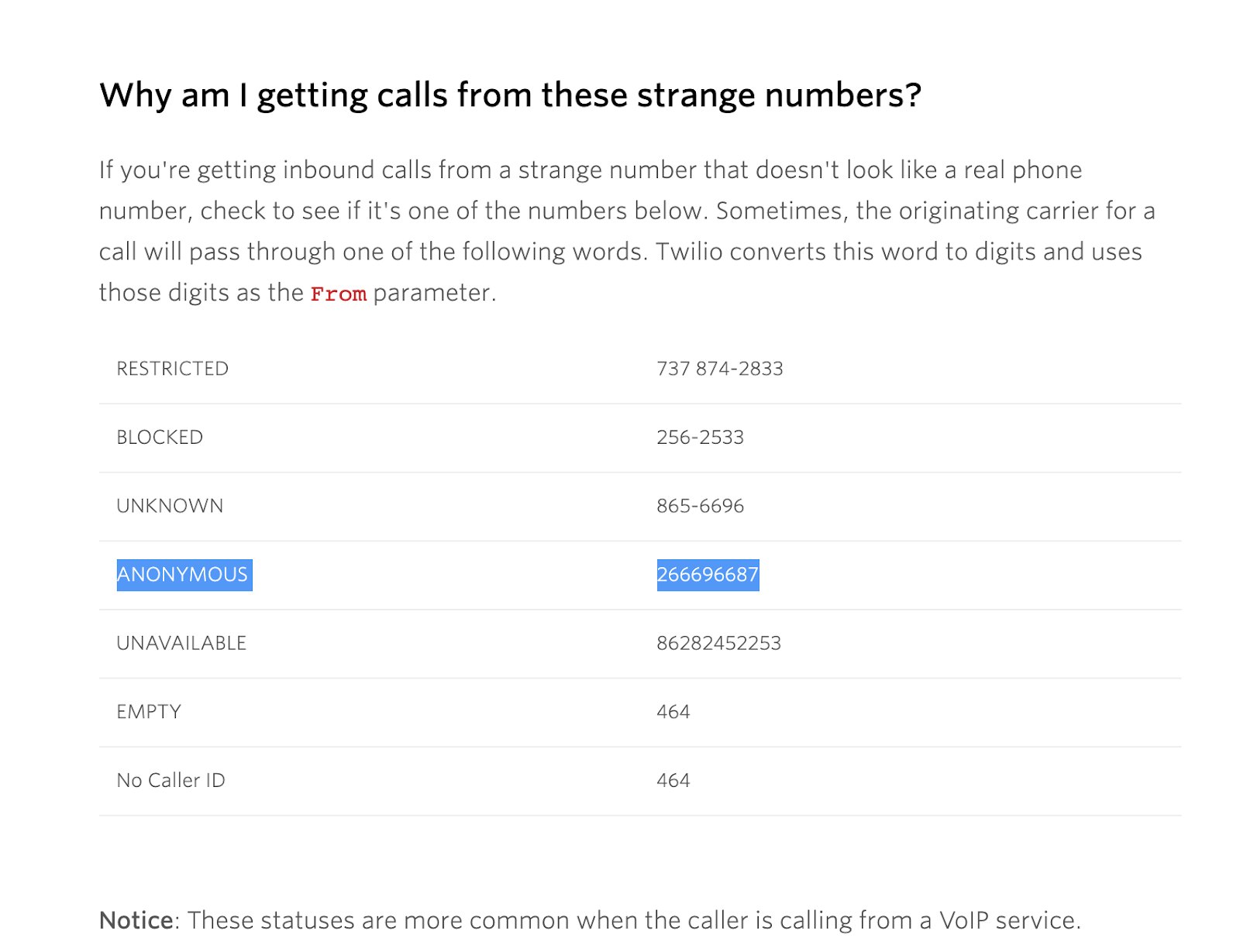
Conversations relies on the information supplied by carriers, messaging providers, and connected apps. If the carrier does not deliver a distinct caller ID, the platform groups those calls under a single system generated placeholder. The same principle applies to messages: when the sender is an integration, the source field records that origin.
When a number type does not support group texting, such as toll free, short code, or international numbers, each reply is treated as an individual one to one message. This causes separate conversation threads. All of these behaviors are built into the platform and do not indicate an error.
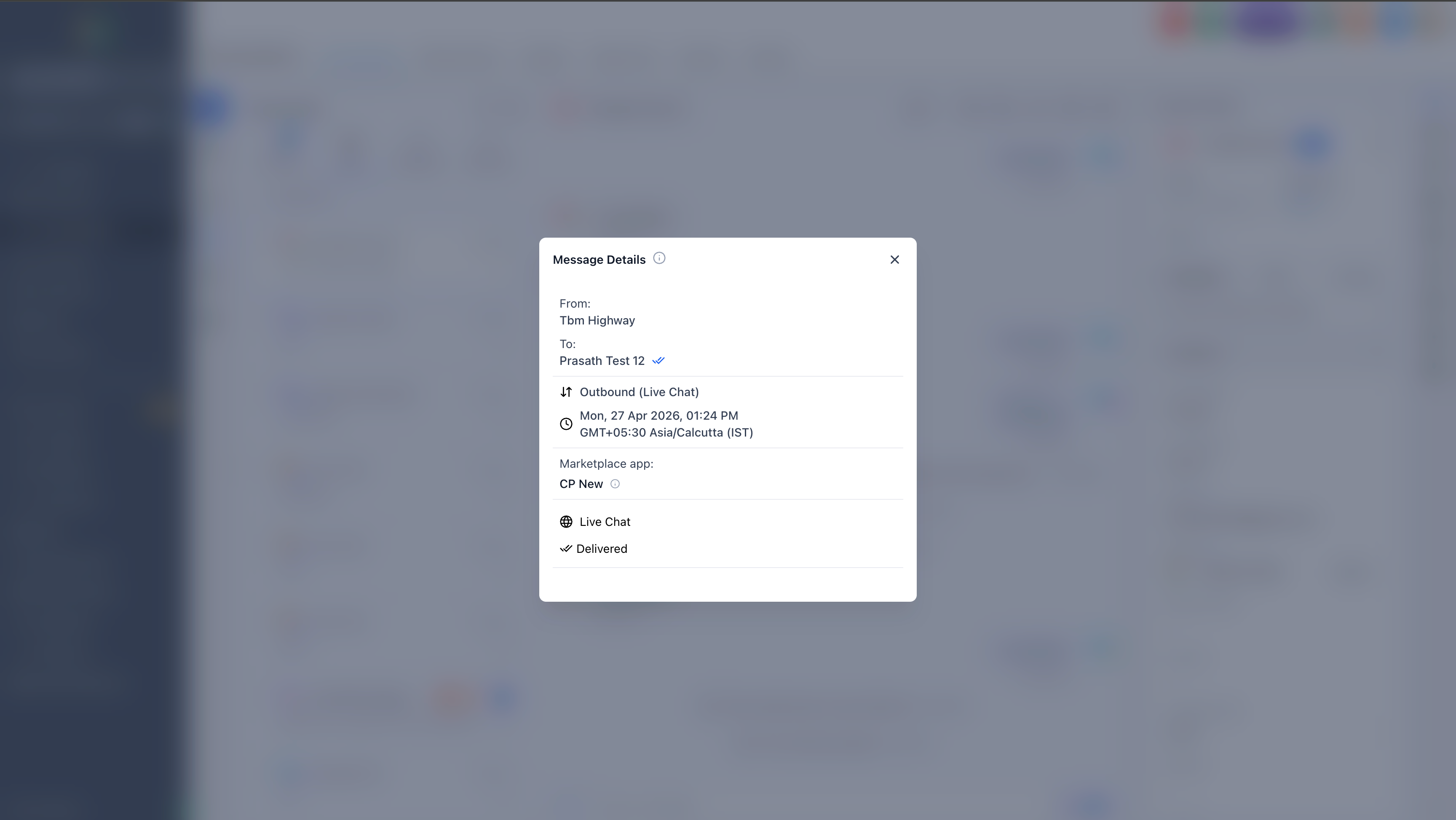
The feature lives inside the Conversations inbox. Individual items can be opened, and the Message Details panel reveals a “Source” field that tells whether a message came from a user, workflow, or Marketplace app.
03How businesses use conversations issues
- Dental practice. Staff notice several missed calls appearing under the same placeholder number. They advise patients to disable caller ID blocking on their phones so future calls will be recorded with the correct number in Conversations.
- Real estate agency. Agents send a group text to a list of prospective buyers using a US long code number. Because the number type supports group texting, replies stay inside the original thread, keeping the dialogue organized.
- Online coaching business. A workflow sends reminder messages via a connected integration. When an unexpected message shows up, the coach opens Message Details, checks the Source field, and confirms the automation triggered it rather than an error.
04The numbers and rules that matter
- Placeholder numbers can vary by carrier, examples include generic numbers like +266696687.
- Group Texting is supported for eligible +1 long code numbers in the US and Canada.
- Toll free numbers, short codes, and international numbers are not supported for group texting.
05How to set up and use conversations issues in HighLevel
Identify the origin of an unexpected message
- Open the message in the Conversations view and select Message Details from the options.
- In the details pane, locate the Source field to see if the message was sent by a Marketplace app, custom integration, workflow, or messaging provider.
06What it looks like in HighLevel
07Things to know before you rely on it
- Placeholder numbers vary by carrier; they are generic identifiers like +266696687.
- Group texting works only with US or Canada +1 long code numbers; toll free, short code, and international numbers do not support it.
- Anonymous caller IDs cannot be revealed by HighLevel; callers must disable blocking on their devices to be identified.
08If something goes wrong
- A message appears in Conversations without a recognizable sender.. Open Message Details and review the Source field to determine whether a connected integration or workflow generated the message.
- Replies to a group text are showing up as separate conversations.. Switch to a US or Canada +1 long code number for the group texting workflow, as other number types treat each reply as an individual message.
09How it connects to the rest of HighLevel
- Use the SMS delivery troubleshooting guide to resolve message issues. SMS troubleshooting
- Learn how to prevent carrier filtering errors like 30007. Carrier filtering guide
- Review pricing and rebilling details for the phone system. Pricing and billing
Michael's take

Wondering why the same number keeps popping up for different callers? That’s because the carrier hides the real number and HighLevel uses a placeholder, so you see a single generic ID. It isn’t a bug; it’s how blocked IDs work.
If you need to tell callers apart, the only fix is to have them call without the anonymous setting. For group texts, make sure you’re using a US or Canada +1 long code; otherwise each reply will show up as its own conversation. Check Message Details to see if an integration is the source before you think the platform is broken.