
01Who this is for
- Marketing managers who run large SMS campaigns need a systematic way to resolve delivery blocks and keep outreach on schedule.
- Customer support teams handling inbound queries can quickly verify why a contact did not receive a confirmation text.
- Agency owners managing multiple client accounts benefit from a repeatable process to troubleshoot SMS across different phone providers.
02SMS delivery issues, explained
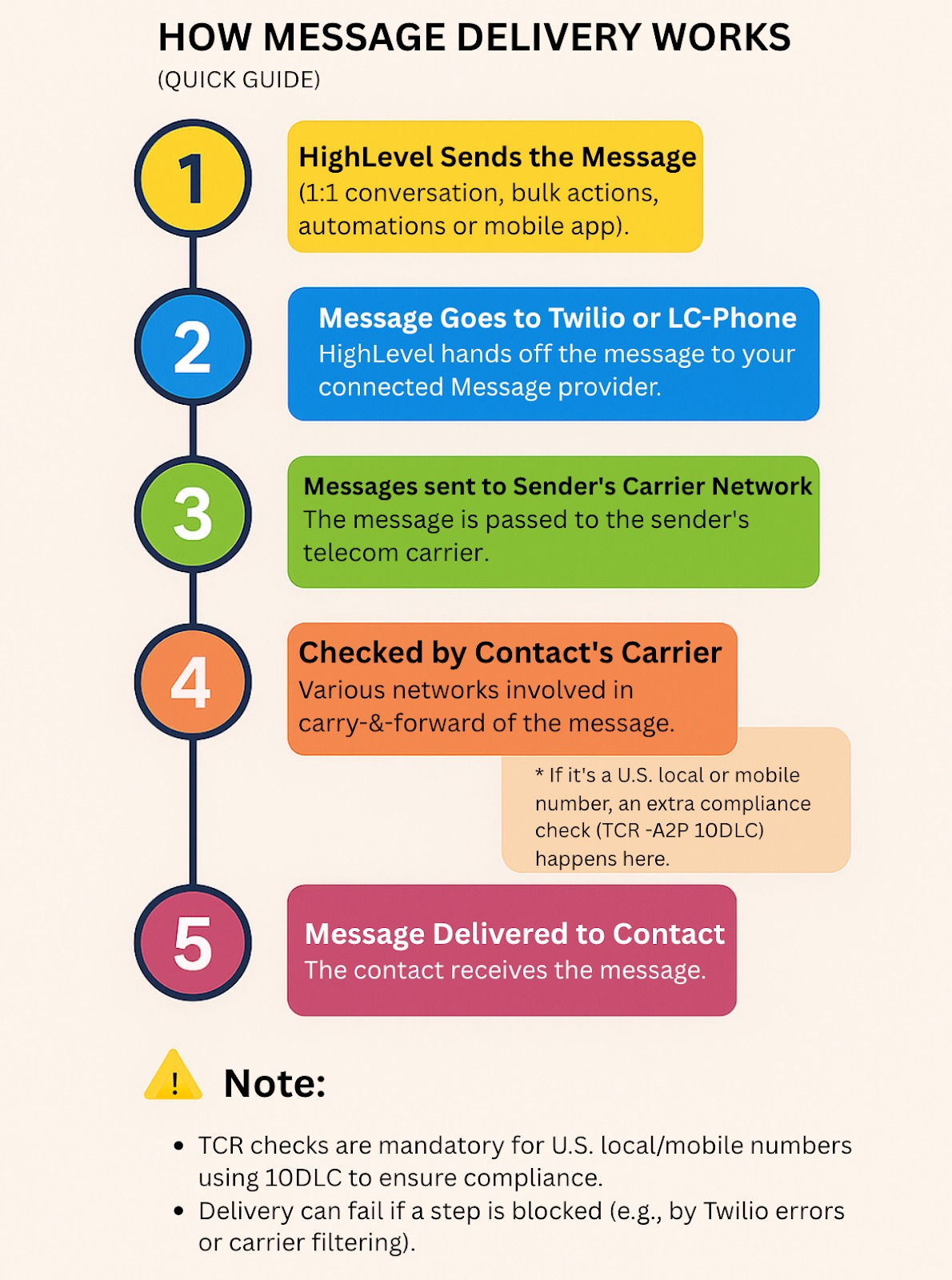
The feature is a detailed troubleshooting framework for SMS messages sent through HighLevel. It categorises delivery into three layers, HighLevel platform validation, phone provider checks, and the mobile carrier, so users can see where a failure originates. Error codes are surfaced in Conversations, contact timelines, workflow logs, and provider specific logs.
When a message fails, the guide directs users to note the exact error code, then follow a nine step checklist. Steps cover scope identification, inspection of the failed message, verification of recipient and sender numbers, account restrictions, message content, error code lookup, retesting, and escalation if needed. The process lives within the HighLevel interface, primarily in the Conversations tab and related log screens.
03How businesses use SMS delivery issues
- Dental practice. A dental office uses the checklist to confirm why appointment reminder texts are not reaching patients. Staff open the failed message in Conversations, verify the patient’s mobile number, ensure the practice’s sending line is SMS capable, and adjust content if it triggers a filter.
- Real estate agency. Agents troubleshooting missed property alert texts follow the steps to validate their outbound number’s A2P registration, check daily send caps, and retest after correcting any content issues before resending to prospects.
- Ecommerce store. The store’s marketing team uses the error code dictionary to identify a 30007 filtering error, revises promotional language to meet policy standards, and then sends a test order confirmation SMS to confirm successful delivery.
04The numbers and rules that matter
- Daily send caps and ramp up limits are enforced by HighLevel.
- MMS attachment limit is 5 MB.
- Error code 30007 indicates carrier filtering.
- Error codes 30032, 30033, 30034 relate to A2P or Toll Free registration.
05How to set up and use SMS delivery issues in HighLevel
Diagnose and resolve SMS delivery failures using the checklist
- Determine whether the problem affects a single contact, a specific sending number, or all outbound messages.
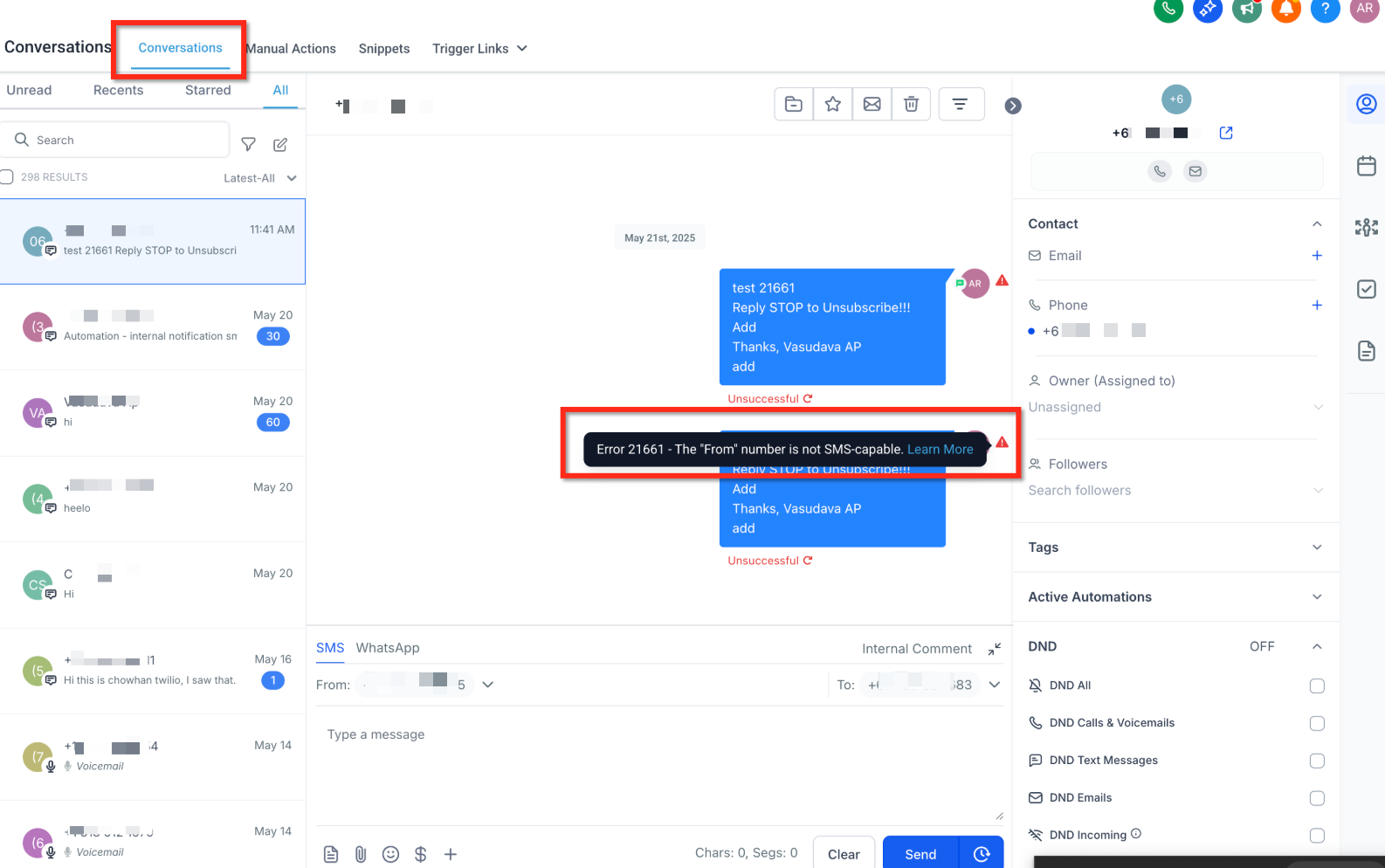
- Open the failed message in Conversations and read the displayed error explanation.
- Verify that the recipient's phone number is a valid, correctly formatted mobile number and not opted out.
- Confirm the sending number is active, SMS capable, and has any required A2P or Toll Free registration.
- Check for account level limits such as daily send caps, ramp up periods, or missing geo permissions.
- Review the message length, attachment size, URLs, and overall content for compliance with messaging policy.
- Look up the error code in the LC Phone System, Error Code and Warning Dictionary for exact cause and guidance.
- After fixing the identified issue, send a test SMS to verify successful delivery.
- If the message still fails, gather the sending number, recipient number, timestamp, and error code and forward them to HighLevel Support.
06What it looks like in HighLevel
07Things to know before you rely on it
- MMS attachments must stay below 5 MB, otherwise delivery will fail.
- Daily send caps and ramp up limits may restrict volume for new numbers or campaigns.
- A2P or Toll Free registration is required for US local and toll free numbers before messaging can occur.
- International messages need geo permissions enabled for the destination country.
08If something goes wrong
- Message continues to fail after applying checklist steps. Contact HighLevel Support and provide the sending number, recipient number, timestamp, and error code for deeper analysis.
09How it connects to the rest of HighLevel
- Review SMS compliance settings to manage opt outs and sender ID requirements. SMS compliance settings
- Read best practices to improve SMS deliverability and avoid carrier restrictions. SMS deliverability best practices
- Look up detailed error meanings in the LC Phone System error code dictionary. Common SMS delivery errors
Michael's take

SMS delivery issues are worth the effort only if you rely heavily on texting customers.
If you send few messages or use another channel, you can skip this deep dive.