
01Who this is for
- Founders who run SMS marketing need to avoid carrier blocks that stop outreach.
- Marketing managers at local retailers must include clear opt out instructions to stay compliant.
- Customer support leads sending appointment reminders must use proper sender IDs and respect DND lists.
02SMS filtering, explained
The platform reports error 30007 when a carrier filters an outgoing SMS because the message lacks required consent, sender identification, STOP language, or contains prohibited content such as spam like text, illegal material, or public URL shorteners. A filtered message can automatically place the contact in DND status.
03How businesses use SMS filtering
- Dental practice. The practice creates appointment reminder texts that list the clinic name and add STOP instructions at least once a month. It verifies each patient has opted in and uses the clinic’s local number as the sender. The practice reviews DND lists daily to keep the contact base clean.
- Real estate agency. Agents send property updates only to leads who have explicitly consented. Each message includes the agency’s branded sender ID and a clear STOP option. The agency avoids URL shorteners, instead using its own domain for any links.
- Ecommerce store. The store sends order status notifications from a registered short code, includes the store name and opt out text, and ensures no emojis or excessive punctuation appear. It monitors complaint spikes and stops messaging numbers that trigger error 30007.
04The numbers and rules that matter
- Error 30007 indicates carrier filtering due to content, sender identity, or compliance reasons.
- Messages must include STOP language at least once every 30 days if you message the same contact regularly.
- Reconfirm opt in every 18 months to avoid accidental messaging of recycled numbers.
- Forbidden use cases include payday loans, debt relief, cannabis, and other listed categories.
- A message triggering 30007 can automatically mark a contact as DND.
- Any U.S. Bound SMS traffic must comply with A2P 10DLC registration.
05How to set up and use SMS filtering in HighLevel
Share contact links with support
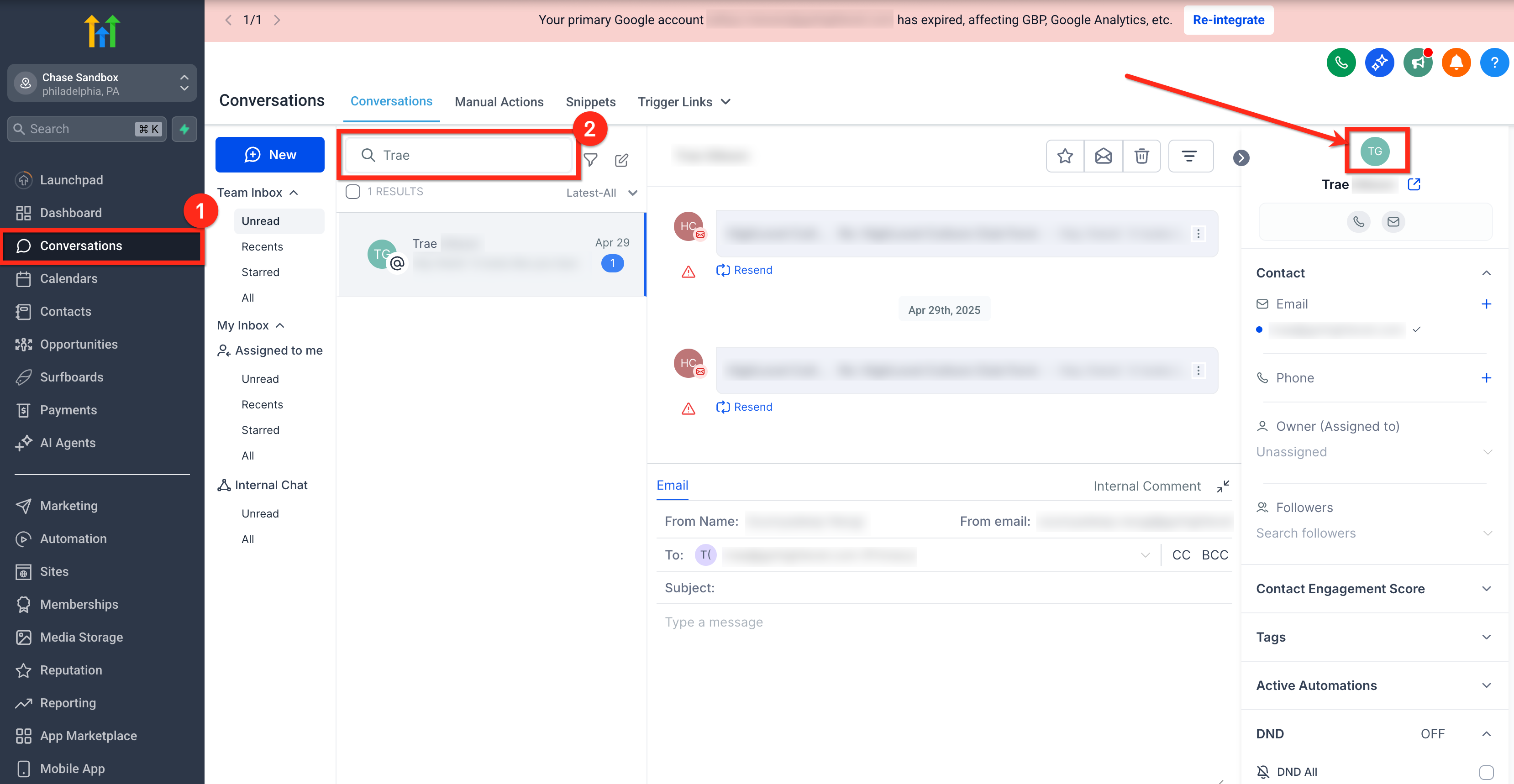
- Open the Conversations section from the relevant subaccount.
- Search for the affected contact by entering their name or phone number.
- Select the contact’s image to open the detailed view.
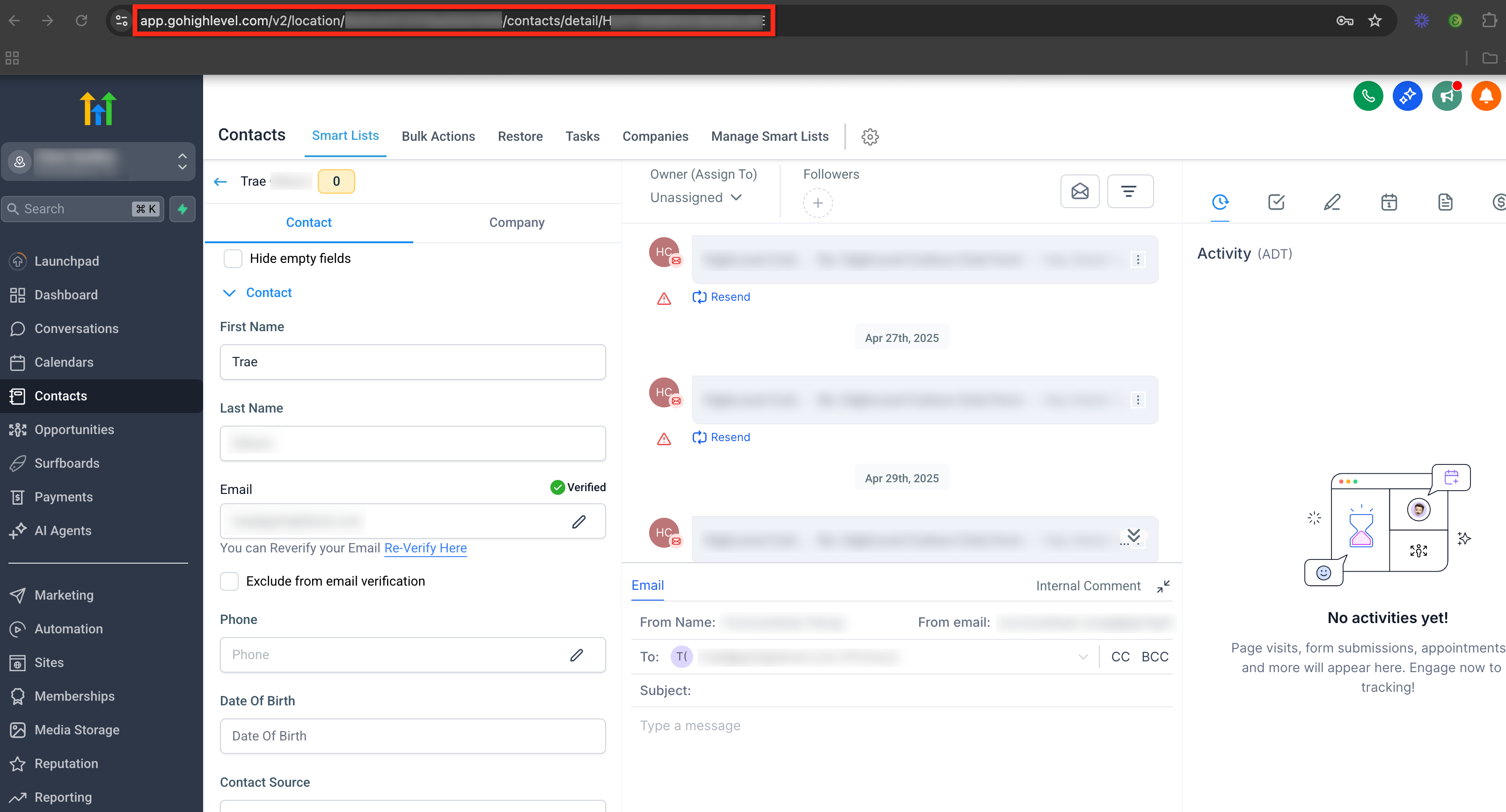
- Copy the browser URL shown in the address bar.
06What it looks like in HighLevel
07Things to know before you rely on it
- Carriers filter messages that lack opt in consent, sender identification, or STOP language.
- STOP instructions must appear at least once every 30 days for recurring messages.
- A message that triggers error 30007 can automatically place the contact in DND status.
- Forbidden use cases such as payday loans, debt relief, or cannabis are not allowed.
- Public URL shorteners and obfuscated links must not be used in SMS content.
08If something goes wrong
- Messages are blocked with error 30007 despite following compliance rules.. Collect three or more recent contact examples showing the error and share their conversation URLs with the Support team.
09How it connects to the rest of HighLevel
- Review the SMS compliance settings for opt out language and sender ID. SMS compliance settings
- Check the troubleshooting checklist for SMS delivery issues. SMS delivery troubleshooting
- Read best practices for SMS deliverability and avoiding restrictions. SMS deliverability best practices
- Learn how to spot and monitor common SMS delivery errors. SMS error guide
- Get guidance on preparing and fixing A2P 10DLC campaigns. A2P 10DLC guide
Michael's take

Getting your texts blocked because carriers think they are spam can cripple a campaign. The first thing I would get right is making sure every outbound message includes clear STOP instructions at least once a month and identifies the sender.
Once the opt in and sender ID are solid, I would double check that no public URL shorteners are in use and that all links point to a branded domain. That simple step keeps the traffic transparent and significantly reduces the risk of hitting error 30007.