
01Who this is for
- Sales teams, need reliable call outcome data to avoid false completed statuses.
- Call center managers, want clear accountability on which agents actually answer calls.
- Marketing agencies, rely on accurate reporting to trigger follow up automations.
02Call Connect, explained
Call Connect adds a confirmation step to inbound routing. When a contact answers, the system dials the assigned agent, plays a brief whisper, and waits for the agent to press any key. Only after that press does the system bridge the two parties.
If the agent does not respond, the call ends without being marked as connected. This prevents Twilio’s default "Completed" label from appearing on voicemails, missed calls, or time outs. The feature is configured from a phone number’s advanced settings within the Phone System section of HighLevel.
The whisper message can be customized to instruct the agent on which key to press. Enabling Call Connect also activates the option to play the whisper, ensuring agents hear the prompt before confirming.
03How businesses use call connect
- Real estate office. The office enables Call Connect on its main inbound number. When a prospect calls, the assigned realtor hears a whisper and must press a key. Only calls with that key press are logged as connected, keeping lead tracking accurate.
- Medical clinic. The clinic configures a custom whisper for its appointment line. Receptionists must confirm calls by pressing a key, so the system records genuine patient conversations and avoids counting voicemails as completed calls.
- IT services firm. The firm forwards its HighLevel number to personal mobile phones. Call Connect prompts the mobile user to press a key before the caller is connected, allowing the platform to differentiate real answers from answering machines.
04How to set up and use call connect in HighLevel
Enable Call Connect
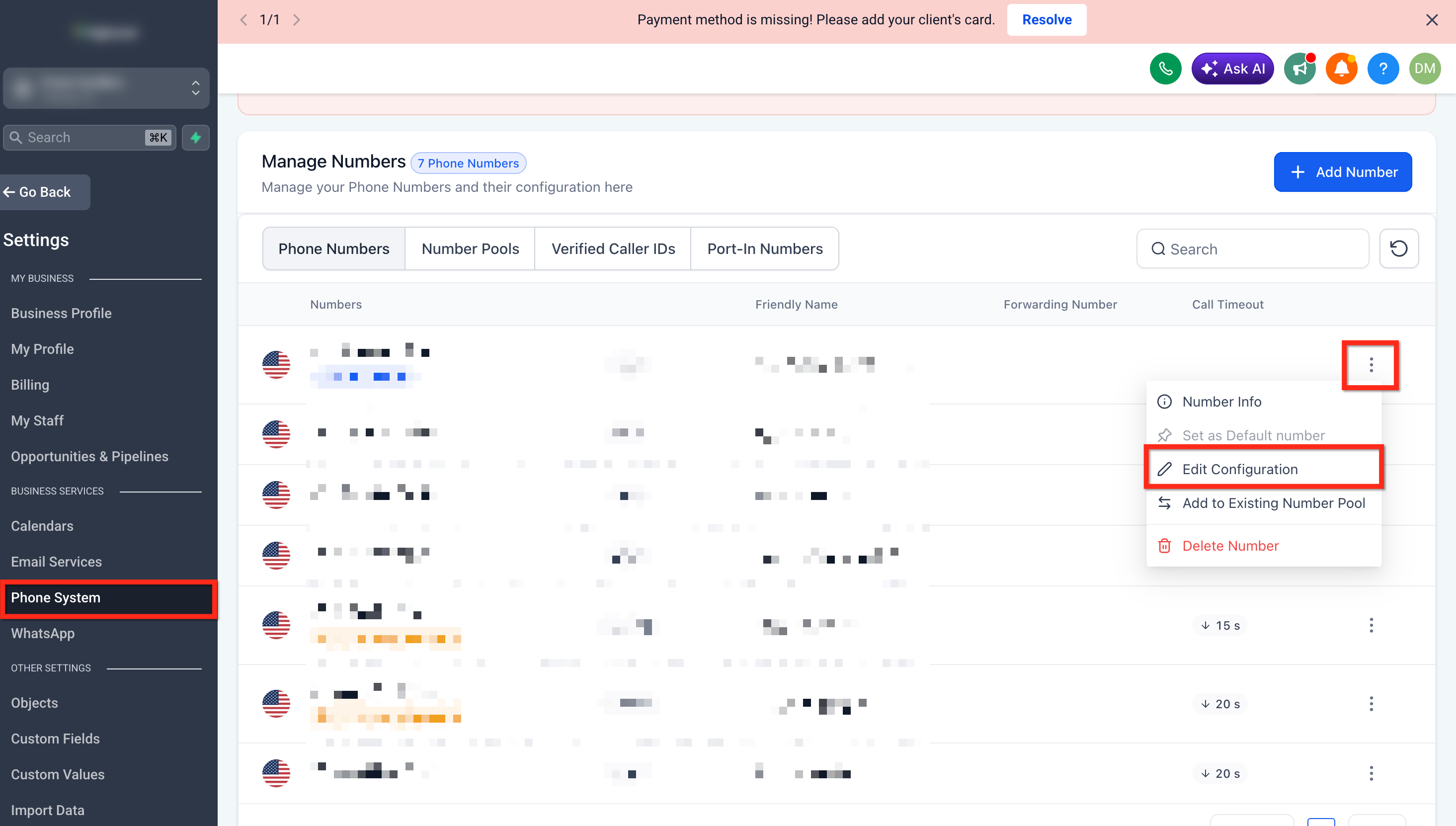
- Open Settings then select Phone System.
- Find the desired phone number and click the three dots beside it.
- Choose Edit Configuration from the menu.
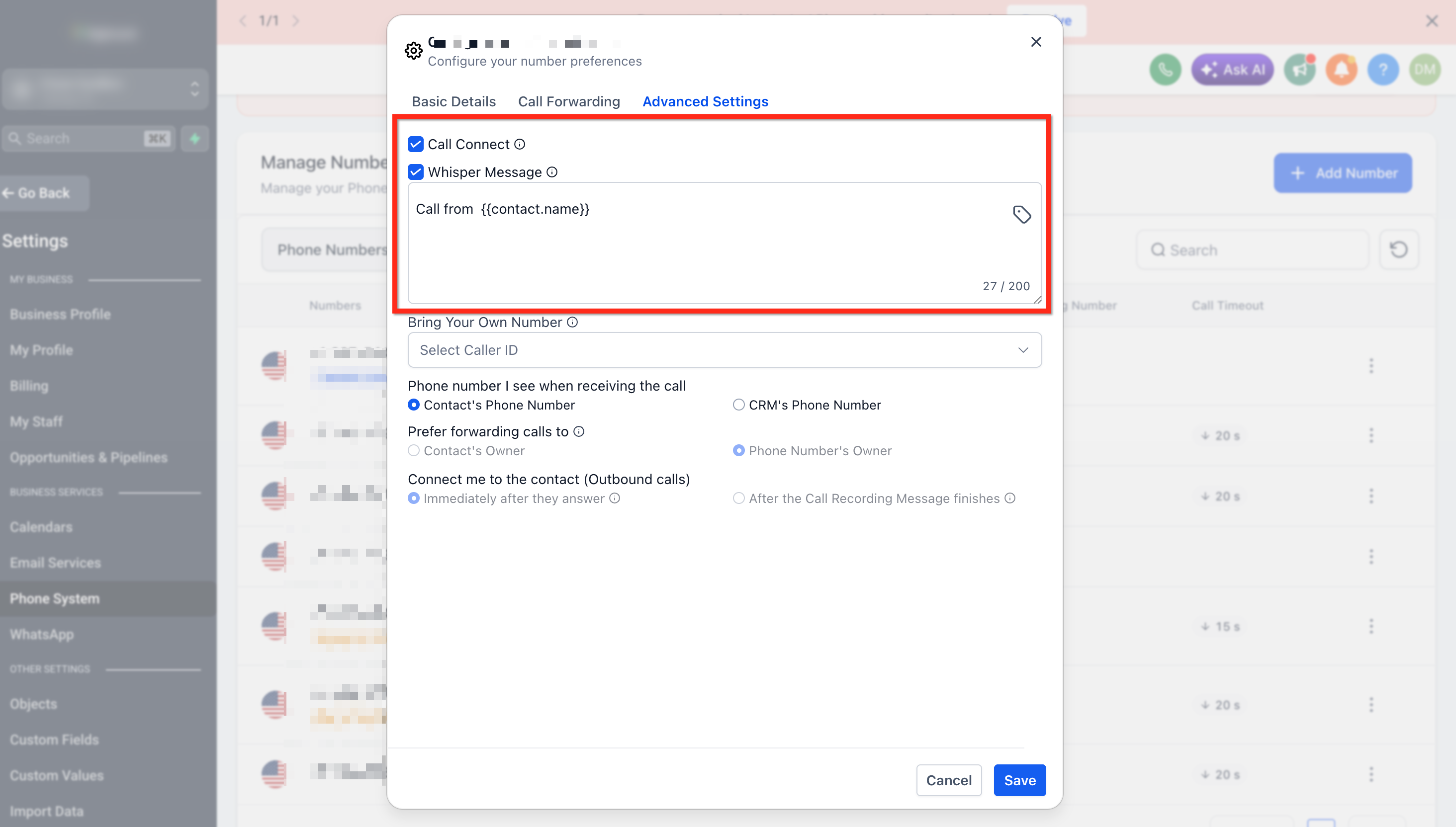
- Scroll down to Advanced Settings.
- Turn on the Call Connect toggle.
- Turn on the Play Whisper Message toggle.
- Edit the whisper text as needed and click Save.
05What it looks like in HighLevel
06Settings that matter
- Call Connect. Controls whether a key press from the agent is required before the call is considered connected.
- Play Whisper Message. Enables a short audio prompt that tells the agent to press a key to accept the call.
07Things to know before you rely on it
- The feature applies to inbound calls that are routed through assigned users or teams.
- Calls answered inside the HighLevel web or mobile app generally do not need Call Connect because the platform already confirms answer.
- If the number is forwarded to an external phone, Call Connect helps distinguish a human answer from voicemail.
08How it connects to the rest of HighLevel
- Read the Call Connect Setup + Benefits article for an overview of why the feature matters. Call Connect setup guide
- Review the Phone Number Configuration Options to understand where Call Connect fits in the broader phone system. Phone number settings
Michael's take

Most people assume that a call marked “Completed” means someone actually talked to a lead. The truth is that Twilio tags every call attempt as completed, even if it rings voicemail or never gets answered. That misleads reporting and can fire off automations at the wrong time.
I would turn on Call Connect for any number that forwards to an external line or is part of an inbound lead response flow. The whisper prompt and keypress give me confidence that the call truly connected before I let any follow up actions run.