
01Who this is for
- Founders who run outbound marketing campaigns and need their calls to be recognized as legitimate.
- Call center managers who handle support callbacks and want to reduce spam warnings for their agents.
- Compliance officers who must ensure calling practices meet carrier and regulatory expectations.
02Spam labels, explained
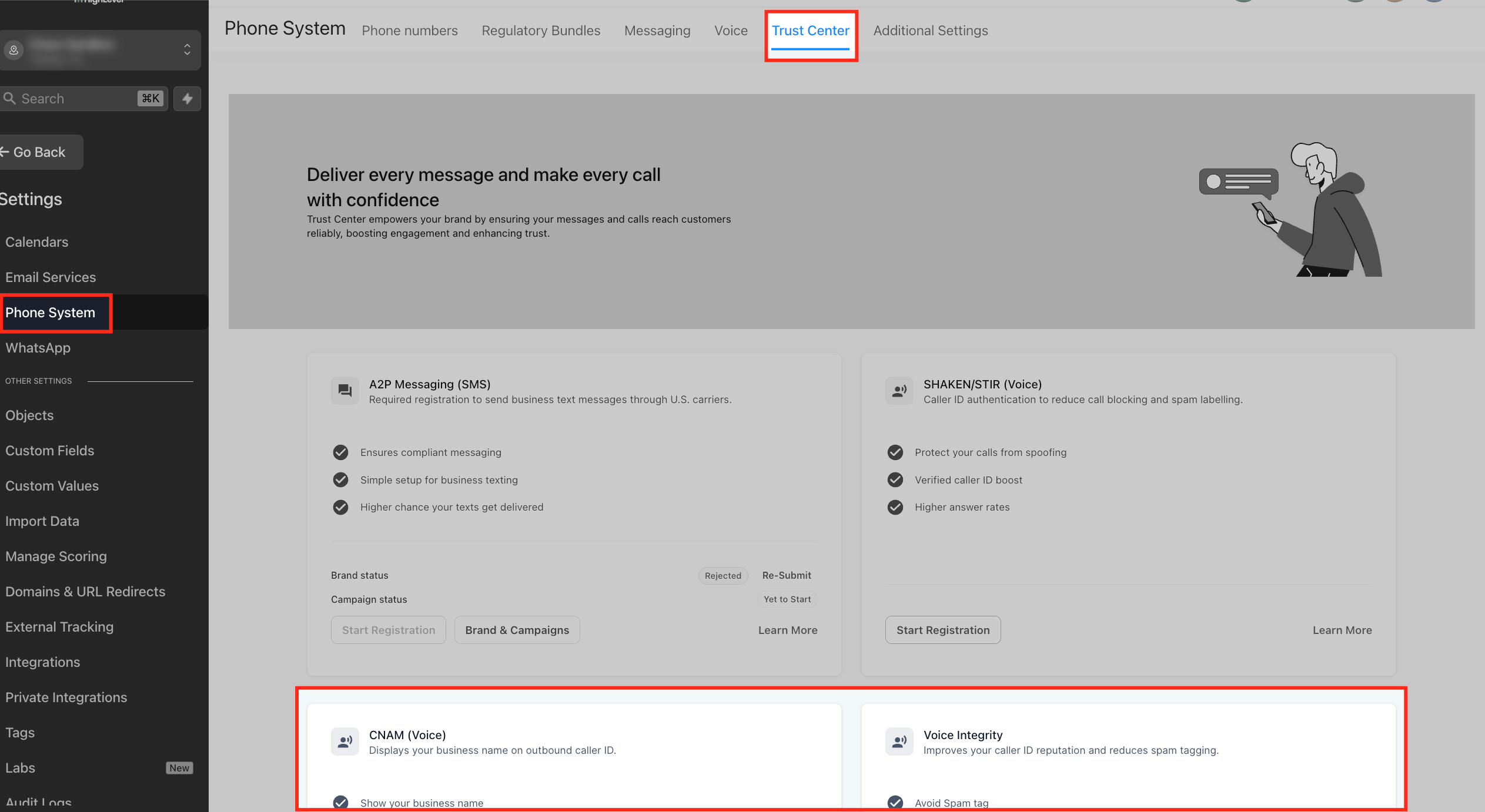
HighLevel provides three trust layers for outbound calls. The authentication layer uses SHAKEN/STIR to certify that a business is authorized to use a phone number. The identification layer applies CNAM so a registered name can appear on the recipient’s display, where supported. The reputation layer offers Voice Integrity, which submits eligible U.S. numbers to major caller analytics providers for review.
All three tools are accessed through Settings > Phone Numbers > Trust Center. SHAKEN/STIR and CNAM require an EIN for registration. Voice Integrity is limited to eligible U.S. numbers and follows successful SHAKEN/STIR registration. A separate Free Caller Registry exists for businesses without an EIN.
03How businesses use spam labels
- Real estate agency. The agency registers its sales line with SHAKEN/STIR to prove ownership, adds its brokerage name via CNAM, and submits the number to Voice Integrity to lower the chance of a spam label when reaching out to leads.
- Dental practice. The practice configures CNAM so patients see the clinic name on reminder calls, uses SHAKEN/STIR for authentication, and monitors Voice Integrity status to ensure appointment reminders are not flagged as spam.
- Ecommerce store. The store enrolls its order confirmation line in SHAKEN/STIR, adds its brand name with CNAM, and submits the number to Voice Integrity to improve deliverability of promotional outbound calls.
04Before you start
- Complete SHAKEN/STIR registration for the number.
- Configure CNAM where applicable.
- Confirm the phone number is an eligible U.S. number.
- Ensure business information is accurate and consistent.
05How to set up and use spam labels in HighLevel
Fix calls marked as spam in HighLevel
- Identify the exact outbound number showing the spam warning and note the label, carrier, and devices involved.
- Open Settings > Phone Numbers > Trust Center and verify the SHAKEN/STIR status; register if it is not active.
- From the Trust Center, open CNAM (Voice) and confirm the registered name is correct; update if needed.
- Navigate to Settings > Phone Numbers > Trust Center > Voice Integrity, select the eligible U.S. number, fill out the required business information, and submit the reputation review.
- If the business lacks an EIN, consider the Free Caller Registry alternative for eligible U.S. numbers.
- Review outbound call volume, consent handling, list accuracy, and calling patterns; adjust practices to avoid spikes or neighbor calling behavior.
- Continue monitoring carrier displays for spam labels, caller name appearance, and any new complaints; repeat remediation steps if needed.
06What it looks like in HighLevel
07Settings that matter
- SHAKEN/STIR. Authenticates the caller ID and verifies the business is authorized to use the outbound number.
- CNAM (Voice). Associates a U.S. phone number with a business or personal name for caller ID display where supported.
- Voice Integrity. Submits eligible numbers to caller analytics providers for reputation review and possible removal of spam labels.
08Things to know before you rely on it
- SHAKEN/STIR does not remove nuisance or spam labels; it only authenticates the caller.
- CNAM display depends on the receiving carrier and is not guaranteed for every call.
- Voice Integrity review can take time and does not ensure permanent label changes.
- All three tools apply only to eligible U.S. numbers; an EIN is required for SHAKEN/STIR and CNAM registration.
- Free Caller Registry follows a separate timeline from Voice Integrity.
09If something goes wrong
- Spam label remains after SHAKEN/STIR registration. Confirm SHAKEN/STIR is active in the Trust Center; then proceed to CNAM and Voice Integrity steps, as authentication alone does not remove the label.
- Business name does not appear after CNAM registration. Verify the CNAM entry is correct, but understand that the carrier decides whether the name is displayed.
- Only some carriers show a spam warning. Complete all applicable trust registrations, review calling behavior, and monitor which carriers continue to flag the number.
10How it connects to the rest of HighLevel
- Review A2P 10DLC requirements for eligible numbers A2P 10DLC guide
- Learn how to set up number pools for call tracking Number pool setup
- Start a 30 day HighLevel trial to test these features 30 day trial
- View HighLevel pricing and plan details Pricing page
- Explore the Founder Plan for advanced trust tools Founder Plan
Michael's take

Most people assume that simply enabling SHAKEN/STIR or CNAM will make a ‘Spam Likely’ warning disappear. In reality those tools only add trust signals; the label can persist if the calling patterns still look like spam. I would first verify that the number is authenticated, then submit it for a reputation review, and finally audit my outbound volume and consent handling.
If I were cleaning up a number that keeps getting flagged, I would walk through the step by step troubleshooting checklist, make sure the EIN based registrations are in place, and then taper the call volume up gradually. Only after those pieces are solid would I consider swapping the number.