
01Who this is for
- Support teams can quickly flag suspicious callers and prevent repeated interruptions.
- Sales groups benefit from fewer cold robocalls reaching reps, keeping call time focused on prospects.
02Inbound spam calls, explained
Number Intelligence scans incoming calls from unknown U.S. numbers and flags those that appear to be spam with a “Spam Likely” label. It does not block calls on its own; downstream workflow or DND settings handle blocking.
Agents use a custom disposition named “Spam call” to label calls after they end. A workflow that watches for this disposition can enable inbound DND for the contact, stopping future inbound voice calls from that number.
An optional IVR can be placed before normal routing. The IVR asks callers to press a key, allowing you to route only those who respond correctly while sending others to voicemail or ending the call.
03How businesses use inbound spam calls
- Real estate agency. The agency turns on Number Intelligence to see a “Spam Likely” tag on unknown callers. After a call, agents select the Spam call disposition. A workflow then enables inbound DND for that number, preventing repeat nuisance calls.
- Dental practice. The practice adds an IVR that says, “Press 1 for appointments, press 2 for emergencies.” Callers who do not press a key are sent to voicemail, reducing automated robocalls while still allowing genuine patients to connect.
- IT consulting firm. Consultants mark unsolicited sales calls with the Spam call disposition. A workflow automatically applies inbound DND, and the firm uses a VIP tag to exempt key partners from the DND rule.
04The numbers and rules that matter
- HighLevel Mobile App version 3.97.3 or later shows Spam Likely labels on mobile.
- Autoclear DND workflow example uses a 30 day wait before disabling DND.
05How to set up and use inbound spam calls in HighLevel
Enable Number Intelligence
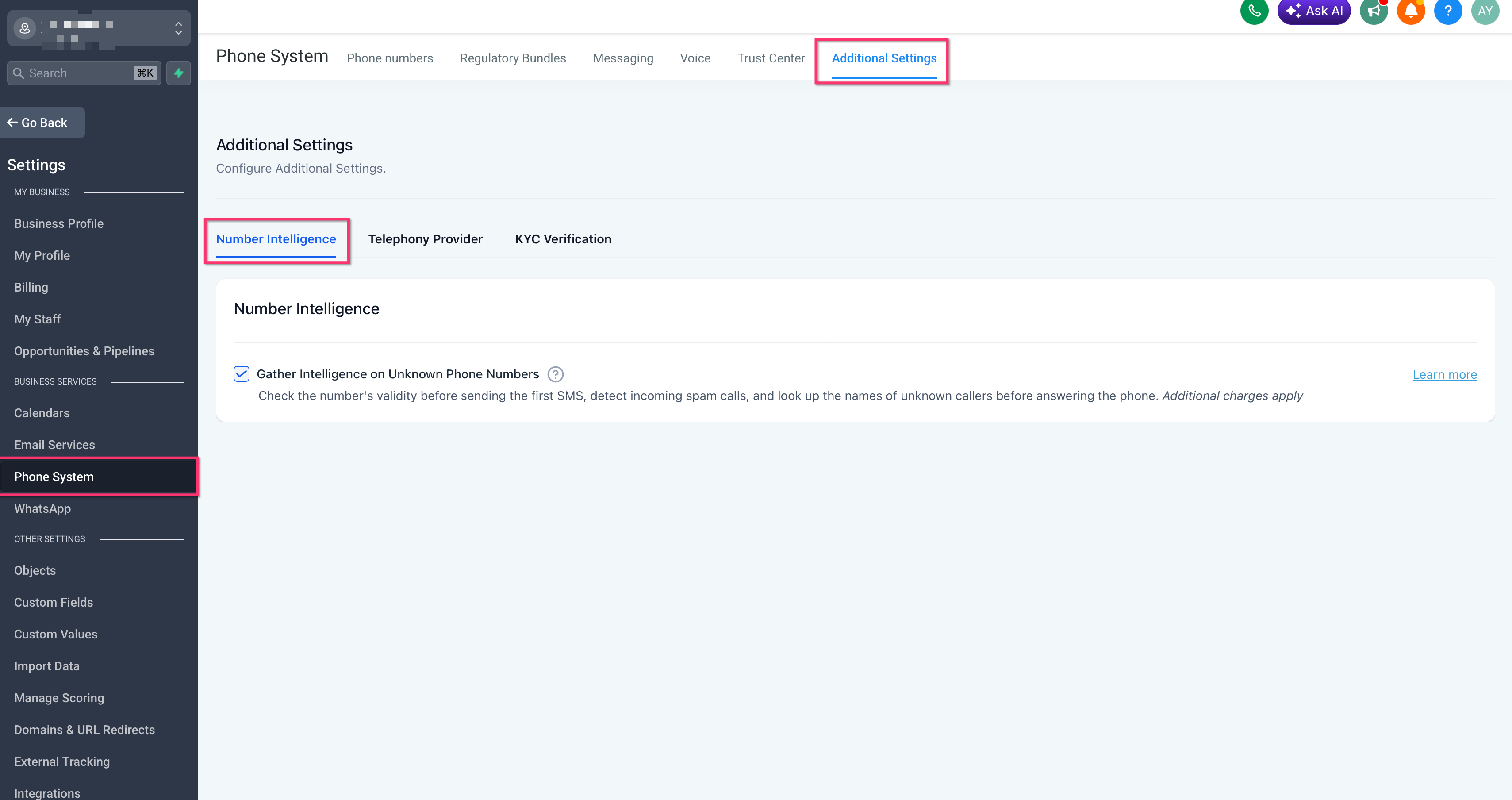
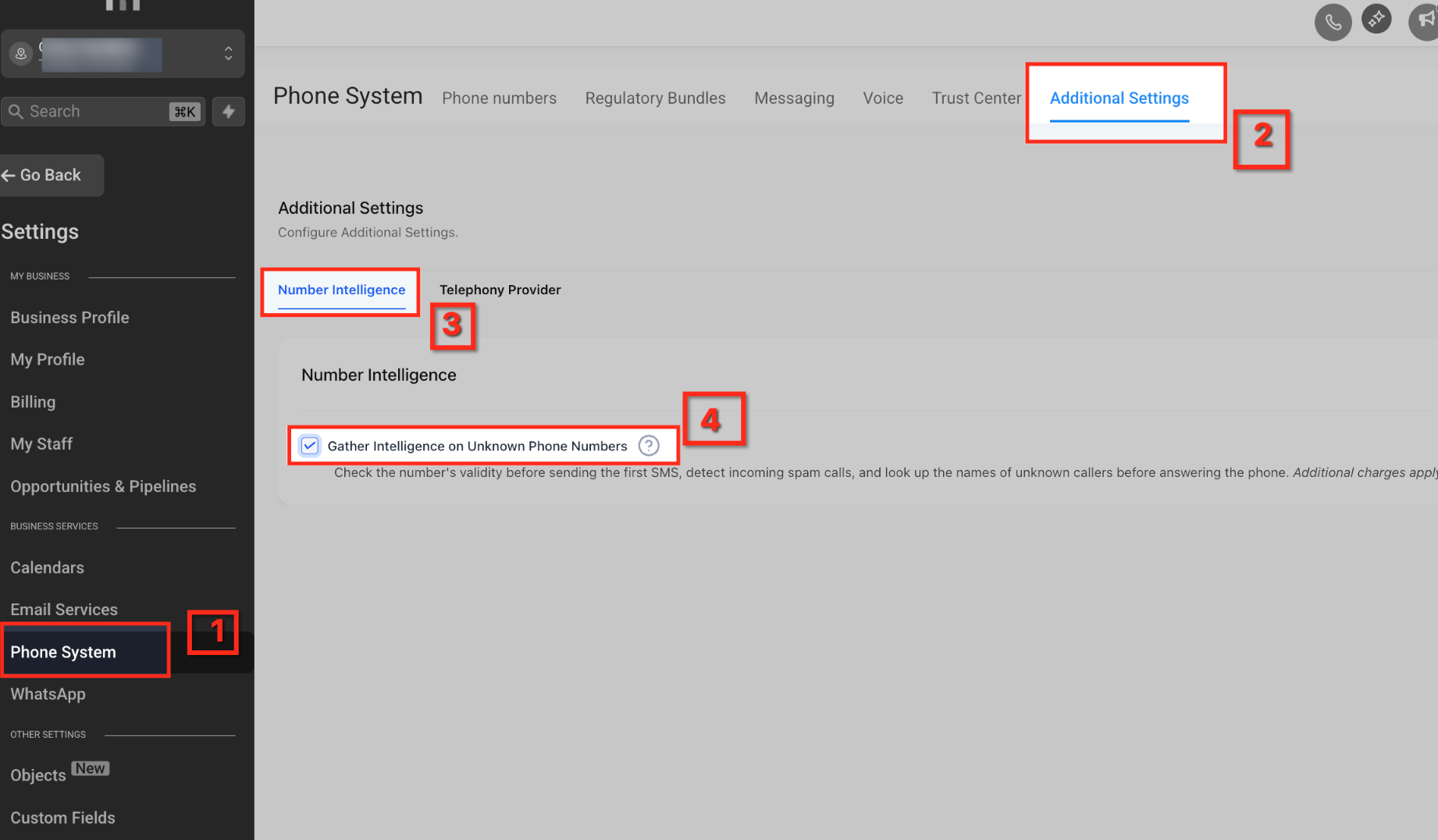
- Open Settings and select Phone System.
- Choose Additional Settings, then open Number Intelligence.
- Check the option Gather Intelligence on Unknown Phone Numbers.
- Save the changes.
Create a Spam Call Custom Disposition
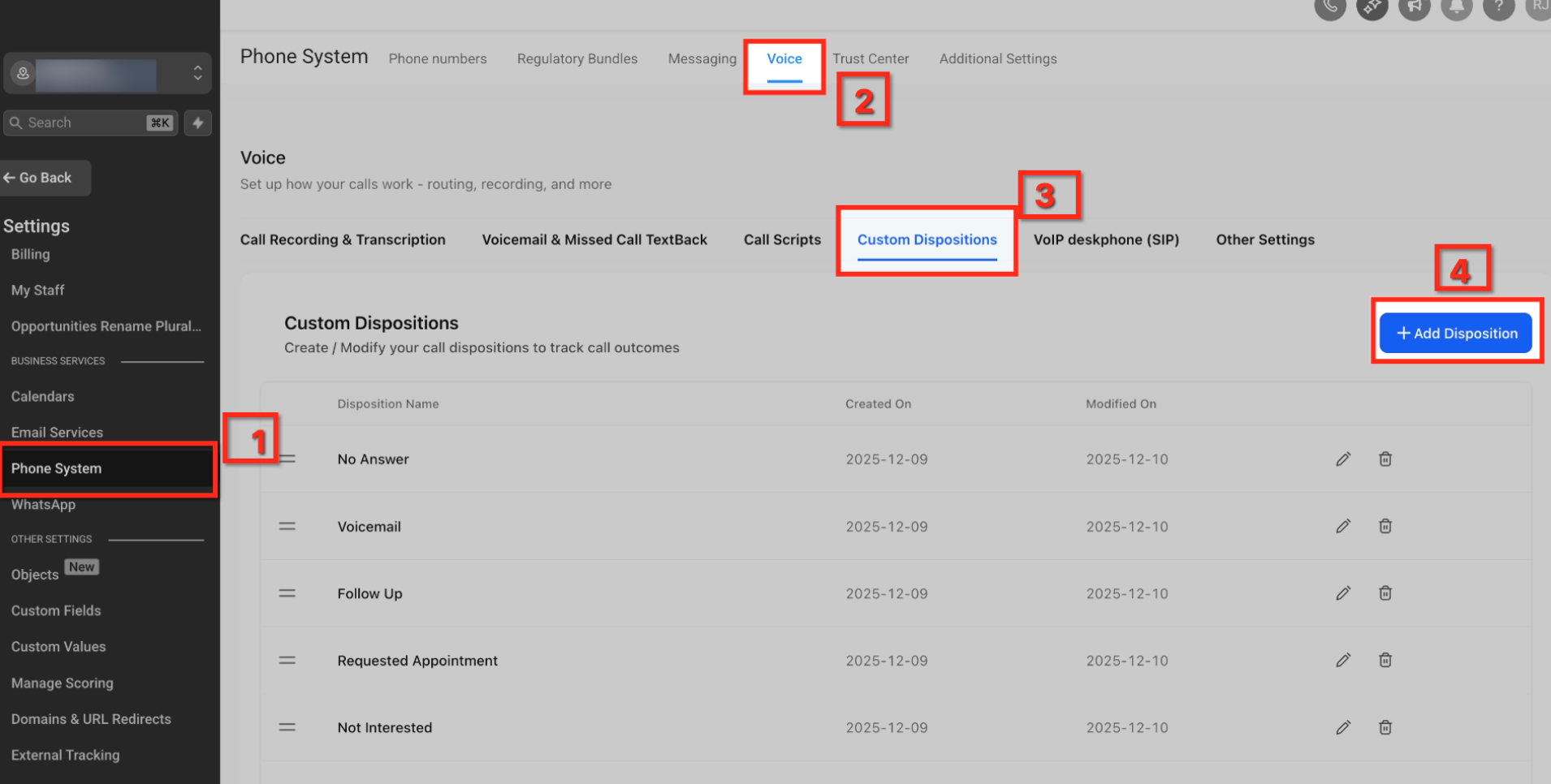
- Navigate to Settings > Phone System > Voice > Custom Dispositions.
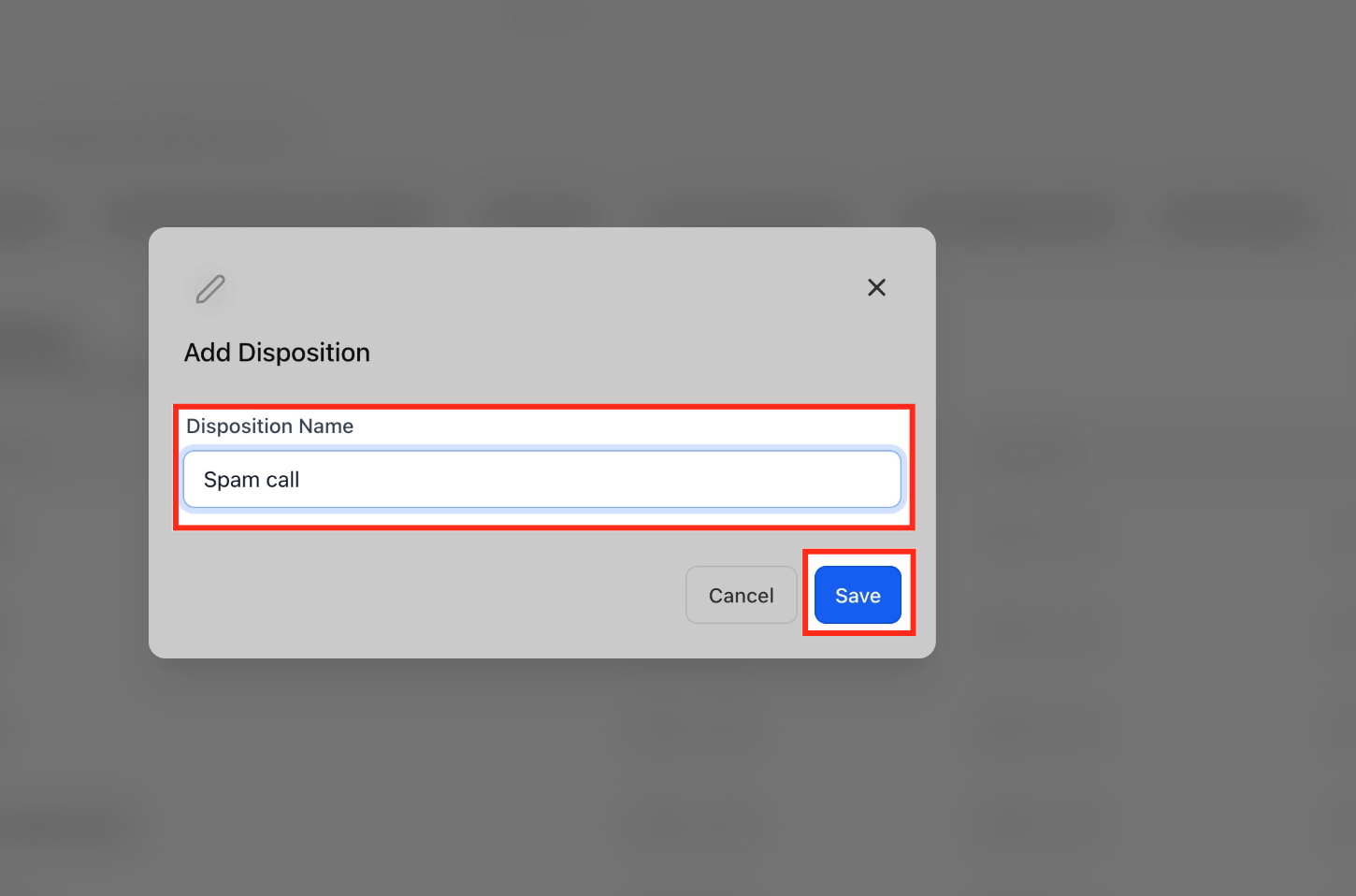
- Click the + Add Disposition button.
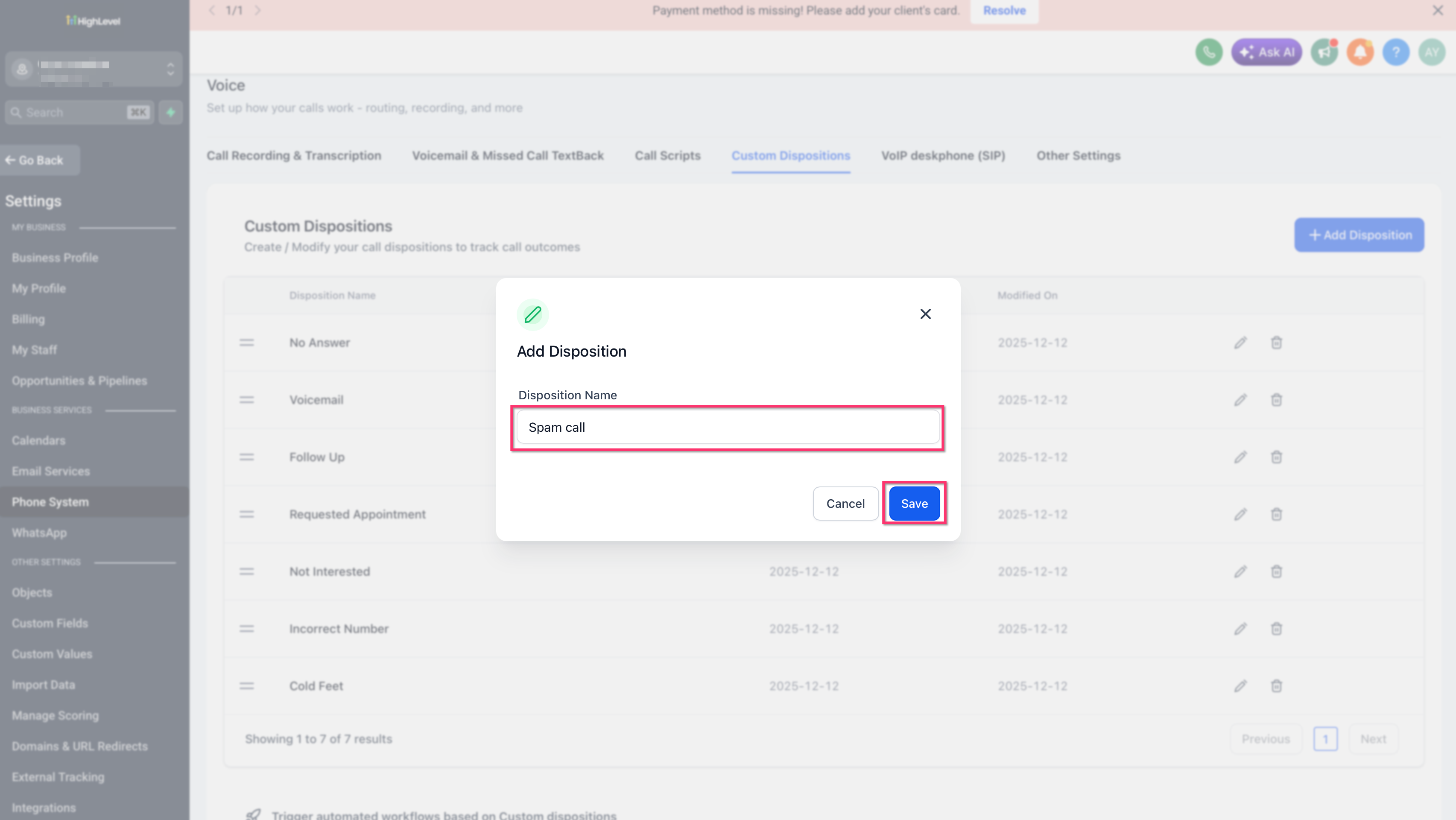
- Enter Spam call as the disposition name.
- Save the new disposition.
Block Repeat Spam Callers with Inbound DND
- Go to Automation and open Workflows.
- Create a new workflow.
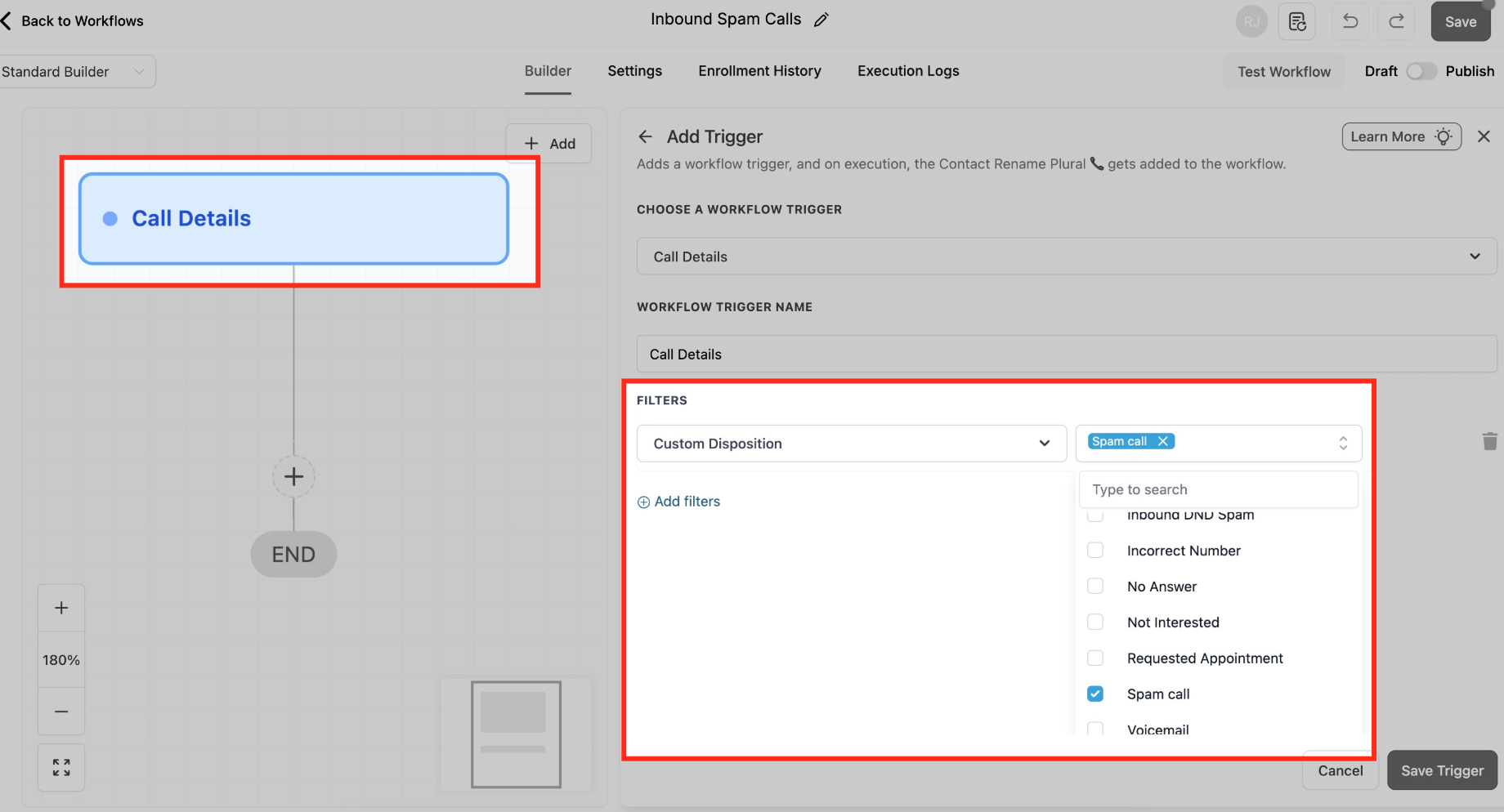
- Add the Call Details trigger.
- Set the filter Call Direction to Incoming.
- Add a second filter Custom Disposition equals Spam call.
- Insert the Enable/Disable DND action.
- Choose DND Direction set to Inbound.
- Configure the inbound channel option shown for your account and publish the workflow.
Set up optional IVR screen
- Create a new workflow and select the Start IVR trigger.
- Set the In Phone Number filter to the public inbound number you want to screen.
- Add a Say/Play action with a brief prompt such as “Thanks for calling, press 1.”
- Add a Gather Input action, limiting input to digit 1 with a timeout of about 3 to 5 seconds and one retry.
- Add a Connect Call action that routes callers who press 1 to the appropriate user or group.
- Add a Say/Play action for callers who give no input or the wrong key, then End Call or route to voicemail.
- Optionally enable Detect Voicemail or Record Call inside the Connect Call action.
- Publish the IVR workflow.
Validate call flow & monitor
- Open Phone Numbers, select the number you configured, and review the Incoming Calls Settings.
- Confirm the IVR or workflow is attached to the number and set an appropriate ring timeout.
- Place test calls from an unknown number, a number marked as Spam call, and a VIP tagged number.
- Check that the expected routing, DND block, and IVR prompts occur for each test.
- Review Call Logs and disposition usage regularly to fine tune prompts, timeouts, and DND rules.
06What it looks like in HighLevel
07Settings that matter
- Gather Intelligence on Unknown Phone Numbers. Enables Number Intelligence to analyze incoming calls from unknown U.S. numbers and display a Spam Likely indicator.
08Things to know before you rely on it
- Number Intelligence usage is billed based on consumption; see the pricing guide for details.
- A single phone number can be associated with only one IVR workflow at a time.
- IVR prompts should remain short to avoid excessive friction for urgent response businesses.
09How it connects to the rest of HighLevel
- Review the cost structure for Number Intelligence and DND usage. Phone system pricing guide
- Learn more about the built in LC Phone that powers these features. LC Phone overview
- If you need to set up physical desk phones, see the SIP deskphone guide. SIP deskphone setup
Michael's take

Michael ReimerFounder of CRM Pros, HighLevel Commander and Certified Admin
Avoid forgetting to add a VIP tag before enabling DND, or you’ll lock out important contacts.
Get More InformationOpens on HighLevelPublished November 2, 2026 · Updated November 16, 2026