
01Who this is for
- Agency owners who want to eliminate third party Twilio or Plivo accounts and simplify billing.
- Founders of SaaS platforms that manage multiple client subaccounts and need a uniform phone system.
- Businesses with call centers that require quick onboarding of new locations without extra integration steps.
02LC Phone migrations, explained
LC Phone is HighLevel’s native telephone and SMS engine. It removes the need to maintain separate Twilio or Plivo connections, allowing calls and messages to be sent and received directly from the platform. The feature lives under Settings > Phone Integration and includes agency level and subaccount level controls.
When an agency switches to LC Phone, new subaccounts are automatically linked unless the agency changes that preference. Existing subaccounts stay on their current provider until the agency links them individually or uses the bulk migration option. The migration moves numbers, call logs, SMS and MMS, while historical recordings remain in the previous provider.
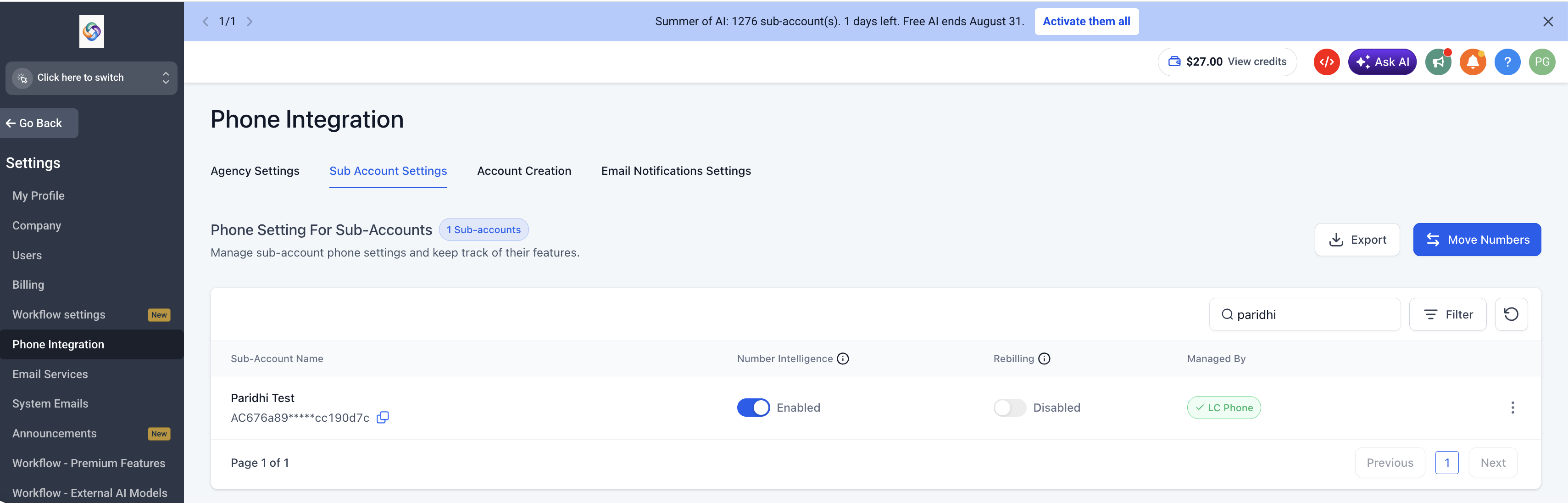
After migration, the subaccount’s Managed By column shows a green LC Phone badge, indicating that the new system is active. Agencies must repeat any A2P 10DLC registration for US numbers because the prior registration does not transfer.
03How businesses use LC Phone migrations
- SaaS agency. The agency clicks Switch to LeadConnector Phone System in the Agency Settings tab, then uses the Subaccount Settings table to link each client subaccount individually or bulk move all US/Canada clients. This centralizes messaging and call handling inside HighLevel.
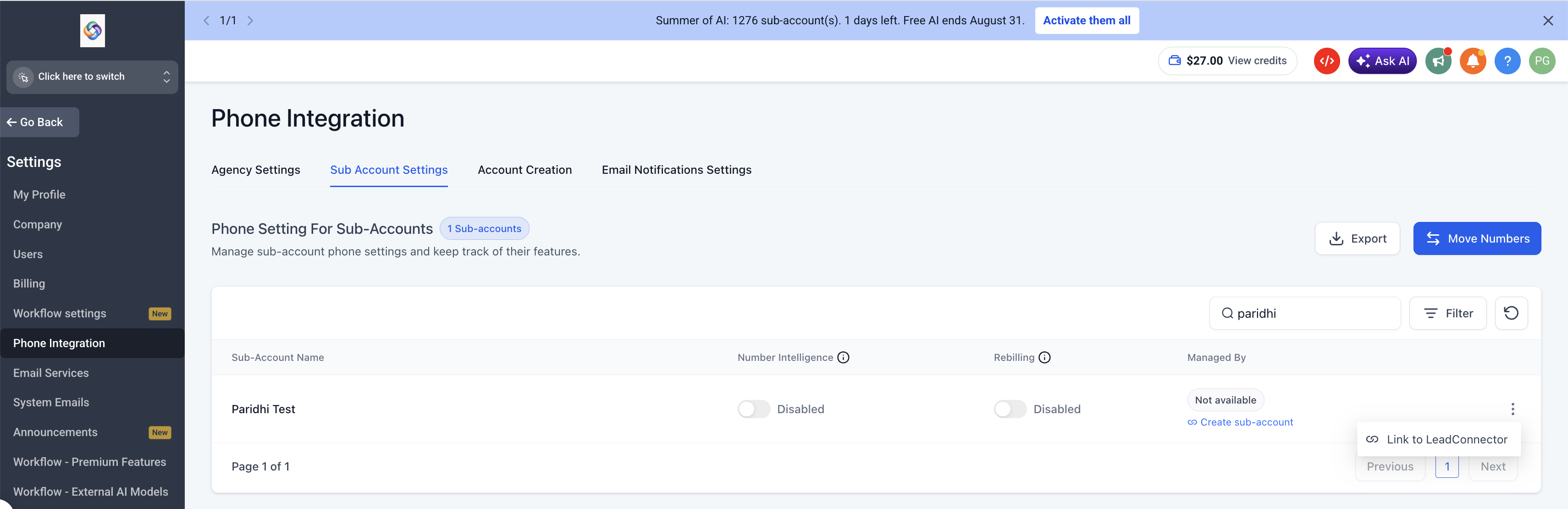
- Dental practice with multiple locations. After switching the practice’s agency to LC Phone, the manager selects each clinic’s subaccount in the Subaccount Settings view, uses the row menu to Link to LeadConnector, and confirms the migration. The clinics can then send appointment reminders directly from HighLevel.
- Real estate brokerage. The brokerage chooses the bulk migration button on the Subaccount Settings page to move all eligible US and Canada agents at once. Once the green LC Phone badge appears, agents can place calls and send texts without configuring external providers.
04The numbers and rules that matter
- Migration may take up to 48 hours.
- Existing Trust Product records are not migrated; A2P registration must be completed again.
05Before you start
- The agency must first switch to LC Phone via Settings > Phone Integration > Agency Settings.
- Any Twilio account associated with the agency must not be suspended.
- For non US/Canada subaccounts, an approved Regulatory Bundle and Address must exist before migration.
06How to set up and use LC Phone migrations in HighLevel
Link one subaccount to LC Phone
- Search for the target subaccount using the Search subaccounts box on the Subaccount Settings tab.
- Click the three dot icon at the right end of the subaccount’s row.
- Select Link to LeadConnector from the menu that appears.
- Confirm the prompt to start the individual migration.
Bulk migrate eligible subaccounts
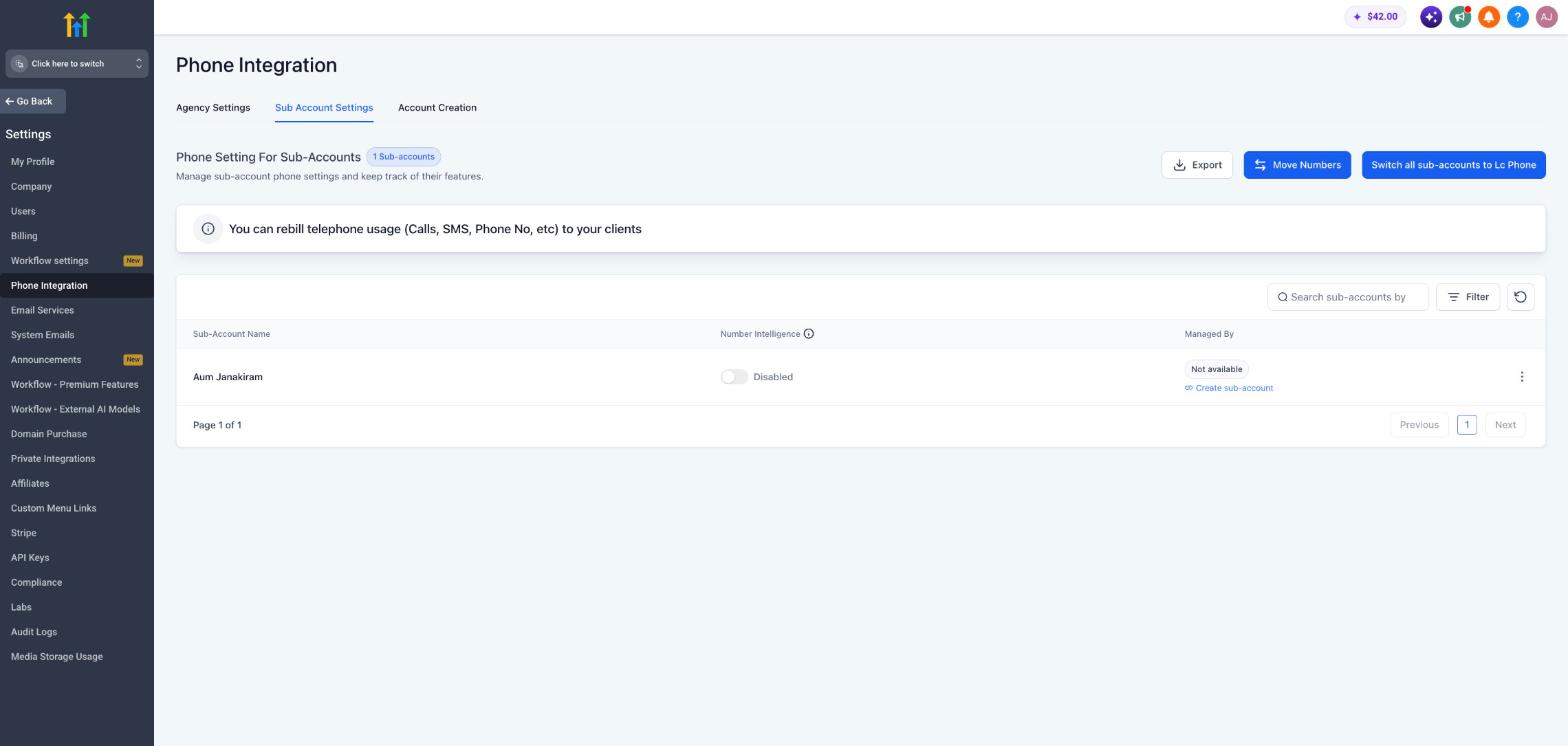
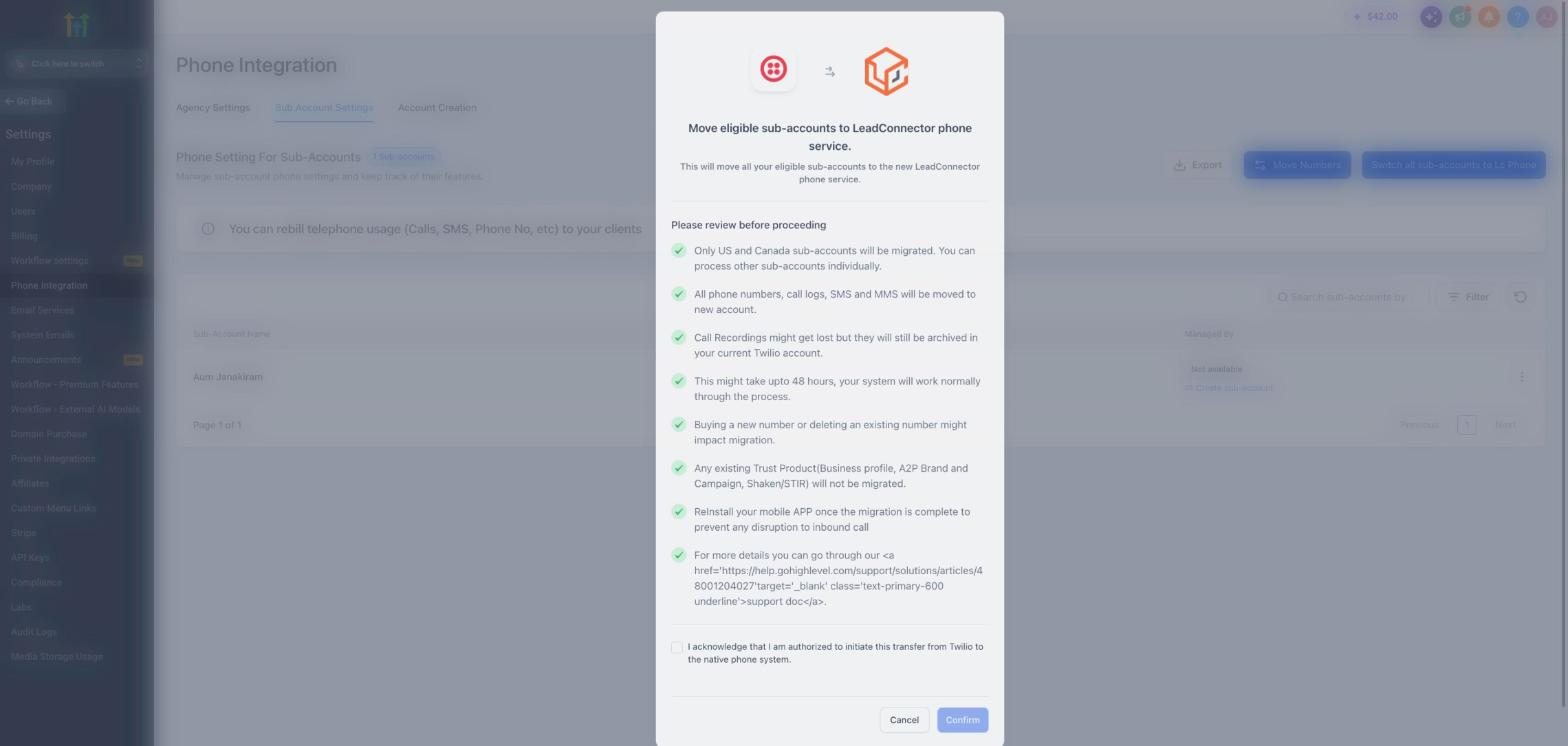
- Click the Switch all subaccounts to LC Phone button at the top right of the Subaccount Settings table.
- Read the migration window that outlines what will happen.
- Tick the acknowledgement checkbox confirming authority to transfer the numbers.
- Press Confirm to launch the bulk migration for all US and Canada subaccounts.
07What it looks like in HighLevel
08Settings that matter
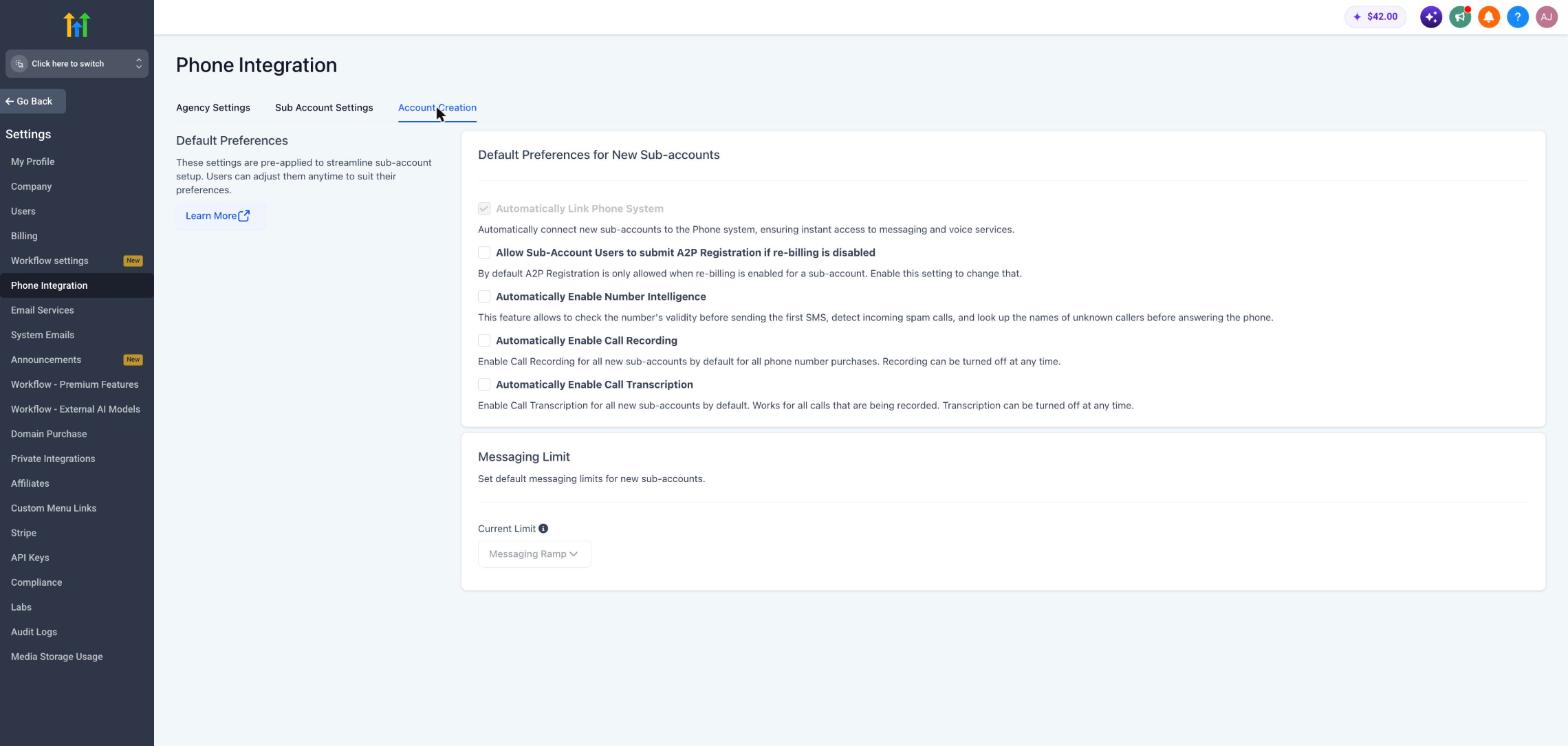
- Automatically Link Phone System. Controls whether new subaccounts are automatically connected to LC Phone when they are created.
- Switch to LeadConnector Phone System. Initiates the agency level change from a third party provider to HighLevel’s native LC Phone.
- Account Creation. The section where the Automatically Link Phone System toggle is located.
09Things to know before you rely on it
- Bulk migration only includes subaccounts located in the US or Canada; other countries require individual linking.
- Historical call recordings and voicemails do not transfer and stay in the original provider’s account.
- A2P 10DLC registration must be completed again after migration; the previous registration does not carry over.
- Migration can take up to 48 hours, and buying or deleting numbers during that window may affect the process.
- If the bulk migration button is not visible, the agency must link subaccounts individually.
- The process is currently available to all agencies without a separate validation step.
10If something goes wrong
- Migration remains pending beyond the expected processing window. Contact HighLevel Support.
11How it connects to the rest of HighLevel
- Learn more about LC Phone and its built in capabilities LC Phone overview
- View pricing details and real time billing for LC Phone Phone system pricing
- Create regulatory bundles and addresses required for international numbers Regulatory bundle guide
- Configure SMS compliance and opt out settings after migration SMS compliance
- Start a 30 day trial of HighLevel to explore LC Phone Start trial
Michael's take

Jumping onto LC Phone without checking your current Twilio status can bite you. If the old account is suspended or you haven’t backed up historic recordings, you’ll run into roadblocks after the switch.
For agencies that want a cleaner, faster phone setup, LC Phone delivers a one click start and real time billing. Once the agency is on LC Phone, you can pull subaccounts over individually or bulk move all US/Canada accounts.