
01Who this is for
- Car rental agencies, they can secure high value reservations with a smaller upfront amount while still collecting the full price before the rental begins.
- Vacation property owners, they can show renters the deposit and later balance clearly, reducing checkout abandonment for expensive stays.
- Equipment lease firms, they can protect valuable gear by collecting a deposit early and optionally charging the balance automatically before use.
02Partial payments for rentals, explained
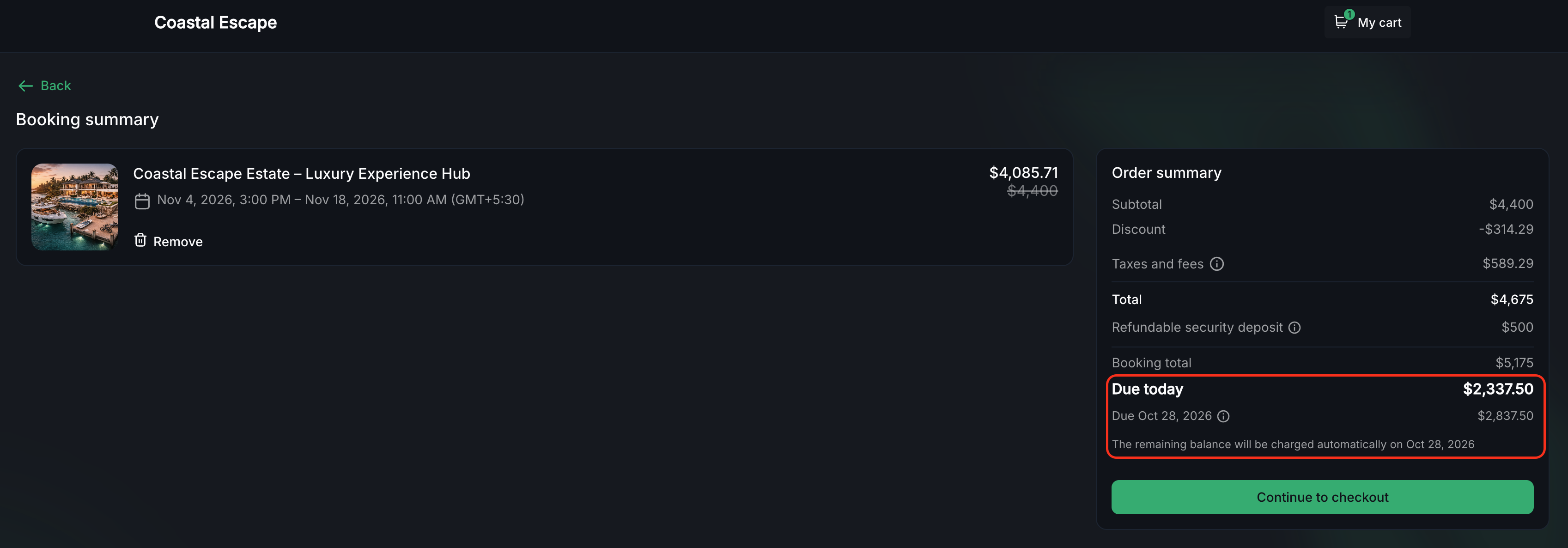
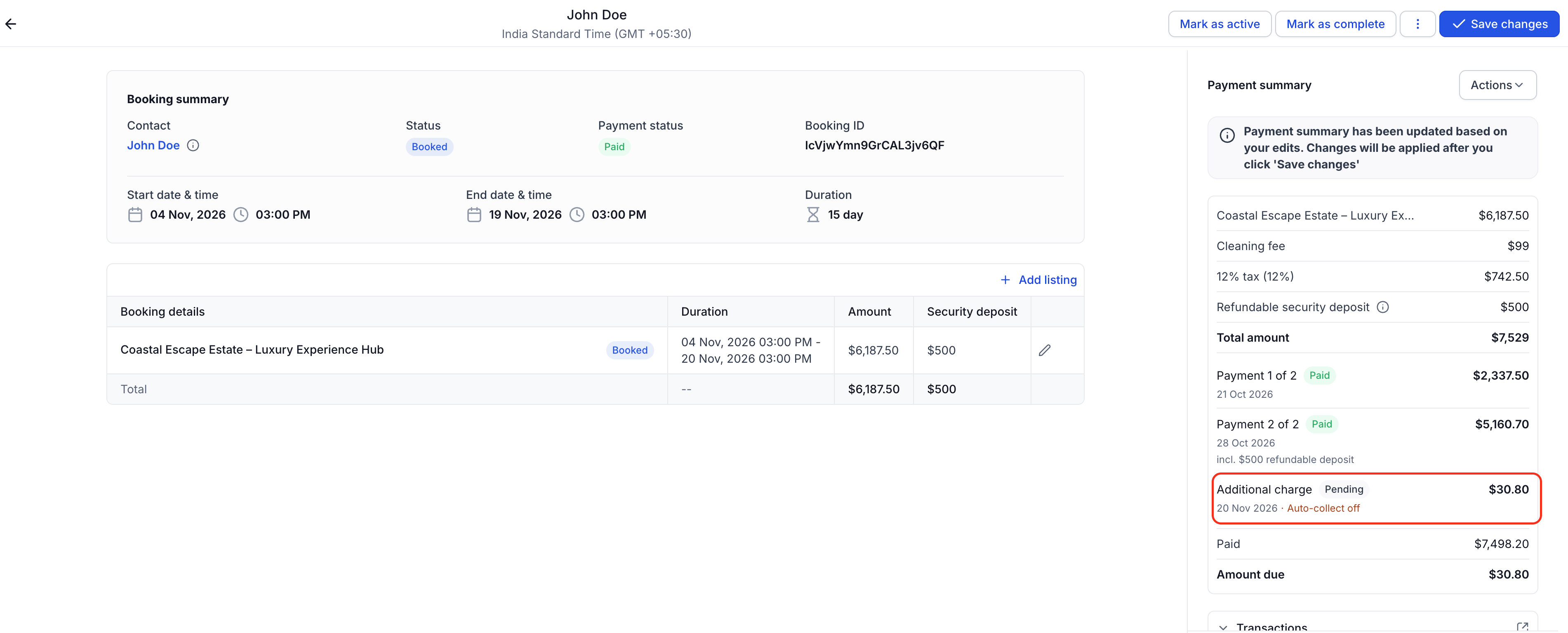
The Partial Payments option inserts a two step payment plan into every new booking. At checkout the system charges a deposit that equals a chosen percentage of the total rental price. The remaining amount becomes a separate invoice line that is due a set number of days before the rental start date.
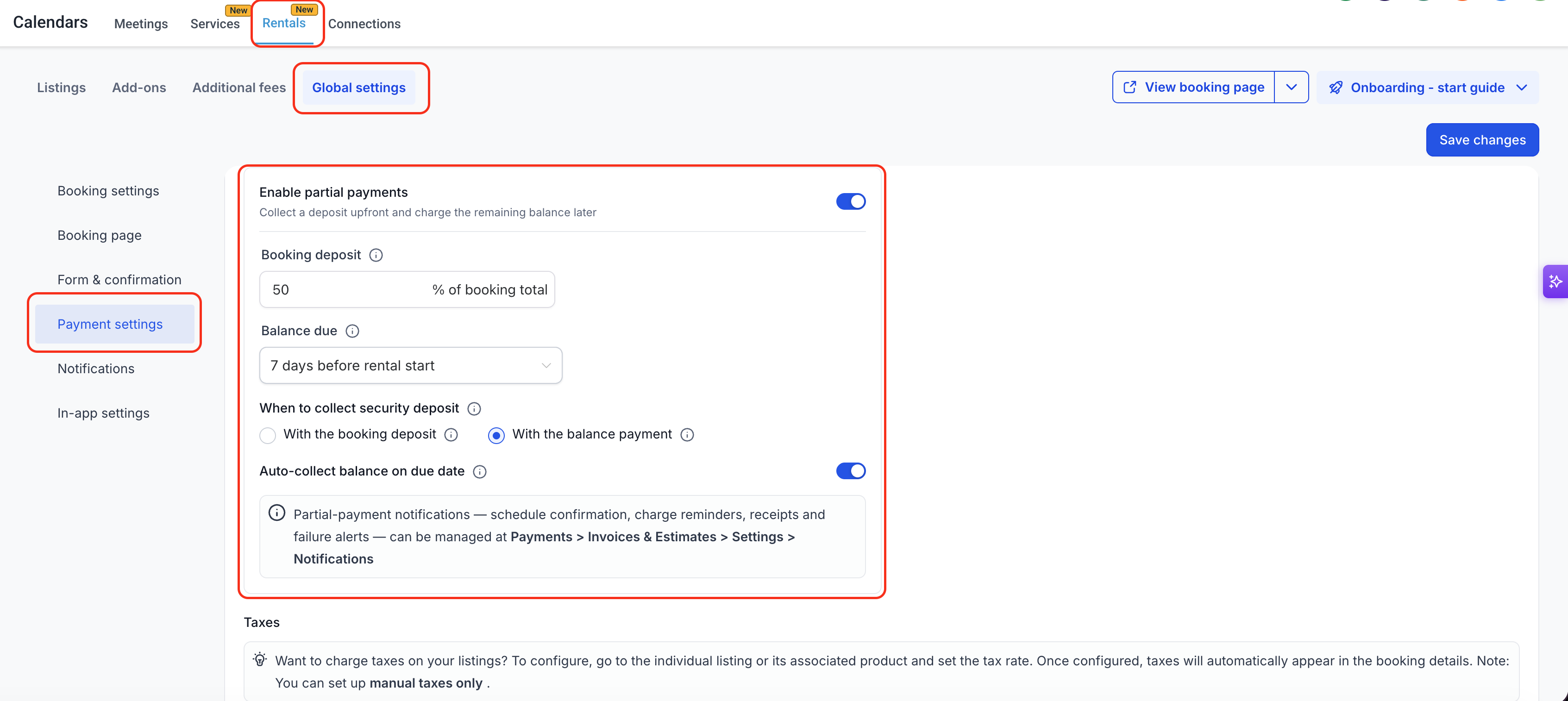
If auto collect is enabled, HighLevel will attempt to charge the saved card on the balance due date at a fixed time (11:00 AM ET, 10:00 AM CT, 9:00 AM MT, 8:00 AM PT). The settings that control this behavior live under Calendars > Calendar Settings > Rentals > Global Settings > Payment settings.
Security deposits are handled independently. When both deposits and the security hold are active, the owner can choose to collect the security amount together with the booking deposit or with the later balance.
03How businesses use partial payments for rentals
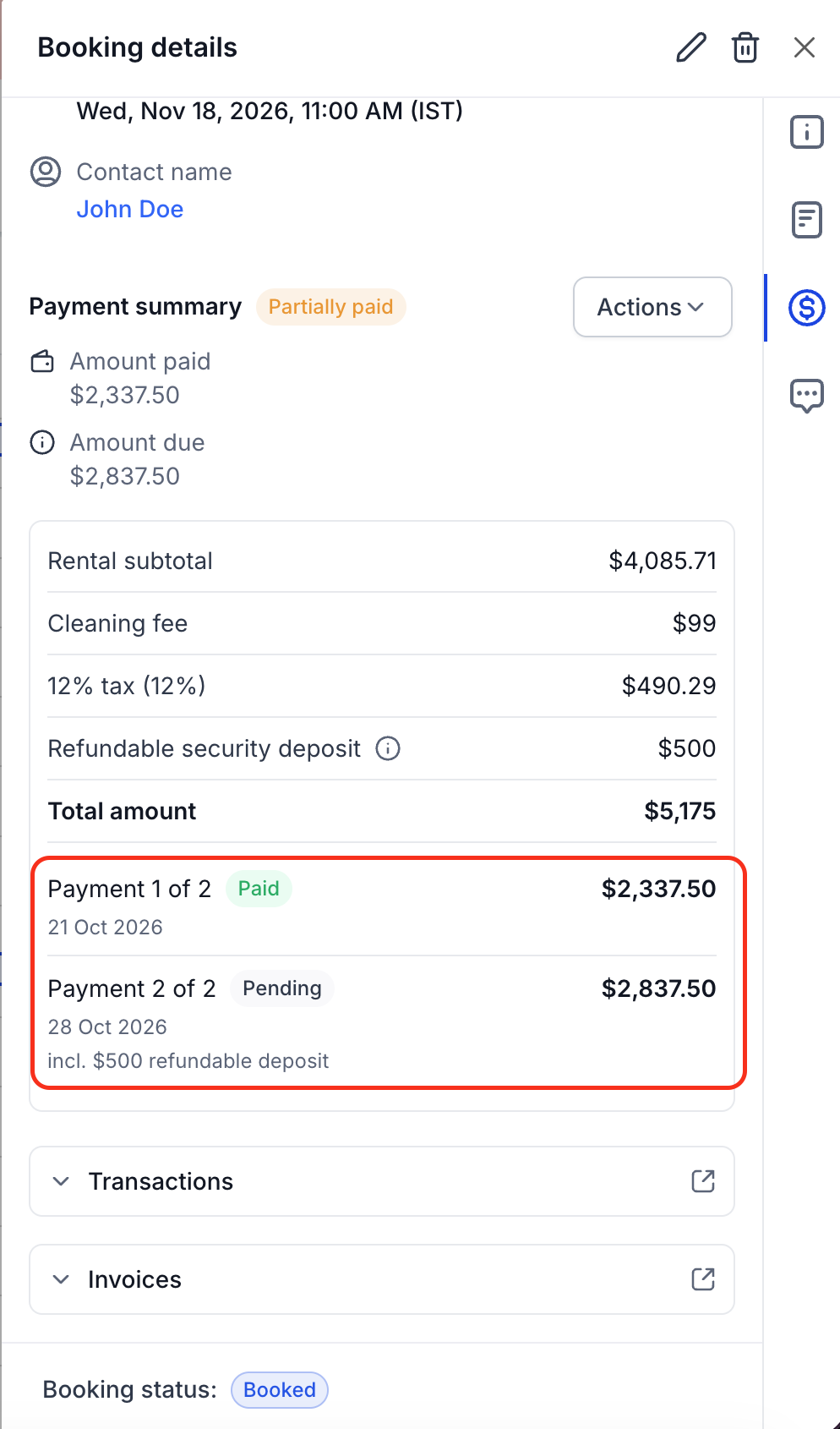
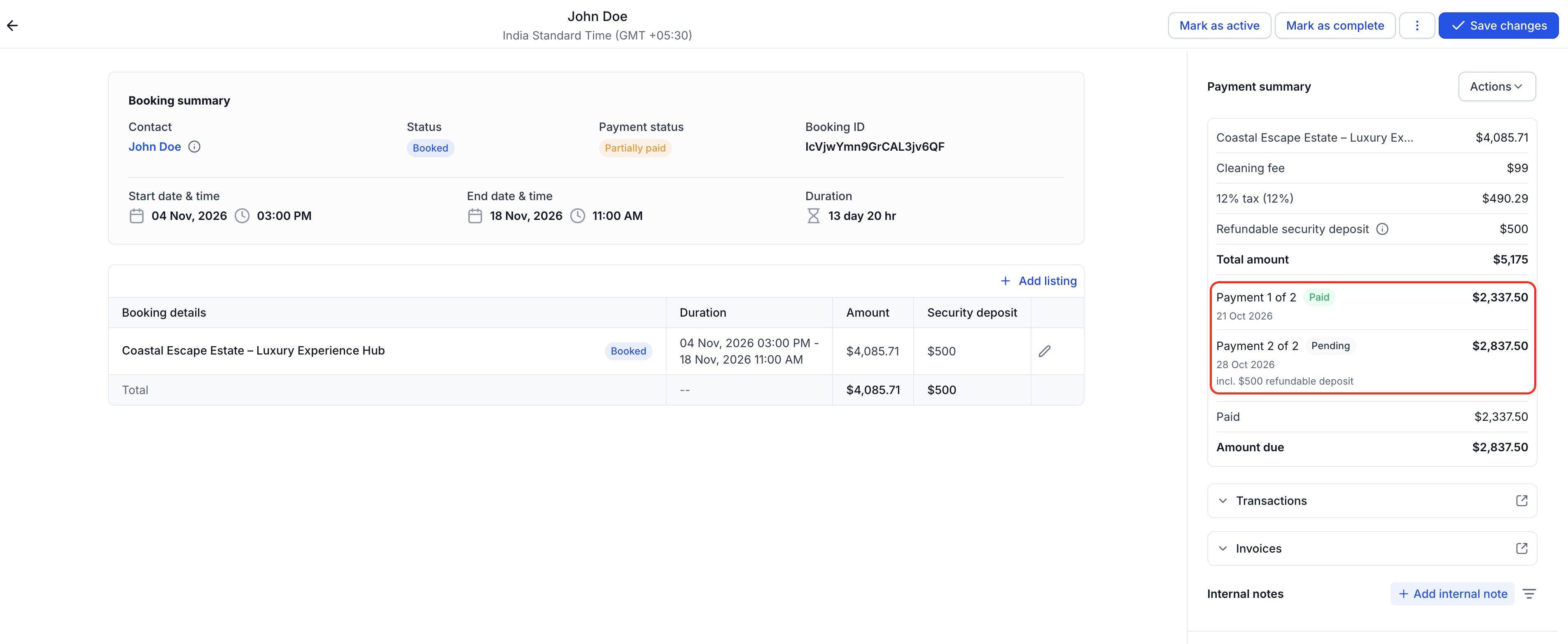
- Car rental agency. The agency turns on Partial Payments, sets a deposit percentage, and schedules the balance to be due several days before the rental start. The system then creates two invoice rows for each new reservation, allowing customers to pay the smaller upfront fee and automatically charging the balance later.
- Vacation property owner. The owner enables the feature, picks a deposit percentage, and chooses to collect the security deposit with the final balance. When a guest books, HighLevel generates an invoice with the deposit row and a second row for the remaining rent plus the security amount, both visible at checkout.
- Equipment lease company. The company activates Partial Payments, defines a deposit percentage, and disables auto collect because customers pay cash. The booking page shows the deposit amount due now and the balance amount and date, and staff can manually collect the balance using the Collect Payment action in the booking view.
04The numbers and rules that matter
- Deposit amount can be set to 1, 99% of booking total (including applicable taxes and fees, but excluding the refundable security deposit).
- Autocharge runs at 11:00 AM ET / 10:00 AM CT / 9:00 AM MT / 8:00 AM PT on the due date.
05Before you start
- Require Payment at Booking must be turned on.
- A card based payment method (or ACH when supported) must be available for auto collect.
06How to set up and use partial payments for rentals in HighLevel
Enable partial payments
- Open Calendars > Calendar Settings > Rentals > Global Settings > Payment settings.
- Verify that Require Payment at Booking is switched on.
- Toggle the Partial payments switch to ON.
- Press Save Changes.
Configure the payment schedule
- Enter a deposit percentage between 1 and 99 in the Deposit amount field.
- Select the desired lead time for the Balance due setting.
- Turn on Auto collect balance on due date if automatic charging is required.
- Press Save Changes.
Set security deposit timing
- In the same Payment settings screen, locate the Security deposit timing option (visible when the required conditions are met).
- Choose either With the booking deposit or With the balance payment based on protection preference.
- Confirm that Require Payment at Booking, Security deposit, Collect upfront and Partial Payments are all ON.
- Press Save Changes.
07What it looks like in HighLevel
08Settings that matter
- Deposit amount. Defines the percentage of the total rental price that is charged as the initial deposit.
- Balance due. Sets how many days before the rental start date the remaining balance must be paid.
- Auto, collect balance on due date. When enabled, HighLevel automatically charges the saved card on the balance due date.
09Things to know before you rely on it
- Deposit percentage must be between 1 and 99 percent of the rental total.
- Partial Payments is unavailable unless Require Payment at Booking is enabled.
- Auto collect works only with card based payment methods; cash and other offline methods are disabled when Partial Payments is on.
- If a booking occurs inside the collapse window or after the balance due date, the system creates a single full payment invoice instead of two installments.
- ACH support for auto collect is announced for future release.
10If something goes wrong
- Balance charge fails on the due date. HighLevel retries the card charge up to three times, 24 hours apart. After all retries fail, collect the payment manually from the booking view.
- Partial Payments toggle does not appear. Ensure Require Payment at Booking is turned on and a card or ACH payment method is available.
11How it connects to the rest of HighLevel
- Explore all payment related features All Payments features
- Review HighLevel pricing and plan options HighLevel pricing and plans
- Start a free trial to test Partial Payments 30 day trial
Michael's take

Partial payments are most useful for high value rentals where customers might otherwise abandon the checkout. The deposit lets the customer lock in the reservation, while the later balance charge can help keep cash flow steady and may help reduce abandoned bookings. If you have a clear deposit percentage and a reliable card on file process, the feature works without extra manual effort.
It doesn’t make sense if your rentals are low cost or you only accept cash. Without a saved card, the autocollect part can’t run, so you’ll be back to manual follow up. Also, if you need different payment plans per listing, the global setting will force the same schedule across everything, which can be limiting.