
01Who this is for
- Ecommerce Founders targeting LATAM customers, they can offer familiar local payment options.
- Subscription SaaS owners, they need CVV less flows that Mercado Pago supports for off session billing.
- Digital marketers running funnels, they can assign Mercado Pago to specific checkout pages for higher conversion.
02Mercado Pago integrations, explained
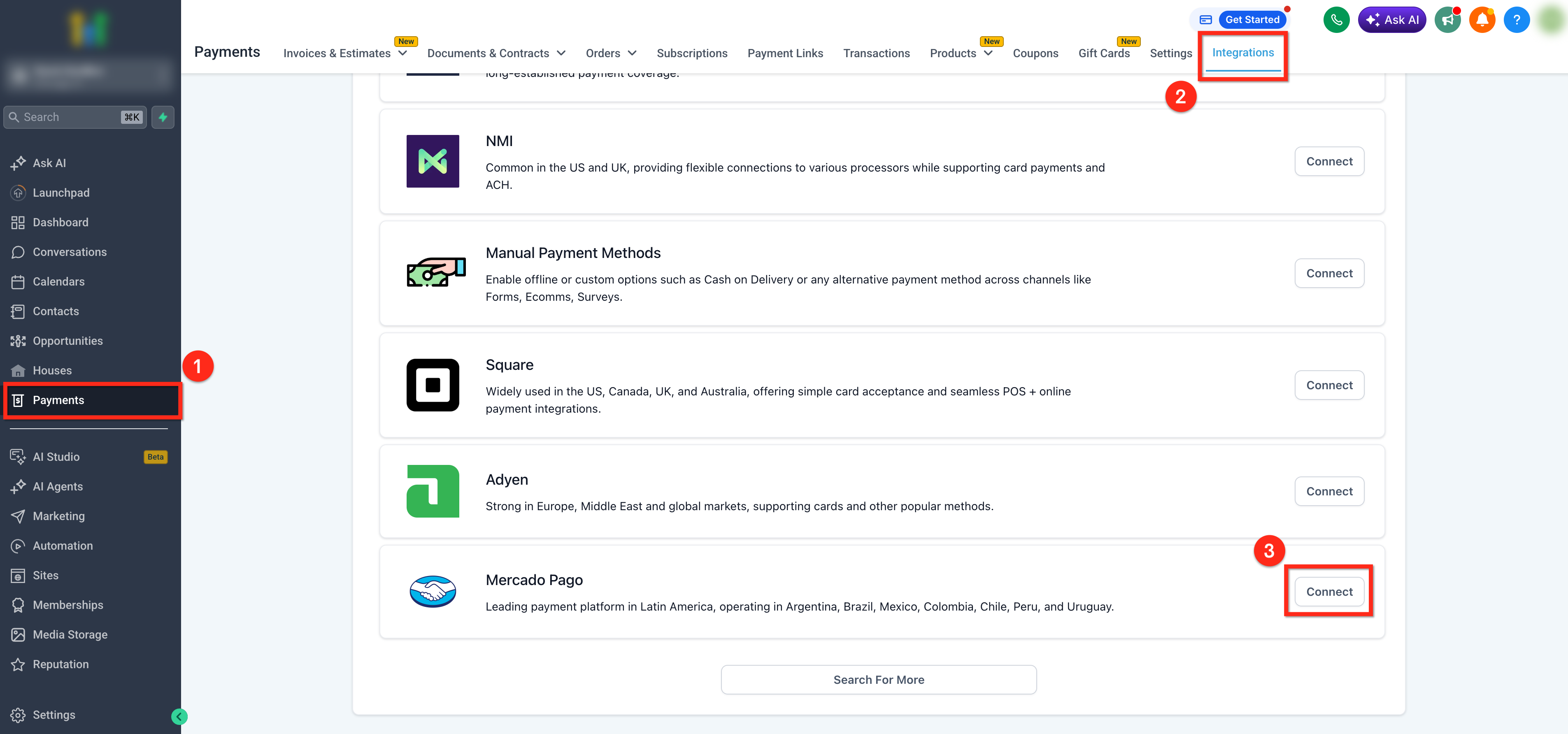
The integration lets HighLevel connect to a Mercado Pago account and process live payments. After the provider is linked, it appears in Payments > Integrations where you can select it for any supported payment channel.
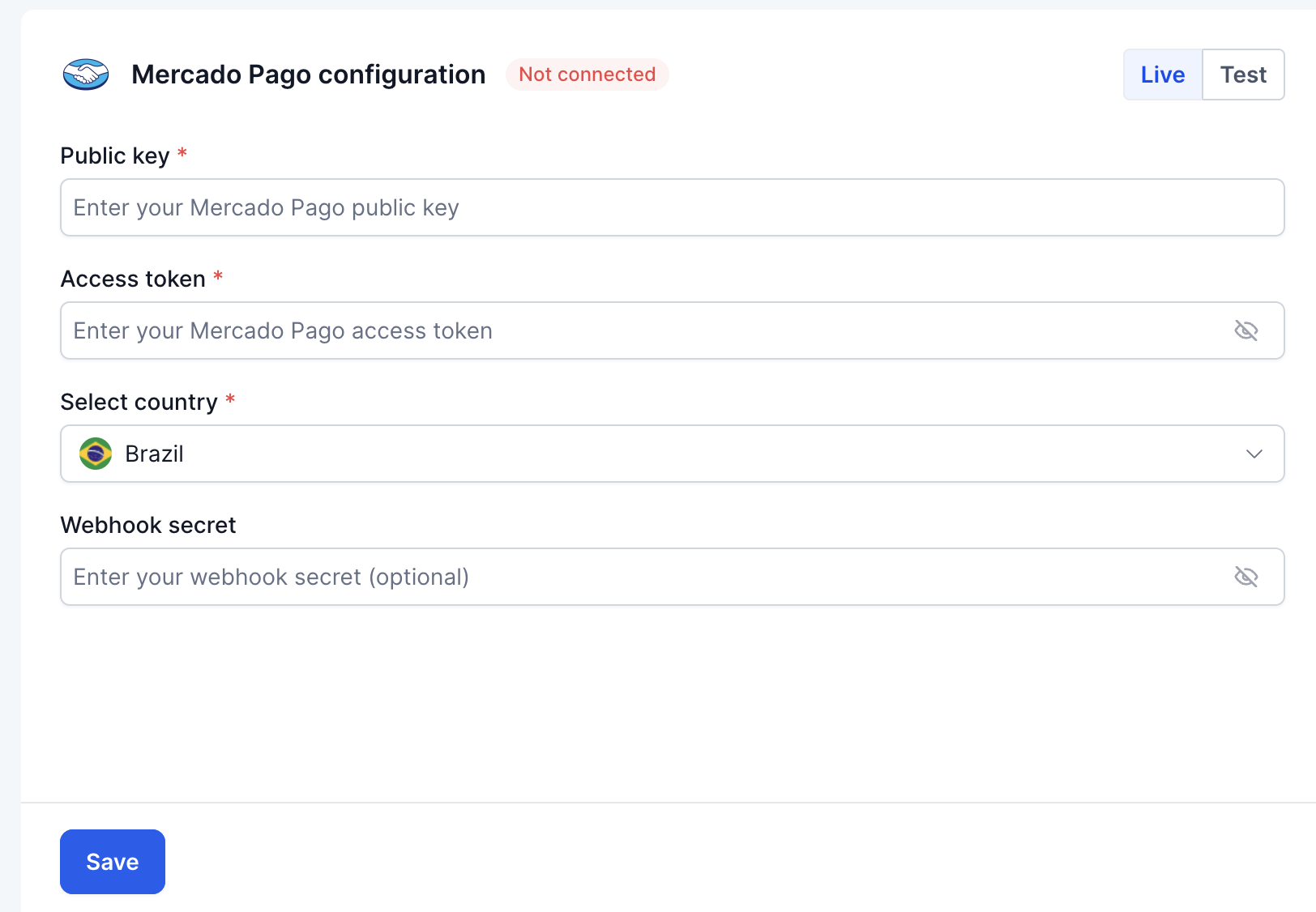
Credentials entered in HighLevel include the public key, access token, country and webhook secret. Webhook notifications from Mercado Pago are sent to a HighLevel endpoint so payment events are reflected in the platform in real time.
All settings are managed inside the Payments section, and you can toggle between live and test modes or assign the provider to individual channels such as checkout forms, payment links or funnel steps.
03How businesses use Mercado Pago integrations
- Online clothing retailer. The retailer connects its Mercado Pago account, enters the production keys, and assigns the provider to checkout forms on its product pages. This lets shoppers pay with local cards without leaving the site.
- Fitness membership SaaS. The SaaS business enables CVV less support, adds the Mercado Pago credentials, and activates webhooks. Subscription renewals are then processed automatically through the integrated provider.
- Event ticketing platform. The platform links Mercado Pago, configures the webhook URL, and assigns the provider to the ticket purchase funnel. Attendees can complete a single step payment using the regional payment method.
04The numbers and rules that matter
- Minimum amount for one time credit or debit card payments: $100.00 (per HighLevel's help center, checked November 2026).
- Minimum amount for installment purchases: $100.00 per installment (per HighLevel's help center, checked November 2026).
- Maximum amount for credit or debit card payments: $15,000,000.00 (per HighLevel's help center, checked November 2026).
- Minimum amount for Easy Payment and Rapipago: $100.00 (per HighLevel's help center, checked November 2026).
- Maximum amount for Easy Payment and Rapipago: $1,000,000.00 (per HighLevel's help center, checked November 2026).
- Supported countries: Colombia, Argentina, Chile, Mexico, Uruguay, Peru, Brazil, and upcoming Ecuador and El Salvador.
05Before you start
- A Mercado Pago account with CVV/CVC less support enabled.
- Access to the Mercado Pago developer dashboard.
- Your business website URL for production credential activation.
06How to set up and use Mercado Pago integrations in HighLevel
Connect Mercado Pago in HighLevel
- Open the Payments area from the left navigation menu.
- Select the Integrations tab.
- Find Mercado Pago in the list and click Connect.
Obtain production credentials from Mercado Pago
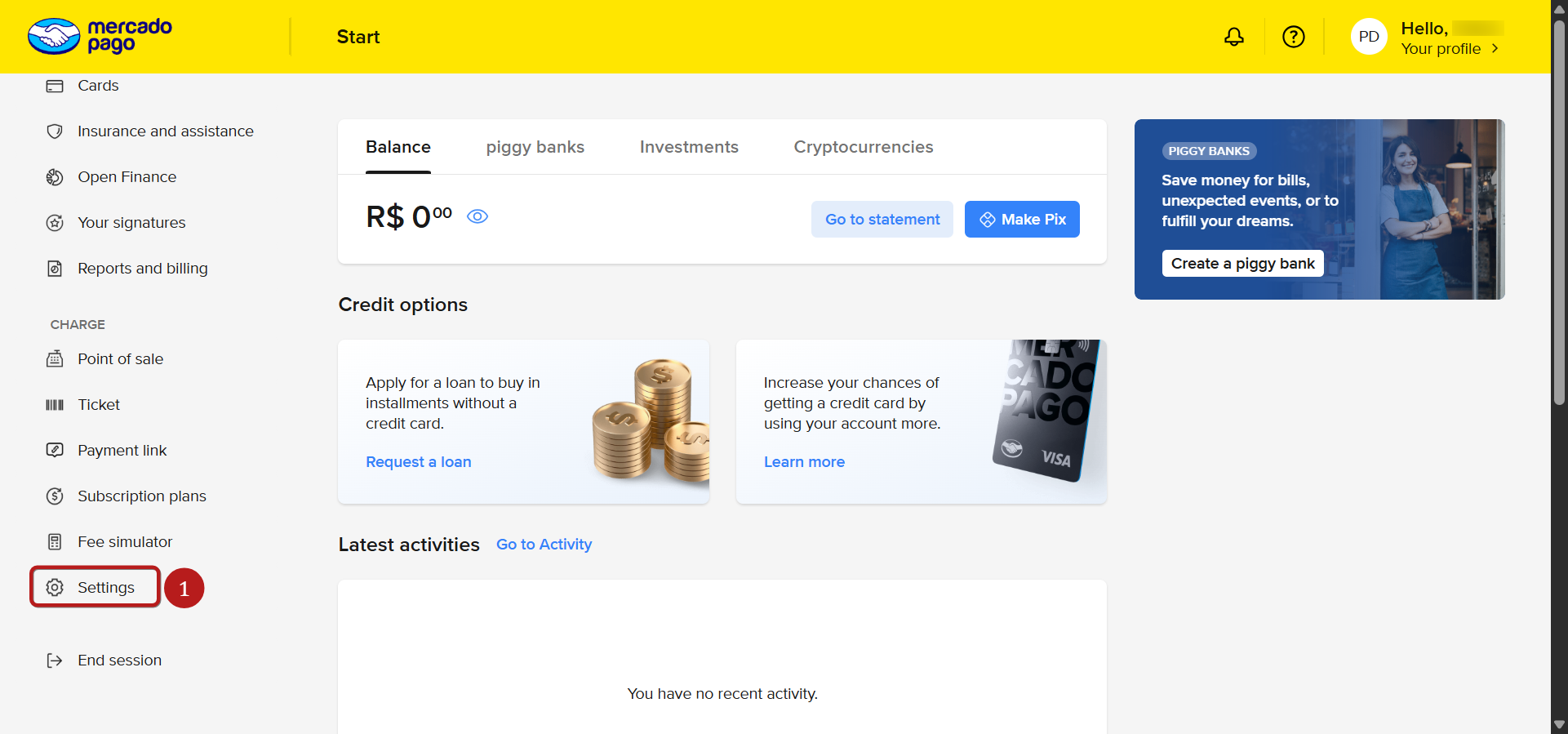
- Log in to your Mercado Pago account.
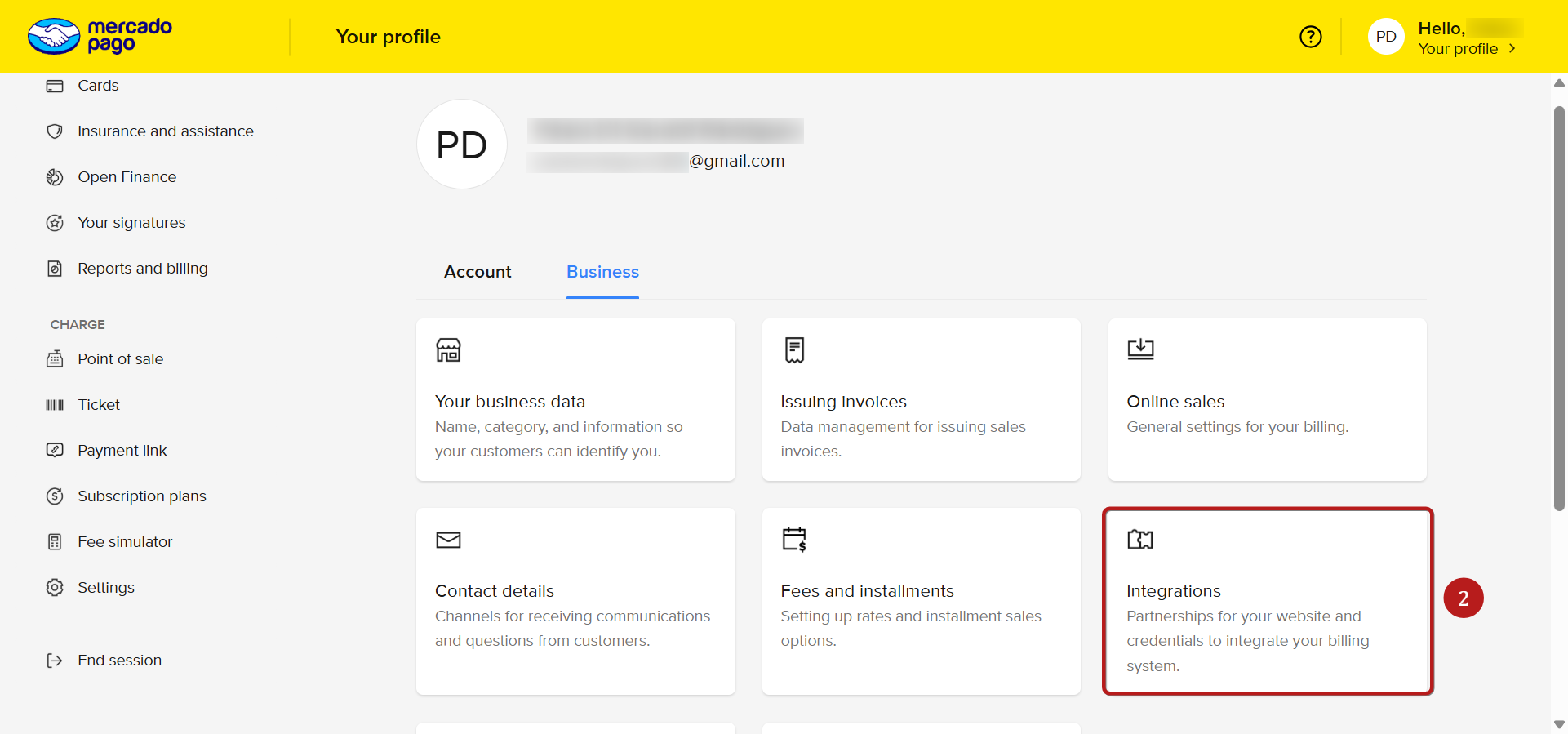
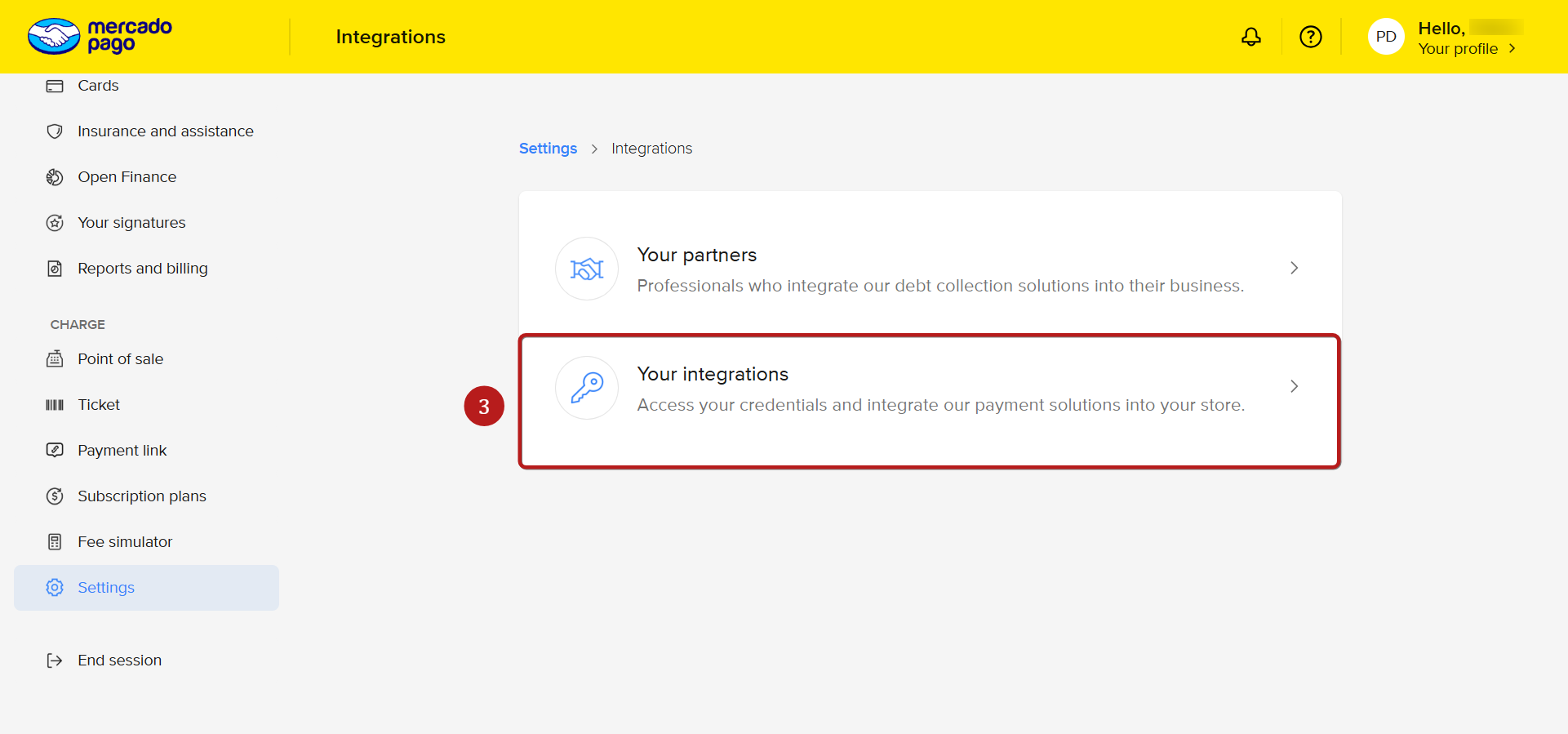
- Open the developer area.
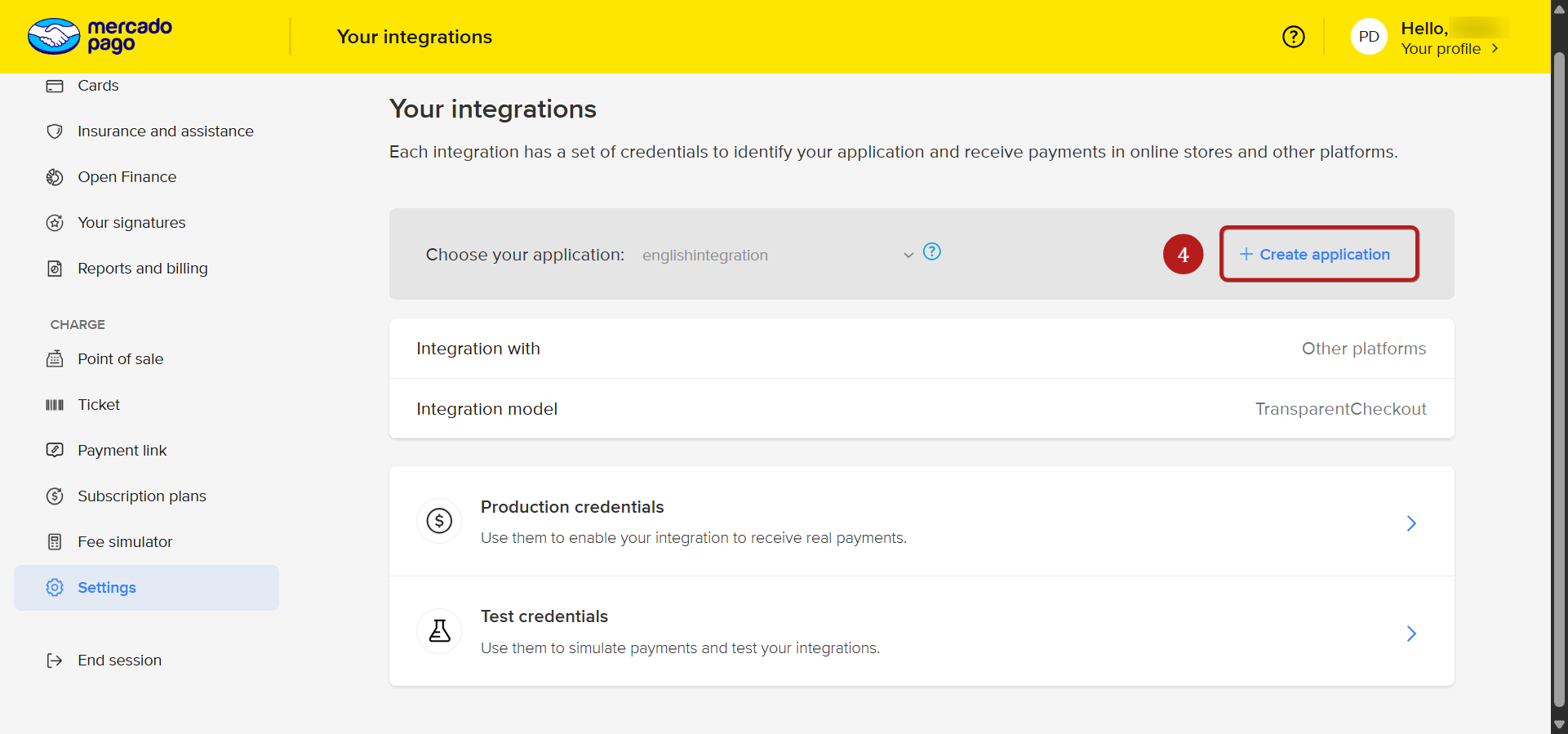
- Navigate to Your integrations and select or create an application.
- Copy the Public Key and Access Token from the Production credentials section.
Enter credentials in HighLevel
- Paste the Public Key into its field.
- Paste the Access Token into its field.
- Select the appropriate country or account region.
- Enter or generate the Webhook Secret.
- Click Save or Connect to store the information.
Configure webhooks in Mercado Pago
- Log in to the Mercado Pago developer panel.
- Open the application used for the integration.
- Go to the Webhooks section.
- Click Configure notifications.
- Enter the HighLevel webhook URL (https://backend.LeadConnectorhq.com/payments/mercado pago/webhook) and the matching webhook secret.
- Select the Payment event and Save the changes.
Assign Mercado Pago by channel
- Open Manage Provider Configurations for Mercado Pago in HighLevel.
- Toggle between Live and Test mode as needed.
- Assign Mercado Pago to the desired payment channels.
07What it looks like in HighLevel
08Settings that matter
- Public Key. Identifies the Mercado Pago application for API calls.
- Access Token. Authorizes HighLevel to perform transactions on behalf of the account.
- Country. Specifies the market region for the Mercado Pago account.
- Webhook Secret. Used to sign webhook payloads so HighLevel can verify incoming events.
09Things to know before you rely on it
- Only production credentials process real payments; test credentials cannot be used for live transactions.
- Minimum and maximum payment amounts differ by country and method; amounts outside these ranges will cause failures (per HighLevel's help center, checked November 2026).
- The Mercado Pago account must have CVV less support enabled; without it, subscriptions and off session payments may not work.
- Only one Mercado Pago checkout element can exist on a single page; multiple elements will not load.
- Supported countries currently include Colombia, Argentina, Chile, Mexico, Uruguay, Peru and Brazil; additional countries are planned.
- The webhook secret entered in HighLevel must exactly match the one set in Mercado Pago.
10If something goes wrong
- Two checkout elements on a funnel do not work.. Ensure only one active Mercado Pago checkout or payment element is present on each page.
- Payments fail because CVV less support is not enabled.. Contact Mercado Pago support to activate CVV less support on the account.
- Payment amount is rejected.. Verify that the amount meets the minimum and does not exceed the maximum allowed for the selected payment method and country.
- Currency mismatch when using USD pricing.. Set product pricing to the same currency as the Mercado Pago account.
11How it connects to the rest of HighLevel
- Supported payment providers by area Supported providers
- All Payments features overview Payments overview
- HighLevel pricing and plans Pricing
Michael's take

Adding Mercado Pago to a HighLevel account feels like a modest convenience for businesses that already sell in Latin America. The steps are straightforward, but the real value comes from letting customers pay with a method they already trust, which can smooth the checkout flow.
A boutique online store that ships from Argentina to nearby countries will benefit quickly. With the integration in place, the shop can accept local cards without extra plugins, keep the checkout simple, and even run subscriptions once CVV less support is active.