
01Who this is for
- Agency owners, can bundle monthly service fees with one time onboarding costs in a single contract.
- Businesses, can combine recurring subscriptions with one time charges to streamline agreements and billing.
02Recurring products, explained
The feature lets you place both recurring and one time products inside a HighLevel document or contract. Each product is chosen from your existing product catalog, and HighLevel marks whether the price is a subscription or a single charge.
When a signer completes the document, HighLevel creates invoices based on the selected items. If only one time items are chosen, a single invoice is generated. If a recurring product is selected, the platform starts a repeat billing schedule using the defined frequency.
All settings are configured within the document editor under Payments > Documents & Contracts. You can adjust optional item status, quantity editing, taxes, and the recurring invoice schedule directly on the product list.
03How businesses use recurring products
- Digital marketing agency. The agency adds a monthly social media management service as a recurring product and an onboarding fee as a one time product. When the client signs, HighLevel generates the first invoice with the onboarding charge and sets up a monthly billing cycle for the service.
- Template reuse for contracts. Product lists with recurring configurations can be saved in a Documents & Contracts template. Future contracts can reuse the same setup, ensuring consistent billing without reconfiguring each time.
- Invoice tracking after signing. After a document is signed, any invoices generated from the selected products are visible in the Documents & Contracts and invoice sections of HighLevel, allowing users to monitor billing status.
04The numbers and rules that matter
- Frequencies supported: Daily, weekly, monthly, yearly.
05Before you start
- User must have access to Payments > Documents & Contracts.
- Products with defined one time or recurring prices must already exist in the system.
06How to set up and use recurring products in HighLevel
Add recurring product to a document or template
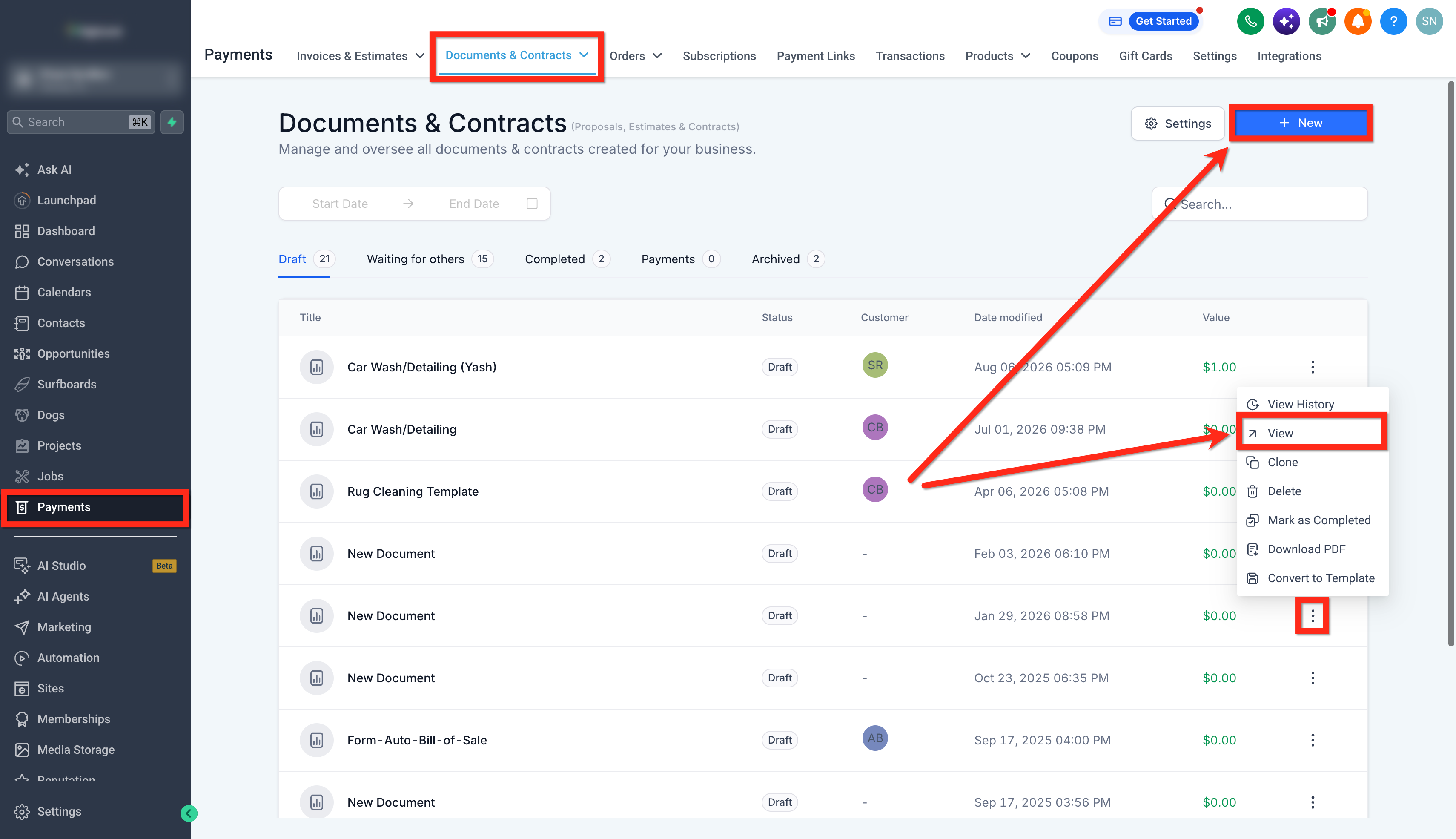
- Open Payments > Documents & Contracts.
- Create a new document or open an existing one, or edit a template via Documents & Contracts > Templates.
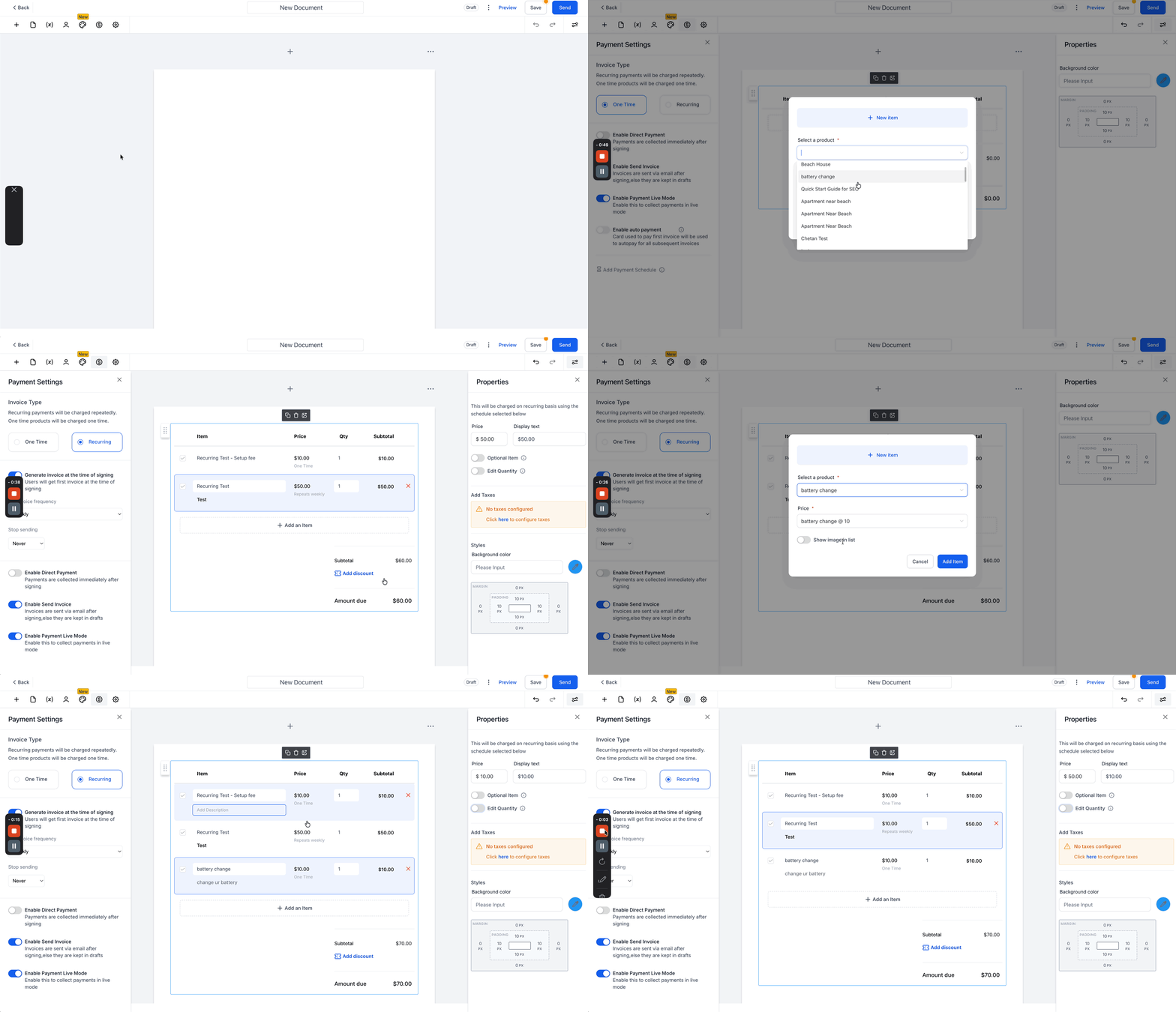
- In the document editor, insert a Product List.
- Click Add an Item and choose the desired product.
- Select the appropriate price if the product has multiple price options; HighLevel will identify its type.
- Add any additional one time or recurring products needed for the agreement; a setup fee will appear separately if applicable.
- Configure product properties such as pricing adjustments, mark the product as an Optional Item, enable quantity editing, and set applicable taxes.
- Set the recurring invoice schedule, defining the start date and frequency (daily, weekly, monthly, yearly).
- Specify when invoice generation should begin, aligning it with document signing or a chosen schedule.
- Define an end condition for the recurring billing if it should not run indefinitely, such as a set number of occurrences.
- Review the product list and confirm each product has the correct price type, optional item setting, quantity, taxes, and recurring schedule.
07What it looks like in HighLevel
08Settings that matter
- Optional Item. Marks a product as selectable by the recipient, allowing them to include or omit it when signing.
- Recurring invoice settings. Controls when the recurring billing starts and the repeat frequency for the product.
- Invoice generation start. Determines the moment invoicing begins, either at document signing or a later scheduled date.
- End condition. Sets a termination rule for the recurring schedule, such as ending after a certain number of occurrences.
09Things to know before you rely on it
- Recurring schedules can use daily, weekly, monthly, or yearly frequencies only.
- An end condition is only available where the selected recurring configuration supports it.
- Setup fees are shown as separate one time line items and do not repeat on subsequent invoices.
10How it connects to the rest of HighLevel
- Manage automatic sales receipts generated from documents Automatic sales receipts
- Create, edit, tax, discount, and send invoices in HighLevel Invoice workflow
- Review HighLevel pricing and plan options Pricing
Michael's take

I find that bundling a recurring service with an upfront fee in a single document keeps the signing and billing steps together. The recurring product handles the ongoing invoices, while the one time line captures the initial charge.
If I only sell one off items or have irregular billing cycles, setting up recurring schedules adds steps that may not be necessary.