
01Who this is for
- Email marketers who run RSS campaigns and need a simple way to reach contacts that missed the first send.
- Businesses using Batch Schedule to send large lists and want a targeted reminder without rebuilding the email.
- Founders who want to avoid sending another full campaign to all contacts and prefer a focused follow up.
02Resend to unopened emails, explained
Resend to Unopened creates a follow up email that reuses the content of an already sent RSS or Batch Scheduled campaign. The platform identifies contacts whose open activity was not recorded and queues the resend only for those contacts. The feature appears in the campaign’s action menu after the original send and can also be enabled while creating the campaign.
When you schedule a resend you choose a new date and time, and you may edit the subject line. The resend is treated as a separate delivery, but its content remains the same as the original email. After the resend is sent you can view opens, clicks, and unsubscribes in the campaign statistics.
The controls for reviewing, editing, or canceling a pending resend live under the same three dot menu in the Campaigns list. If the original campaign is canceled before it launches, the associated resend will not be sent.
03How businesses use resend to unopened for RSS and Batch Scheduled Emails
- Content marketing agency. After an RSS newsletter is sent, the agency opens the sent campaign’s menu, selects Resend email to Unopened, picks a later time, and modifies the subject line to attract more opens without rebuilding the newsletter.
- Ecommerce store. When a Batch Scheduled promotional email is delivered, the store uses the campaign creation screen to enable Resend email to Unopened, sets a 48 hour delay, and adjusts the subject to highlight a new offer before the follow up is queued.
- Consulting firm. The firm reviews pending resends in the Campaigns list, edits the resend duration if the timing needs to shift, or cancels the resend if the original email’s content becomes outdated.
04Before you start
- An eligible RSS Schedule or Batch Schedule campaign must have already been sent.
05How to set up and use resend to unopened for RSS and Batch Scheduled Emails in HighLevel
Resend from a sent RSS or Batch Scheduled campaign
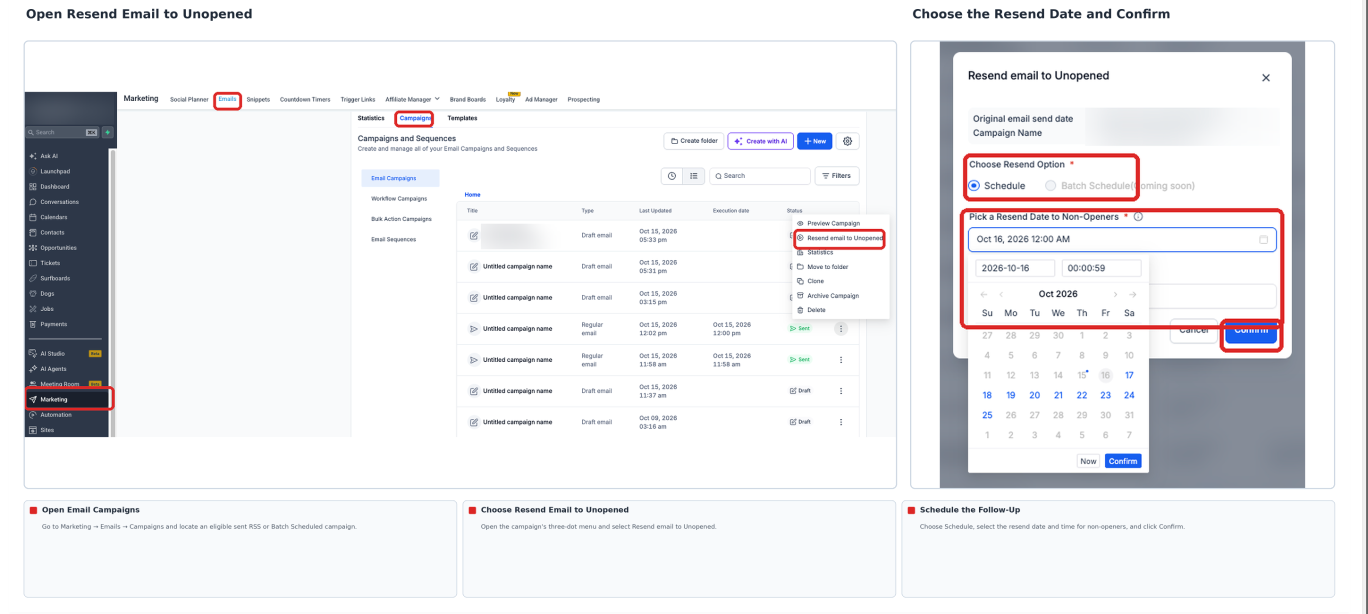
- Navigate to Marketing > Emails > Campaigns.
- Locate the sent RSS or Batch Scheduled campaign you want to target.
- Open the three dot menu (⋮) for that campaign.
- Select Resend email to Unopened from the menu.
- Choose the resend date and time, then review the subject line.
- Confirm the resend by clicking the final confirmation button.
Plan a resend during campaign creation
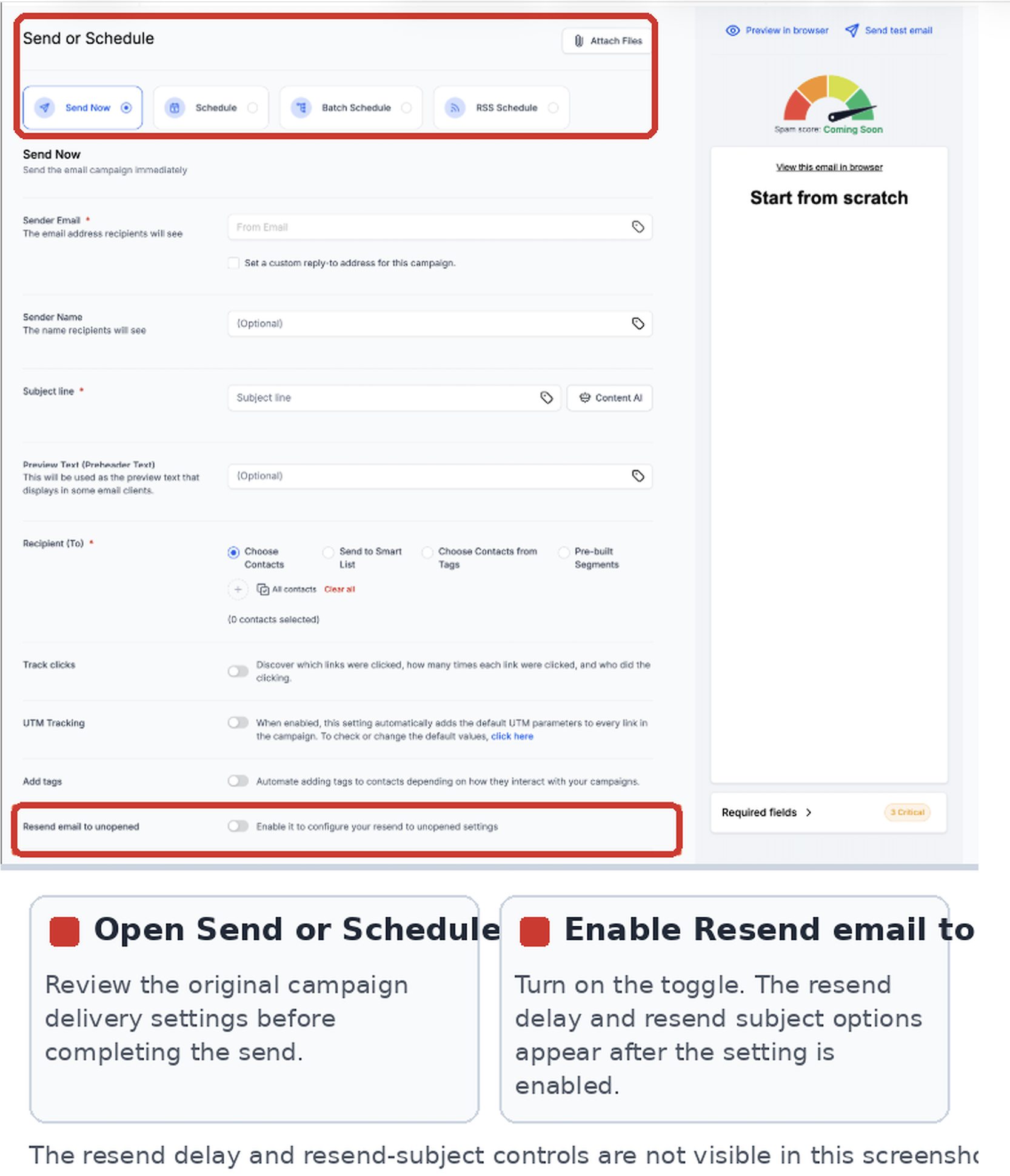
- Open the Send or Schedule settings while creating the campaign.
- If the option appears, enable Resend email to unopened.
- Set the resend delay and modify the subject line if desired.
- Complete the original campaign by sending or scheduling it.
Review and manage a pending resend
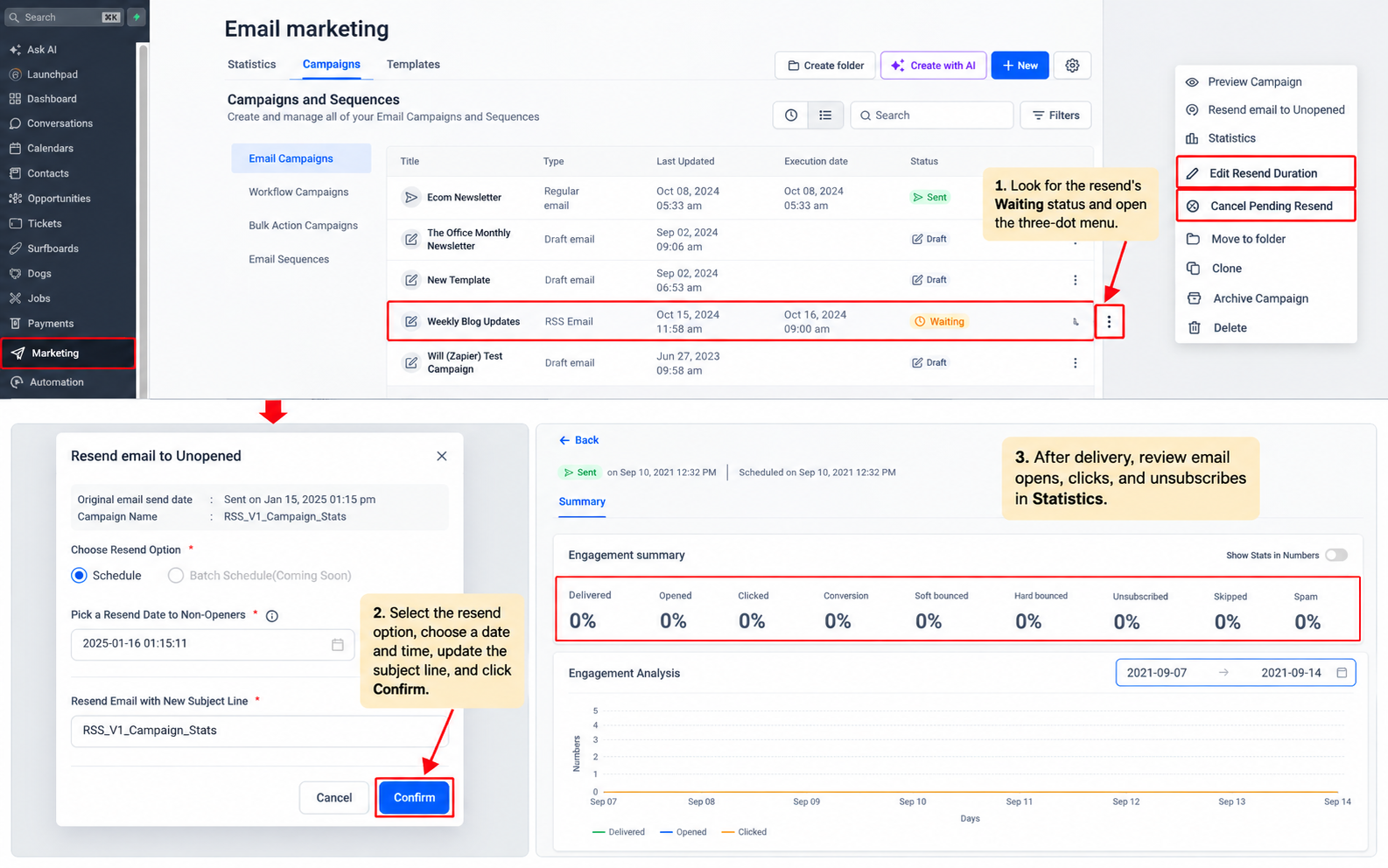
- Go to Marketing > Emails > Campaigns and find the entry with a Waiting status.
- Open its three dot menu (⋮) to access edit or cancel controls.
- After delivery, examine opens, clicks, and unsubscribes in Statistics.
06What it looks like in HighLevel
07Settings that matter
- Resend email to unopened. Enables a follow up that targets contacts who did not open the original email.
- Resend delay. Specifies how long after the original send the follow up should be delivered.
08Things to know before you rely on it
- Only eligible sent RSS Schedule and Batch Schedule campaigns can use Resend to Unopened.
- The resend targets contacts with no recorded open activity; it does not consider clicks or other actions.
- If the original campaign is canceled before sending, its resend will not be delivered.
- The feature does not provide a bulk resend capability for multiple campaigns at once.
09If something goes wrong
- Resend email to Unopened does not appear in the campaign menu. Verify that the campaign is an eligible RSS or Batch Scheduled type and that it has already been sent.
10How it connects to the rest of HighLevel
- Send RSS email campaigns RSS campaigns guide
- Send or schedule a regular email campaign Email schedule overview
- HighLevel pricing and plans Pricing details
Michael's take

Resend to unopened feels like a small convenience that can save a lot of wasted outreach. It gives you a second shot at a message that slipped past the inbox without having to rebuild the whole email or blast everyone again.
A newsletter driven media company fits this well. They can send a weekly RSS roundup, then quietly resend to the few subscribers who never opened it, perhaps with a sharper subject line.