
01Who this is for
- Ecommerce Founders who need to push purchases through website tracking using Meta Pixel.
- Service based businesses that want direct inquiries via Facebook Messenger or WhatsApp.
- Marketers managing multiple client accounts who require a clear, single conversion location per campaign.
02Meta sales objective campaigns, explained
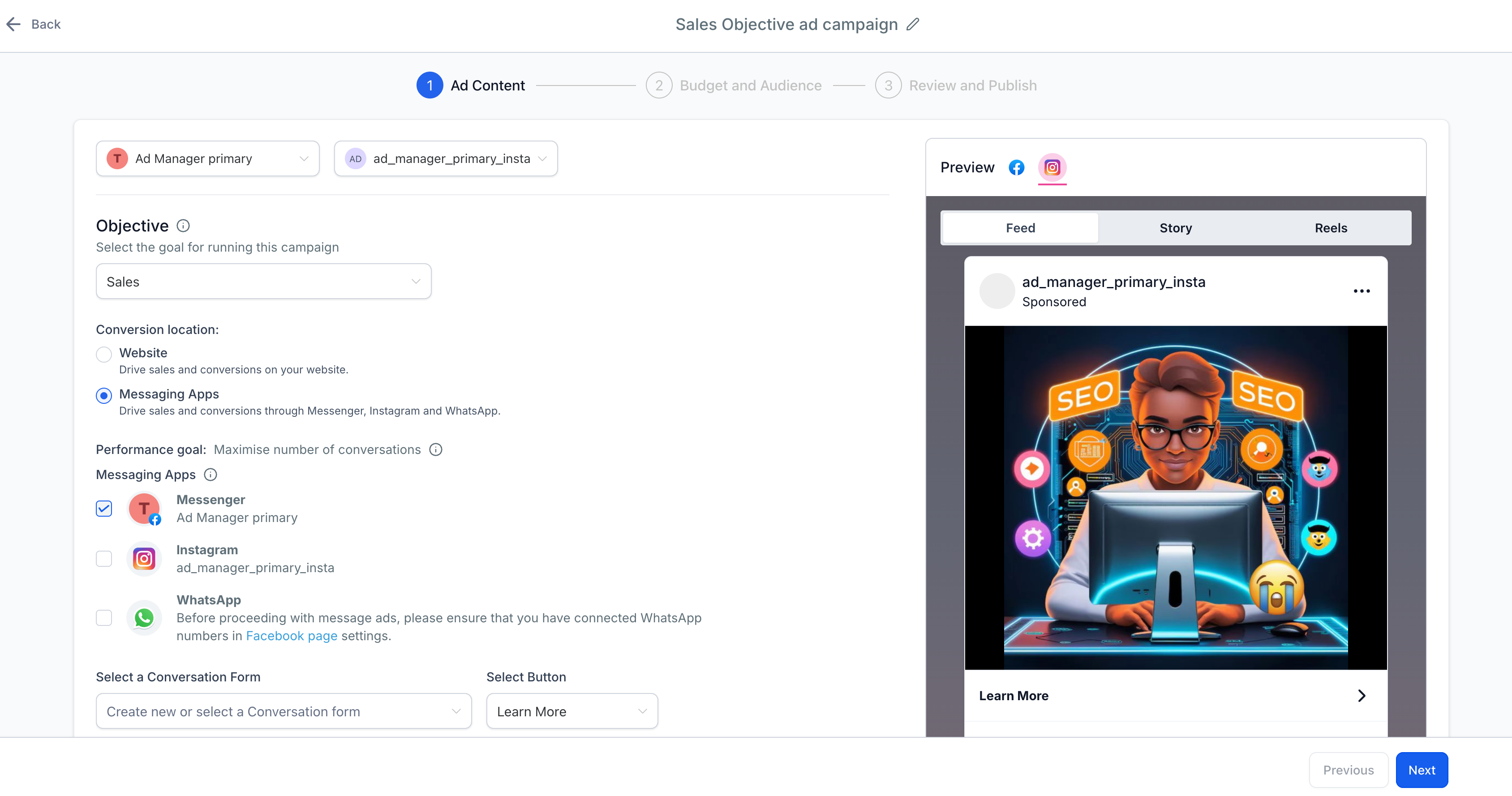
The Sales objective focuses on generating measurable conversions. When you create a campaign you can target either website actions tracked by Meta Pixel or direct interactions in messaging apps. The platform presents the choice of conversion location, handles pixel integration for web tracking, and allows you to configure automated replies for messaging apps.
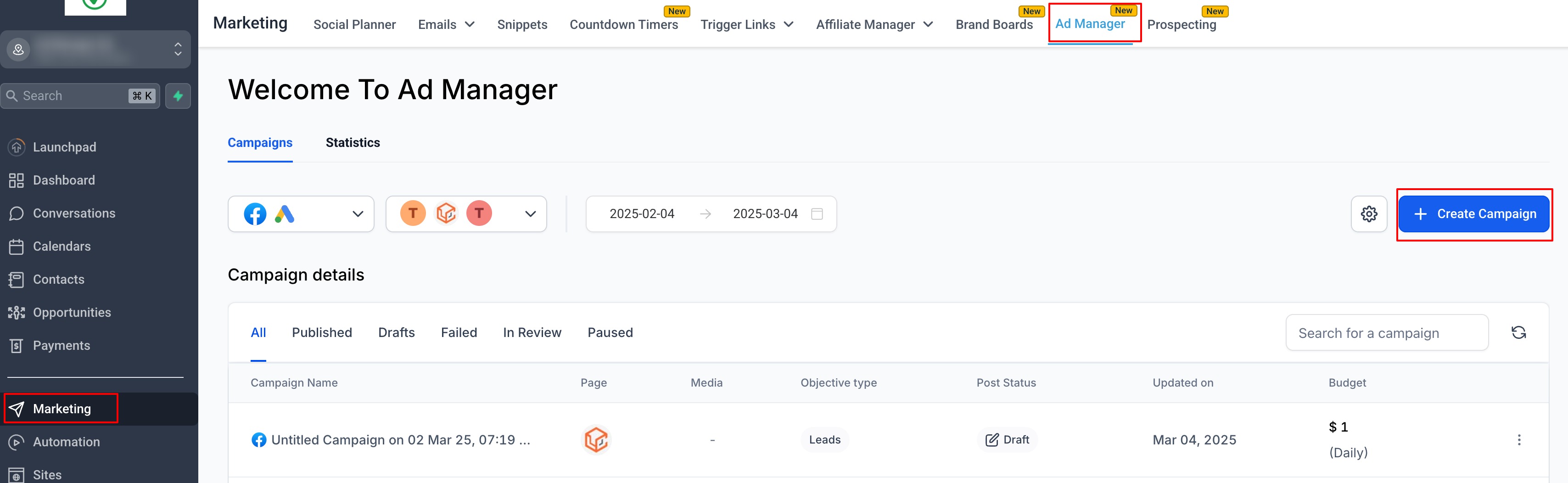
The feature lives inside the Ad Manager. After onboarding is complete, you reach it via subaccount > Marketing > Ad Manager. From there you build a new Facebook campaign, select Sales, choose the conversion location, and configure budget, audience, and creatives before publishing. Monitoring is done through Ad Manager statistics and Pixel data.
03How businesses use Meta sales objective campaigns
- Ecommerce store. Select Website as the conversion location, install Meta Pixel, and choose a purchase event. The ad drives traffic to the store and tracks sales directly.
- Salon or spa. Choose Messaging Apps, pick WhatsApp as the destination, and set automated replies that guide clients to book appointments. The campaign encourages direct messages that can be turned into bookings.
- Online education provider. Use the Sales objective with Facebook Messenger, create a lead generation event, and design automated messages that prompt prospects to enroll. The campaign captures leads without needing additional code.
04The numbers and rules that matter
- Messaging apps include Facebook Messenger, Instagram Direct, WhatsApp.
- Only one conversion location can be chosen per campaign.
05Before you start
- Onboarding must be completed so the Ad Manager is available.
- Meta Pixel must be installed on the website if you plan to track website conversions.
- An Instagram account must be linked to the chosen Facebook page to run ads on Instagram.
- Messaging apps (Messenger, Instagram Direct, WhatsApp) must be set up within Meta Ads.
06How to set up and use Meta sales objective campaigns in HighLevel
Create a sales objective campaign
- Open subaccount > Marketing > Ad Manager, click + Create Campaign, pick Facebook Campaign and Start from scratch.
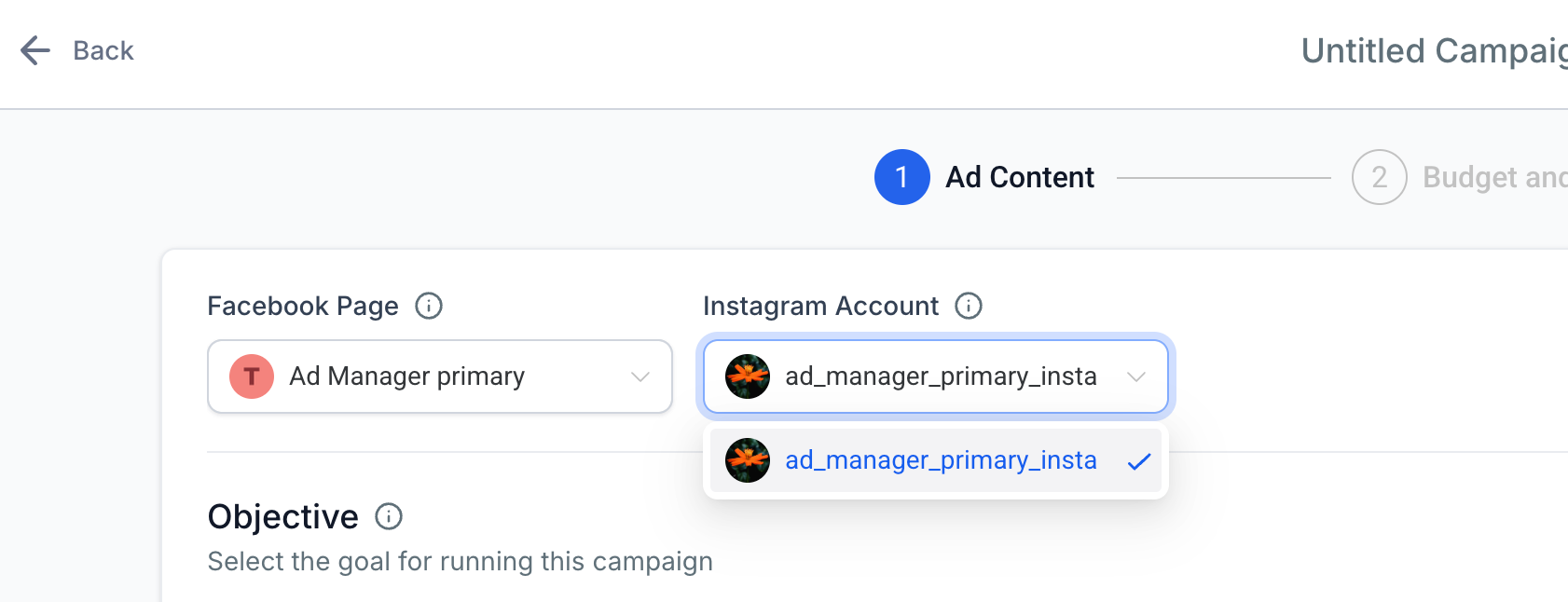
- Select the Facebook page for the ad and connect an Instagram account if you want the ad to appear on Instagram.
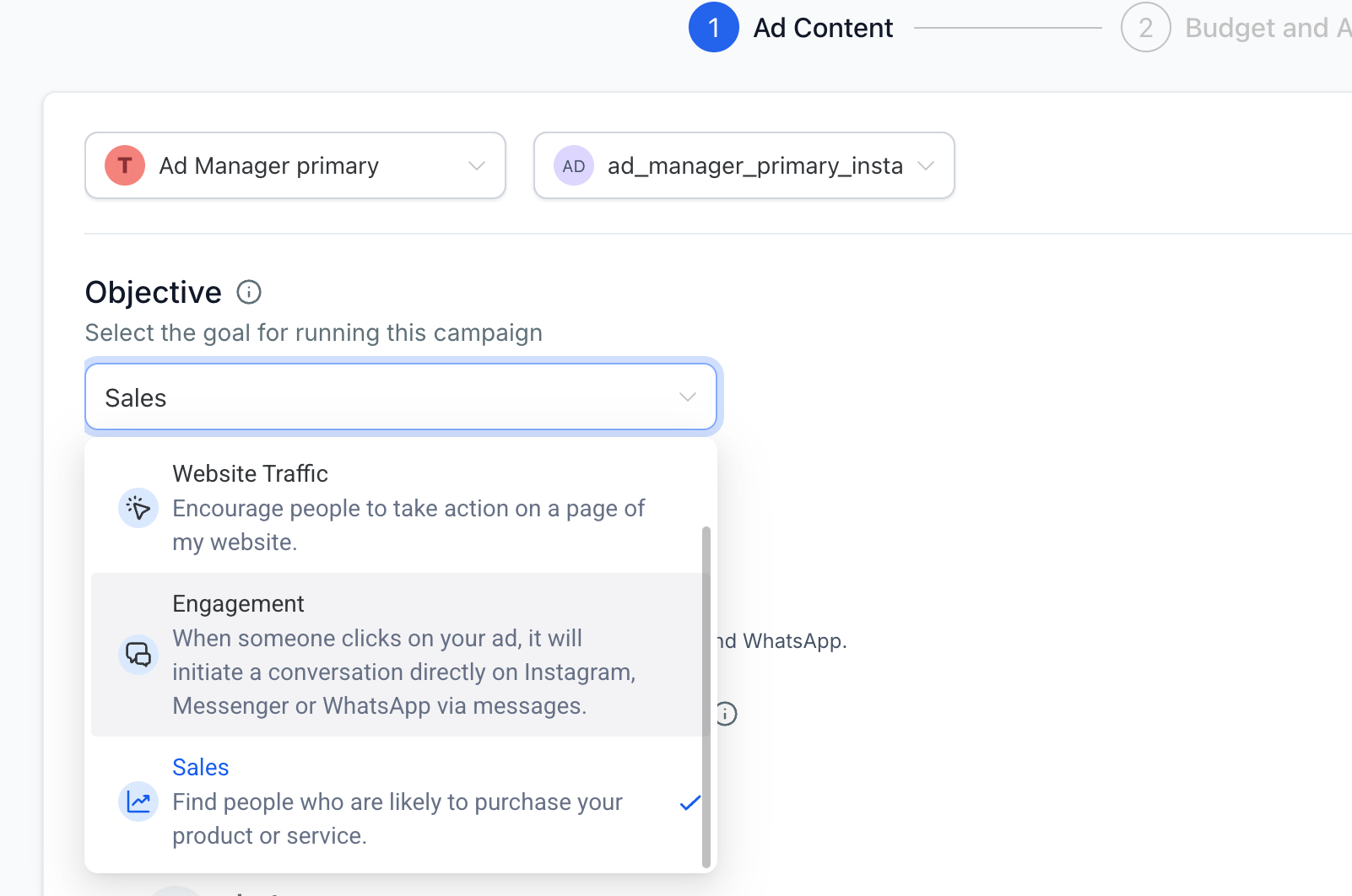
- Choose Sales as the campaign objective.
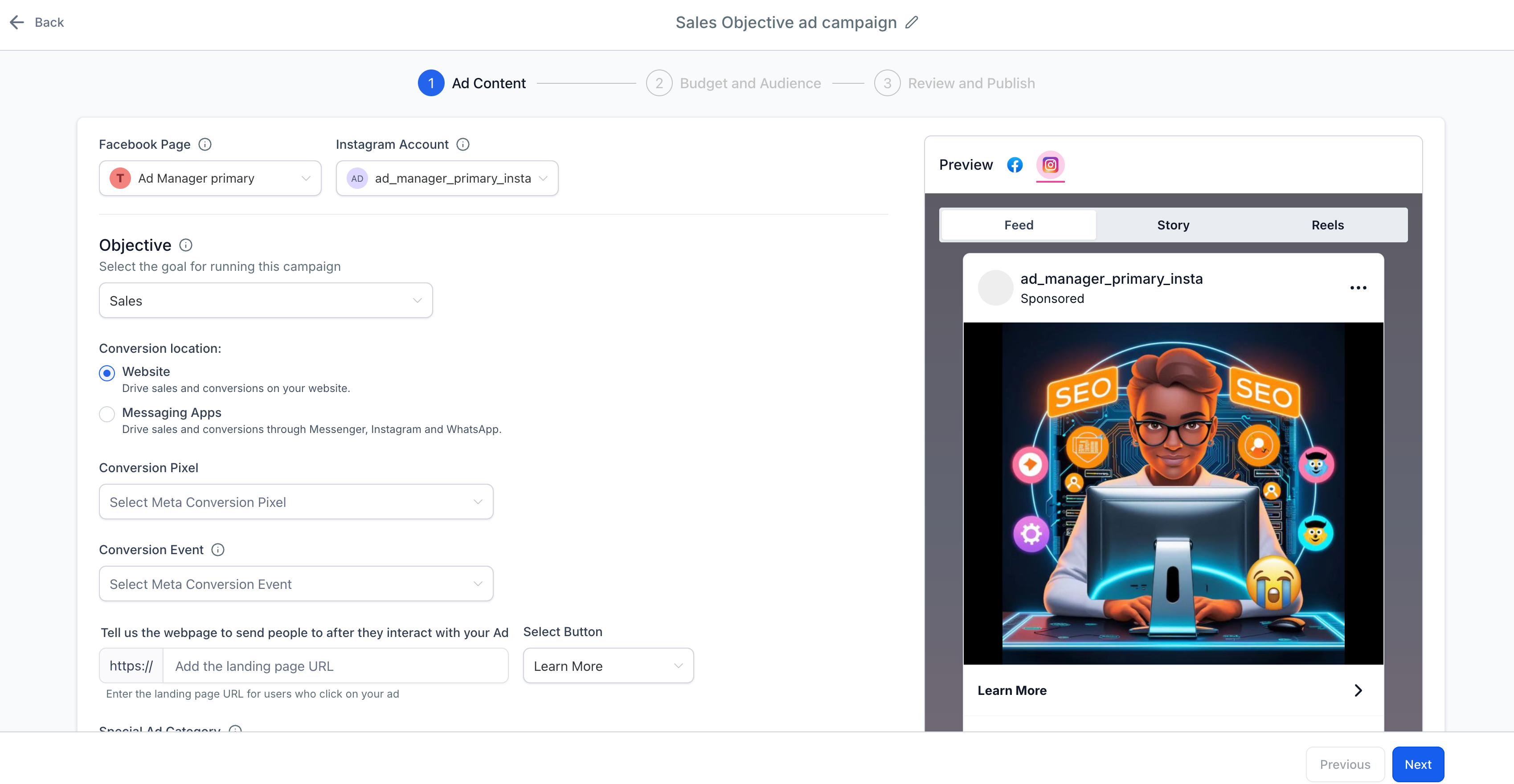
- Pick the conversion location, either Website or Messaging Apps.
- For Website, verify Meta Pixel is installed and select a conversion event; for Messaging Apps, choose the app and set up automated responses.
- Choose an ad format, upload the creative assets, write the copy and add a clear Call to Action.
- Select Daily Budget or Lifetime Budget and enter the desired amount.
- Define the audience using Custom Audiences, Lookalike Audiences, or interest based targeting.
- Review all settings, including geographic targeting, audience, budget, and creatives.
- Click Publish to launch the campaign.
- Monitor performance using Meta Pixel data and the Ad Manager statistics view.
- Modify budget, creatives, or audience as needed based on the observed results.
07What it looks like in HighLevel
08Settings that matter
- Sales. Sets the campaign objective to focus on driving direct conversions.
- Website. Selects website actions as the conversion location and enables Meta Pixel tracking.
- Messaging Apps. Designates Messenger, Instagram Direct, or WhatsApp as the conversion destination.
- Daily Budget. Limits spending to a fixed amount each day.
- Lifetime Budget. Limits total spend over the entire campaign period.
- Custom Audiences. Targets users who have previously interacted with the business.
- Lookalike Audiences. Reaches new users who resemble existing customers.
- Interest, Based Targeting. Filters the audience by demographics, behaviors and interests.
09Things to know before you rely on it
- Only Website and Messaging Apps are supported as conversion locations; other options such as App or In Store are unavailable.
- A single campaign can use either Website or Messaging Apps, not both.
- Instagram messaging ads are ineligible for Click to Direct if the Instagram account is not linked to the selected Facebook page.
10If something goes wrong
- Website conversions are not being tracked.. Verify the Meta Pixel is installed and firing correctly, ensure the correct conversion event is selected, and confirm URL settings point to the appropriate pages.
- Messaging App conversions are not recorded.. Check that the chosen messaging app is enabled within Meta Ads and linked to the business, then test an interaction to see if the conversion event appears.
- Campaign is not delivering as expected.. Increase the budget if it is too low, broaden audience targeting, and test different ad creatives for better engagement.
- Low conversion rates.. Improve the landing page or messaging flow, refine audience targeting based on performance data, and refresh ad creatives regularly.
11How it connects to the rest of HighLevel
- Create a new Facebook ad campaign Ad campaign guide
- Set audience targeting and geographic controls Audience controls
- View and export campaign performance statistics Ad statistics
Michael's take

I’d separate the two goals, run one campaign that points to the website and another that drives chats, then compare the results side by side.
If I were setting this up, I’d start with a clean Pixel install and a simple, single step message flow before adding retargeting or lookalike audiences.