
01Who this is for
- Founders of ecommerce businesses benefit by limiting ad spend to regions where they ship products, ensuring ads reach only relevant customers.
- Marketing managers at service firms use Intended Audience options to narrow targeting to specific interests or professional attributes, improving ad relevance.
02Audience controls, explained
Audience Controls are settings inside HighLevel that tell an advertising platform where a campaign can run and which audience groups it may target. The controls differ by platform: Meta shows them at the Ad Set level, Google at the campaign level, and LinkedIn at the Campaign level inside a Campaign Group.
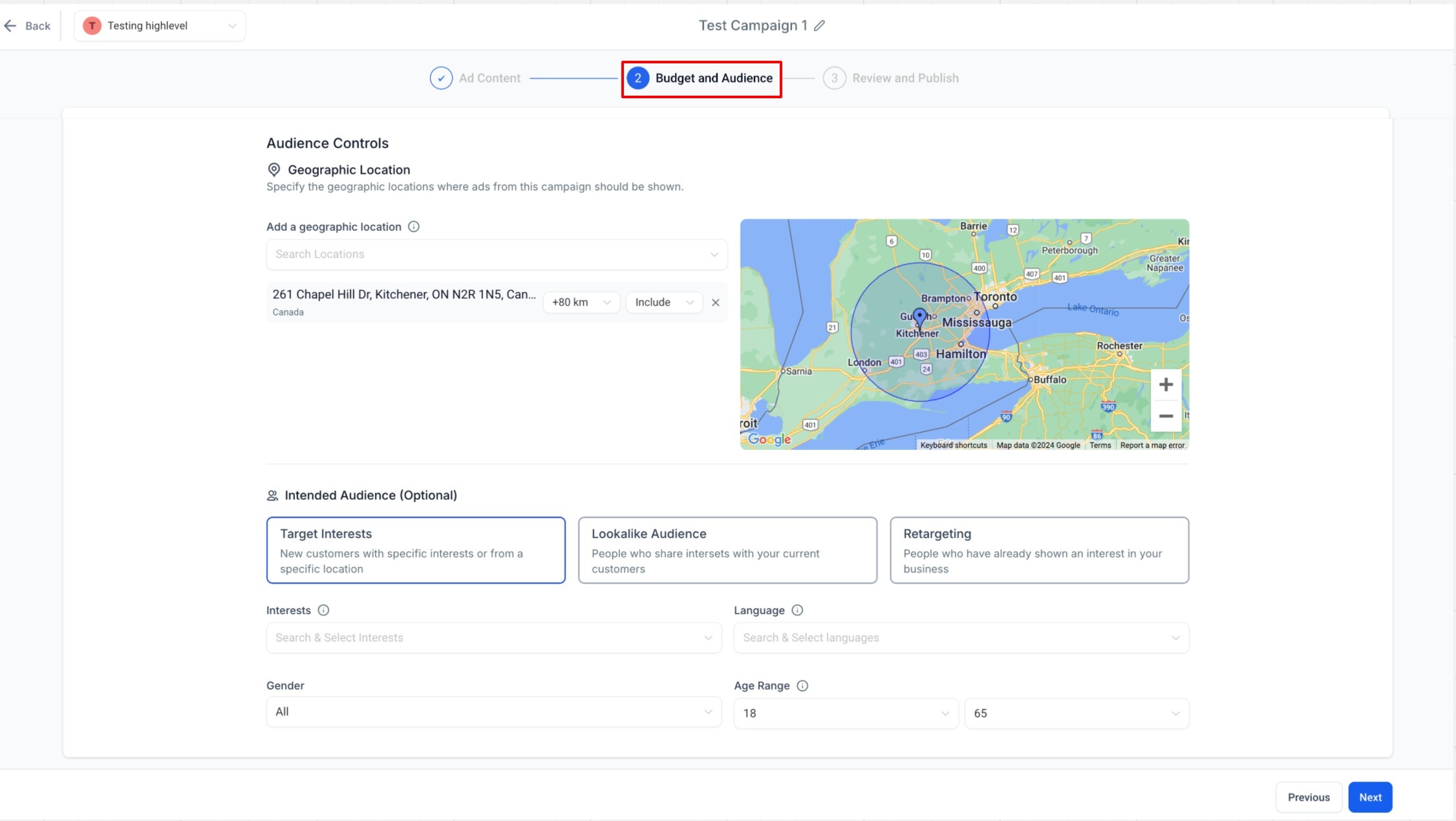
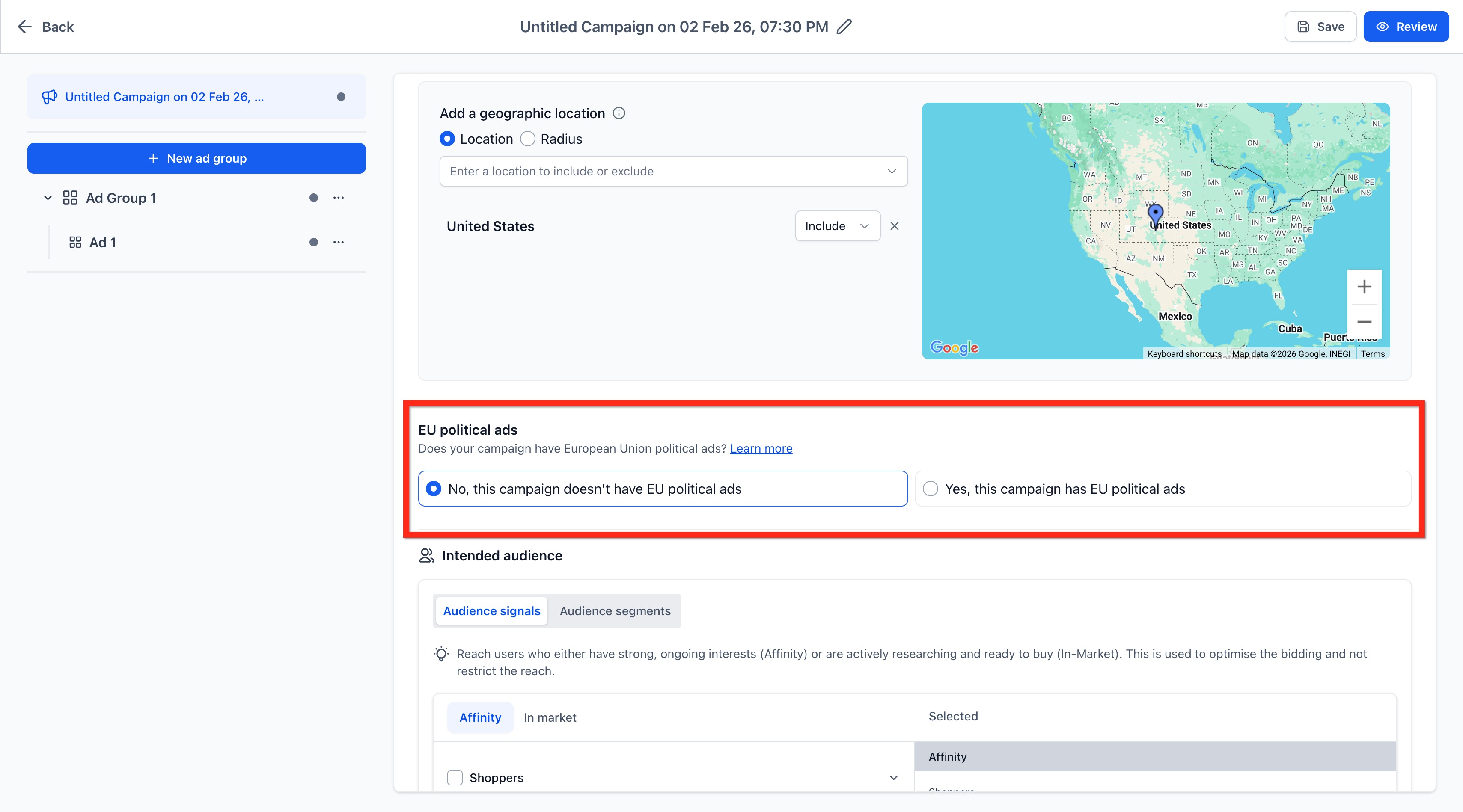
Geographic Location is a core control that lets you include or exclude cities, states, countries or custom radii. When the platform supports it, you can also add Intended Audience criteria such as Target Interests, Lookalike Audiences or Retargeting for Meta, and professional attributes for LinkedIn. Google offers its own Audience Segments and may require a declaration for EU political ads.
All controls appear in the Ad Manager section of HighLevel after you select Marketing from the Subaccount view and open the appropriate campaign builder.
03How businesses use audience controls
- Retail ecommerce store. The owner opens a Meta campaign in HighLevel, navigates to the Ad Set level, and adds geographic locations for cities where shipping is offered. They then select a Lookalike Audience based on recent purchasers to expand reach without rebuilding the audience.
- B2B consulting firm. The firm creates a LinkedIn Campaign Group, opens a specific campaign, and configures geographic locations for target regions. They add Intended Audience attributes like company size and job title to focus ads on decision makers.
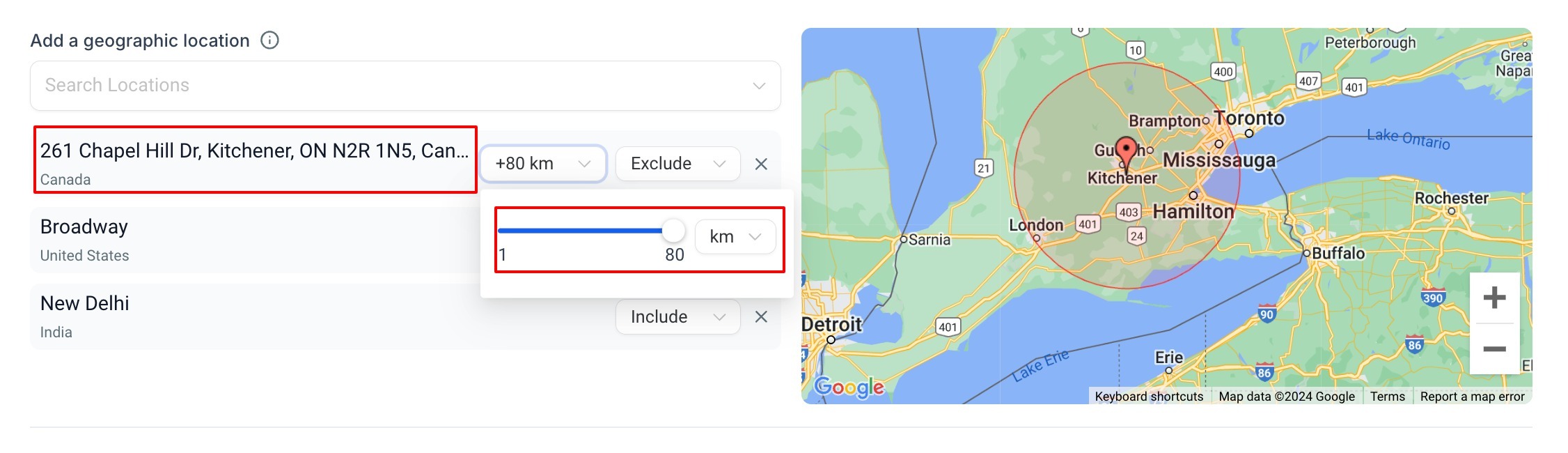
- Local service provider. The provider builds a Google Search campaign, selects the required EU political ads option, and specifies a radius around the office address. Because Google radius targeting does not support Include/Exclude, they rely on the radius alone to reach nearby neighborhoods.
04The numbers and rules that matter
- Supported platforms: Meta, Google, LinkedIn.
05How to set up and use audience controls in HighLevel
Configure audience controls for a Meta campaign
- From the HighLevel Subaccount view, select Marketing.
- Select Ad Manager.
- Create a new Meta campaign or open the applicable campaign setup.
- Continue to the Ad Set level.
- Locate Audience Controls.
- Configure Geographic Location.
- Configure Intended Audience when needed.
Configure audience controls for a Google campaign
- From the HighLevel Subaccount view, select Marketing.
- Select Ad Manager.
- Create or open the applicable Google campaign.
- Continue to the Campaign configuration.
- Locate the available geographic and audience controls.
- Select the appropriate EU political ads option before continuing.
- Configure the required settings before proceeding to the next campaign level.
Configure audience controls for a LinkedIn campaign
- From the HighLevel Subaccount view, select Marketing.
- Select Ad Manager.
- Create or open a LinkedIn Campaign Group.
- Create or open the applicable Campaign.
- Configure Geographic Location.
- Configure Intended Audience when additional targeting is needed.
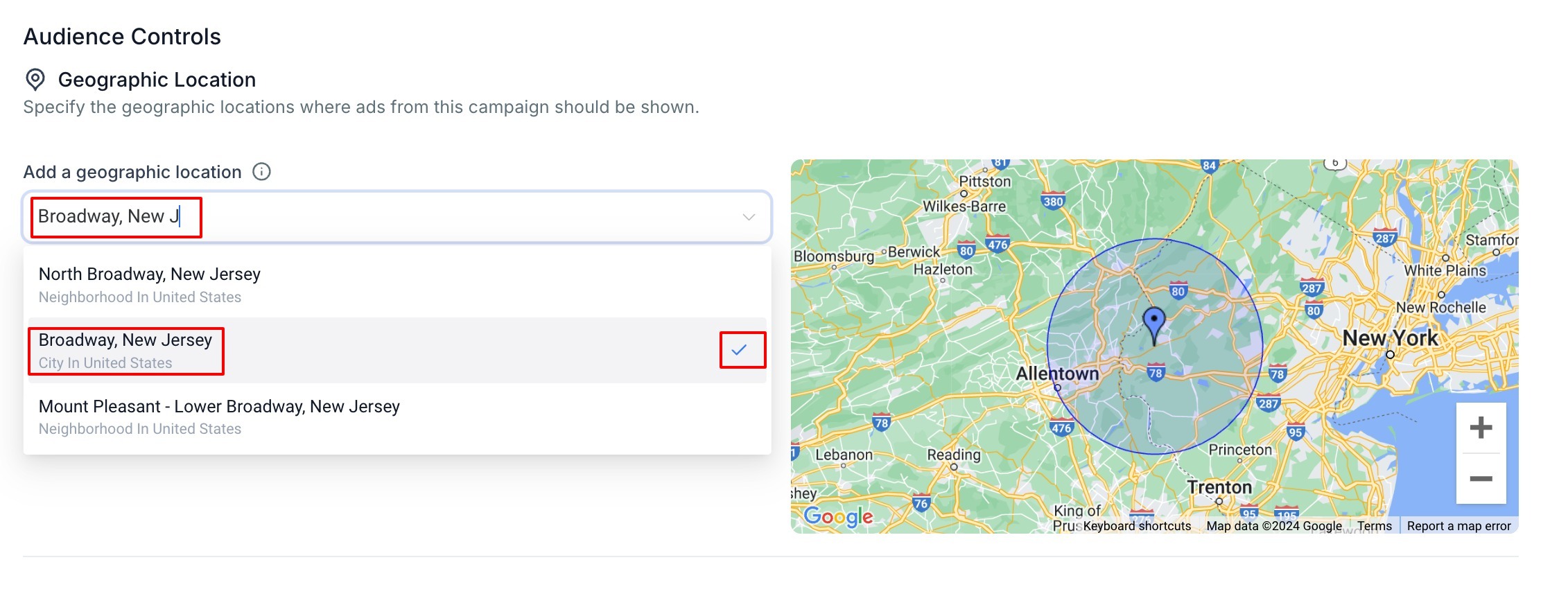
Add a geographic location
- Open the geographic location search field.
- Enter the supported city, state, country, place, or address.
- Select the intended result from the dropdown.
- Review the selected geographic area on the map.
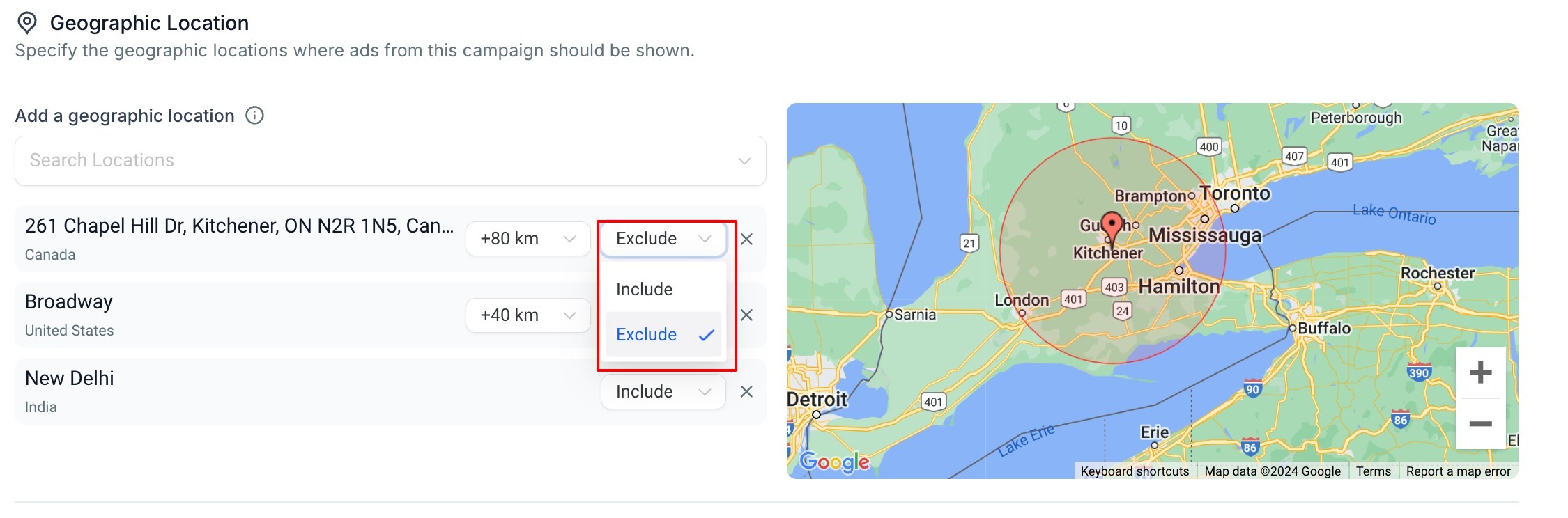
- Configure the available radius or Include/Exclude controls when needed.
Include or exclude a geographic location
- If the selected platform and targeting mode support it, choose Include to add the selected geographic area to the campaign targeting.
- If supported, choose Exclude to remove the selected geographic area from eligible targeting.
- Click the X control beside a selected location to delete that location entirely.
06What it looks like in HighLevel
07Settings that matter
- Geographic Location. Specifies the physical areas where the ad may appear, with options to add, radius, include or exclude locations.
- Intended Audience. Optional group of audience criteria such as interests, lookalike or retargeting that further refines who sees the ad.
- Target Interests. Allows selection of interests, language, gender or age range to narrow a Meta audience.
- Lookalike Audience. Creates a new audience based on characteristics of a source audience to reach similar users.
- Retargeting. Selects a Custom Audience that has previously interacted with the business across supported sources.
- EU political ads declaration. A required choice that states whether the Google campaign contains EU political advertising.
- Audience Segments. Google specific audience options such as Customer Match, Website Visitors, Interest Segments, or Lookalike Segments.
08Things to know before you rely on it
- Audience Controls vary by platform, campaign type and targeting restrictions.
- Google radius targeting does not support Include or Exclude controls.
- Meta Special Ad Category campaigns cannot use Lookalike Audiences and restrict age, gender and detailed targeting.
- LinkedIn requires at least one geographic location; Include/Exclude controls are optional.
09How it connects to the rest of HighLevel
- Create a new Facebook ad campaign in HighLevel Facebook ad guide
- View and export ad manager campaign statistics Ad statistics
- Start a 30 day HighLevel trial Free trial
Michael's take

Audience controls are worth the time they save by letting small businesses precisely focus ad spend on the right locations and people without rebuilding audiences from scratch. They make it easy to test interest, lookalike or retargeting pools and see estimated reach before launching.
Avoid assuming every platform offers Include and Exclude controls; they may not be available for certain radius targeting modes.