
01Who this is for
- Email marketers need to see IP health to maintain inbox placement for large campaigns.
- Agency owners managing multiple client IPs benefit from a single view of deliverability metrics.
02IP status monitoring, explained
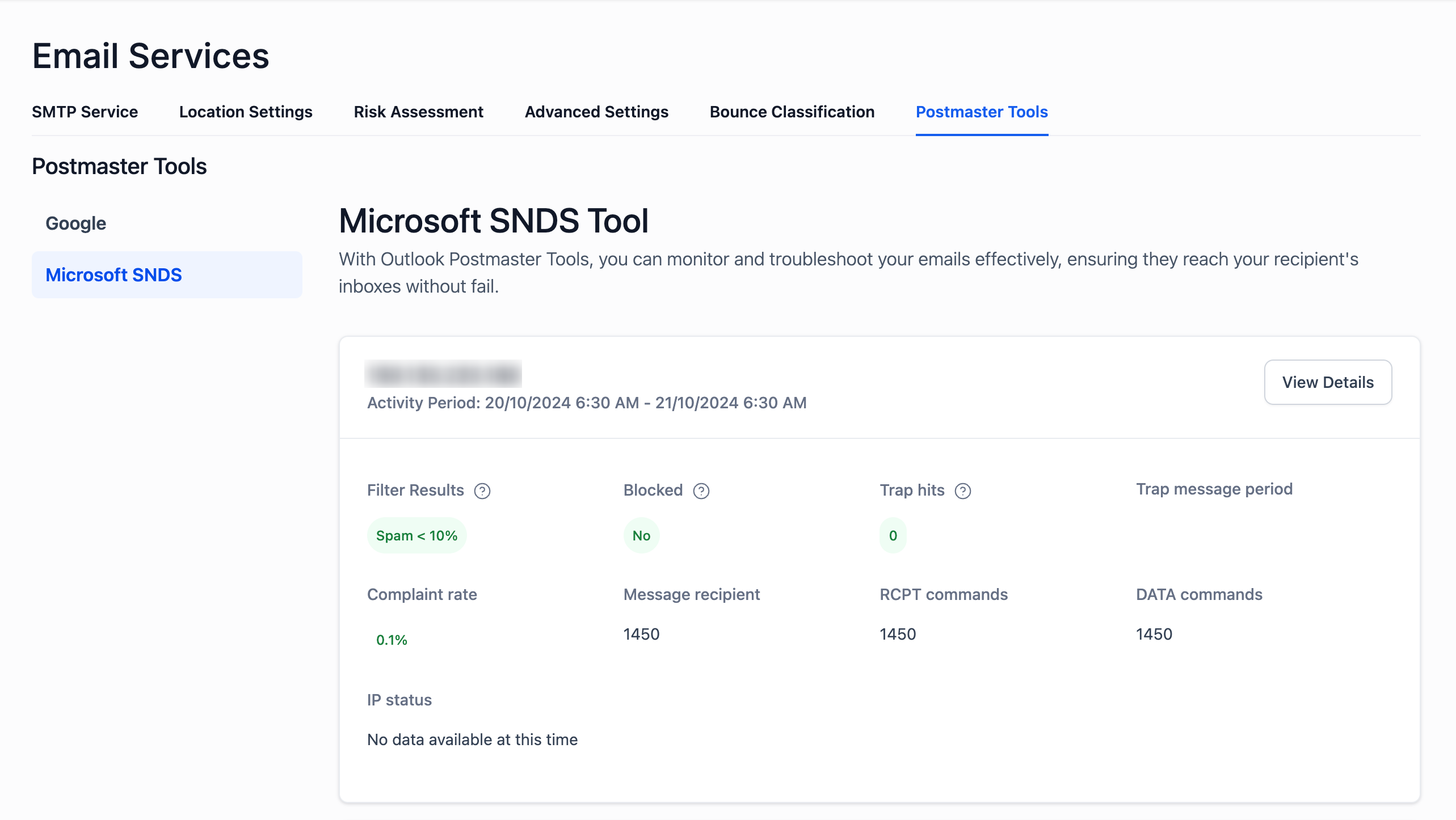
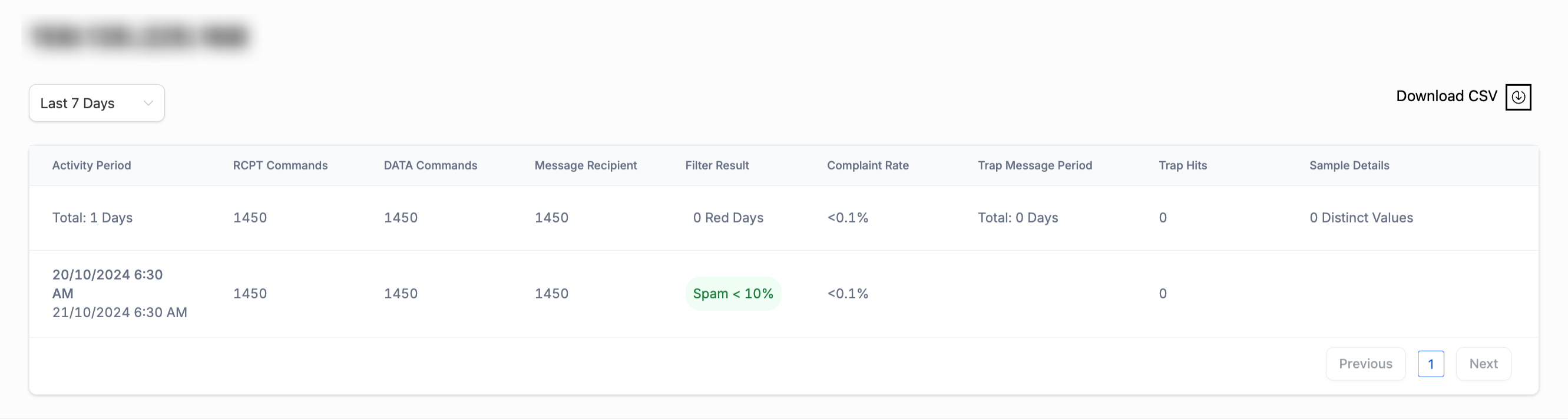
The IP Status feature links HighLevel to Microsoft’s Smart Network Data Services. Daily data for each dedicated IP you own appears in a dashboard located under Settings > Email Services > Postmaster Tools > Microsoft SNDS. From the dashboard you can select an IP, view summary health data, open detailed activity periods, see RCPT and DATA command volumes, and download CSV files for offline analysis. The data cover only Microsoft owned mailbox providers such as Outlook and Hotmail and refresh once per day.
03How businesses use IP status monitoring
- Digital marketing agency. The agency opens the IP Status dashboard, selects each client’s dedicated IP, and checks filter results and complaint rates after a major send. If a blocked status appears, the agency follows the prescribed steps to clean lists and request delisting, keeping client reputations intact.
- Ecommerce store. The store’s owner reviews the IP Health Overview before launching a holiday promotion. By downloading the CSV report, they compare the expected recipient volume with actual RCPT and DATA commands, ensuring the send aligns with planned volume.
- Non profit organization. The nonprofit monitors trap hits and complaint rates after a fundraising email blast. When a trap hit is detected, they immediately remove the offending address from their list and verify opt in status for all remaining contacts.
04The numbers and rules that matter
- Filter Results healthy range: Below 10% spam.
- Trap Hits healthy range: 0.
- Complaint Rate healthy range: Below 0.1%.
- Trap Message Period healthy range: 0 days.
- Red Days (Filter Result Issues) healthy range: 0.
05Before you start
- You must have an active IP subscription that includes IP Status Monitoring.
06How to set up and use IP status monitoring in HighLevel
Use the IP status feature
- Open Settings > Email Services > Postmaster Tools > Microsoft SNDS to reach the IP status dashboard.
- Select the IP address you want to examine from the list presented.
- Click View Details for the chosen IP to see activity period, command counts and reputation rates.
- Press Download CSV to export the detailed activity data for offline review.
- Read the overview information such as spam and complaint rates to assess IP health.
Handle IP blocking or high spam rates
- Review recent metrics, paying close attention to trap hits and complaint percentages.
- Clean your mailing lists by removing invalid or inactive addresses and confirming opt in for all recipients.
- Submit an IP delisting request using the Microsoft Outlook Support page.
07What it looks like in HighLevel
08Settings that matter
- Microsoft SNDS. Enables the IP status dashboard and provides daily deliverability metrics for Outlook and Hotmail.
09Things to know before you rely on it
- The dashboard only reports activity for Microsoft owned mailbox providers; Gmail and Yahoo are not included.
- Data appears only after the IP has recent sending volume to Outlook or Hotmail recipients.
- A blocked IP or any non zero trap message period requires immediate remediation.
- Metrics refresh once per day, so changes may not be visible right away.
10How it connects to the rest of HighLevel
- Email warm up and DMARC guide Warm up guide
- Email verification setup and billing Verification guide
- Dedicated sending domain setup Domain setup
Michael's take

Watch out for a blocked IP or any nonzero trap hits. Those signals mean you’re already on Microsoft’s radar, so the sooner you act, the better.
When you have a dedicated IP, the SNDS dashboard gives you a clear view into how Outlook and Hotmail see your messages. Spotting a rising complaint rate or a red day lets you clean lists and tweak content before inbox placement suffers.