
01Who this is for
- Anyone sending emails through the platform, especially users of LC Email and LC Email Dedicated Domain.
- Agencies that manage multiple client subaccounts and need isolated domain reputations.
02Email best practices & warm up, explained
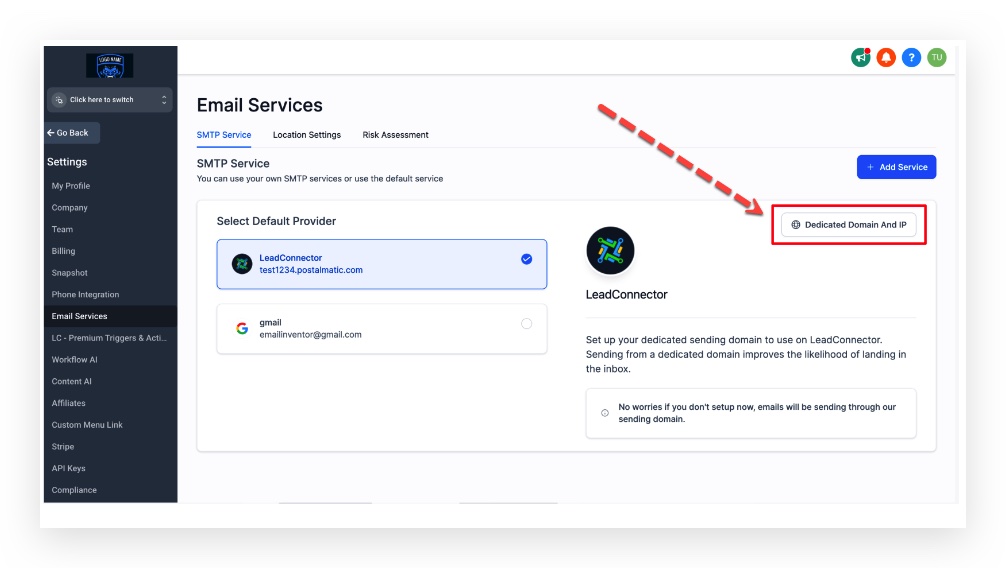
The email best practice feature set lives inside HighLevel’s email settings. It includes domain authentication, dedicated sending domains, dedicated IP addresses, email validation, proper From address configuration, unsubscribe handling, and double opt in. When a dedicated domain is configured, you can add DNS records, set a matching From address, and enable validation directly from the subaccount or agency view.
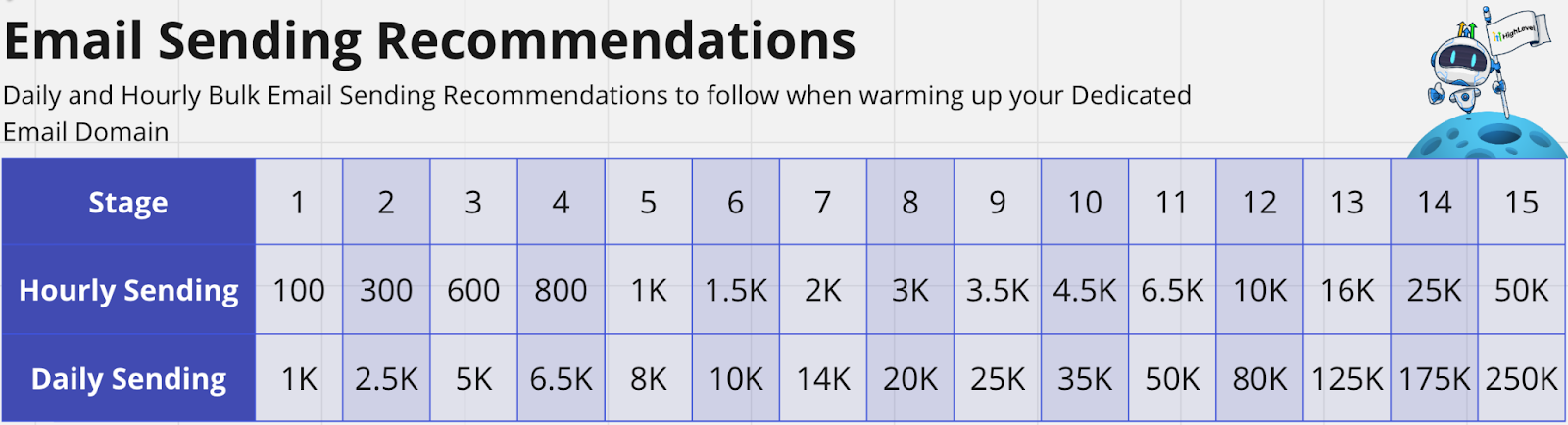
Warm up is a phased sending schedule that limits how many emails you may send per hour and per day. It guides you through Stage 1 (up to 100 per hour, 1 000 per day) and Stage 2 (up to 300 per hour, 2 500 per day) until the domain reputation stabilises.
If messages still land in spam, a four step troubleshooting flow helps you verify the age of the domain, MX records, DMARC record, and then reach out to support.
03How businesses use email best practices & warm up
- Real estate agency. The agency adds a DMARC TXT record through its DNS host, verifies it, and then follows the warm up schedule to send new property listings to opted in leads. If listings drift to spam, the agency runs the troubleshooting steps to check MX and DMARC records.
- SaaS startup. The startup configures a dedicated sending domain, enables first send validation, and gradually ramps up product update emails using the warm up volume limits. When an update falls into spam, the team confirms the domain age and DMARC setup before contacting support.
- Health clinic. The clinic sets up a DMARC record, uses a matching From address for appointment reminders, and follows the warm up guide to reach patients. If reminders are flagged as spam, the clinic checks the MX configuration and DMARC validity as outlined in the troubleshooting flow.
04The numbers and rules that matter
- $59 per month per dedicated IP address (per HighLevel's help center, checked November 2026).
- $2.50 per 1,000 email validations (per HighLevel's help center, checked November 2026).
- Stage 1 warm up limit: 100 emails per hour, 1,000 per day.
- Stage 2 warm up limit: 300 emails per hour, 2,500 per day.
- Domain warm up can take up to 4 weeks.
- DMARC TXT record: Type TXT, Name _dmarc, Content v=DMARC1; p=reject.
05Before you start
- A dedicated email sending domain must be added and verified in HighLevel.
- Access to the domain’s DNS provider is required to create DNS records.
- Ignoring this guide can result in emails going to spam. Please read, learn, and apply these practices before sending.
06How to set up and use email best practices & warm up in HighLevel
Add DMARC record
- Log into your DNS provider’s control panel.
- Create a new TXT record named _dmarc with the value v=DMARC1; p=reject.
- Use a DMARC checker tool to confirm the record is published correctly.
Warm up emails
- Apply all Email Best Practices such as using a dedicated domain and proper From address.
- Send emails within the daily and hourly limits for the current warm up stage.
- Keep content short, avoid public link shorteners, and send only to opted in contacts.
Troubleshoot spam placement
- Verify how long the domain has been sending; allow up to four weeks for warm up.
- Check that MX records are installed and resolve correctly.
- Confirm that a valid DMARC record is present and active.
- If the problem persists, contact HighLevel support for further assistance.
07What it looks like in HighLevel
08Settings that matter
- Verify Email Address when the first email is sent to a new contact. Enables automatic validation of a contact’s address the first time an email is sent from a subaccount.
- Enable Re validation for 90 days. Triggers automatic re validation of email addresses every ninety days for a subaccount.
09Things to know before you rely on it
- Stage 1 warm up permits up to 100 emails per hour and 1 000 emails per day.
- Stage 2 warm up permits up to 300 emails per hour and 2 500 emails per day.
- A dedicated sending IP costs $59 per month per IP (per HighLevel's help center, checked November 2026).
- Email validation costs $2.50 per 1 000 validations (per HighLevel's help center, checked November 2026).
10If something goes wrong
- Emails are landing in the spam folder. Follow the four step process: confirm domain age, verify MX records, ensure DMARC is set up, then contact support if needed.
11How it connects to the rest of HighLevel
- Add and verify a sending domain in HighLevel Domain setup guide
- Learn how to set up DMARC authentication DMARC guide
- Review pricing for dedicated IP addresses Pricing page
Michael's take

I’ve found that setting up a dedicated domain first, adding the DMARC TXT record, and following a modest warm up schedule makes the process feel more predictable. Watching the health reports in MX Toolbox and the Google Postmaster dashboard gives a sense of where the reputation stands before scaling up.