
01Who this is for
- Founders of SaaS businesses protect their brand reputation by ensuring outgoing mail passes DMARC checks.
- Marketing agencies that send newsletters need DMARC to avoid spam folder placement for client campaigns.
- Ecommerce store owners use DMARC to keep order confirmation emails from being rejected by major providers.
02DMARC records, explained
The DMARC record is a TXT entry in your domain’s DNS named _dmarc. Its value contains a series of tags that define the version, policy, alignment mode and reporting addresses. When an email is received, the server checks SPF and DKIM, then confirms that the authenticated domain aligns with the From address before applying the policy you set.
You control the policy with the p tag, none to monitor only, quarantine to send failing messages to spam, or reject to block them completely. Additional tags let you specify how strict the alignment must be, which sub domains inherit the rule, and where aggregate or forensic reports should be sent. The record lives outside the HighLevel platform, but its presence determines how the platform’s outbound mail is treated by inbox providers.
03How businesses use DMARC records
- SaaS startup. Create a DMARC TXT record that starts with p=none to collect reports, then move to p=quarantine and eventually p=reject as the product email sources are verified. This is done in the DNS console, not inside HighLevel.
- Digital marketing firm. Add a DMARC record with a customized rua address to receive daily XML summaries of delivery performance for each client domain. The firm updates the DNS for each client and monitors the reports to fine tune SPF/DKIM setups.
- Online retailer. Set the DMARC policy to p=reject on the store’s domain so that any unauthorized promotional emails are blocked, reducing the chance of phishing attacks that could confuse customers.
04The numbers and rules that matter
- V tag default DMARC1.
- Fo tag default 0.
- Pct tag default 100.
- Ri tag default 86400.
- Gmail and Yahoo require DKIM and DMARC authentication for all senders starting February 2024.
05Before you start
- Access to the DNS management console for the domain you plan to protect.
06How to set up and use DMARC records in HighLevel
Add a DMARC record to your domain
- Log into the control panel of your DNS hosting provider.
- Open the section for managing DNS records.
- Create a new record of type TXT.
- Enter _dmarc as the host or name field.
- Paste the DMARC policy string (for example, v=DMARC1; p=none;) into the value field and save.
07What it looks like in HighLevel
08Settings that matter
- v. Specifies the DMARC version and must be set to DMARC1 for the record to be recognized.
- p. Defines the action for messages that fail DMARC checks: none, quarantine, or reject.
- adkim. Controls DKIM alignment mode, relaxed (r) or strict (s).
- aspf. Controls SPF alignment mode, relaxed (r) or strict (s).
- sp. Sets a separate policy for sub domains; defaults to the main p value if omitted.
- fo. Determines when forensic reports are generated: on all failures, on any failure, or specific to DKIM or SPF.
- ruf. Email address where forensic failure reports are sent.
- rua. Email address where aggregate XML reports are delivered.
- rf. Specifies the format of forensic reports; default is afrf.
- pct. Percentage of failing messages to which the policy applies; useful for gradual rollout.
- ri. Interval in seconds between aggregate report deliveries; default is 86400 (24 hours).
09Things to know before you rely on it
- Gmail and Yahoo started requiring both DKIM and DMARC for all senders in February 2024.
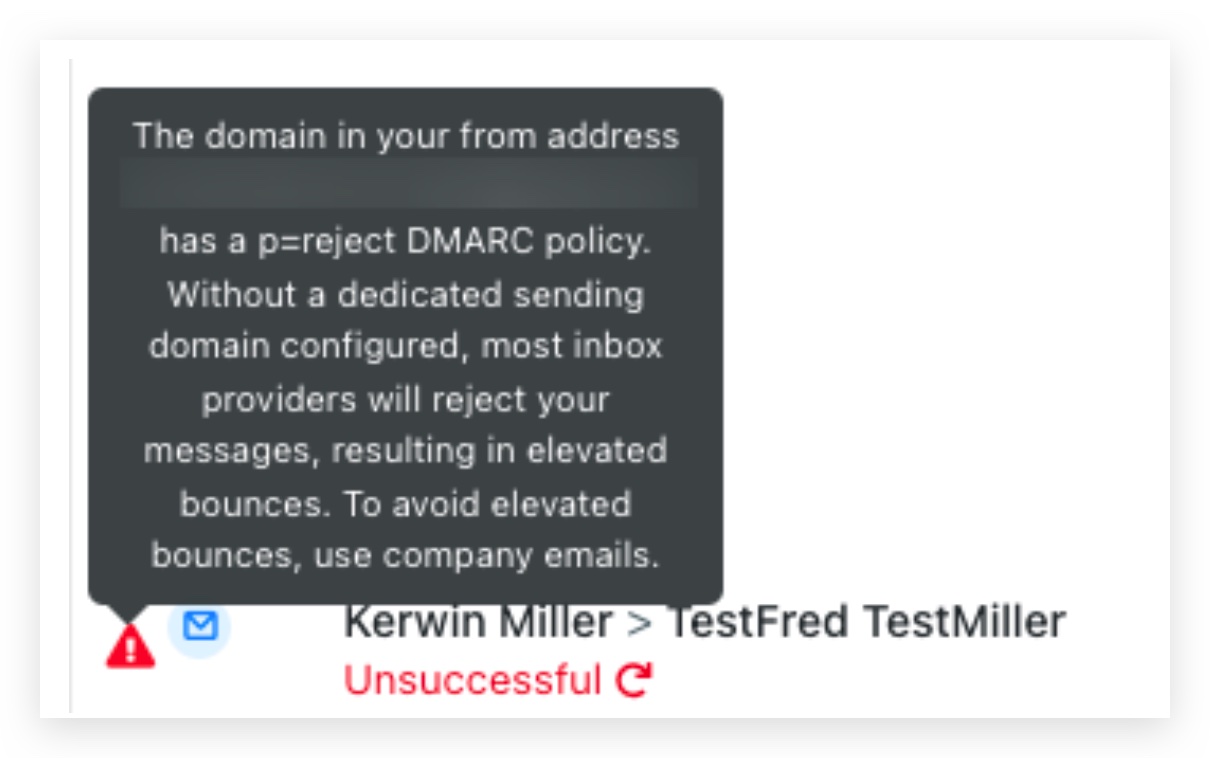
- DMARC is not mandatory for sending via HighLevel’s shared domain, but a strict p=reject policy on that domain will cause delivery rejections.
- Temporarily setting p=none reduces protection against spoofing and should only be used as a short term fix.
- DNS propagation of a new DMARC record can take from a few minutes up to 48 hours depending on the provider.
10If something goes wrong
- DMARC p=reject error when using a shared sending domain. Edit the _dmarc TXT record in your DNS and change the policy tag to p=none until a dedicated sending domain is configured.
11How it connects to the rest of HighLevel
- How to add and verify a sending domain in HighLevel Add and verify domain
- HighLevel email warm up and DMARC guide for reliable delivery Warm up and DMARC guide
- HighLevel pricing and plans overview Pricing
Michael's take

DMARC is a small convenience that can become a real shift in how safely your emails land. It gives you a clear way to tell inbox providers what to do with messages that pretend to be you, which is especially important now that Gmail and Yahoo require it for bulk senders.
A local service business that sends appointment reminders and promotions fits perfectly. Set up a basic record with p=none to start collecting reports, then move to quarantine and finally reject as you confirm all your sending sources pass.