
01Who this is for
- Founders who run email marketing campaigns need a clear path to restore sending after a permanent ESP block.
- Agency owners responsible for multiple subaccounts must handle unblock requests to keep client communications active.
02ESP blocks, explained
The ESP Block system tracks rejection rates from major email providers. When the block rate reaches certain thresholds, sending is paused for a set duration. The policy adds warning emails before each pause and escalates to a permanent suspension after repeated blocks. The block status appears as a top banner inside the affected subaccount, informing users that sending is blocked due to a high number of spam blocks.
Permanent unblocking is not automatic. To lift a permanent suspension, the account holder must ask the agency owner to review the request and manually remove the block. The agency owner evaluates whether the underlying deliverability problems have been corrected before approving the unblock.
03How businesses use the ESP blocks
- SaaS startup. When the platform’s notification emails trigger a permanent ESP block, the Founder contacts the agency owner through the HighLevel interface to request a manual unblock. The agency owner reviews the bounce classification and lifts the block, allowing the startup to resume sending onboarding emails.
- Online coaching business. If a coaching program’s weekly newsletters cause a permanent suspension, the coach follows the request process: identify the block, reach out to the agency owner, and wait for the manual review. Once approved, the newsletters can be sent again.
- Ecommerce retailer. When promotional campaigns lead to a permanent ESP block, the retailer’s marketing manager uses HighLevel to request an unblock from the agency owner. After the owner verifies that authentication and content issues are fixed, the block is removed and order confirmation emails can be delivered.
04The numbers and rules that matter
- Effective Date: 12th Feb 2026.
- 30 days to prepare before enforcement.
- ESP Block Rate 3%, Warning Email Sent, Immediate notification, PreBlock Warning.
- ESP Block Rate 5%, Email sending suspended, 12 hours, 1st Block.
- ESP Block Rate 3% after 1st block, Critical Warning Email Sent, Immediate notification, Pre 2nd Block Warning.
- ESP Block Rate 5% after 1st block, Email sending suspended, 24 hours, 2nd Block.
- ESP Block Rate 3% after 2nd block, Final Warning Email Sent, Immediate notification, Pre 3rd Block Final Warning.
- ESP Block Rate 5% after 2nd block, PERMANENT SUSPENSION, Permanent, 3rd Block, FINAL.
- Blocks reset after 7 consecutive days of maintaining ESP block rates below 1%.
- Permanent suspension occurs if 3 blocks happen within any 7 day period.
- ESP Block Lock update effective 13th Aug 2026.
- Minimum send floor tiered up to 500 sends based on ESP block rate.
05Before you start
- Review current bounce classification data in the analytics dashboard.
- Implement recommended email authentication (DMARC, SPF, DKIM).
- Clean email lists and improve content quality before the policy takes effect.
06How to set up and use the ESP blocks in HighLevel
Request permanent unblock
- Identify that the subaccount shows the ESP block banner indicating a permanent suspension.
- Contact your agency owner within HighLevel to ask for an unblock.
- Allow the agency owner to review the request and manually lift the block.
07What it looks like in HighLevel
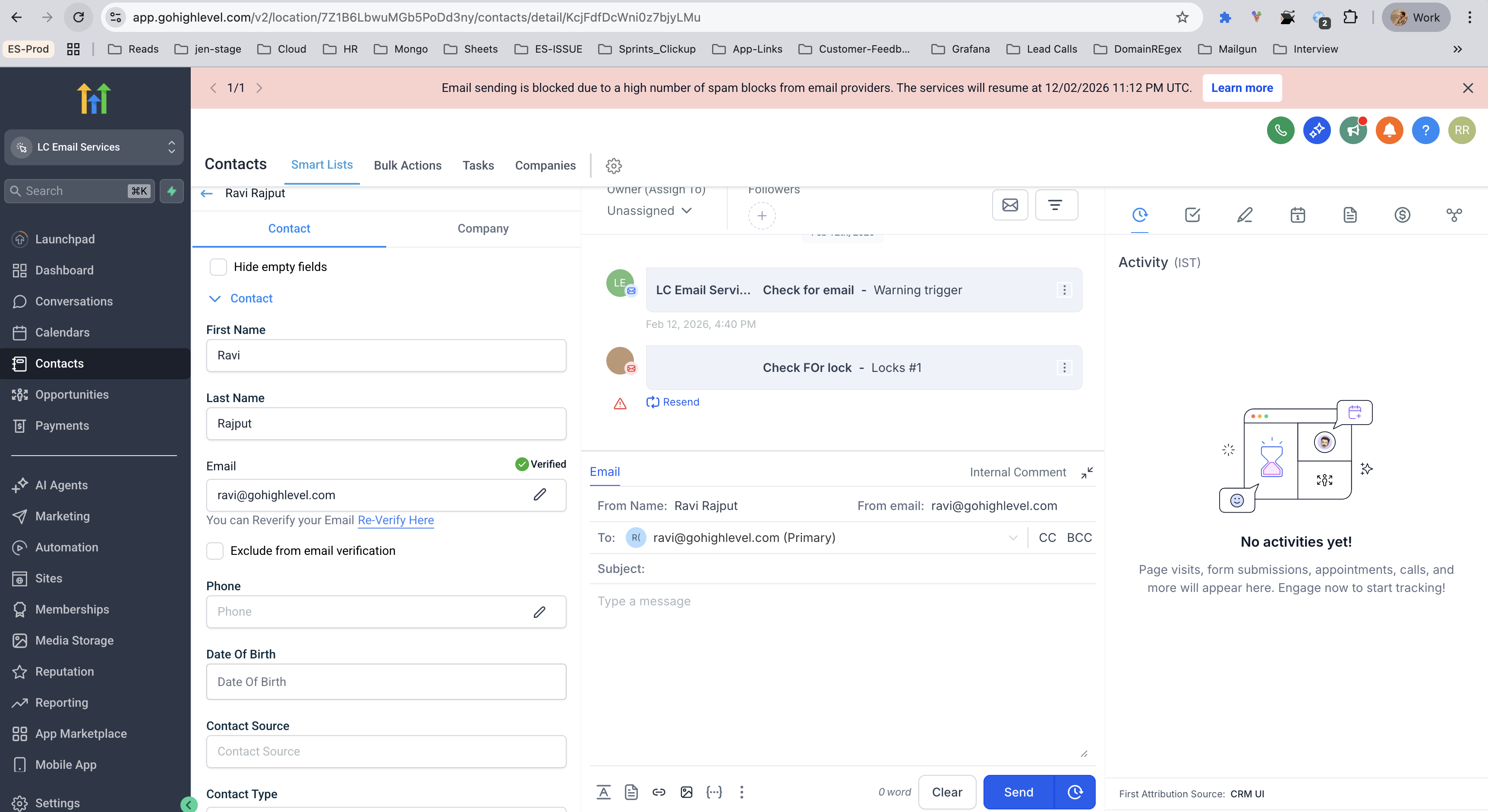
08Things to know before you rely on it
- Blocks trigger when ESP block rates reach 3% (warning) and 5% (sending suspension).
- First block lasts 12 hours, second block 24 hours, and a third block results in permanent suspension.
- All blocks reset after 7 consecutive days with ESP block rates below 1%.
- Permanent suspensions cannot be lifted automatically; they require a manual request to the agency owner.
- The new ESP Block Policy becomes effective on 12 Feb 2026. The ESP Block Lock tweaks take effect on 13 Aug 2026, raising the minimum send floor to up to 500 and the minimum block count to 25.
09If something goes wrong
- Permanent ESP block cannot be removed automatically.. Submit a manual unblock request to your agency owner as described in the request procedure.
10How it connects to the rest of HighLevel
- Set up DMARC and other authentication methods to avoid ESP blocks. DMARC setup guide
- Enable email verification and learn about rebilling for ongoing checks. Email verification guide
- Review LC Email sending limits and upgrade options if needed. LC Email limits
Michael's take

Most people assume that a warning email means they can ignore the issue until the next block, but the system resets only after a full week of sub 1% rates. I would begin with diving into the Bounce Classification dashboard the moment the policy is announced and fix the top three block categories right away.
After the fixes are in place, I would run daily checks on the ESP block rate and keep the list hygiene tight. If the rate stays low for seven days, the system resets and you avoid any temporary suspension.