
01Who this is for
- Online apparel retailers can map coastal and inland zones to reflect varied carrier costs, ensuring each customer sees accurate shipping fees.
- Handmade furniture sellers benefit from ZIP restrictions to limit delivery to serviceable neighborhoods, avoiding unfulfillable orders.
- Boutique jewelers can apply free shipping for high value carts while charging a flat fee for lighter, lower priced purchases.
02Shipping and delivery rates, explained
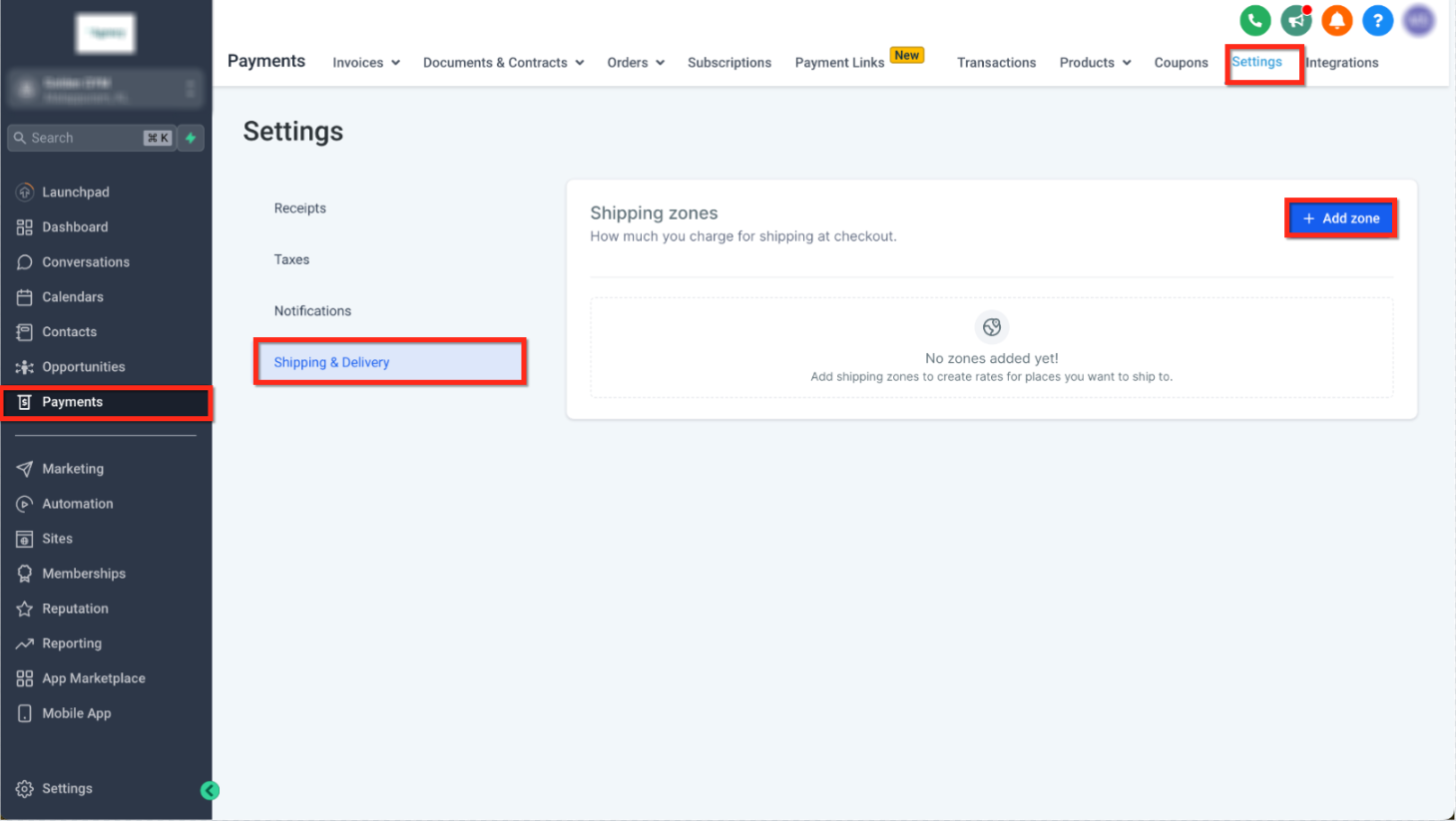
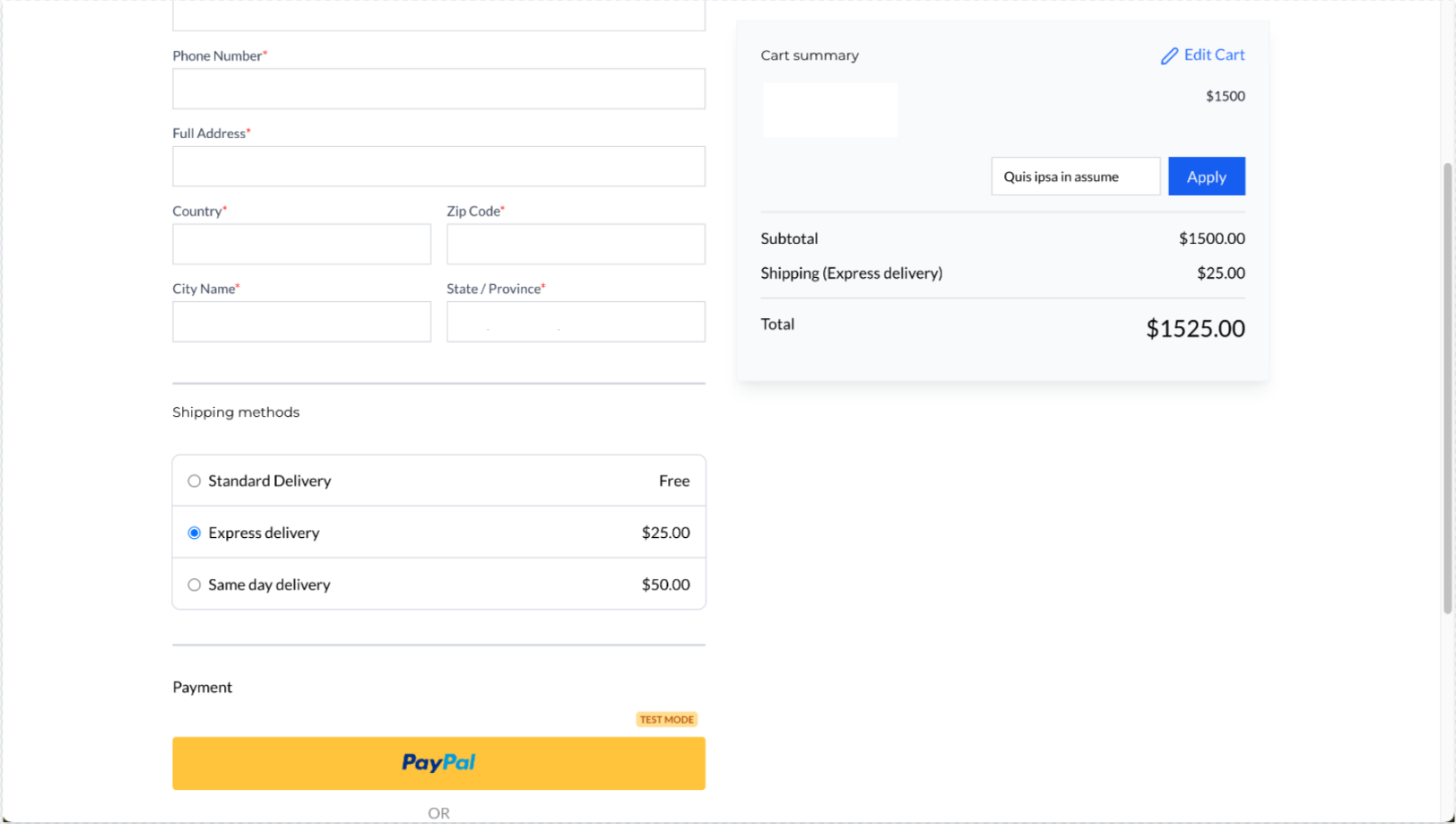
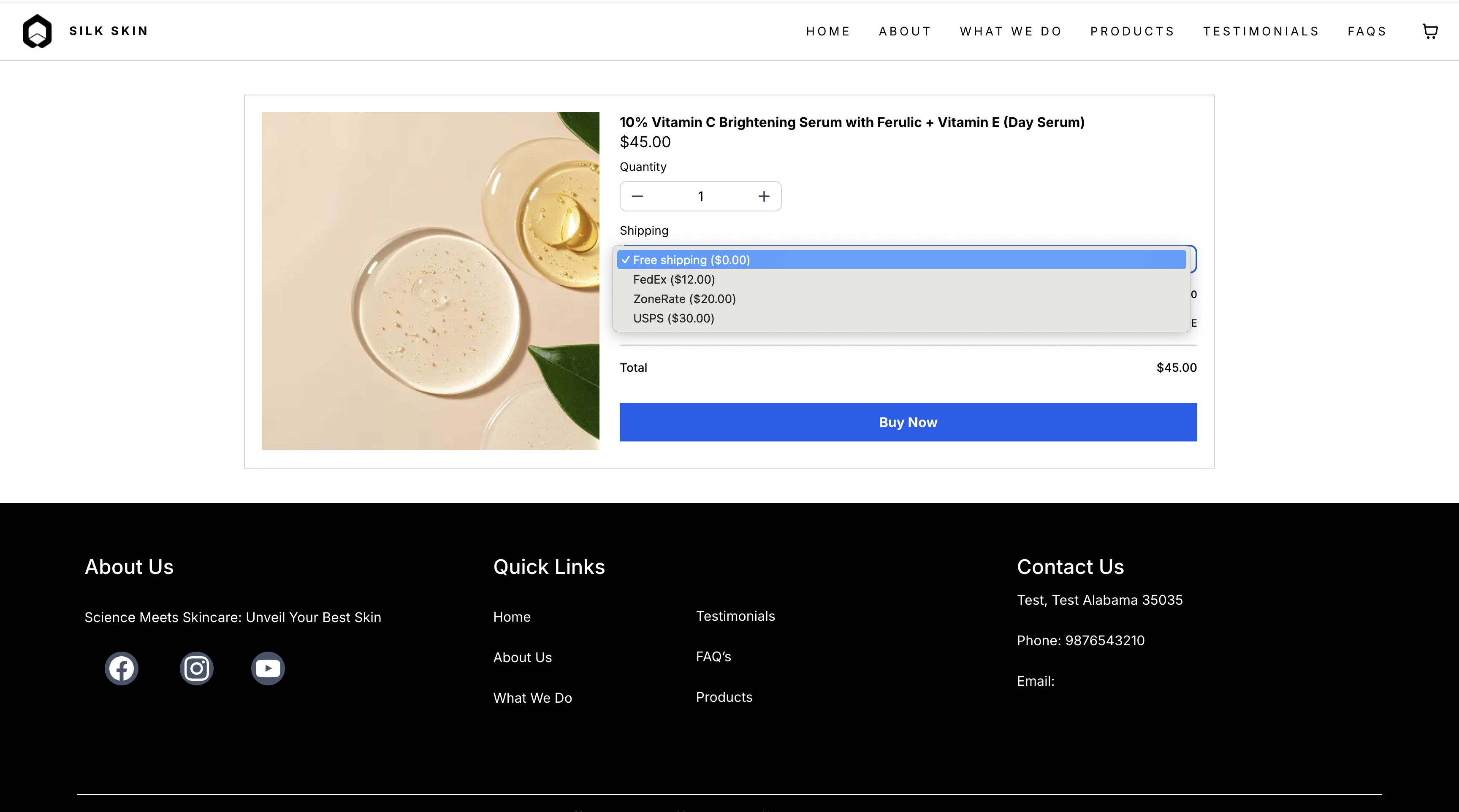
The shipping feature lives under each subaccount in the Payments section. Within Settings > Shipping & Delivery, owners create zones that group countries, states or provinces sharing the same rates. After a zone is saved, rates appear automatically on the checkout page based on the buyer’s address.
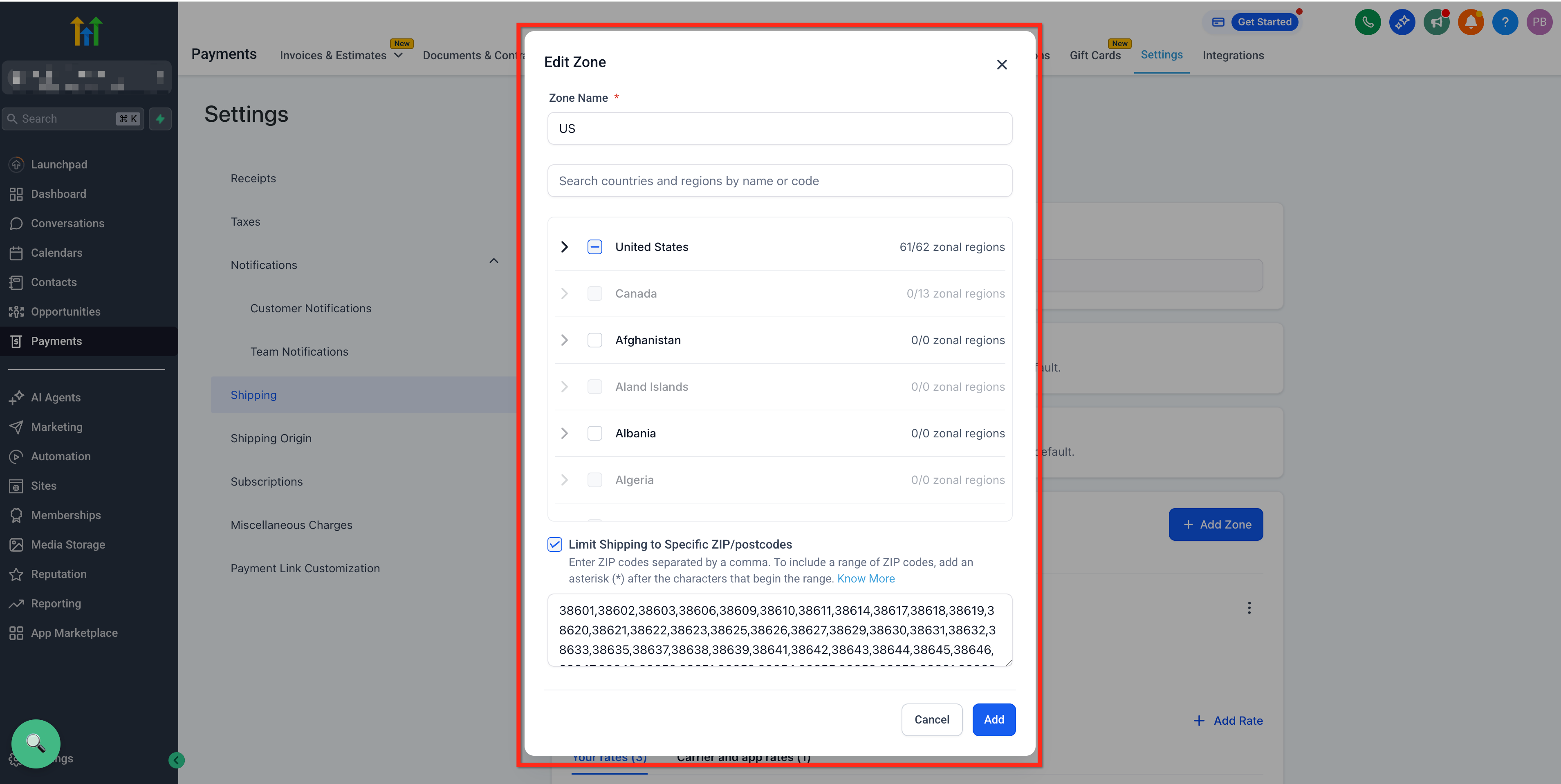
Zones can be narrowed further by enabling ZIP/postcode limits. When the restriction is active, the system only applies the zone if the entered postal code matches one of the valid entries. Invalid or duplicate ZIP entries are rejected, and at least one valid code is required before saving.
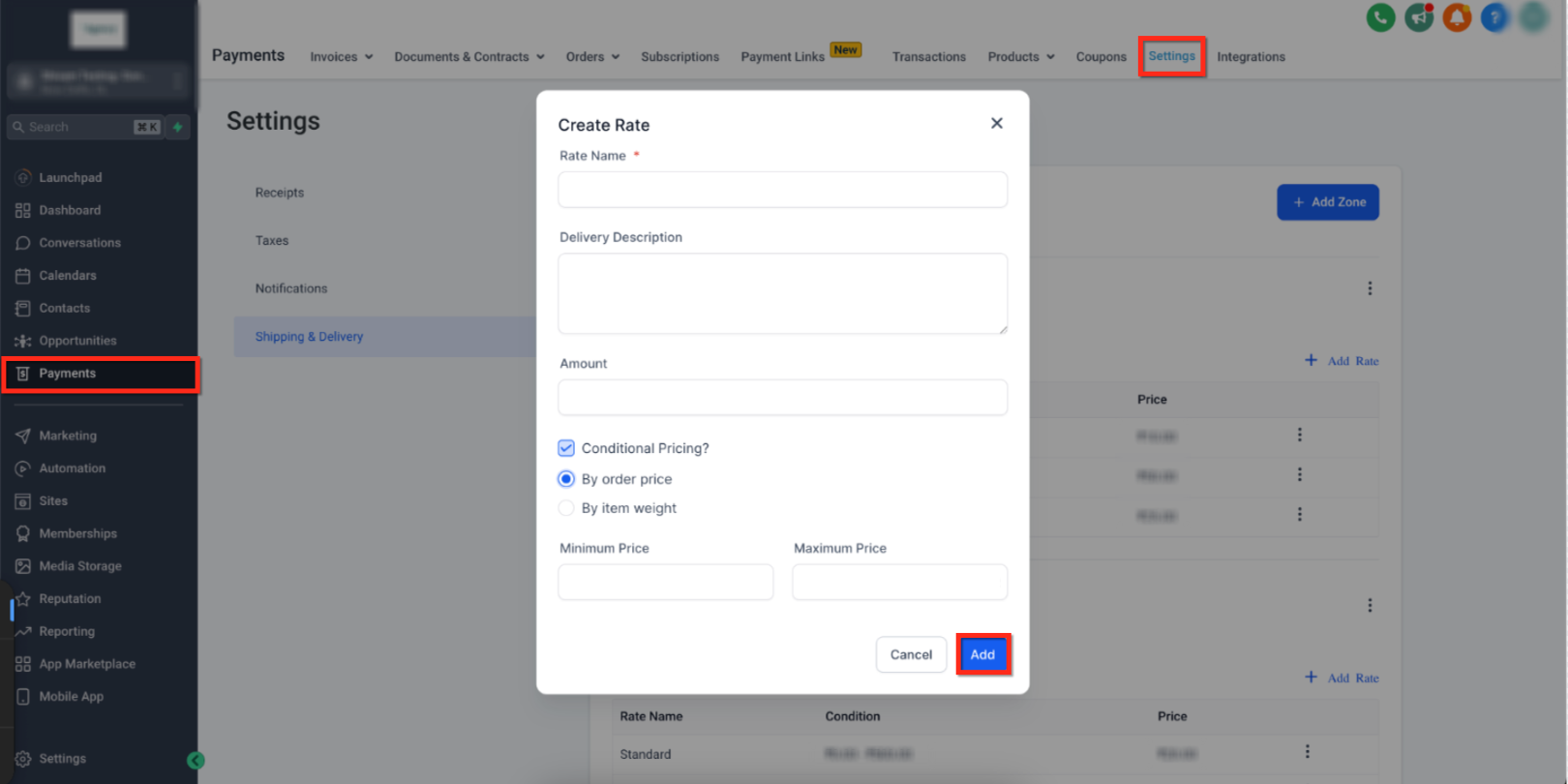
Conditional pricing adds a second layer of logic. Within a zone, owners add a rate and turn on Conditional Pricing, then choose to base the charge on total order amount or total weight. Minimum and optional maximum thresholds define the range, and the associated cost is saved. Checkout evaluates these rules in real time and selects the appropriate shipping amount.
03How businesses use shipping and delivery rates
- Apparel retailer. The retailer defines a "US East Coast" zone, adds a flat rate, then restricts the zone to ZIP codes starting with a wildcard. They also create a weight based condition that sets free shipping for orders over a high weight threshold. All settings are made within the Shipping & Delivery page.
- Furniture workshop. The workshop creates a "Local Delivery" zone covering its city, inputs specific ZIP codes for each suburb, and sets a flat rate. They add a price based condition that waives the fee for orders above a high value threshold. The configuration is saved in the zone’s rate panel.
- Jewelry boutique. The boutique builds an "International" zone for all other countries, assigns a flat rate, and adds an order price condition that gives free shipping for carts over a high value threshold. They also enable ZIP restrictions for a special "Free Shipping" zone limited to promotional postal codes.
04How to set up and use shipping and delivery rates in HighLevel
Create a shipping zone
- Open Subaccount > Payments > Settings > Shipping & Delivery.
- Select Add Zone.
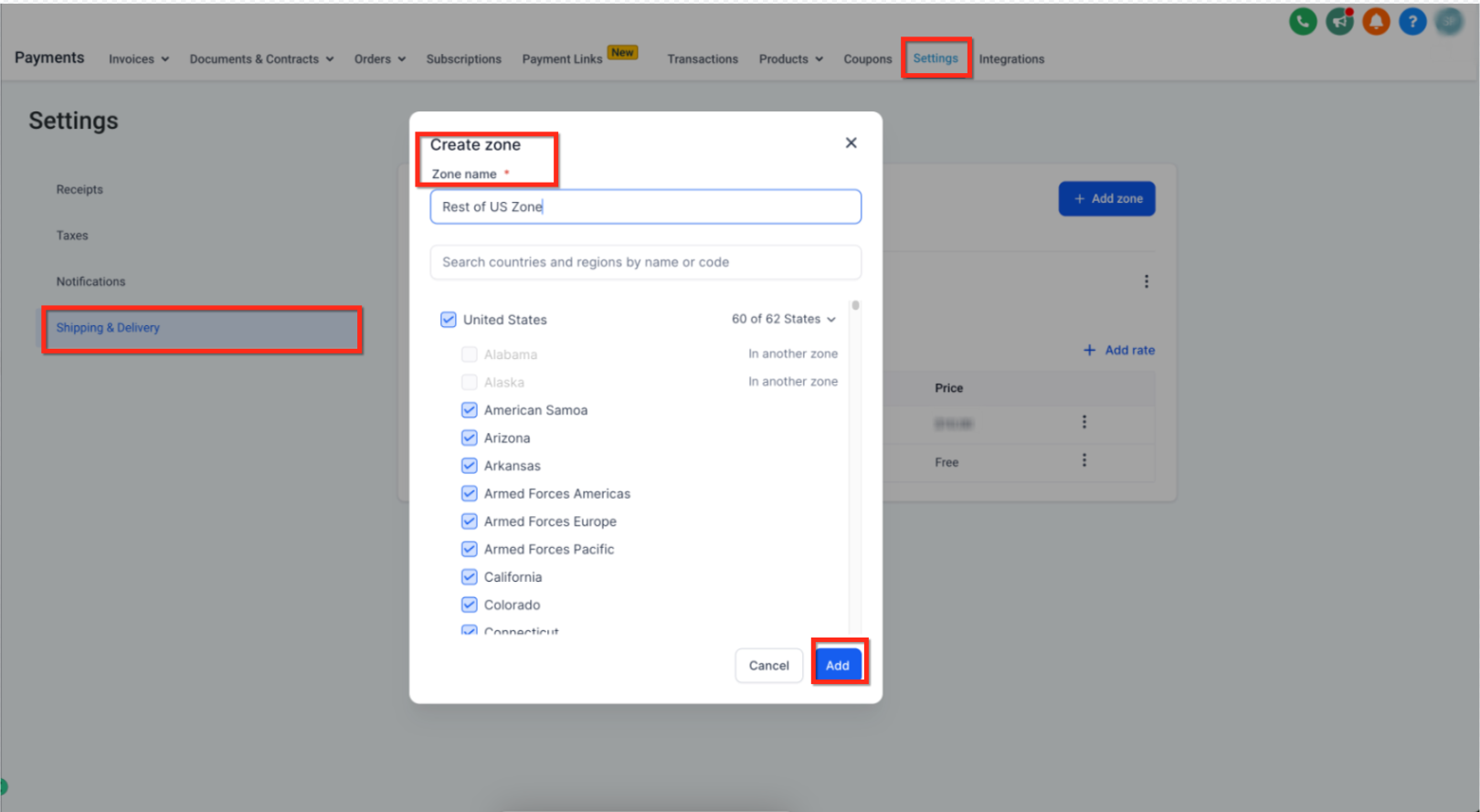
- Type a descriptive name for the zone.
- Choose one or more countries and the appropriate states or provinces.
- Press Add Rate to enter the base shipping cost for that region.
- Optionally add conditional pricing based on weight or order total.
Enable ZIP/postcode restriction for a zone
- Navigate to Payments > Settings > Shipping & Delivery.
- Open the desired Shipping Profile and go to Shipping Zones.
- Create a new zone or edit an existing one.
- Turn on Limit Shipping to Specific ZIP/Postcodes.
- Enter the allowed ZIP/postcodes, separating each entry with a comma.
Add conditional pricing to a shipping rate
- Go to Subaccount > Payments > Settings > Shipping & Delivery.
- Inside the selected zone, click Add Rate and switch on Conditional Pricing.
- Pick the condition type: By Order Price or By Item Weight.
- Enter the Minimum value and, if needed, a Maximum value for the range.
- Specify the rate amount that applies to that range.
- Click Add to store the conditional rate.
05What it looks like in HighLevel
06Settings that matter
- Limit Shipping to Specific ZIP/Postcodes. Controls whether the zone is applied only when a buyer’s postal code matches the entered list.
- Conditional Pricing. Enables a rate to change automatically based on the total order amount or total item weight.
07Things to know before you rely on it
- A state or province can belong to only one zone; it cannot be reused in another zone.
- ZIP/postcode entries must be unique and valid; duplicate or malformed values are blocked.
- The wildcard asterisk (*) may appear only at the end of a ZIP entry, such as 46*.
- A zone with ZIP restrictions cannot be saved unless at least one valid ZIP/postcode is entered.
08How it connects to the rest of HighLevel
- Step by step guide for configuring shipping zones and weight rates Shipping zones and weight rates
- How to connect Shippo for live shipping rates Shippo integration
- Overview of all ecommerce store capabilities All ecommerce features
Michael's take

Shipping costs can cause cart abandonment when customers encounter unexpected fees or when their address isn’t covered. Start by defining clear zones that match where you ship, then assign a flat rate or free shipping threshold for each zone.
After zones are set, add weight based or price based conditions for larger orders so you can reward big carts without manually adjusting each product. Run a quick checkout test with a couple of addresses to confirm the right numbers show up before going live.