
01Who this is for
- Founders who want a custom Android app for their brand without using external developers.
- Marketing teams that need a quick way to distribute a branded app to clients.
02Branded Android apps, explained
The feature builds a signed Android package (APK) from a mobile app created in Client App Builder. It packages the app, applies branding elements such as the app name, icon and splash image, and produces a file that can be shared with end users.
The process lives in the Publish window of the mobile app editor. After configuring the branding details, you start a build queue. The build typically finishes in 15 to 25 minutes, after which the APK can be downloaded directly from the platform.
03How businesses use Branded Android apps
- Digital marketing agency. The agency creates a client specific mobile experience, uploads the client’s logo and splash screen, and builds a signed APK to hand off to the client for distribution on Android devices.
- Fitness studio. The studio designs class schedules and workout videos in the app, adds its branding assets, and generates an APK to share with members who install the app on their phones.
- Real estate brokerage. Agents build a property showcase app, customize the store name, upload branding images, and produce an APK that can be sent to prospects for easy installation.
04The numbers and rules that matter
- App icon must be 1024 x 1024 PNG.
- Splash image must be 1080 x 1920 PNG.
- Build usually takes 15 to 25 minutes.
- You can build up to 10 APKs per project.
05Before you start
- A mobile app must already be built in Client App Builder.
- Prepare a 1024 × 1024 PNG app icon and a 1080 × 1920 PNG splash image.
- Optionally have an Android Firebase file (google services.json) if Firebase services are used.
06How to set up and use Branded Android apps in HighLevel
publish branded Android app
- Open the mobile app you created in Client App Builder.
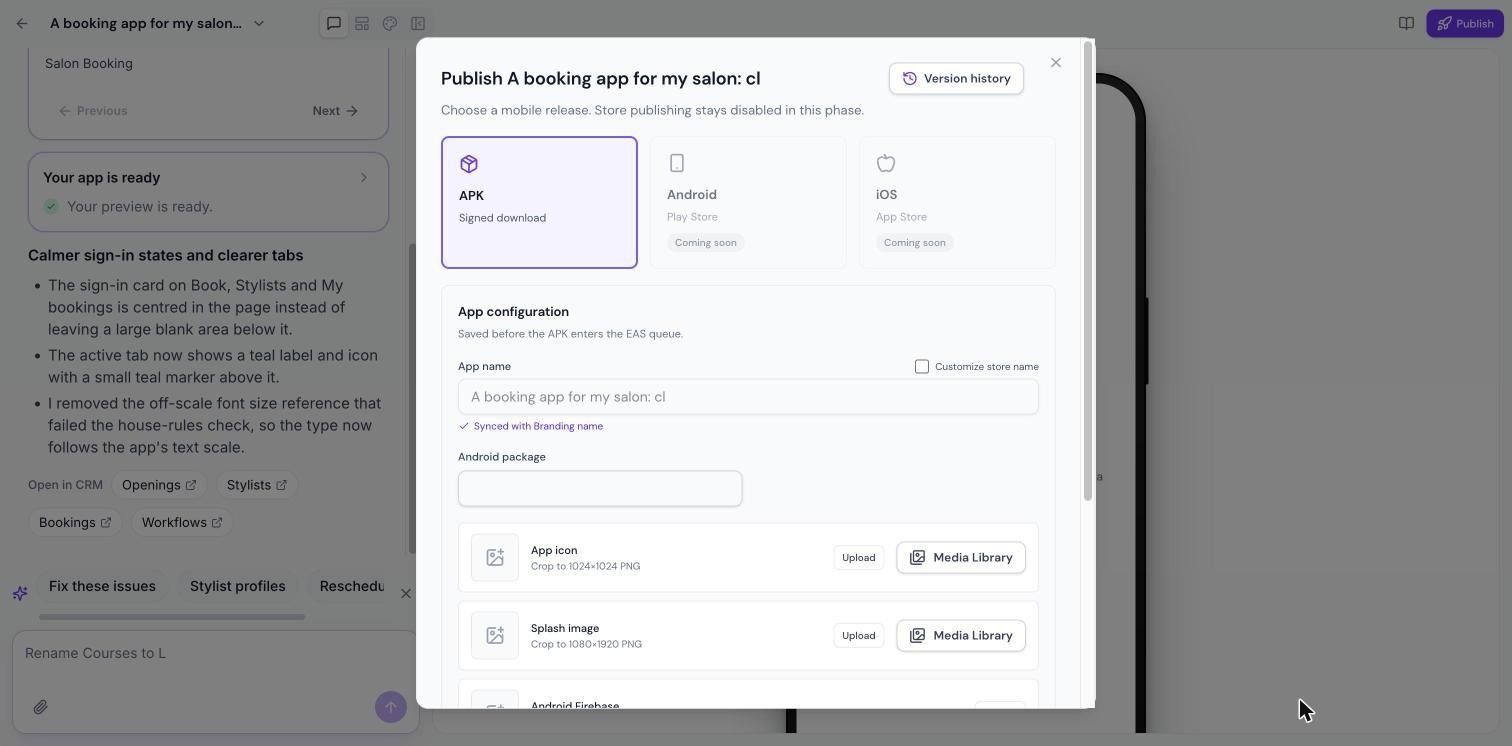
- Click the Publish button located at the top right of the editor.
- Select APK, shown as Signed download.
- In the App configuration area, verify the App name and tick Customize store name if a different name is required.
- Review the Android package identifier displayed.
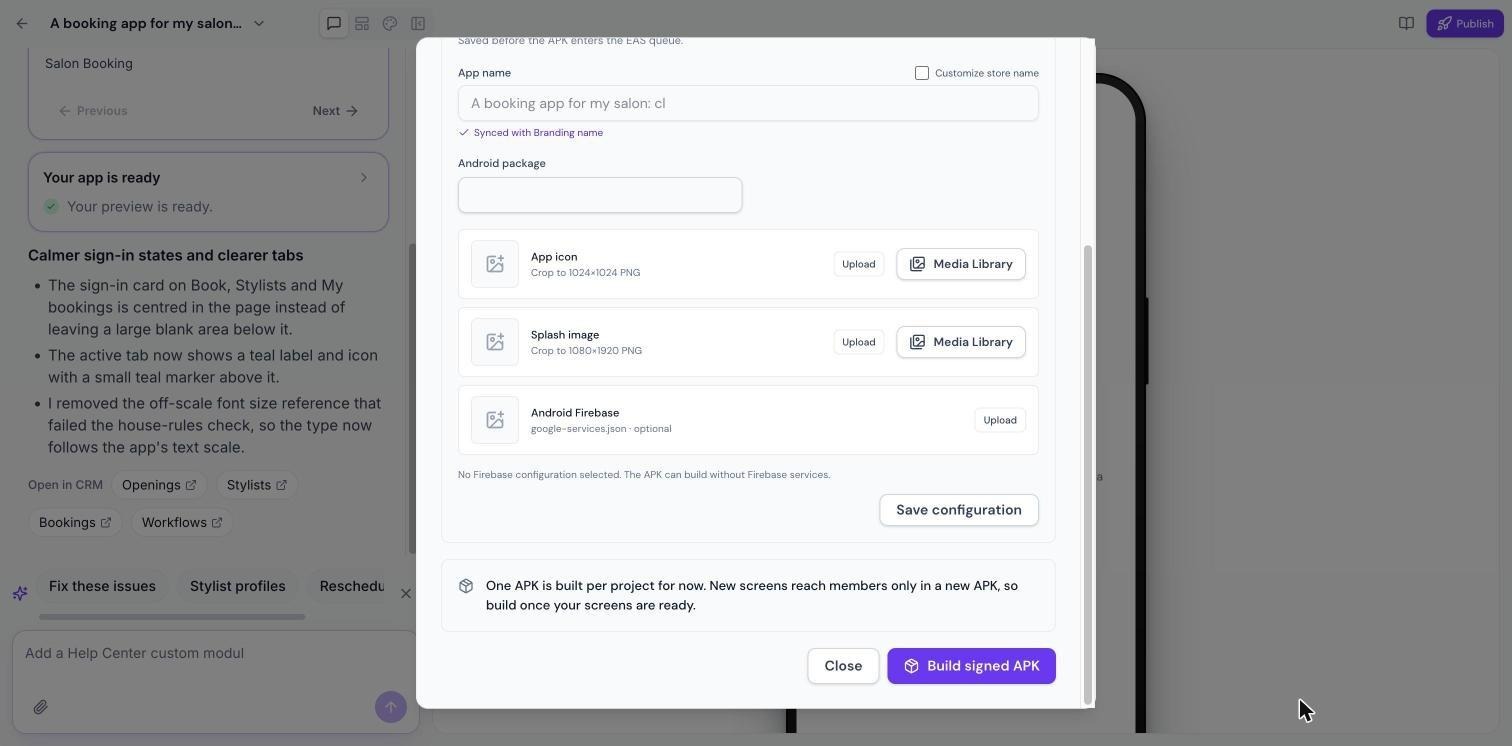
- Upload the prepared App icon and Splash image from your computer or the Media Library.
- If you use Firebase, upload the google services.json file.
- Click Save configuration to store the changes.
- Press Build signed APK to start the build queue.
- Wait for the build to finish (typically 15 to 25 minutes) and then download the APK.
07What it looks like in HighLevel
08Settings that matter
- App name. Controls the name shown for the app in the store and on devices.
- Customize store name. Allows you to override the default store name with a custom value.
- App icon. The 1024 × 1024 PNG image used for the app’s icon on devices.
- Splash image. The 1080 × 1920 PNG image shown while the app loads.
09Things to know before you rely on it
- A maximum of 10 APKs can be built per project.
- New screens reach members only after a new APK is generated.
- Direct publishing to Google Play Store and Apple App Store is not yet available.
10If something goes wrong
- Build fails. Review the failure reason shown, make the required change, and start a new build.
11How it connects to the rest of HighLevel
- Learn how to create the mobile app that you will publish as an APK. Getting started with Client App Builder
- See how branding settings such as app name and icons are applied in the builder. Theme and branding
- Use the Mobile Customizer to adjust layout and navigation before publishing. Mobile customizer
Michael's take

Turning a client mobile app into a downloadable Android APK can be a useful option for agencies that want to provide a branded installable file without going through app store approvals.
A consultancy can build a portal in Client App Builder, export a signed APK and share it with each client, allowing them to install the app on their phones.