
01Who this is for
- Plumbing companies that send technicians to customer sites and need to coordinate multiple visits per job.
- Cleaning services that want an online booking page with service area rules and automatic staff assignment.
02Field Services, explained
Field Services groups requests, estimates, jobs and visits into one place. Users can capture a new request from a booking page or manually, convert it to an estimate, then lock in a job with pricing and services. Each job can hold several scheduled visits.
The module provides a list and calendar view of visits, a map for dispatch, and route optimization. Staff can update visit status, add notes, complete checklists and track time from the mobile app, with all changes syncing back to the web interface.
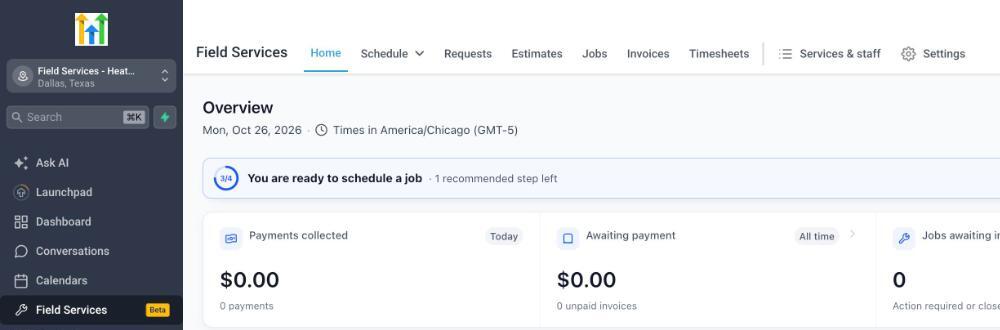
Field Services appears in the left navigation of an enrolled subaccount with a Beta tag. The Home screen offers a daily overview of payments, scheduling and pending work, while Settings let you define booking rules, payment options and notification preferences.
03How businesses use field services
- Plumbing contractor. The contractor creates service areas for the neighborhoods they serve. They add plumbers, set working hours and assign the plumbing service to each staff member. When a customer books online, the system suggests available times and assigns the nearest plumber.
- Residential cleaning business. The cleaning company imports its list of cleaning packages into Field Services. It creates a booking page where clients choose a package and address. Once a request is received, the team converts it to an estimate, then schedules a visit for the appropriate crew.
- HVAC repair firm. The firm sets up a travel fee and extra travel time in the service definition. Technicians receive visit notifications on the mobile app, update the job status after each service call, and log hours against each visit for accurate billing.
04Before you start
- Complete the interest registration form for the private beta.
- Be added to the beta and have an enrolled subaccount where Field Services appears in the left navigation.
05How to set up and use field services in HighLevel
Get started with Field Services
- Submit the registration form to express interest in the private beta.
- After enrollment, locate Field Services with a Beta tag in the left navigation of your subaccount.
- Open the Home screen; a welcome page shows a three step checklist to add staff, review service area and add services.
- Review the default service area and add additional areas under Services & staff > Service areas.
- Add each staff member, setting their working hours, assigned services, service areas and route start/end points.
- Create new services or import existing ones via Services & staff > Import to populate the service catalog.
- If you already use Services, note that your existing setup is not changed; you choose what to copy with the importer.
- Open Field Services Settings and configure customer booking options, payment methods and notification preferences.
- Create a test request or job, then schedule a visit to experience the complete workflow.
06What it looks like in HighLevel
07Settings that matter
- Field Services Settings. Controls how customers book appointments, which payment options are offered, and which email, SMS or WhatsApp notifications are sent.
08Things to know before you rely on it
- The private beta does not include features listed under Upcoming Features, such as reporting or a client portal.
- AI receptionist currently supports only chat; voice interaction is not yet available.
- Occasional minor performance or interface issues may appear as the product is refined.
09How it connects to the rest of HighLevel
- Explore the initial dashboard and daily overview. Field Services Home Overview
- Define geographic boundaries where staff can work. Service Areas in Field Services
- Set up technicians, their working hours and route preferences. Staff in Field Services
- Import or create the services you will offer in the field. Services and Add ons
- Review pricing plans and trial options for HighLevel. HighLevel pricing and plans
Michael's take

Wondering if you should spend time testing a beta before it’s generally available? The private beta gives you a chance to see how Field Services ties requests, jobs and routing together, and your feedback actually shapes the final product. If your team travels to customer sites and you need more than one visit per job, this is worth a look.
I’d start by adding a couple of service areas and staff, then walk through a full booking from request to invoice. It shows you where the workflow fits your current process and where you might need tweaks. Before you rely on it, make sure the AI receptionist chat meets your expectations, since voice isn’t ready yet.