
01Who this is for
- Founders who need rapid data entry without leaving the chat to keep momentum.
- Operations managers who want to adjust pipelines or tags for many contacts in one command.
- Support teams that must update appointments or invoices quickly during live conversations.
02MCP server, explained
Ask AI now acts as an interface to the Master Control Panel. When you type a command, the AI extracts the verb and object, maps the words to MCP fields and validates your role permissions. The resulting API call runs in real time, returning success or error details right in the chat window. All actions are logged under Settings ▸ Audit Logs ▸ AI Chat for later review.
The feature works inside any location’s Ask AI pane. It supports all MCP endpoints, contacts, opportunities, payments, automations, and more. Destructive operations such as deletes or bulk updates trigger a confirmation step to prevent accidental changes. Each successful command consumes one AI credit, while previews and denied attempts are free.
03How businesses use the MCP server
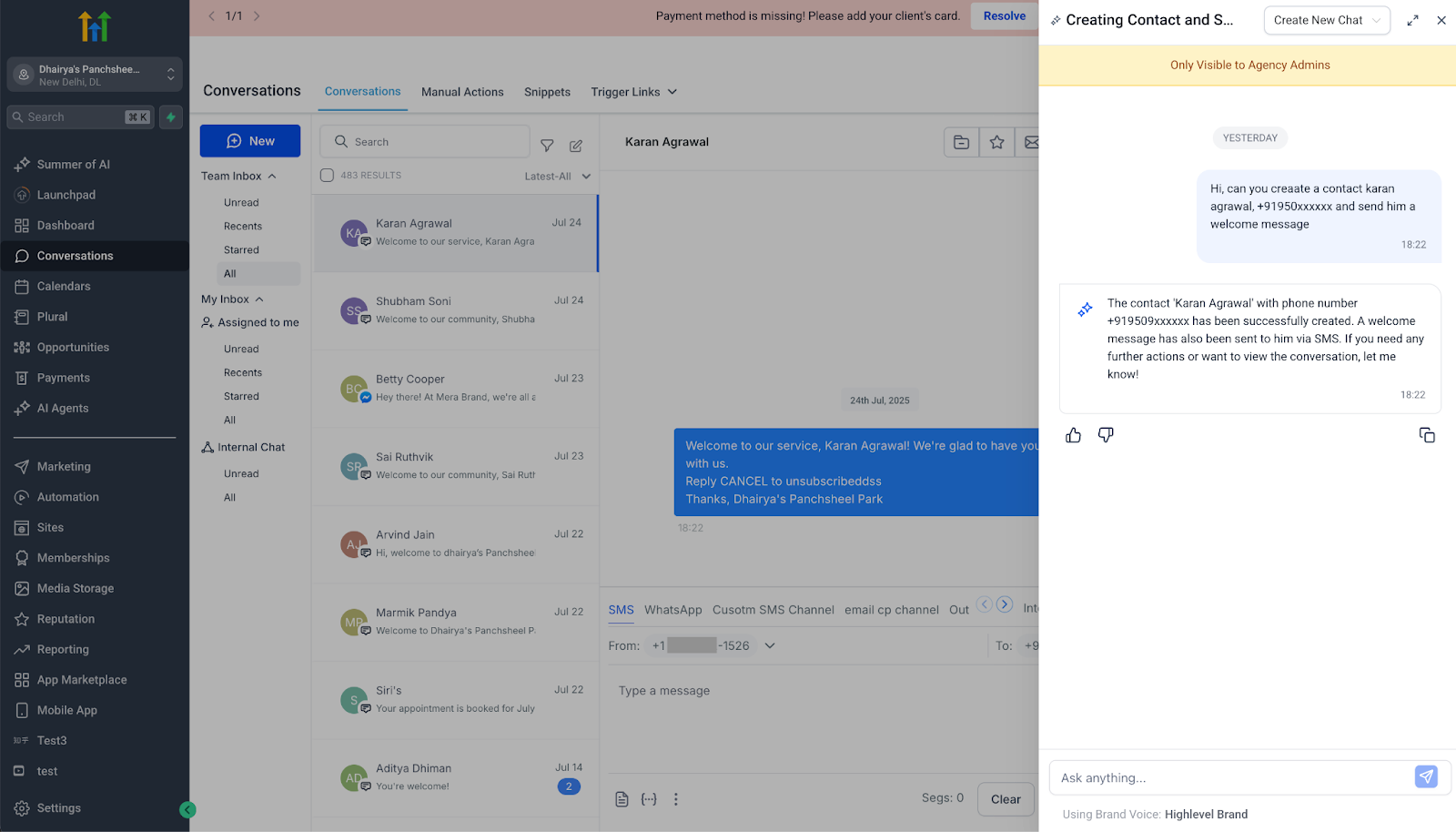
- Real estate agency. An agent types “Create a contact named Sarah Lee with phone 555 to 0199 in Location West.” The contact appears right away, saving the time of opening the contacts tab. The action logs for compliance.
- SaaS startup. The growth team issues “Tag all contacts from last week’s webinar as ‘Webinar 2025’.” The AI loops through the list, updates each record, and confirms completion in the chat.
- Event management company. A planner asks “Change pipeline stage of Opportunity #812 to ‘Closed Won’.” The opportunity moves to the final stage without navigating the pipeline view.
04The numbers and rules that matter
- Each successful MCP command costs 1 AI credit.
- Bulk actions are throttled to 1,000 records per minute.
- Undo last action is available within 5 minutes.
- Mobile is read only today; MCP actions launch on iOS & Android in Q4 2025.
05How to set up and use the MCP server in HighLevel
Execute an MCP command via Ask AI
- Open the Ask AI chat window inside any location on the platform.
- Enter a natural language sentence that describes the desired MCP action.
- If the command is destructive or a bulk edit, a confirmation prompt appears, click Yes to confirm.
- The AI converts the sentence into an MCP API call and checks your permissions.
- The platform runs the call, displays the result in the chat, and logs it to the audit feed.
06What it looks like in HighLevel
07Settings that matter
- Audit Logs ▸ AI Chat. Shows the raw JSON payload sent to the MCP for each AI initiated action.
- Security ▸ AI Controls. Controls AI permissions such as allowing or blocking delete verbs for each role.
- Allow AI Deletes per role. Toggle that lets admins permit or forbid delete commands via Ask AI for specific user roles.
08Things to know before you rely on it
- Each successful MCP command consumes one AI credit; previews and denied commands do not cost credits.
- Bulk actions are limited to 1,000 records per minute to protect performance.
- Destructive commands always require a manual confirmation before execution.
- MCP actions are read only on mobile devices until the iOS and Android rollout in Q4 2025.
09If something goes wrong
- AI misinterprets the prompt and suggests the wrong action.. Answer the clarification question; no change is made until you confirm the correct intent.
- Bulk command is rejected due to rate limit.. Reduce the number of records in the request to stay under the 1,000 per minute limit.
- A mistaken destructive action was executed.. Use “Undo last action” within five minutes or restore the data from a backup file.
10How it connects to the rest of HighLevel
- Understand how AI credits are billed for each MCP command. AI credit pricing
- Add a knowledge base to give Ask AI context for more accurate commands. Knowledge bases
- Set up AI Employee access and configure role permissions for safe MCP use. AI Employee access
Michael's take

In my experience, the MCP server in Ask AI can cut down on repetitive clicks, especially for bulk operations, but the credit cost and the current mobile read only limitation are factors to consider.