
01Who this is for
- Admins who manage AI agents need quick access to the exact rows that power AI answers for audits.
- Data analysts can pull the CSV into spreadsheet or BI tools to run reports without custom code.
- Product owners can back up pricing or policy tables before major updates for version comparison.
02Knowledge Base tables CSV download, explained
The CSV download button appears on each table row that shows a Ready status in the Knowledge Base Tables tab. It works for tables created from static CSV uploads and for live Google Sheet connections.
When you select Download CSV, HighLevel creates a secure URL that expires after about 15 minutes. The browser then starts the file download to the default location. Only users with admin or editor rights can see and use the button.
The exported file contains the same rows and columns that the AI engine indexes, so you can reopen it in Excel, Google Sheets, or any analytics application. The download does not alter the source table.
03How businesses use Knowledge Base tables CSV download
- Marketing agency. The agency opens the Knowledge Base, finds the pricing table for a client, clicks the three dot menu and selects Download CSV. The file is saved and later imported into a reporting spreadsheet to build client invoices.
- Ecommerce shop. The shop owner accesses the product catalog table, chooses Download CSV, and opens the file in a BI dashboard to compare current pricing with historical snapshots before a sale rollout.
- SaaS support team. Support staff locate the SLA table, export it as CSV, and load it into a QA spreadsheet to verify that AI generated answers match the documented service levels.
04The numbers and rules that matter
- CSV uploaded Table Sources: Up to 50,000 rows, 500 columns, and 50 MB per file.
- Google Sheets sync frequency: Approximately every 15, 20 minutes or via manual refresh.
- Download link expiration: Approximately 15 minutes.
05Before you start
- You must have admin or editor access to the Knowledge Base that contains the table.
- The table must be in Ready status, meaning indexing has finished.
06How to set up and use Knowledge Base tables CSV download in HighLevel
Download a Knowledge Base table as CSV
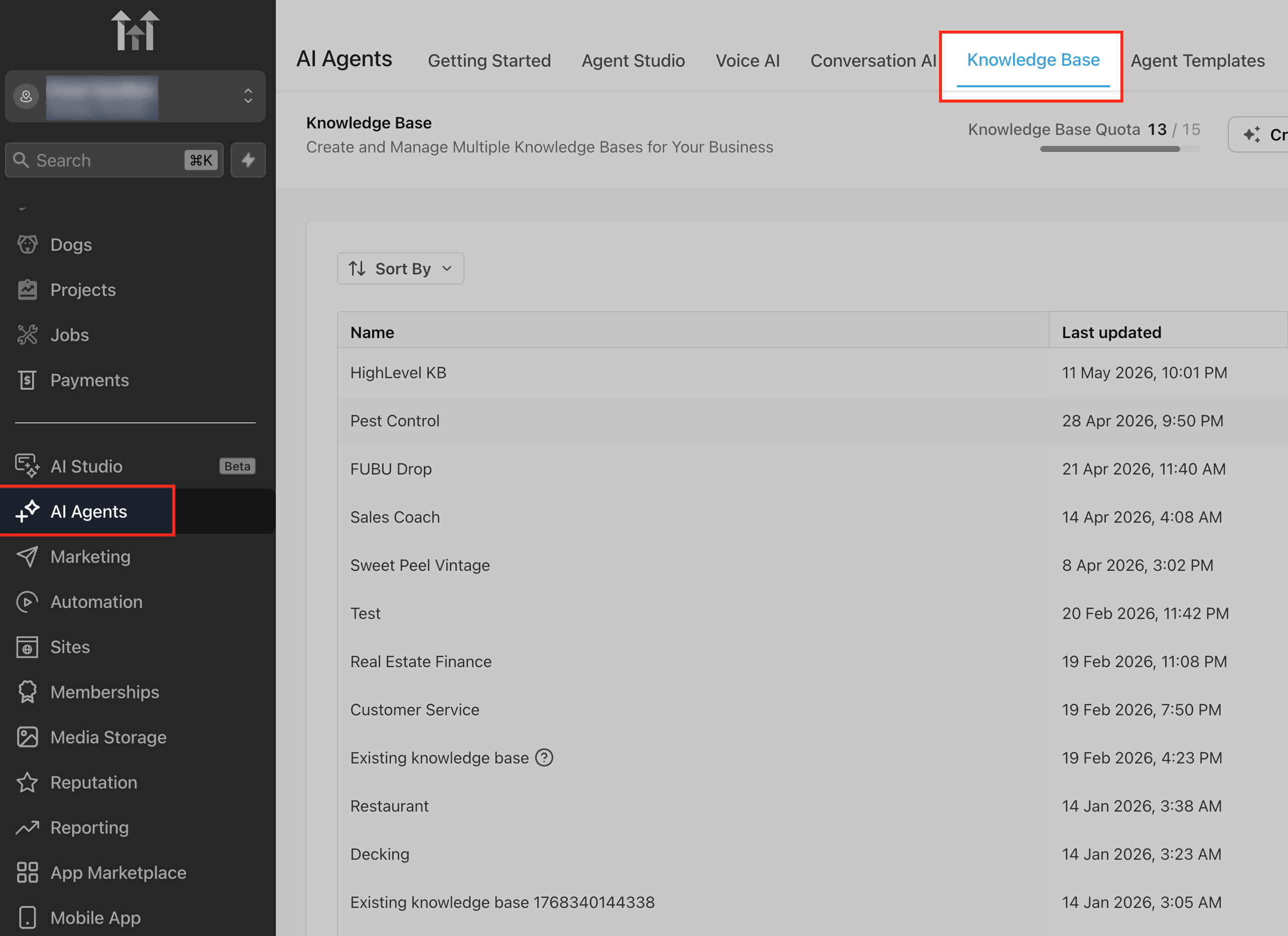
- Navigate from your subaccount to AI Agents > Knowledge Base.
- Open the Knowledge Base that holds the table you want.
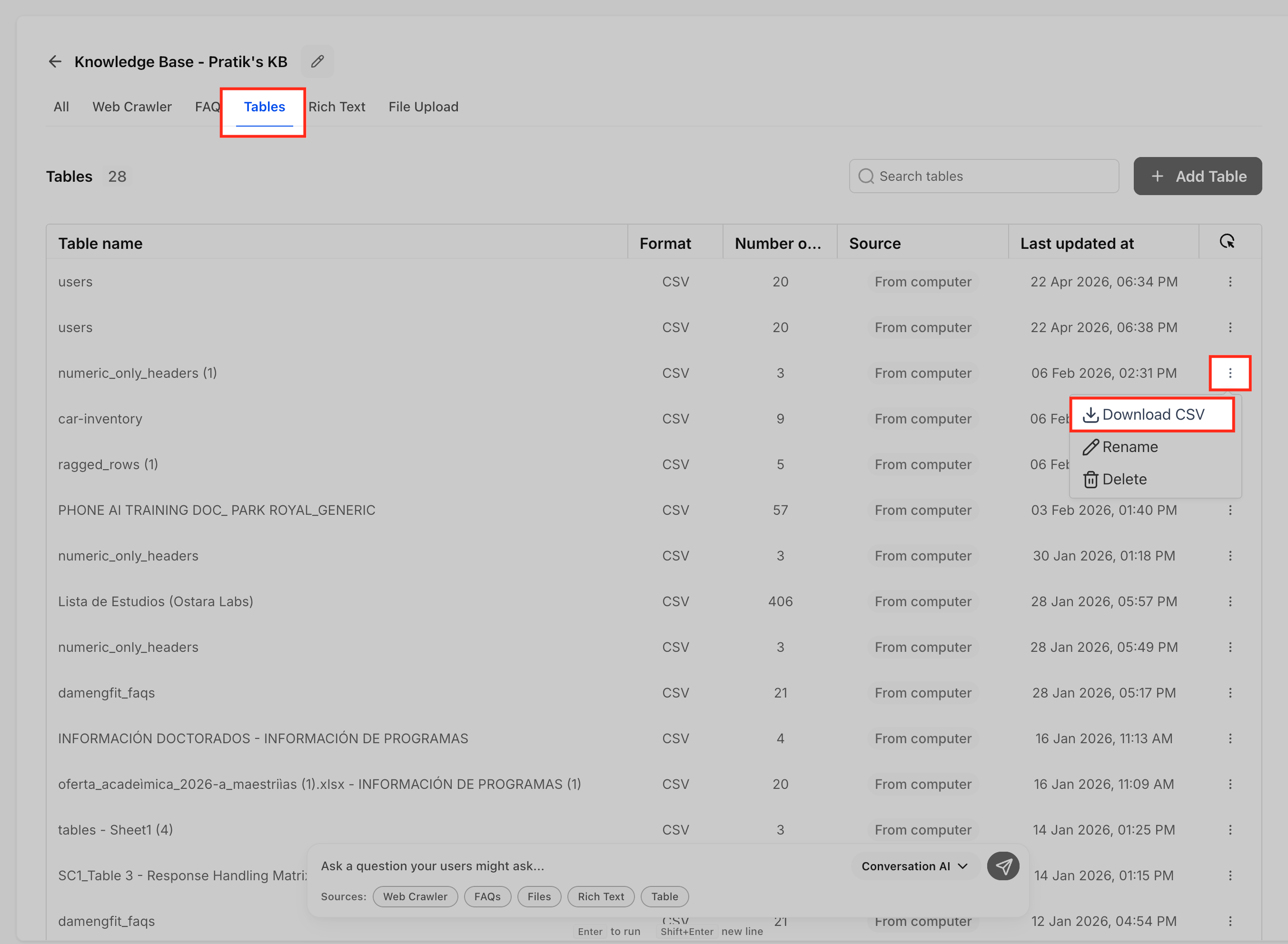
- Select the Tables tab in the source header.
- Make sure the desired table shows a Ready status.
- Click the three dot (⋯) action menu at the end of that row.
- Choose the Download CSV option from the menu.
- HighLevel generates a secure link and the browser begins the download.
- The CSV file saves to your browser’s default download folder.
07What it looks like in HighLevel
08Things to know before you rely on it
- CSV uploaded tables may contain up to 50,000 rows, 500 columns, and 50 MB per file.
- Download links automatically expire after roughly 15 minutes.
- Only users with admin or editor permissions can see the Download CSV control.
09If something goes wrong
- Download CSV option is missing for a table.. Confirm the table’s status is Ready and that you have admin or editor rights for the Knowledge Base.
- The generated link no longer works after a short time.. Create a new download by repeating the steps; each link is time limited.
10How it connects to the rest of HighLevel
- Explore how tables are used in AI search. Table Search in Knowledge Base
- Learn how to integrate Google Sheets as a knowledge source. Google Drive integration
- Review overall knowledge base management UI. Knowledge base overview
- Start a 30 day trial to test AI Employee features. 30 day trial
Michael's take

Downloading Knowledge Base tables as CSV feels like a small convenience that can become a real shift for teams that rely on AI driven answers. It lets you pull the exact rows the bot sees, so you can audit, report or back up data without asking a developer to write code.
A SaaS startup that maintains a dynamic pricing catalog would find this handy. Export the table, compare it to the live pricing feed, and spot any gaps before the bot starts giving customers the wrong quote.