
01Who this is for
- Founders with modern JavaScript front ends who need deeper site content for AI training.
- Small agencies that build WordPress or SPA sites and want the bot to learn hidden FAQs.
- Support teams that rely on AI to surface product details hidden behind tabs or accordions.
02Enhanced web crawlers, explained
The Enhanced Web Crawler replaces the basic URL scanner with an engine that mimics a visitor. It clicks open accordions, switches tabs, scrolls and triggers lazy loading to capture text that static crawlers miss. The extracted material is added to the bot's training set alongside any existing Exact URL, Path or Domain sources.
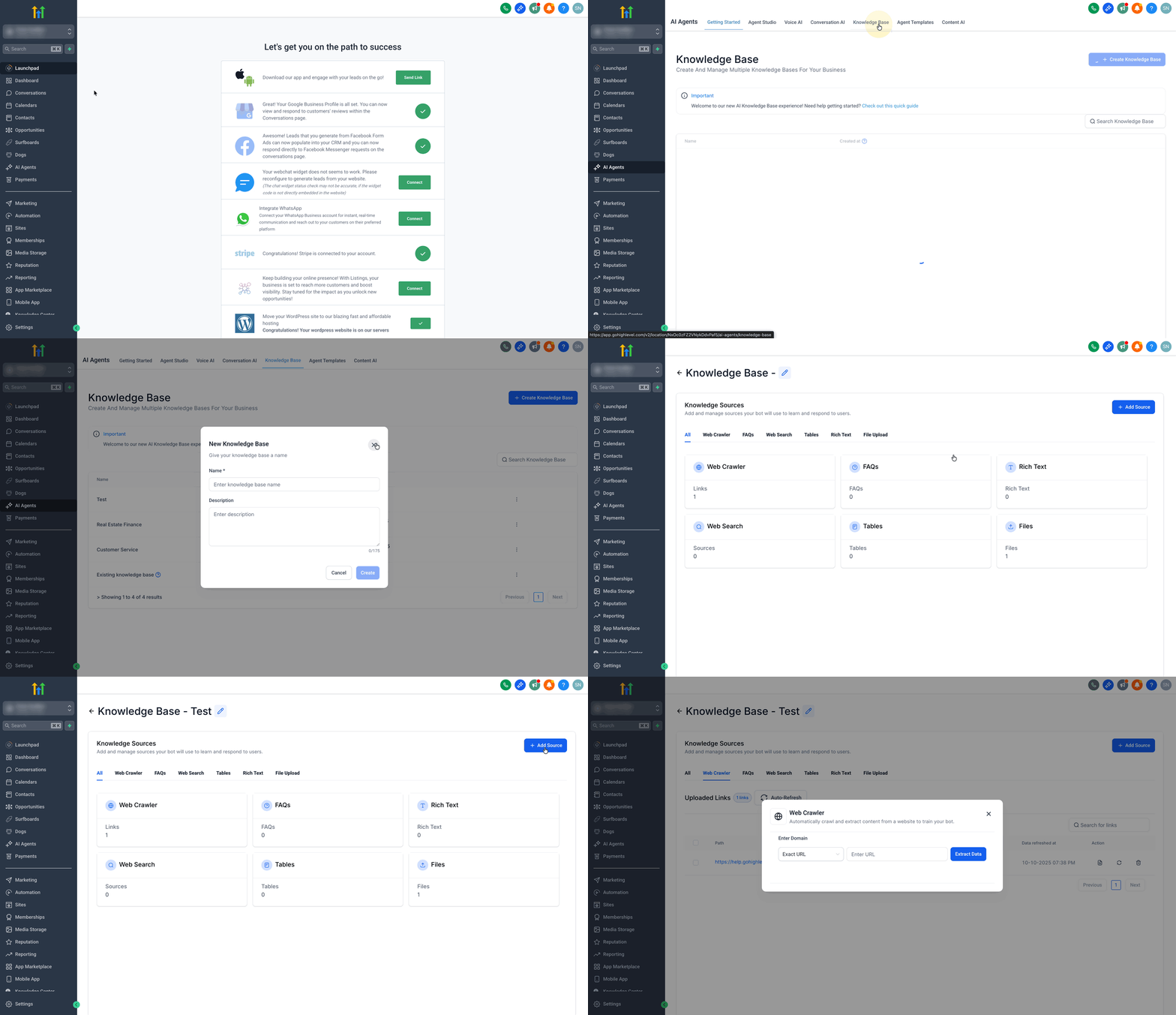
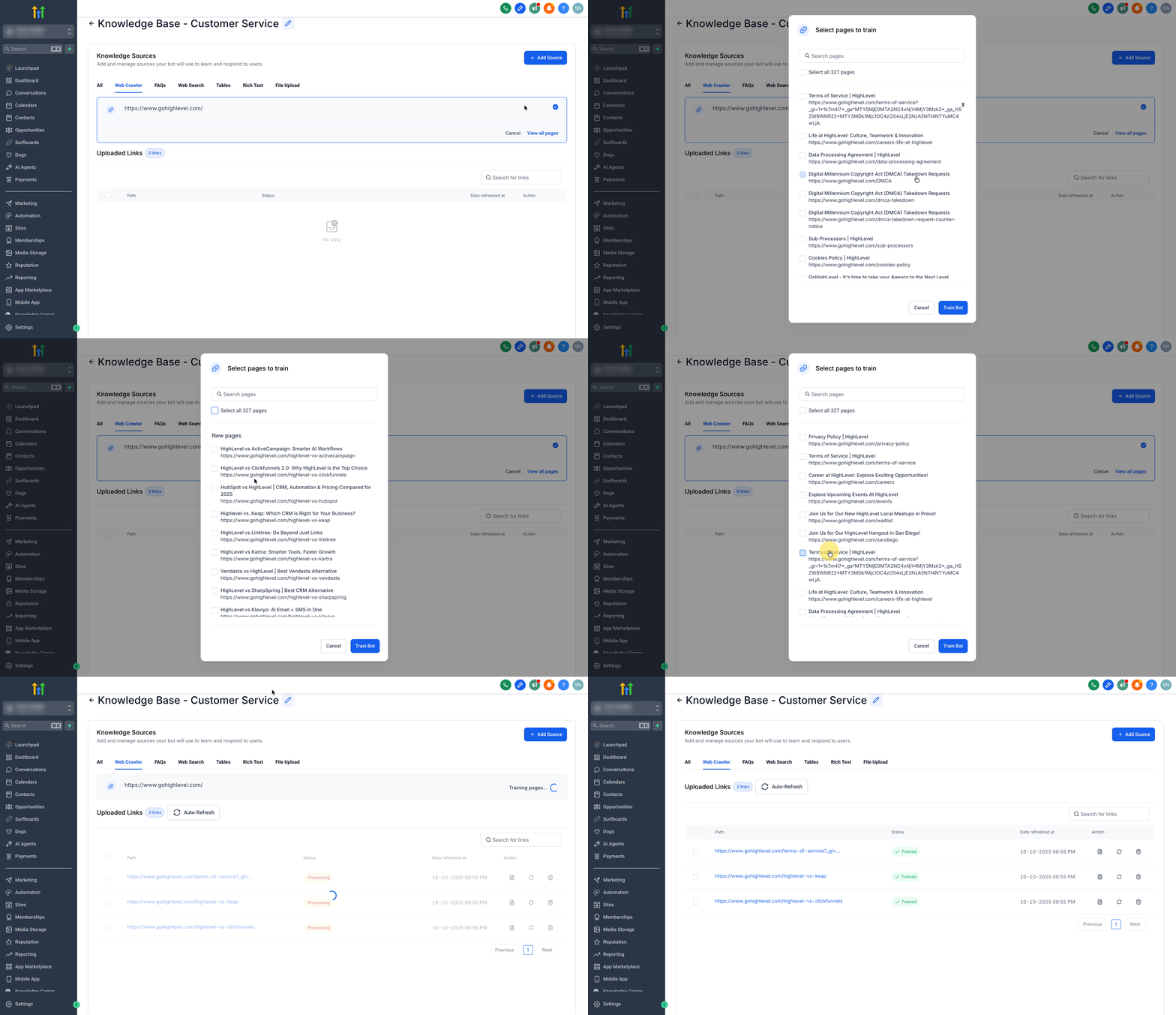
You find the crawler inside the Knowledge Base area of an AI Agent. After creating or editing a knowledge base, you add a new source, pick Web Crawler, choose a domain type, supply the address and start extraction. Once the crawl finishes you see a list of discovered pages, pick the ones you want, and press Train Bot to incorporate the content.
The engine runs many detection strategies at the same time, skips risky actions like form submissions, respects navigation boundaries and can read compressed sitemap files. Metrics such as crawl time, interactions and memory usage are shown for troubleshooting.
03How businesses use enhanced web crawler
- Digital marketing agency. The agency adds a web crawler source for each client’s site, selects the domain type that matches the client’s structure, and trains a Conversation AI bot that can answer detailed service queries pulled from hidden tabs and accordions.
- Ecommerce retailer. The retailer configures the crawler to scan all URLs within its domain, extracts product descriptions hidden behind lazy load sections, and trains the AI to provide accurate product information during chat interactions.
- Healthcare clinic. The clinic chooses the Exact URL option for its services page, runs the crawler to capture hidden FAQs, and trains the bot so patients receive complete answers about hours, staff and procedures.
04The numbers and rules that matter
- Extracts 30, 50% more on page content from modern SPAs.
- Captures up to 5.2× more website content.
- Success rate improved from 81.6% to 94.7%.
- Extracts 94% more structured data.
- Runs 12+ content detection strategies in parallel.
- Uses 6+ parallel detection strategies for hero sections, testimonials, etc.
- Uses 2+ smart detection strategies for semantic content and metadata.
05How to set up and use enhanced web crawler in HighLevel
Add a web crawler source
- Open the AI Agents area of the selected subaccount.
- Select the Knowledge Base tab.
- Create a new knowledge base or open an existing one for editing.
- Press the + Add Source button.
- Choose Web Crawler from the source options.
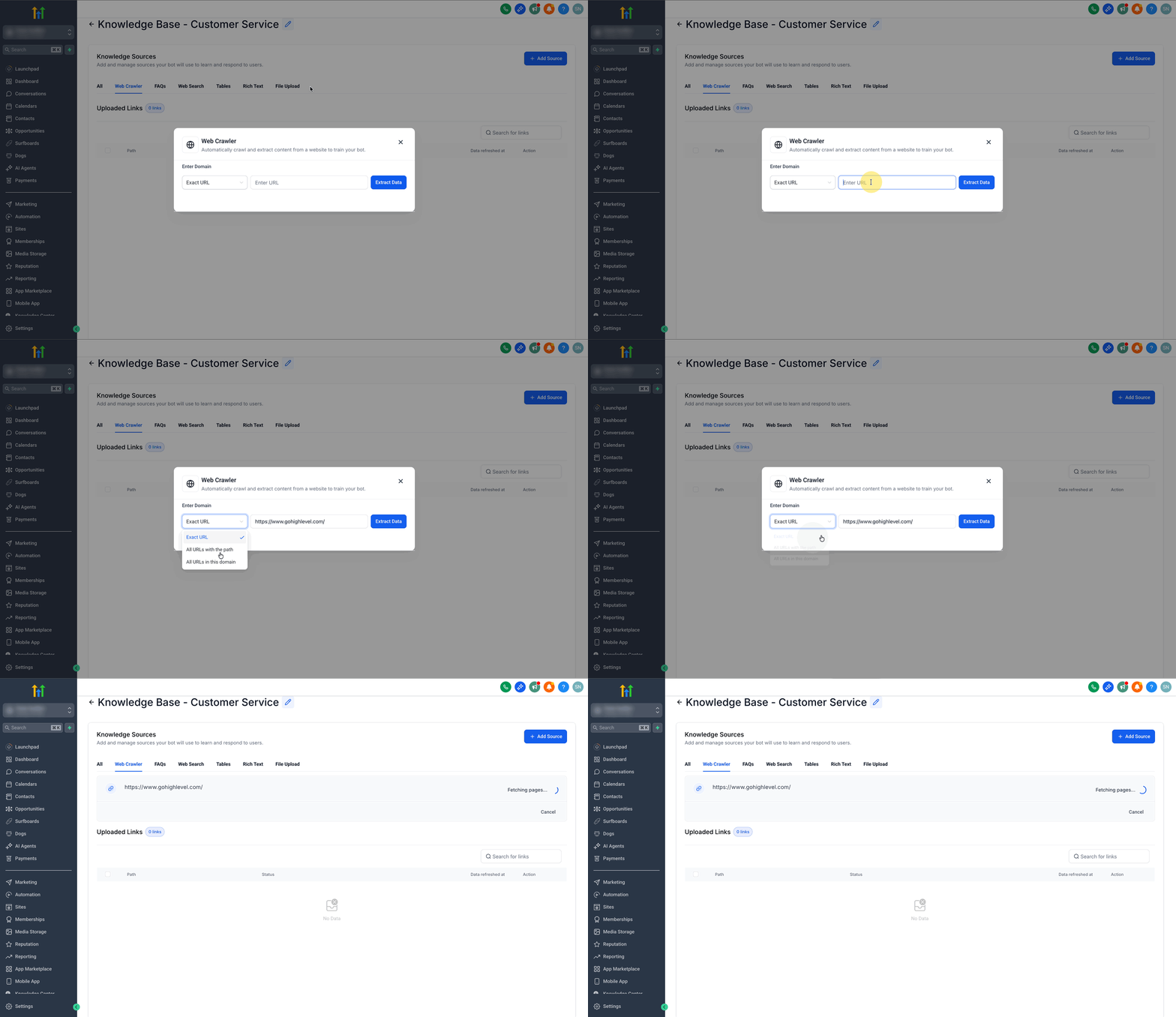
Configure domain type and start extraction
- Pick a domain type that determines the crawl scope (Exact URL, Path or full domain).
- Enter the target address in the URL field.
- Click the Extract Data button to begin crawling.
Select crawled URLs and train the bot
- When crawling completes, open the View All Pages view.
- Mark either all URLs or individual pages using the checkboxes.
- Click Train Bot to add the selected content to the bot’s training set.
06What it looks like in HighLevel
07Settings that matter
- Domain type. Determines how many pages are collected: a single page, all pages under a specific path, or every page on the domain.
- Exact URL. Limits the crawl to the single URL entered, useful for focused training on one page.
- All URLs with the Path. Crawls every page that shares the entered URL segment, capturing a group of related pages.
- All URLs in this Domain. Scans the entire website under the root domain, gathering all publicly reachable pages.
08Things to know before you rely on it
- The crawler can capture up to fifty percent more on page content than a static scanner.
- It does not interact with forms, checkout buttons or any element that could submit data.
- Content behind a login or other authentication barrier is ignored because only public pages are accessed.
09How it connects to the rest of HighLevel
- Knowledge Base Overview Knowledge Base Overview
- Auto refresh of Knowledge Base trained links Auto refresh of trained links
- Document & Rich Text Support for Knowledge Bases Document support
Michael's take

Most people think the crawler will automatically scrape everything behind a login or private area. It doesn’t. The engine only works with publicly available content, so hidden member zones stay untouched.
If I were setting up a new bot, I’d point the crawler at the main site, choose the “All URLs with the Path” option for the product section, and let it pull the expanded testimonials and pricing tables. After the crawl finishes I’d check the metrics tab to confirm content length and memory usage before training the bot.