
01Who this is for
- Agency administrators, because they need documented proof of wallet funding for internal accounting.
- Finance managers at agencies, as the receipts simplify month end reconciliation.
- Founders of agencies that bundle client spend, since the PDFs keep wallet credits distinct from other billing documents.
02Monthly wallet top up receipts, explained
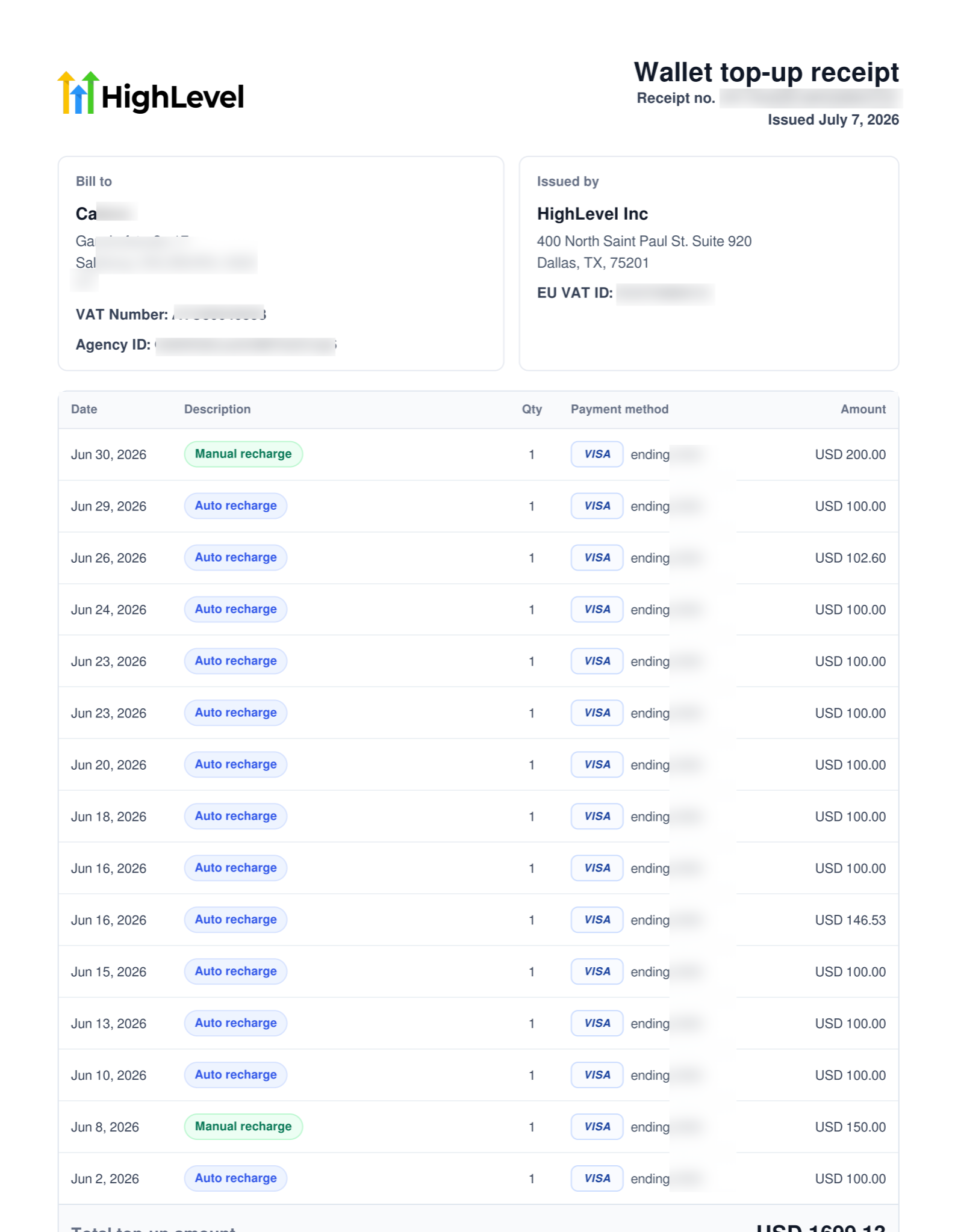
A Monthly Wallet Top up Receipt is a downloadable PDF that aggregates every wallet recharge, manual, auto, or ACH, performed in a chosen month. It lists receipt number, date, billed to and issued by details, line item recharges, payment method and the total amount added to the wallet.
The receipt appears in the Billing Dashboard of the agency account. No configuration is required; once the platform generates the PDF, it can be accessed alongside other invoices. It serves as a separate financial record, distinct from tax invoices and usage receipts.
Because the document is a static PDF, agencies can store it for bookkeeping, match it against internal payments, and provide proof of funding to auditors or accountants.
03How businesses use monthly wallet top up receipts
- Digital marketing agency. The agency opens Settings > Billing, selects the month’s wallet activity, and downloads the PDF. The file is then attached to the agency’s monthly finance spreadsheet for audit trails.
- SaaS reseller. The reseller retrieves the top up receipt from the Invoices section to verify that prepaid wallet credits match the amount billed to partner clients for the same period.
- Coaching firm. The firm downloads the receipt to keep a clear record of wallet funding separate from client session invoices, simplifying internal bookkeeping.
04The numbers and rules that matter
- PDF receipt includes receipt number, receipt date, billed to details, issued by details, itemized recharge line items, payment method, and total top up amount.
- Receipts can include Manual Recharges, Auto Recharges, and ACH/Manual Recharges.
05How to set up and use monthly wallet top up receipts in HighLevel
Download monthly wallet top up receipt
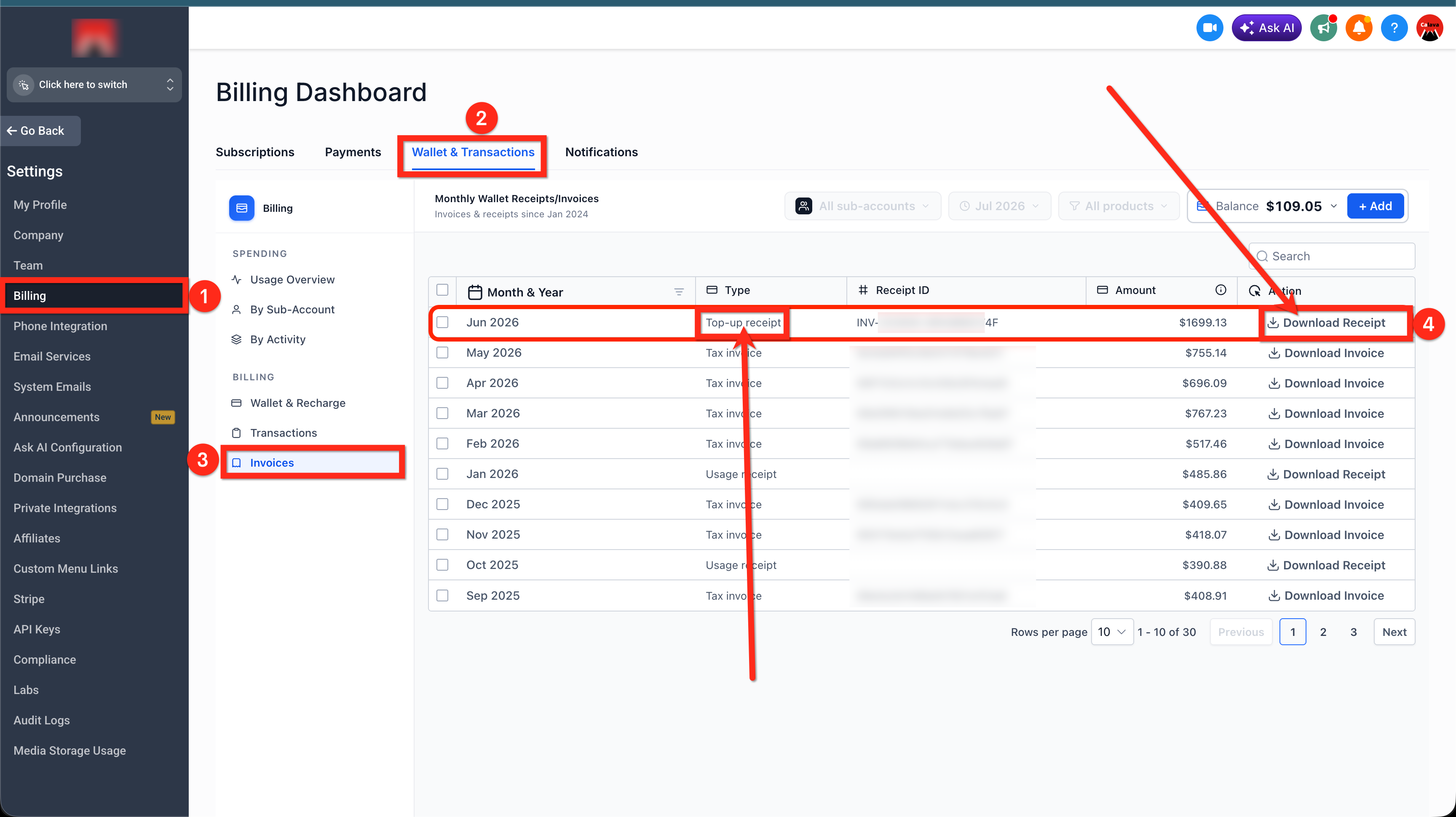
- Log in to your agency account and navigate to Settings > Billing.
- Select the Wallet & Transactions option.
- Open the Invoices view.
- Click Download Receipt to save the PDF for the chosen month.
06What it looks like in HighLevel
07Things to know before you rely on it
- Receipts are generated automatically; no manual setup is needed.
- Receipts for months earlier than June 2026 may be created only on a case by case basis.
08How it connects to the rest of HighLevel
- Agency wallet usage overview and transaction review Wallet transactions
- All Agency View features Agency View
- HighLevel pricing and plans Pricing
Michael's take

Skipping the monthly wallet receipt can leave you scrambling for proof when tax time arrives. The upside is simple: A single PDF that details every wallet credit for the month, ready for bookkeeping or audit review.
If I were an agency owner, I’d pull the receipt each month and file it with my other financial docs. That way the wallet funding stays cleanly separated from tax invoices and usage reports.