
Home/HighLevel/Guides/Become a HighLevel affiliate
HighLevel Guides · Volume 12 · Affiliate
How to become a GoHighLevel affiliate and track every referral.
The HighLevel Affiliate Program pays a commission on each paying agency you refer. This guide takes you from joining the program to a working referral link, a payout method on file, a campaign built around your own landing page, and a dashboard that shows who signed up. At the end you will know exactly where your referrals and commissions live.
What you are building
What you are building and what it does.
You will have an active affiliate account inside the HighLevel Affiliate Portal with a referral token you chose, a Tipalti payment method and tax form on file, link variations for each channel you promote on, an affiliate campaign that points to a landing page you control, and a referrals dashboard that sorts every signup into trial, paying or cancelled. Each paying referral is tracked to your account and paid out through Tipalti on a fixed monthly schedule.
- An approved affiliate account with the HighLevel Affiliate Policy accepted
- A clean referral token your audience can recognize
- A Tipalti payout method and tax form completed so commissions can be sent
- SubID links for each channel so you know which source drives signups
- A referrals dashboard that shows Active / Paying, Signup, Lead and Canceled stages
- An affiliate campaign in Affiliate Manager that points to a landing page you control
Before you start
Before you start have these ready.
The portal and payouts each have their own requirements, so gather these first.
- Agency Admin login to your HighLevel account, or an email address to register as a noncustomer at gohighlevel.firstpromoter.com
- Your business name, address and tax ID (EIN for US affiliates) for the Tipalti tax form
- A payment method: US affiliates choose Direct Deposit, PayPal or Debit Card; international affiliates choose ACH Transfers, PayPal or Debit Card
- The Tipalti invitation email if you received one, and the registration deadline it names
- A funnel, website or store in your subaccount if you plan to build your own affiliate campaign
- A short list of the channels you will promote on, such as YouTube, email or a community
Part 01 of 06
Join the affiliate program and accept the policy.
The program is open to HighLevel agency customers and to people who do not have a HighLevel account. Agency accounts receive a referral link automatically. Noncustomers register through FirstPromoter.
- If you are a HighLevel agency customer, log in, switch to Agency View and click Affiliate Portal in the left hand menu to see your link and status.
- If you are not a HighLevel customer, open gohighlevel.firstpromoter.com and register for an affiliate account.
- Review the HighLevel Affiliate Policy at the link provided and accept it.
- Complete the required onboarding resources in the portal, including the welcome course.
- Save your affiliate login. Returning affiliates sign in at affiliate.gohighlevel.com/login.
Part 02 of 06
Open the portal and set your referral token.
Your referral link ends in a token. The default token is a random ID. A custom token makes the link readable and easier for your audience to trust. Set it once and leave it alone.
- Log into HighLevel and switch to Agency View.
- Click Affiliate Portal in the left hand menu.
- Open Dashboard.
- Select the HighLevel Affiliate Program campaign.
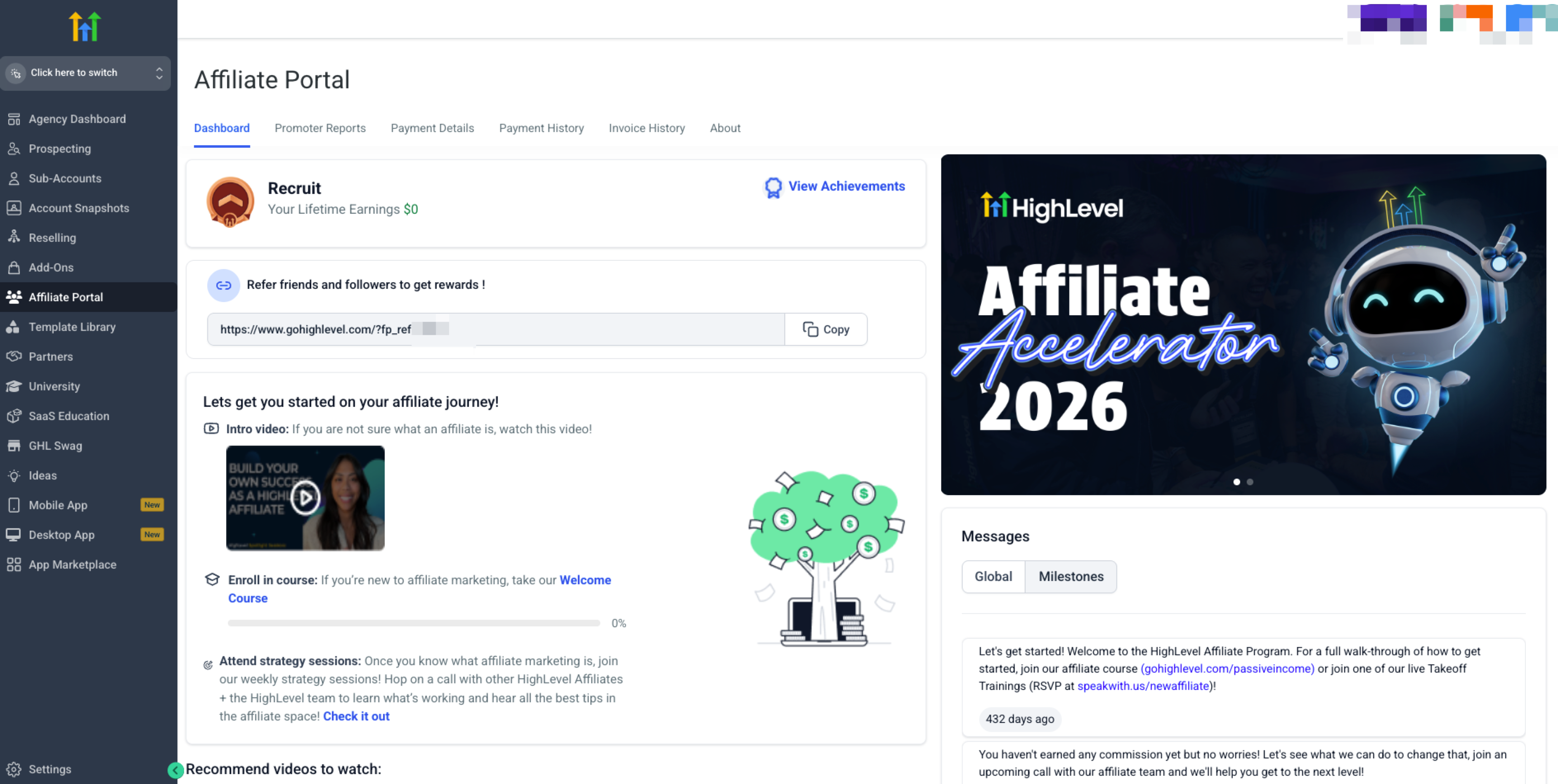
The Affiliate Portal dashboard, where you select the campaign and customize your token. - Click Customize Token.
- Enter a new token and save it.
- Copy your updated referral link and store it where your team can find it.
Part 03 of 06
Set up Tipalti so payouts can be sent.
All affiliate payouts go through Tipalti. Nothing is paid until the Tipalti setup and tax form are complete. Do this now so your first commission is not held.
- In the Affiliate Portal, click Payment Details.
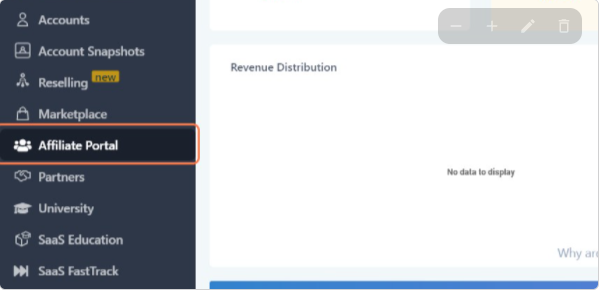
Payment Details is where Tipalti collects your payout method and tax form. - Follow the Tipalti onboarding steps on screen to create or link a Tipalti account.
- If you do not have an active HighLevel agency, contact support for a Tipalti setup link instead.
- Choose your payment method: Direct Deposit, PayPal or Debit Card for US affiliates, or ACH Transfers, PayPal or Debit Card for international affiliates.
- Open Tax Forms and enter your EIN or other required tax information.
- Submit the form and wait for the Tipalti email confirming your setup is complete.
- If you need confirmation, email affiliatepayments@gohighlevel.com or open a support ticket.
Part 04 of 06
Create links for each channel and each landing page.
One link tells you nothing about where a signup came from. SubIDs let you run several link variations under one promoter ID. The portal also holds ready made links for landing pages, including the Pro plan.
- In the Affiliate Portal, open the HighLevel Affiliate Program campaign.
- Create a SubID for your first channel, such as your YouTube channel.
- Create one more SubID for each channel you promote on, such as email or a community.
- Copy each SubID link and label it by channel in your own notes.
- Find the landing page you want to promote in the portal and generate its unique affiliate link.
- Review the list of existing links in the portal, including the referral links for the Pro plan, and pick the ones you will use.
- Open each link in a private browser window to confirm it lands on the right page.
Part 05 of 06
Build an affiliate campaign around your own page.
The Affiliate Manager in your subaccount lets you run a campaign that points to a funnel, website or store you control. Use it when you want your own landing page in front of the HighLevel offer, or when you bring on subaffiliates.
- Go to Affiliate Manager and click + Add.
- Select the campaign source: a funnel, website or store.
- Choose the landing page where potential customers arrive. The campaign URL is generated with an affiliate ID placeholder.
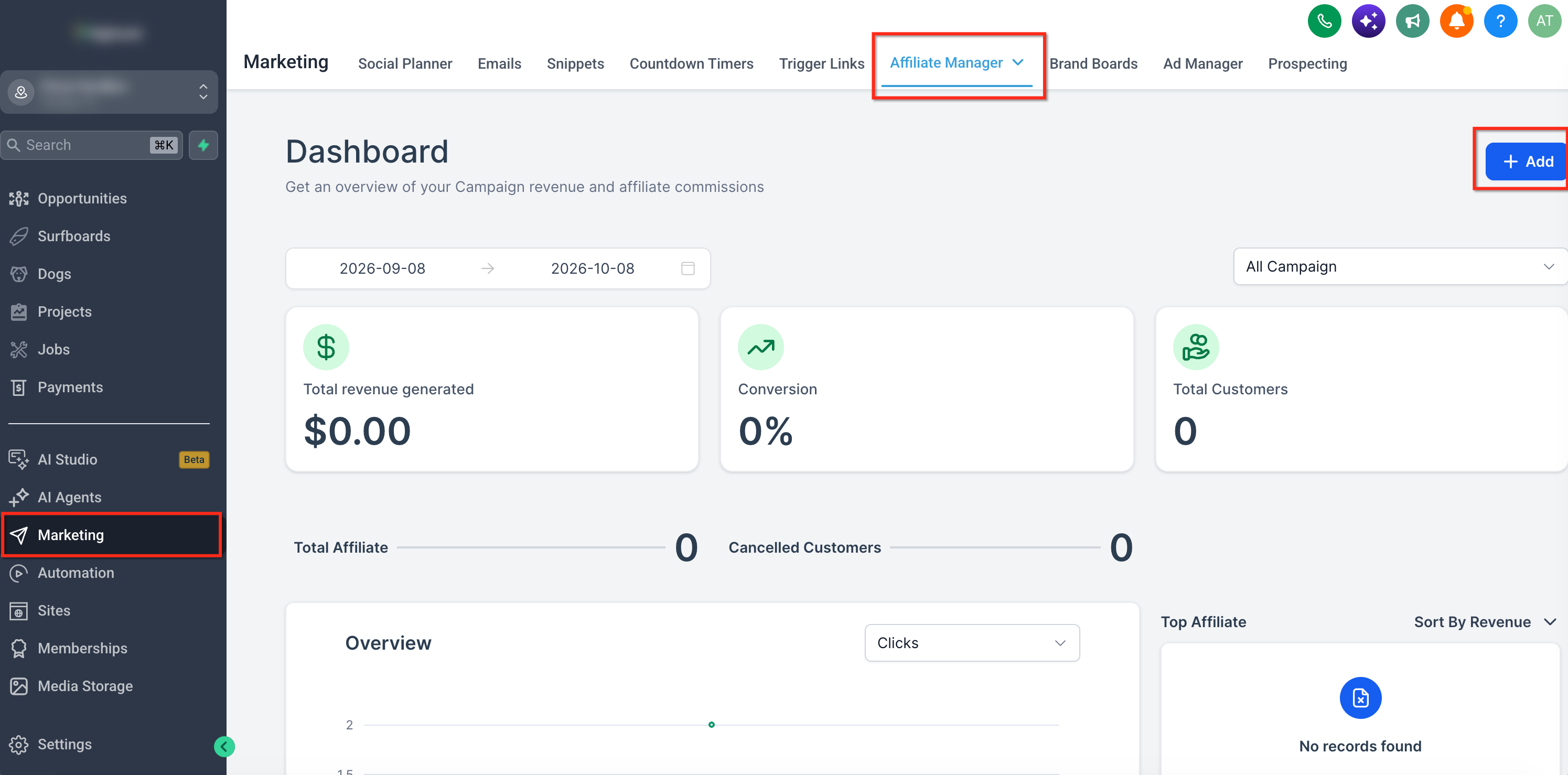
The campaign builder: pick the source, the landing page and the commission structure. - Review the product list and add or remove items.
- Set a default commission as a flat fee or a percentage.
- Open Advanced Commissions and enable multitier commissions if you plan to use subaffiliates, then assign a rate to each tier.
- Adjust the additional settings: Email templates, cookie duration, payout terms, include setup fees, enable subaffiliate signups and autoenroll new customers as subaffiliates.
- Click Publish, or save the campaign as a draft.
Part 06 of 06
Track referrals and support each signup.
The dashboard sorts referrals by stage so you know who is on trial, who is paying and who cancelled. Commission only applies to paying customers. The first weeks after a signup decide whether they stay.
- Log into HighLevel and click Affiliate Portal.
- From the Affiliate Dashboard, click Referrals.
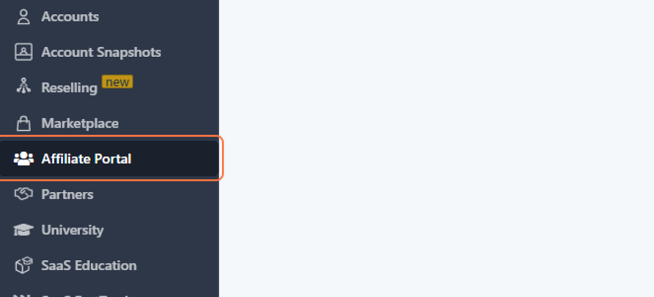
Referrals sorted by stage: Any, Active / Paying, Signup, Lead and Canceled. - Open the Active / Paying tab to see who is currently paying.
- Check the Signup and Lead tabs for trials that have not converted yet.
- Click View Campaign under the Supercharged software Program, then open Referrals and the Rewards tab to see commissions from customers on the $497 Pro plan.
- For each new referral, recommend a plan that fits their size and experience: Starter, Unlimited or Founder.
- Send each new referral to HighLevel University and have them book a free kickoff call while they are still in trial.
- Join the weekly Affiliate Strategy Sessions to learn what other affiliates are doing.
Test it
Test it before you promote anything.
Run through these checks once so you are not chasing a broken link or a held payout later.
- Open your referral link in a private browser window. It should land on the HighLevel signup page with your token in the URL.
- Open each SubID link the same way. Each should load and carry its own SubID.
- Open Affiliate Portal, then Payment Details. Your payment method should be listed and the tax form should show as complete.
- Check your inbox for the Tipalti email confirming setup. If it has not arrived, email affiliatepayments@gohighlevel.com to confirm.
- Open Referrals on the dashboard. The stage tabs should load with no portal errors.
- If you built a campaign in Affiliate Manager, open its referral URL and confirm it reaches your chosen landing page.
It is easier to recommend what you use yourself. See what a new customer gets on the 30 day trial through Michael's link page and the GoHighLevel pricing hub, and read the HighLevel review for an honest view of the platform. Practical builds to share with new signups include the AI receptionist setup and the Founder Plan setup guide.
When a step fails
When it fails here is the fix.
Most affiliate problems come from the token, the tax form or how attribution works.
- Links you already shared stopped working
- You changed the referral token, or changed a campaign source. Both generate a new URL and disable the old one. Replace every published link with the new one and test it before you promote again.
- Invalid EIN error during Tipalti setup
- Log in at suppliers.tipalti.com/HighLevel/Account/Login and correct the EIN on the tax form page, or reenter it in the Affiliate Portal under Payment Details, then Tax Forms. If validation still fails, open a support ticket with your affiliate email and referral link.
- Payment stuck on pending
- Pending payments can be flagged as self referrals when the same IP, name, email or phone number appears on both sides. Open a support ticket with your affiliate email and referral link.
- Commission showed but no payout arrived
- A $50 minimum in accrued commissions is required before a payout is sent. Payments go out on the 15th for the previous month, and a submitted payment can take 1 to 3 days to arrive depending on the method.
- A customer you referred is missing from Referrals
- If they were an existing HighLevel customer who moved to Pro, they are a split customer. They will not show in your referrals, but their commission appears in the Rewards tab of the Supercharged software campaign.
- Request failed with status code 400 in the portal
- Create a support ticket, include your affiliate email and referral link, and title the ticket with the affiliate portal issue.
Questions
Common questions.
Short answers to the questions people ask most about the affiliate program.
- Do I need to be a HighLevel customer to become an affiliate?
- No. Noncustomers can join by registering at gohighlevel.firstpromoter.com. Agency customers get a referral link automatically when they sign up for HighLevel and manage it in the Affiliate Portal, which sits in the left hand menu in Agency View. Check the portal first, so you do not register a second time.
- How is the commission structured?
- A direct referral is Tier 1 and pays 40% of that agency's monthly fee. If an agency you referred signs up another agency, you receive an additional 5% of the second agency's monthly fee as Tier 2. Commission only applies to paying customers.
- When are affiliate commissions paid?
- Payments are approved and sent on the 15th of each month for commissions earned the previous month. A $50 minimum in accrued commissions is required before a payout is sent, and a submitted payment can take 1 to 3 days to arrive depending on the method you chose in Tipalti.
- Can I use a payment method other than Tipalti?
- No. All payouts run through Tipalti. You choose your payment method inside the Tipalti setup, under Payment Details in the Affiliate Portal, and complete the tax form there too. Nothing is paid until both are done, so finish the Tipalti setup before you start promoting your link.
- How many commission tiers can an affiliate campaign have?
- Up to seven commission tiers can be configured in an Affiliate Manager campaign using Advanced Commissions. Open Advanced Commissions, enable multitier commissions if you plan to use subaffiliates, then assign a rate to each tier. Skip this step if your campaign pays one rate for every referral.
- What happens if I change my referral token later?
- Changing the referral token disables every link you promoted before. Set the token before you share any link, then leave it alone. If you do change it, replace every published link with the new one and test it before you promote again.
From the field
Michael’s take.

Here is what I would do first. Lock in your token before you share a single link. People publish a link in a video, change the token a week later, and every click from that video goes nowhere. Then go straight to Payment Details and finish Tipalti, tax form included. Nothing gets paid until that is done, and a held payout is the fastest way to lose interest in the program.
Where people go wrong is tracking. One link for everything tells you nothing. Set up a SubID per channel on day one. After a month you will know whether your signups come from YouTube, email or your community, and you can put your time where the referrals actually come from. The dashboard already does the sorting. You just have to give it something to sort.
This build pays off when you treat a referral as a relationship, not a click. Commission only applies to paying customers, so a trial that never converts is worth nothing. Get each new signup into HighLevel University and onto a free kickoff call while they are still in trial. That is the work that turns a signup into an active account, and it is the part most affiliates skip.
Go deeper
The features behind this build.
Every feature this guide touches has its own page in the library, with the settings, limits and Michael’s notes.
- HighLevel Affiliates ProgramHow to become a HighLevel affiliate and earn recurring commissions
- HighLevel Affiliates ProgramUsing the affiliate portal in HighLevel to track links and earnings
- HighLevel Affiliates ProgramFirst Steps to be a Successful HighLevel Affiliate
- HighLevel Affiliates ProgramAffiliate payouts in HighLevel: How the new Tipalti system works
- MarketingCreating and managing affiliate campaigns in HighLevel
- HighLevel Affiliates ProgramCreating affiliate links from HighLevel landing pages
- HighLevel Affiliates ProgramUsing referral tabs in HighLevel affiliate portal to track customers and commissions
- HighLevel Affiliates ProgramAffiliates first steps in HighLevel: Guide for referrals
Get the guide
Take it with you. The PDF is yours.
The whole build, cover to cover, as a PDF you can keep open on a second screen or print for the team. HighLevel's Founder page opens alongside it.
Next step
Start the trial with the team behind you.
Start your HighLevel trial through Michael and the CRM Pros team comes with it. You get the setup help, the training and a community of affiliates who already run this system.
The how to library has step by step HighLevel builds for Conversation AI, Voice AI, funnels, calendars, workflows and AI Studio. Go back to the full list.
Back to the GuidesAll the step by step builds